
 @zhang-guo-wen
dsh-drawio
Standalone DeepSeek Harness plugin: preview .drawio (mxGraph XML) diagrams in the Web Sidebar.侧边栏预览流程图 .drawio文件
- Stars
- 0
- Language
- JavaScript
- Created
- Sep 14, 2026
- Updated
- Oct 17, 2026
Introduction
dsh-drawio
English | 中文
Preview .drawio (mxGraph XML) diagrams in the DeepSeek Harness Web Sidebar
In the plugin list, display names and descriptions follow the Harness language setting in English or Chinese (English is the default fallback); English names use the package name without its npm scope, Chinese names describe the purpose, and installation still uses the unchanged real package name.
Background: DeepSeek Harness
DeepSeek Harness (dsh) is the open-source agent harness from DeepSeek AI, where nearly every capability is a plugin on Cordis. It is in developer preview and iterating fast, so expect compatibility-breaking changes (docs, 0.1.7-alpha.*); this plugin is a standalone third-party package that resolves @deepseek-ai/* from the running host.
The problem this plugin solves
A .drawio file opens as mxGraph XML source; this plugin renders it as the diagram you drew, read-only, in the Web Sidebar.
Screenshots
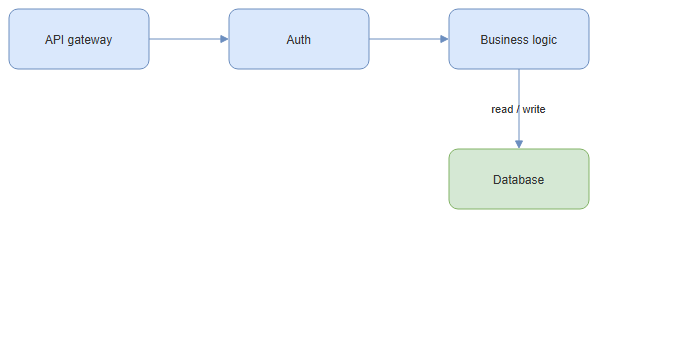
The capture is this repository's docs/example.drawio: API gateway → Auth → Business logic, with read / write on the edge down to Database.
Install
npx @deepseek-ai/dsh plugin --profile web add @guowenzhang/dsh-drawio
From the npm registry: https://www.npmjs.com/package/@guowenzhang/dsh-drawio — restart the host afterwards; local checkouts, git sources and troubleshooting are in AGENTS.md.
Usage
Open a diagram
Opening a .drawio file from the file tree opens it in the Sidebar's document tab and renders it as a diagram, the way an image or a Markdown file opens. The engine that draws it is a separate, on-demand download — the plugin itself boots without it — so the first diagram shows a placeholder of the pane's own shape for a moment while the engine arrives, and a diagram the engine cannot lay out is reported in place with a Retry. Decoding and layout stay on the main thread, because the engine builds its SVG through the DOM; the image keeps the diagram's own aspect ratio, and the pane provides scrolling.
See which save formats are readable
| Saved by draw.io as | What the file holds |
|---|---|
| Plain XML | mxGraph XML as text, greppable in a diff |
| Compressed (draw.io's default) | that same XML percent-escaped, raw-DEFLATE compressed, and base64 encoded |
Read a multi-page diagram
A multi-page <mxfile> renders its first page. The other pages stay in the file, untouched; open it in dsh-drawioedit or in draw.io to see them.
Expect a preview, not an editor
The pane is read-only and inert. The file is decoded and laid out offscreen, and the pane receives a rendered SVG data: URL — never an engine instance or a live DOM — so a diagram's content cannot script the page. Editing needs dsh-drawioedit; the two are independent packages, and either can be installed without the other.
Notes and caveats
Edge routing and edge-label placement do not match draw.io. A .drawio file stores an edge's endpoints and its edgeStyle name, but not the path between them:
<mxCell id="e4" style="edgeStyle=orthogonalEdgeStyle;…" edge="1" source="n4" target="n5">
  <mxGeometry relative="1" as="geometry" />   <!-- no points, no label offset -->
</mxCell>
Both viewers therefore compute the bend points and the label position at render time from the same inputs, with different code: draw.io's editor adds its own routing and label-avoidance behaviour on top of the shared engine, and this plugin's engine does not carry it. Where the gap between two nodes is narrower than the label — 50px apart, 66px label — the label cannot clear both boxes without moving a node, and an opaque background would only paint over the text it covers.
Workaround. Drag the label where you want it in draw.io: the editor writes an explicit <mxPoint as="offset"> into the file, which every viewer honours. Widening the gap between the two nodes works equally well. Both fix the diagram at its source rather than in one viewer.
Shapes outside the bundled engine's set are drawn as plain rectangles, never omitted: draw.io ships several hundred stencil shapes and the bundled engine carries a smaller set of its own.
License
Apache License 2.0 — see LICENSE. Bundled third-party code is attributed in NOTICE.
"draw.io" is a trademark of its owner; this package is not affiliated with or endorsed by draw.io.
Further reading
- AGENTS.md — installation variants, the build, how the preview is wired into the Sidebar, and troubleshooting.
- dsh-drawioedit — the sibling plugin that edits
.drawiofiles in place with the upstream draw.io editor. - docs/example.drawio — the diagram in the screenshot, as a small file to try the preview on.
- DeepSeek Harness documentation.