Back to home@zhang-guo-wen

dsh-claude-compat

deepseek harness 插件,兼容claude的skill、rules加载规则,mcp配置

Stars
0
Language
TypeScript
Created
Sep 9, 2026
Updated
Sep 10, 2026
GitHub repo

Introduction

dsh-claude-compat

English | 中文

A standalone plugin for DeepSeek Harness (DSH) that makes the harness work with your existing Claude Code / Codex setup — and adds a Harness 兼容 settings page where you manage MCP servers and prompt rules from the Web UI instead of hand-editing YAML.

MCP management

What you get

  • MCP management, live. The settings page lists every MCP server (@deepseek-ai/dsh-mcp-client row) — global and per agent preset, with its scope, description, and status — and lets you add / edit / enable / disable each one. Writes go to the composition file and are applied to the running host immediately, with no restart. Toggling shows a transient 启动中 / 停止中 state while the MCP child process starts or stops, so the list never blocks.
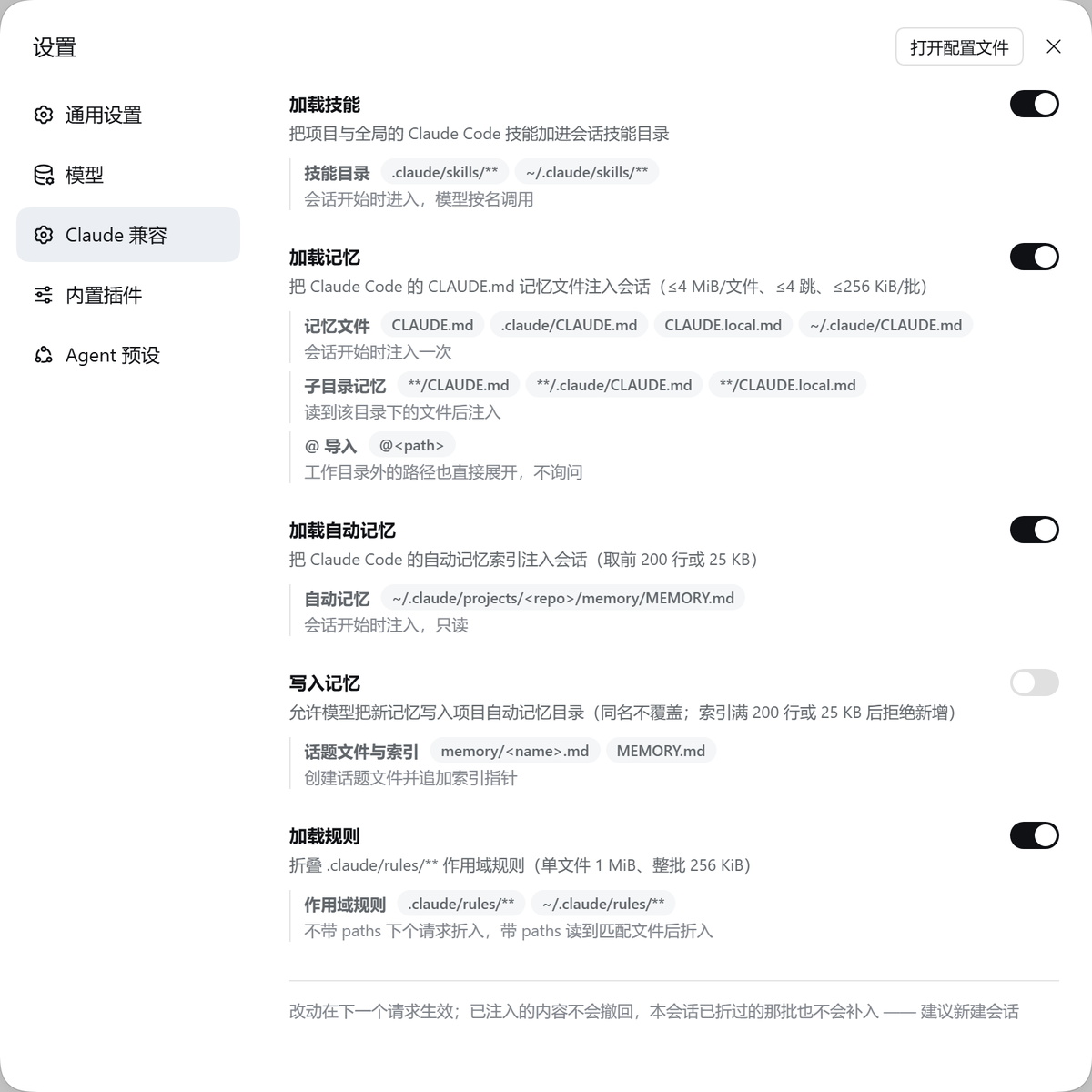
  • Claude Code compatibility. Discovers <root>/.claude/skills/** into the session skill catalog, folds .claude/CLAUDE.md and ~/.claude/CLAUDE.md into the first request, and folds .claude/rules/** — including paths:-scoped rules that activate when you read a matching file.
  • Codex compatibility. Folds .codex/AGENTS.md and ~/.codex/AGENTS.md.
  • A system prompt field. Write a system-level prompt from the settings page; it is injected as a real system-prompt section.
  • Master toggles. Turn Claude-rule and Codex-rule injection on or off.
  • /btw. Ask a side question in a forked, continuable child subagent.

Screenshots

提示词管理 — system prompt and rule toggles

prompt tab

MCP 管理 — one JSON box, parsed and validated on save

MCP editor

Install

The built lib/ is committed, so the repository installs and runs directly — no build step.

From the git repository (recommended)

Install a release tag (v0.1.3-alpha.1) rather than the default branch, so a later work-in-progress commit on master is not picked up:

# over HTTPS (public repo)
npx @deepseek-ai/dsh plugin --profile web add "git+https://github.com/zhang-guo-wen/dsh-claude-compat.git#v0.1.3-alpha.1&path:packages/claude-compat"

# or over SSH
npx @deepseek-ai/dsh plugin --profile web add "git+ssh://git@github.com/zhang-guo-wen/dsh-claude-compat.git#v0.1.3-alpha.1&path:packages/claude-compat"

The spec has two parts: #<ref> pins a tag / commit / branch, and &path:packages/claude-compat selects the plugin package inside the repository (pnpm's subdirectory git spec). Omit the #<ref>& part to follow the default branch (not recommended); re-run the command with a newer tag to update.

From a local checkout

npx @deepseek-ai/dsh plugin --profile web add /absolute/path/to/dsh-claude-compat/packages/claude-compat

A file: dependency installs a copy, so a rebuild in the checkout does not reach the running host until you reinstall. For a live link while developing, use pnpm link instead (see AGENTS.md).

In a profile manifest

Either form also works as a plain profile dependency:

{
  "dsh": { "profile": { "bundles": ["@zhang-guo-wen/dsh-claude-compat"] } },
  "dependencies": {
    "@zhang-guo-wen/dsh-claude-compat": "git+ssh://git@github.com/zhang-guo-wen/dsh-claude-compat.git#path:packages/claude-compat"
  }
}

After installing, run npx @deepseek-ai/dsh web and open the settings page.

Managing MCP servers

Open 设置 → Harness兼容 → MCP 管理. Every MCP row the harness has configured is listed with its scope (全局 or a preset id), a plugin-owned description, and its live status. Each row has an 编辑 button and an enable/disable switch; 新增 MCP opens the editor.

That server list is a live read of the Cordis Loader, so a change shows up as soon as it is applied:

  • Global rows use the loader directly and are live immediately.
  • Preset (agent) rows write the preset's agent.cordis.yml and refresh the preset's standing mount in place, so enabling or disabling one MCP never restarts the others.

The editor JSON

The editor takes Claude-compatible connection JSON and normalizes it. All of these work:

{ "type": "stdio", "command": "cmd", "args": ["/c", "npx", "-y", "@upstash/context7-mcp"] }
{ "context7": { "command": "cmd", "args": ["/c", "npx", "-y", "@upstash/context7-mcp"] } }
{ "mcpServers": { "context7": { "command": "cmd", "args": ["/c", "npx", "-y", "@upstash/context7-mcp"] } } }

Rules:

  • A missing type is inferred: a command means stdio, a url means streamable HTTP.
  • A single-entry map or an mcpServers wrapper uses its key as the server name.
  • A bare spec derives the server name from the arguments (@upstash/context7-mcpcontext7-mcp) when the 服务器名 field is left empty.
  • stdio needs command; http / sse / streamable-http need url.

The 配置范围 dropdown lists Global and every agent preset, so you pick a target instead of typing an id. 描述 is a plugin-owned label shown in the list, stored in the context-injection settings namespace — not part of the MCP connection.

Lazy loading — start a server only when it is needed

Every running MCP server's tool schemas ride every request, so a deployment with a dozen servers pays for all of them all the time. Two things work together to avoid that:

  1. Keep a server stopped. Disable its row in MCP 管理. A disabled row is never mounted, so its tools stay out of the catalog.

  2. Start it on demand. The plugin registers three tools the model can call:

    ToolWhat it does
    mcp_listThe configured servers, their scope, and whether each is running
    mcp_load(server)Starts one server for the calling session only and returns the tool names it added
    mcp_unload(server)Stops that session's server again and shrinks the tool list

The mount is agent-scoped: a server one session loads never appears in another. This is the same trade-off as Claude Code's tool search — you pay one extra round trip, and the loaded schema, only when you actually need a server.

Choosing the loading mode

The two controls answer different questions:

  • A row's enable switch — may this server be used at all. Disabled means never: it is not listed by mcp_list and mcp_load refuses it.
  • Settings → Claude Compat → MCP management → MCP loading — when an allowed server enters context. One of three:
ModeBehavior
Load all (eager)Allowed servers mount at session start, so their tools are always in the request
Dynamic insert (dynamic, default)Allowed servers stay unmounted by default; mcp_load mounts one into the calling session, so its tools join the request — best tool binding, but the tool list changes once per load
Lazy (lazy)Allowed servers stay unmounted by default; mcp_load connects over the MCP SDK without registering anything and returns the tool schemas, and the model calls them through the fixed mcp_call proxy — the tool list never changes, so the request-cache prefix is never invalidated

Measured on one standard+MCP preset (alibaba-devops, lightrag, kingdee, playwright): the first request carries 29 tools under dynamic (built-ins plus mcp_list/mcp_load/mcp_unload) and 378 under eager, 348 of which are MCP tools.

Holding a row back is runtime state: the plugin unmounts the rows in memory and never rewrites your preset file (an agent-presets composition is an input, not a persistence target), so switching modes cannot pollute configuration. The price is one restart of those MCP child processes per switch.

- name: '@zhang-guo-wen/dsh-claude-compat'
  config:
    mcpLoading: lazy   # only while the user document has no such entry

The choice is stored in the user's context-injection settings namespace (mcpLoading in ~/.dsh/settings.yaml) and swaps the tool set as soon as it commits, from the next request on in every session. The plugin's config.mcpLoading only supplies the default while the user document has no entry yet.

Claude Code / Codex compatibility

Skills

RankSourcePath
250project-claude<projectRoot>/.claude/skills
550user-claude~/.claude/skills

The project root is the nearest ancestor containing .git. A skill is <root>/.claude/skills/<name>/SKILL.md (or a flat <name>.md) with YAML frontmatter: required name and description, plus optional whenToUse, metadata, disable-model-invocation, and user-invocable.

Rules

The project .claude/CLAUDE.md and the global ~/.claude/CLAUDE.md are folded into the first request as user messages under the claude-code source kind. Rules under .claude/rules/** (project) and ~/.claude/rules/** (user) fold under claude-rule: a rule whose frontmatter carries a paths: glob list is path-scoped and folds after a read of a matching file; a rule without paths is always-on.

Configuration

FieldDefaultMeaning
providerNameclaude-codeUnique provider name registered on ctx.skills
claudeHome$CLAUDE_HOME or ~/.claudeClaude Code home, scanned for skills and CLAUDE.md
codexHome$CODEX_HOME or ~/.codexCodex home, scanned for AGENTS.md
projectRootMarkers['.git']Directory entries that identify the project root
includeProjectRoottrueScan the project .claude/skills root
includeGlobalRoottrueScan the user ~/.claude/skills root
includeProjectRuletrueLoad the project .claude/CLAUDE.md rule
includeGlobalRuletrueLoad the global ~/.claude/CLAUDE.md rule
includeProjectRulestrueFold the project .claude/rules/** tree
includeGlobalRulestrueFold the user ~/.claude/rules/** tree
maxRuleSourceBytes1048576Maximum UTF-8 bytes read from one rule file
maxRuleRenderBytes262144Maximum UTF-8 bytes rendered in one rules batch
claude / codextrueRule-injection master toggles (also editable from the settings page)
maxQuestionBytes4096Maximum UTF-8 bytes in the /btw side question
providerforkThe ctx.subagents fork provider name used by /btw

Known limitations

  • No skill watcher.claude/skills is discovered on list(); add/rename/delete is picked up when discovery runs again.
  • Rules fold once per session.claude/CLAUDE.md, ~/.claude/CLAUDE.md, and .codex/AGENTS.md are read at the first request; later edits are not re-read mid-session.
  • Path-scoped rules trigger on read onlywrite / edit do not activate them.
  • Enabling an MCP still takes the child process's own startup time (npx -y … / uvx … usually 1–3s). The UI stays responsive; installing the server as a direct executable shortens it.

Development

See AGENTS.md for the build, the Cordis/Typert plugin contract, and the pitfalls.

npm run build      # host (tsdown) + client (rolldown ModuleLoader handoff)

License

Apache License 2.0 — see LICENSE. It is an OSI-approved, permissive license: commercial use, modification, and redistribution are permitted, and every contributor grants a copyright license plus an express patent grant (Section 3).

This product includes MIT-licensed portions derived from DeepSeek Harness; see NOTICE.