
 @z7ping
narratica
AI 原生故事创作与媒体生产工作区|AI-native storytelling workspace for novels, screenplays, and media production.
- Stars
- 0
- Language
- TypeScript
- Created
- Aug 28, 2026
- Updated
- Aug 30, 2026
Introduction


心里的故事,陪你做成作品。
从故事想法到小说、剧本、分镜与媒体成片的 AI 创作工作台。





Narratica 面向故事创作者,让同一个故事项目从想法逐步推进到小说、剧本与分镜,再到图片、视频、音频生成、合成和交付。
Narratica 基于 DSH / Cordis,但不是独立 DSH 发行版。正式产品形态是把唯一顶层 Bundle @narratica/narratica 安装到 DSH Profile 中,并从 DSH 的 Narratica 一级入口进入完整工作区。
[!IMPORTANT] Narratica 当前仍处于 Alpha / Developer Preview。唯一正式 Bundle、三模式 Web、Story Repository、Director、Production Runtime 与发行链已经形成,但公开 npm 首发、完整实机狗粮和真实 Provider 验收尚未全部完成。不要把当前源码状态当成稳定发行版。
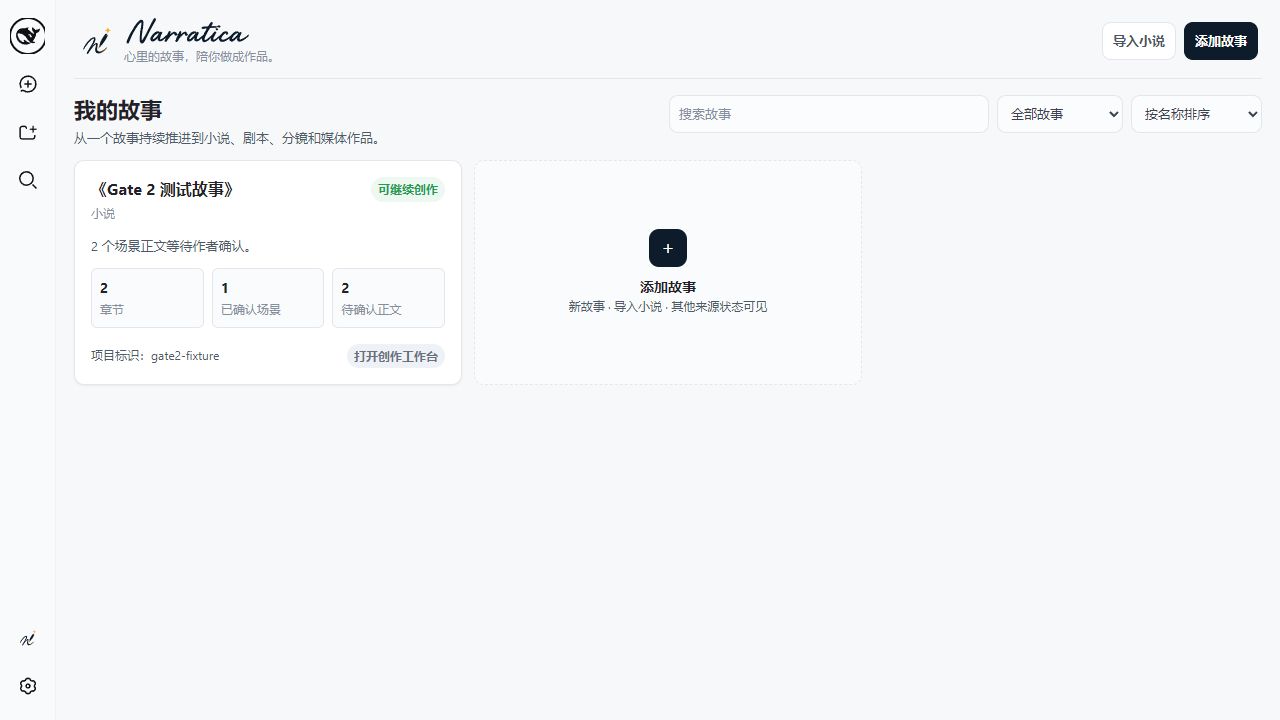
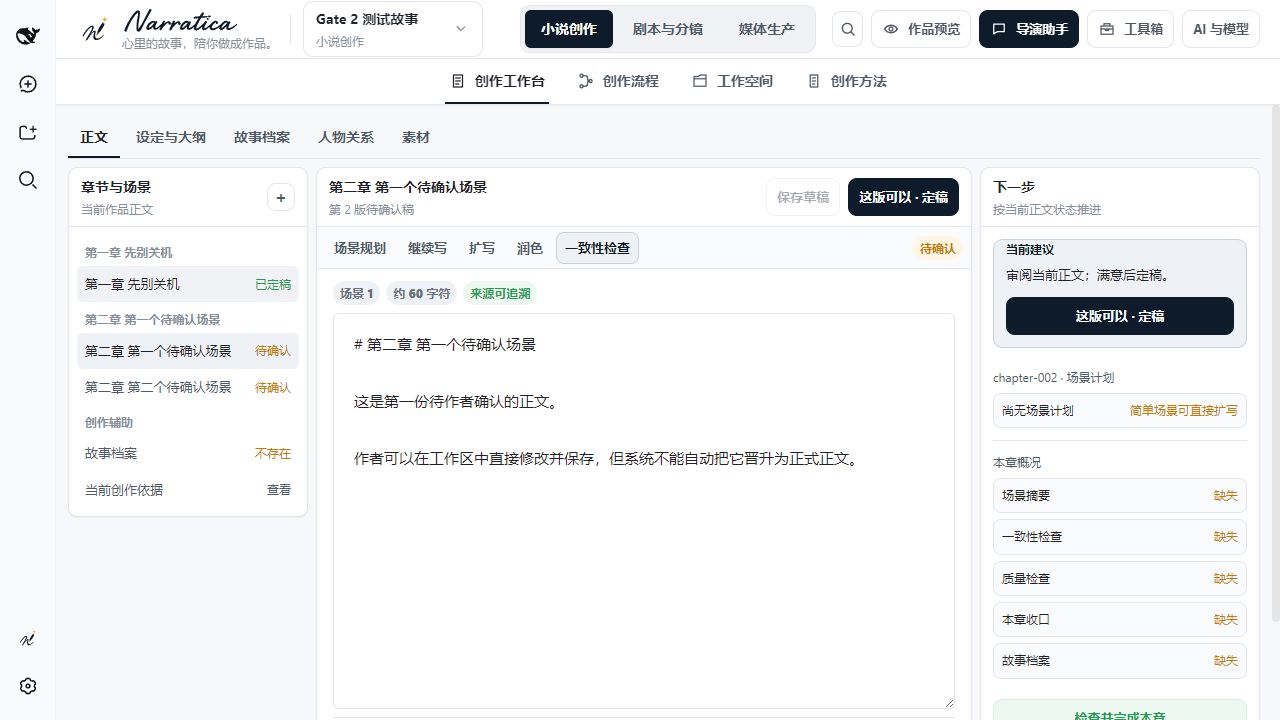
产品界面
以下截图来自正式 DSH + Narratica Web 实现,不是原型截图。
故事库
小说创作工作台
当前产品结构
故事库
├─ 小说创作
├─ 剧本与分镜
└─ 媒体生产
三个模式共用同一个 Story Project,并保持以下边界:
- Story Repository / Markdown 是作品事实源;
- DSH Session 保存 Agent 对话与执行历史,不成为作品事实源;
- Production Runtime 保存生产任务、尝试、Generation 与媒体运行事实;
- AI 可以生成候选、检查和解释,但作者采用、正式确认和最终交付必须由用户显式触发;
- Director 语言模型与图片、视频、音频 Production Provider 分开配置;
- 没有真实 Provider 或业务结果时,不制造假任务、假媒体或假成功状态。
当前状态
已经进入正式代码的主要能力:
- 唯一顶层 Bundle
@narratica/narratica; - DSH Sidebar 中的 Narratica 一级入口;
- 故事库、小说创作、剧本与分镜、媒体生产三模式;
- 创作工作台、创作流程、工作空间、创作方法四个核心视角;
- Story Repository、Draft / Canonical、作者确认边界;
- novel / screenplay / production 三个稳定 Director Role;
- 图片、视频、音频 Provider、Production Task / Attempt / Candidate 与采用链;
- npm + GitHub Release 的手工
verify / publish发行链。
仍需真实环境验收的重点:
- 干净和已有 DSH Profile 的安装、卸载;
- 第一版 Alpha Release verify;
- 首次 npm 发布及 Registry 顶层安装烟测;
- 三模式浏览器与真实 DSH Profile 狗粮;
- ComfyUI / FFmpeg 等真实媒体 Provider;
- Retry / Resume / Cache 与远程 Runtime Node。
已有 DSH:通过 npm 安装 Narratica
Narratica 的默认 DSH Profile 名称是 narratica。它是开箱即用的安装与启动约定,不是业务代码或架构依赖;高级用户也可以把同一个 Bundle 安装到其他兼容的 DSH Web Profile。
首次创建 Profile 时,需要同时加入锁定的 DSH Web Bundle 和 Narratica 顶层 Bundle:
dsh plugin --profile narratica add @deepseek-ai/dsh-web-app@0.1.1-rc.2 @narratica/narratica
Alpha 预览版本应显式使用对应 dist-tag:
dsh plugin --profile narratica add @deepseek-ai/dsh-web-app@0.1.1-rc.2 @narratica/narratica@alpha
[!WARNING] 上述路径已经按 DSH
0.1.1-rc.2CLI 核实,但@narratica/narratica尚未完成 npm 首发。发布前执行会因 Registry 中不存在该包而失败;现阶段请使用后面的源码开发预览。
安装完成后的组合是:
@deepseek-ai/dsh-base
→ @deepseek-ai/dsh-web-app
→ @narratica/narratica
启动并检查最终配置:
dsh --profile narratica
dsh --profile narratica --dump-config
更新或卸载:
dsh plugin --profile narratica add @narratica/narratica@latest
dsh plugin --profile narratica add @narratica/narratica@alpha
dsh plugin --profile narratica remove @narratica/narratica
卸载只移除 Profile 中的 Narratica 依赖与 Bundle 注册,不删除 Story Repository、Media Storage 或 Narratica Runtime DB。删除作品数据必须是独立、显式操作。
5 分钟开发预览
环境
| 工具 | 要求 |
|---|---|
| Node.js | 推荐 24;最低 22.19.0 |
| pnpm | 11.7.0 |
| DSH | 0.1.1-rc.2 |
| Cordis | 4.0.1 |
| 操作系统 | Windows / macOS / Linux |
不要自行把 DSH 或 pnpm 改成无约束的 latest。
下载、初始化并启动
git clone https://github.com/z7ping/narratica.git
cd narratica
pnpm install --frozen-lockfile
pnpm run profile:bootstrap
pnpm start
需要自定义端口时:
pnpm start -- --port 3189
profile:bootstrap 只用于开发和集成环境。正式发行仍以 DSH 的标准插件安装流程和 @narratica/narratica 为唯一用户入口。
接入自己的故事项目
Narratica 不把正文存进 DSH Session。最小 Story Repository:
你的故事仓库/
└─ .narratica/
   └─ project.json
最小 project.json:
{
  "schemaVersion": 1,
  "projectId": "my-first-story",
  "title": "我的第一个故事",
  "enabledDomains": ["novel"]
}
精确格式以 packages/shared/contracts/schema/project-manifest.schema.json 为准。测试结构可参考 tests/fixtures/story-repository。
Windows PowerShell:
$env:NARRATICA_STORY_REPOSITORY="E:\stories\my-story"
pnpm start -- --port 3189
macOS / Linux:
NARRATICA_STORY_REPOSITORY=/path/to/my-story pnpm start -- --port 3189
开发与验证
公开仓库只把正式代码、Schema、配置和测试作为工程事实源。产品原型、内部设计过程和项目知识不参与公开构建。
完整检查:
pnpm run check
核心流程:
语法检查
→ Host 构建
→ Typert 生成
→ Client 类型检查 / Bundle 构建
→ 架构测试
→ Story / Mutation / Skill / Director / Recovery 集成测试
→ 模式一 / 模式二 / 模式三测试
项目结构
Narratica/
├─ packages/              # Host / Client / Story / Production / Bundle
├─ scripts/               # 构建、Profile、发行脚本
├─ tests/                 # 架构、集成、fixture 与探针
├─ docs/brand/            # 正式品牌源资产
├─ .github/workflows/     # CI 与手工 Release
├─ CONTRIBUTING.md
├─ SECURITY.md
├─ TRADEMARKS.md
└─ LICENSE
发行
第一版发行出口只有 npm 与 GitHub Release。Release Workflow 只允许手工触发:
verify:完整检查、生成发行 manifest、真实 pack、本地 tarball 烟测,不发布;publish:通过 verify 后发布 npm、执行 Registry 烟测并创建 GitHub Release。
发行行为以 .github/workflows/release.yml 和 scripts/release/ 中的可执行实现为准。
贡献、安全与许可证
- 贡献说明:
CONTRIBUTING.md - 安全报告:
SECURITY.md - 品牌规则:
TRADEMARKS.md - 代码许可证:MIT,见
LICENSE
Narratica 名称、Logo、App Icon 和其他品牌标识不因代码采用 MIT License 而自动授予商标使用权,具体以 TRADEMARKS.md 为准。