
 @yminghua
dsh-plugin-compare
Controlled A/B comparisons and evidence-backed reports for DeepSeek Harness plugins and presets.
- Stars
- 1
- Language
- TypeScript
- Created
- Aug 27, 2026
- Updated
- Sep 8, 2026
Introduction
DSH Plugin Compare
Compare the runs. Inspect the evidence.
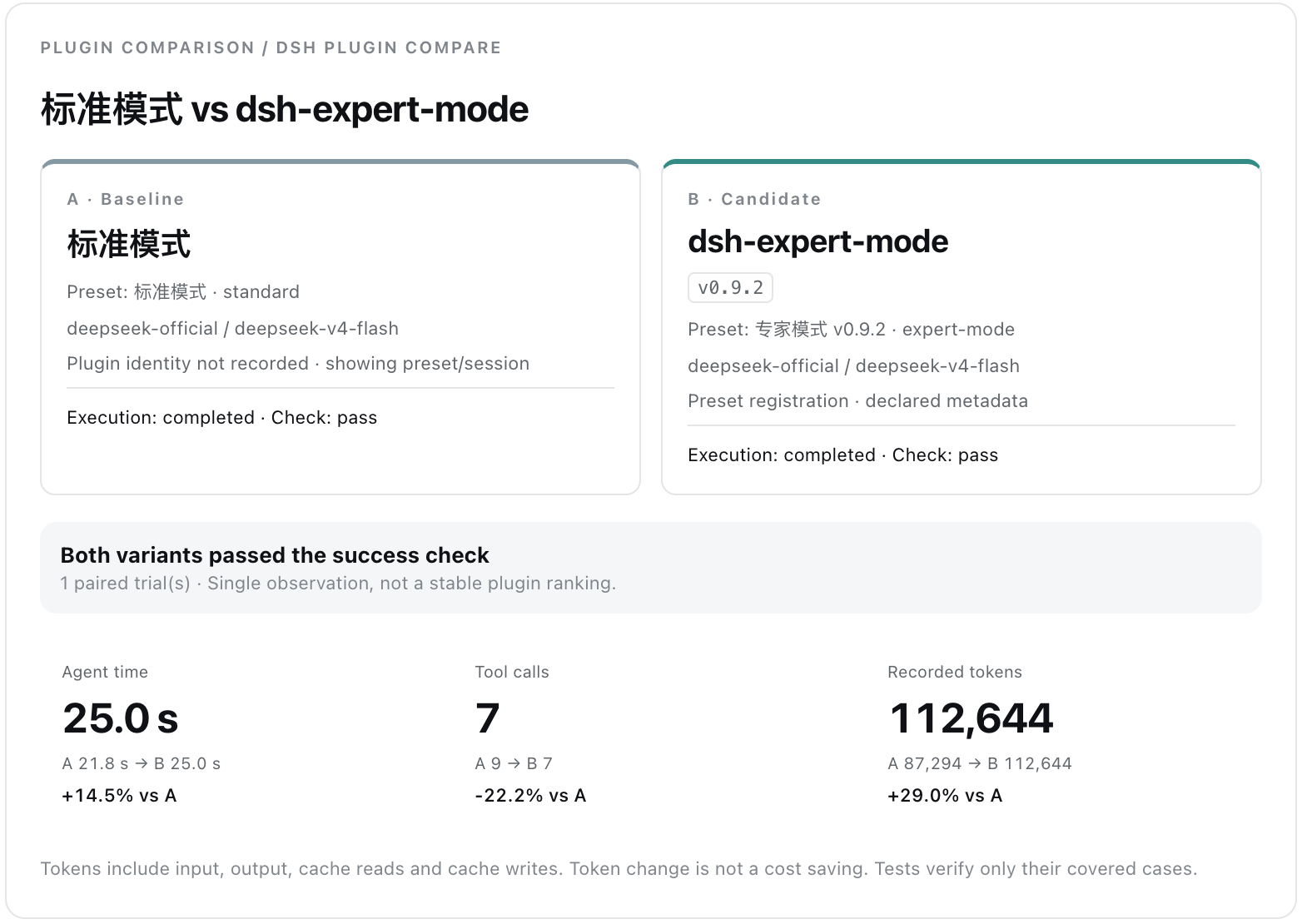
dsh-plugin-compare compares DeepSeek Harness plugins and presets using existing sessions or controlled A/B runs. It turns recorded execution evidence into side-by-side timelines, measurable deltas, explicit success checks, and shareable comparison reports.
中文文档: README.zh.md
Installation
Requires Node.js 22.19+ and a DSH Web profile. Install the stable release from npm:
dsh plugin --profile web add dsh-plugin-compare
dsh web
The next channel is reserved for explicitly announced prereleases. Opt in only when testing one:
dsh plugin --profile web add dsh-plugin-compare@next
Update or remove the installed package with the same profile:
dsh plugin --profile web update dsh-plugin-compare
dsh plugin --profile web remove dsh-plugin-compare
After installing, updating, or removing the plugin, stop any running Web Host with Ctrl+C and start dsh web again. The Compare panel is then available in DSH Web.
Try the checkout example
Follow the step-by-step walkthrough (Chinese): create a fresh intentionally broken checkout project, compare Standard and dsh-expert-mode, inspect the checks, and save screenshots and reports. A reviewed real-run HTML report and screenshots are included. The fixture needs no third-party dependencies; model-backed runs still consume tokens. Run node example/prepare.mjs from this repository to prepare a fresh workspace without changing the fixture.
Status
Stable 0.1.x. The Web Compare panel can compare two existing sessions or run a controlled baseline/candidate pair. Controlled runs explicitly select one configured provider/model for both variants, copy the source workspace twice, compose the selected agent preset in each copy, submit the same prompt, optionally execute the same success-check command, and capture runtime Git evidence. Reports include synchronized timelines, persisted file diffs, explicit check outcomes, and redacted JSON, self-contained HTML, SVG, or PNG exports. See the roadmap.
Historical sessions only expose write / edit diffs persisted in the canonical log. Runtime Git status and tracked diffs are available only for controlled runs, where they are captured before the temporary copies are removed.
The controlled runner supports 1–10 paired trials and alternates which variant runs first. It reports explicit-check counts plus mean and median paired deltas for time and tokens; a Student-t 95% interval is shown when at least two pairs exist. Raw paired observations and Session ids remain in JSON exports so the summary can be recomputed. These intervals describe observed variation under a small-sample assumption—they do not establish an automatic winner or a causal conclusion. Dependency directories are excluded from copies, external symlinks are refused, and Git worktree pointer files are not copied back into the experiment.
The selected provider/model is passed explicitly to every controlled Agent. If an Agent fails before completing its task, the structured failure is displayed and exported, the success-check command is marked not-run, and the comparison is labeled invalid rather than turning unchanged-code test failures into a preset result.
Privacy before sharing
Exports can contain prompts, source paths, code diffs, command output, provider/model names, and Session ids. Automatic redaction is best-effort and is not a privacy clearance. Review every HTML, JSON, SVG, PNG, and screenshot before sharing it; remove credentials, account information, private URLs, personal paths, and proprietary source as appropriate. A redaction count of zero means only that no configured pattern matched.
Evidence captured
- Task outcome and explicit test result
- Tokens, time, steps, retries, and tool failures
- Explicit test results and controlled-run Git snapshots
- Repeat trials and uncertainty display
Development
Contributor requirements: Node.js 22.19+ and pnpm 11.19.
pnpm install
pnpm verify
Install a local checkout into DSH Web:
dsh plugin --profile web add link:/absolute/path/to/dsh-plugin-compare
dsh web
The repository targets DSH 0.1.1-rc.2 or newer compatible 0.1.x builds. DeepSeek Harness is still in developer preview, so every release must be tested against the current published build.
CI tests both the minimum supported DSH version and the dynamic npm latest tag through a real plugin-install and Web-Host boot smoke test. See Compatibility.
Architecture
The package keeps deterministic comparison logic in src/core, DSH Host integration in src/index.ts, and the browser bundle in src/client. See ARCHITECTURE.md.
License
MIT