
 @yiliang114
dsh-session-deck
Codex-inspired activity and session management for DeepSeek Harness: track running, waiting, and unread sessions across workspaces.
- Stars
- 3
- Language
- JavaScript
- Created
- Oct 22, 2026
- Updated
- Oct 25, 2026
Introduction
DSH Session Deck — Session Management for DeepSeek Harness
简体中文 · npm · Latest release · Release CI
A Codex-inspired activity view for DeepSeek Harness. Session Deck adds Activity and Favorites views to the native DSH sidebar. Track running, waiting, and unread sessions across workspaces, reply to sessions that need your attention, and keep important conversations close with Favorites.
The activity-view interaction is inspired by Codex and adapted to DSH's workspaces, session states, and native pinned sessions. Session Deck is an independent community plugin for DSH.
A community plugin with an English interface, no extra npm dependencies, and no telemetry. Licensed under MIT.
Three views, one sidebar
| View | What it helps you do |
|---|---|
| Activity | Follow running, waiting, unread, and recent sessions across all workspaces. |
| Favorites | Keep important sessions close using DSH's native pinned sessions. |
| Workspaces | Return to the native workspace tree, its management tools, and other plugins' menus. |
Switching views keeps your current conversation open. Session rows show the title, workspace, time, and status; their menus provide favorite, rename, fork, archive, and copy-ID actions.
Use More → Show archived to find archived sessions across workspaces. Search by title, workspace, path, or session ID, then click the row’s Restore button to restore and open the original conversation. Clicking the title or row does not restore it. Restoration keeps its recorded workspace position; it does not restart stopped tasks or restore a former pin. Failed restorations stay in the dialog with an error so you can retry.
When a session finishes while you are elsewhere, Session Deck plays a short two-note cue and marks the result unread. Each navigation tab has its own small blue dot: Workspaces and Activity reflect all unread sessions, while Favorites reflects only unread pinned sessions. Selecting a tab does not clear these indicators. Each workspace group carries its own unread dot. The browser tab also adds a blue dot to its favicon and prefixes the title with (N) until those sessions have been viewed. If the page is hidden or unfocused and browser notifications are already permitted, it also sends one silent system notification; clicking it opens that conversation. Opening a session clears only that session, and a dot disappears when its last unread member is viewed. Expanding or collapsing a group or changing views does not mark the group read.
Screenshots captured from a local DSH installation in English; session titles and workspace names anonymized.
| Activity | Favorites | Workspaces |
|---|---|---|
| Follow active work and unread results. | Return to native pinned sessions. | Keep the complete workspace controls. |
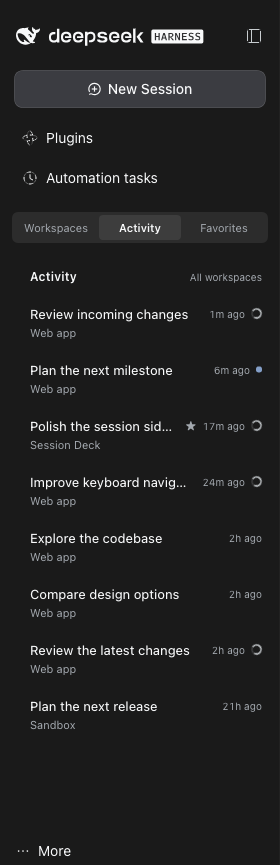 | 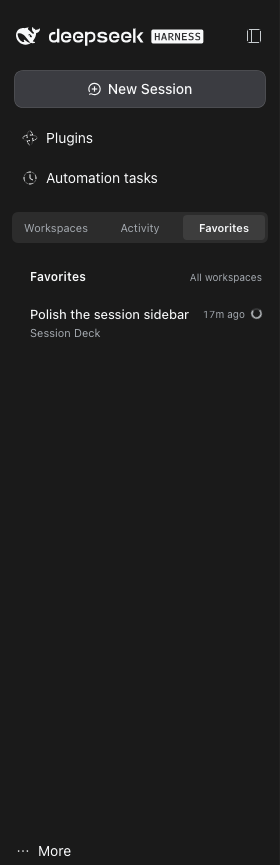 | 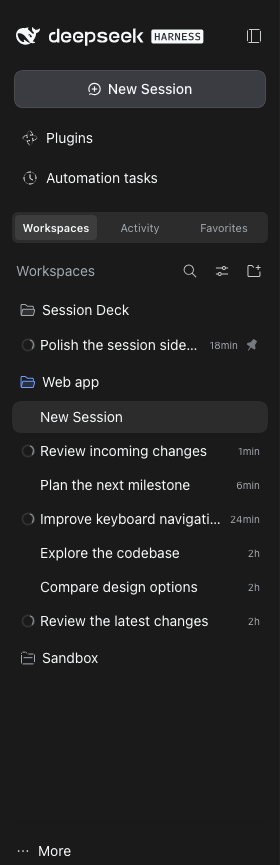 |
Screenshots show the switcher above the workspace region without host patches, below global panels. The interface and anonymized session titles are English; browser menus, tabs, and the address bar are excluded.
Install from npm
Install the latest release from npm. As historical validation, the initial 0.1.2 release tarball was installed in isolation, its SHA512 integrity verified, and its host, client, and patch files checked against the source; this does not establish verification of later releases.
Requirements:
- Node.js 22 or newer.
- DSH Web GUI 0.2.1-rc.2. This is the exact supported host version; other versions are unverified.
- DSH's native sidebar, session, and workspace plugins enabled.
Before installing, check the CLI versions and use the same profile as your running Web GUI:
node --version
dsh --version
Expect Node.js v22 or newer and DSH 0.2.1-rc.2. These instructions assume you already have a working DSH Web GUI; if dsh is not found, install and start the supported DSH host first. If you launch DSH with a custom DSH_HOME, use that same value for plugin commands.
Migrating from an earlier installation: disable and remove the old plugin instance in DSH's plugin manager before installing from npm, to avoid two instances controlling the sidebar. You can keep its browser storage.
dsh plugin --profile web add @yiliang114/dsh-session-deck@latest --ignore-scripts
Replace web if you use another profile. Refresh your existing DSH GUI, then choose Workspaces / Activity / Favorites above the workspace region, below global panels. On the supported DSH 0.2.1-rc.2 layout, the plugin places the switcher there automatically without patching installed DSH files. The native workspace browser remains available in Workspaces. Refresh after client changes too; hot reload is not assumed.
The plugin's own labels are English. To make the rest of DSH English too, use More → Settings → General → Language → English. Session titles remain in the language you wrote them.
First-run check (about two minutes)
- Finish or close DSH's first-run dialogs. In Plugins, confirm that
@yiliang114/dsh-session-deckis installed and enabled, then refresh the page. - Choose Activity and open an existing conversation that has started at least one turn. Newly created empty sessions are intentionally hidden, even if pinned; an empty list on a fresh profile is expected.
- Hover over that session, open its actions menu, and choose Add to favorites (pin). It should appear in Favorites and show a native pin in Workspaces.
- Switch between the three views: the current conversation should stay open. Refresh again: Favorites should still contain the pinned session.
If the switcher is missing, check that the plugin was installed into the Web GUI's profile and DSH_HOME, is enabled, and that the host version matches. The native sidebar, session, and workspace plugins must also be enabled. Look near the sidebar footer too: that is the fallback position when the supported workspace boundary cannot be found. See Compatibility.
On 2026-10-25, version 0.1.8 passed this installation, navigation, favorites, archive/restore, GUI uninstall, and reinstall check in an isolated profile on DSH 0.2.1-rc.2 with Node 22.20.0. Session checks used local synthetic records without model calls; this does not verify live model-state transitions, OS notification delivery, or physical audio output, nor does it certify later versions.
Alternative: link a local checkout
git clone https://github.com/yiliang114/dsh-session-deck.git
cd dsh-session-deck
npm run verify
dsh plugin --profile web add "link:$PWD" --offline --ignore-scripts
There are no dependencies to install. The repository includes the client bundle; build checks JavaScript syntax rather than generating it. Keep the checkout in place while using a linked installation.
You can also install through Plugins → Add plugin → Install a third-party plugin: enter link:/absolute/path/to/dsh-session-deck, choose Install, then Enable now, and refresh the page.
Alternative: install from a tarball
To distribute the plugin without npm, run from the checkout:
npm run verify
npm pack --ignore-scripts
Copy the generated archive to the target machine, then install using its absolute path. Replace VERSION with the version in the filename produced by npm pack:
dsh plugin --profile web add /absolute/path/yiliang114-dsh-session-deck-VERSION.tgz --ignore-scripts
Refresh the GUI. A tarball installation does not depend on the original checkout. Both linked and tarball installations place the switcher above the workspace region automatically on the supported rc.2 layout; neither needs a host patch.
Custom plugin market
The market index lists registry-verified npm releases. Add the following raw JSON URL as a source in DSH's custom plugin market:
https://raw.githubusercontent.com/yiliang114/dsh-session-deck/main/market-index.json
This is a user-added custom market source, not an official DSH listing. Publishing to npm does not automatically add the plugin to an official DSH market.
Maintainers: pushing to main queues an automatic patch release (for example, 0.1.2 → 0.1.3). Rapid pushes can be combined: stale queued runs skip, and the latest eligible run includes the accumulated changes. To choose a minor version, run npm version minor --no-git-tag-version, then commit and push normally; an explicit greater stable version such as 0.2.0 is preserved, and the following release becomes 0.2.1. The workflow runs verification, creates the version commit and tag, publishes with provenance, and updates the market index and GitHub Release. See the release guide for authentication prerequisites and recovery.
How session status works
- Activity keeps all running, waiting, and unread sessions, plus at most 20 ordinary recent sessions, sorted by DSH's
updatedAtrather than last-opened time. Favorites has no 20-session limit. - Favorites are native DSH pins, shared with the workspace tree. Activity and Favorites omit archived, subagent, and empty sessions; ordinary forks remain visible. Show archived lists all known archived sessions, including archived empty sessions and subagents, with no 20-session limit.
- Status priority is waiting for a reply → running → unread. A parent remains running while any known subagent descendant is running; ordinary forks do not propagate status to their source.
- Aggregation covers only descendants known to DSH's session directory. Independent background shell jobs are not tracked: an idle session does not mean every process it launched has exited.
- A session becomes unread when it and its known descendants finish while you are viewing something else. Opening it clears the marker; starting another active cycle also clears the previous result’s unread marker. Native Workspaces navigation acknowledges the visible session before queued completion observation. Persisted observations can recover completions across a refresh, but cannot reconstruct work that started and finished while every page was closed or was never observed.
- One observed finish produces at most one plugin cue and, when permitted in the background, one silent system notification. Reloads, restored unread state, and subagent-only finishes do not replay a completion alert. Waiting for user interaction is not completion. Stops initiated by Session Deck’s archive action are suppressed; a native/external archive whose stop reaches the client before archive membership may still appear as a manual stop. A second complete run is still new. Same-origin tabs use Web Locks when available to serialize completion observation and delivery; without working shared storage or lock support, duplicate prevention is best-effort, not guaranteed.
- Confirmed archive membership clears the session’s known old running/unread baseline once per locally observed archive episode, even if it is absent from the current directory. Unchanged archive membership does not clear later shared records, which may represent newer activity in another tab. These handled records then participate in normal bounded cleanup; directory absence alone never deletes unread data. Restoring an idle session does not replay its old completion. If the first restored snapshot still says running, it is treated as uncertain until an idle-to-running transition is observed, so a run already active at restoration may finish silently. Archive/restore cycles never observed by the page cannot be inferred.
- Opening an Activity/Favorites row reports navigation failures in an error dialog and preserves unread state. Close the dialog and retry the row or menu action. Open in workspace for all actions switches views only after navigation succeeds.
- The brief cue is deliberately neutral rather than claiming success: the client status stream does not distinguish success, failure, or a manual stop. Sound is synthesized locally and defaults on. Use More → Enable and test sound in your own browser to enable the cue and preview it with a user gesture; the result confirms playback started, not physical speaker audibility. The plugin plays its cue in foreground and background alike; system notifications are silent to avoid duplicate sounds. Browser autoplay restrictions may require a pointer or keyboard interaction first. A browser notification is sent only when permission was already granted in site settings; the plugin does not request external push access or track individual chat messages.
- Workspaces, Activity, and the browser tab reflect all eligible unread sessions (not individual chat messages); Favorites reflects the pinned subset; the page title shows the full count. Workspace dots aggregate the same sessions from the complete workspace membership, not from rendered or truncated rows. They cover direct workspace membership in flat and tree views; a collapsed tree ancestor does not roll up unread descendants. A hidden page or an open global panel does not count as viewing a session.
- Archiving an active session requires a Stop and archive confirmation. There is no permanent-delete action. Switch to Workspaces for the complete native menus, including actions from other plugins.
DSH compatibility and switcher position
This plugin declares an exact engines.dsh match of 0.2.1-rc.2. Automatic top placement uses a DOM compatibility adapter for that release, not an official DSH extension API.
| DSH sidebar | Placement mechanism | Session Deck support |
|---|---|---|
| Official 0.2.1-rc.2, without patches | No official sidebar.workspaces.before slot; the adapter places the switcher above the workspace region by default. | Supported target, with a precise rc.2 DOM structure guard. |
| 0.2.1-rc.2 with the legacy local patch | Reuses the existing sidebar.workspaces.before slot below global panels. | Compatible; the patch is no longer needed. |
| Official 0.2.1-rc.3 | The published client and slot contract still lack the before-slot. | Not supported: full compatibility is unverified and the exact engine declaration excludes it. |
On the recognized rc.2 layout, the adapter renders a React portal into its own DOM host immediately before the workspace region, below global panels such as Automation tasks. It does not write installed DSH files or replace the native workspace browser. An unknown DOM layout falls back to the footer. Disabling the plugin removes its scoped observer and DOM host.
The More menu also lacks an item extension slot in rc.2. Session Deck inserts its own portal after Settings only when the native account trigger and menu match that version's layout. Native Settings, Feedback, account actions, and keyboard navigation remain available. Unknown or ambiguous layouts use a Show archived footer button instead. Disabling the plugin removes its menu container and observers.
Workspace group headers likewise have no decoration slot in rc.2. The unread dot is added by a narrowly guarded adapter that recognizes native project rows and their real workspace:<id> key. It owns only its 6px marker, removes markers copied into animated exit rows, and does not identify groups by title or path. Unknown layouts leave the native tree untouched; Activity, sound, and session delivery continue to work. The always-mounted completion observer uses the official shell.overlay slot.
The rc.3 published files were inspected on 2026-10-23; that inspection does not establish plugin compatibility. Supporting another host version requires validating its session, workspace, slot, and UI APIs and DOM layout before widening engines.dsh.
Legacy sidebar patch rollback
The sidebar patch script is retained for rollback and backward compatibility. New installations do not need it. If you previously installed its local before-slot patch, the plugin can reuse that slot, or you can restore the original sidebar.
Locate the @deepseek-ai/dsh-client-ui-sidebar package actually used by your running DSH. From this repository, replace the placeholder with that package's directory, not the DSH root or this plugin directory:
node scripts/patch-sidebar-before.mjs /path/to/dsh-client-ui-sidebar --rollback
Rollback requires the original adjacent .dsa-before.backup files and refuses to overwrite unrelated changes. Refresh the GUI after rollback: the new plugin still places the switcher above the workspace region on the supported unpatched rc.2 layout. If rolling back a DSH source checkout, rebuild the affected client artifacts as well.
Privacy and local storage
Session Deck uses DSH's session and workspace APIs. It makes no model calls, sends no telemetry, and has no external upload endpoint.
Browser localStorage retains the original keys for compatibility:
| Key | Stored data |
|---|---|
dsh-session-activity.mode.v1 | Selected view. |
dsh-session-activity.pending.v1 | Session IDs, observed running state, and completion/unread metadata. |
dsh-session-activity.notified.v1 | Last notification revision delivered per session, used to avoid duplicate notices across same-origin tabs. |
dsh-session-activity.sound.v1 | Whether the completion cue is enabled. |
No conversation bodies are stored by the plugin. Favorites remain in DSH's native pinned data. View and unread state sync between tabs on the same origin, not across devices. If storage is unavailable, state stays in memory. Clearing browser storage resets this metadata; processed records are capped at 1,000, while running and unread records are retained.
Disable or uninstall
Use Plugins → @yiliang114/dsh-session-deck. Turn off the enable switch to disable it, or choose Uninstall and confirm to remove the package. Then refresh the GUI: the native workspace tree should remain, and Activity, Favorites, and the plugin's More menu entries should be gone. Disabling also removes the adapter's observer and DOM host.
Your conversations and native pinned data remain. Uninstalling does not clear the browser metadata listed above or undo a legacy host patch; use the rollback command separately if needed.
If you prefer the CLI, use the same profile and DSH_HOME as your Web GUI:
dsh plugin --profile web remove @yiliang114/dsh-session-deck
After CLI removal, restart that DSH Web instance and refresh the page. In the rc.2 acceptance check, the running host retained the plugin after CLI removal until restart; GUI uninstallation unloaded it immediately. Do not add --ignore-scripts to remove: the bundled pnpm does not accept that option for removal.
Development
npm run verify
This runs syntax checks, Node.js tests for session selection and state handling, and a dry-run package-content check. CI runs it on Node.js 22 and 24. There is no separate lint or TypeScript check, and automated checks do not replace testing the real DSH GUI.
The client lives in lib/client.js, with a minimal host entry and Cordis configuration. Report bugs with your DSH version, installation method, and reproduction steps in GitHub Issues.
License
MIT. Independently maintained; not an official built-in DSH component.