
 @xh0915
dsh-voyage-log
把 AI 会话折成可审计的航海报告 · DeepSeek Harness 双端插件
- Stars
- 0
- Language
- TypeScript
- Created
- Oct 20, 2026
- Updated
- Oct 21, 2026
Introduction
Voyage Log · dsh-voyage-log
中文 | English
A DeepSeek Harness tab plugin that turns one AI session into a report you can actually read.
One conversation is one voyage. When a long session ends in DSH it is hard to say what actually happened: which files changed, how many tool calls ran, which step failed, how many tokens went in. All of it is already in the session log, but nobody wants to read raw events. Voyage Log reads them for you and lays the trip out on a few pages.
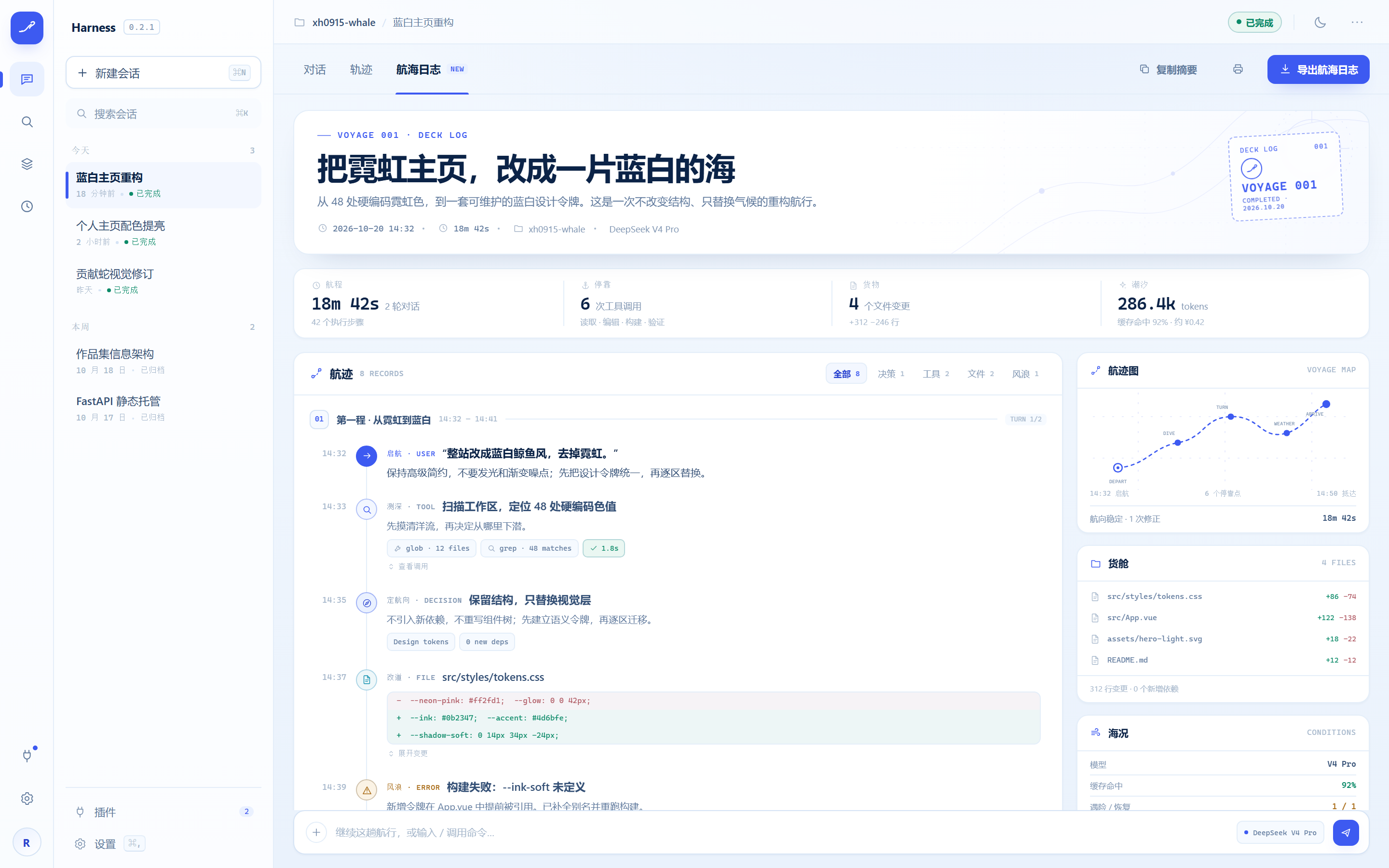
Design mockup, not a capture of the shipped tab. The rendered UI depends on your Harness.
What you see once installed
Any conversation with history gets a Voyage Log tab at the top. It has three sections:
Key numbers
The scorecard for the trip: wall time, turns, tool calls, failed calls, files changed and read, and tokens (input, output and cache-read counted separately).
Every number is measured off the log. Nothing is estimated, and there is no cost figure — the log does not carry one, so the plugin will not invent it.
Timeline
Turn by turn, in order: your prompt, the reply, each tool call with its duration and result, approvals with their outcome, retries, context compactions, and how the turn ended.
A tool call that never received a result is shown as exactly that, instead of silently disappearing.
Files, tools and models
Leaderboards for files and tools: which files were edited, written and read the most, which tools were called and failed the most, and how many replies each model produced.
Also
- Task list — the latest todo board written in the session.
- Export — copy a Markdown digest, or download / print a single HTML file with inline styles, no external assets and no scripts. It opens anywhere.
Privacy: it will not leak your keys
Sessions often carry keys, tokens and email addresses. Everything is cleaned up before it reaches the UI:
- Reading and folding happen on your machine; nothing is uploaded.
- Private key blocks, JWTs, GitHub / AWS / Google / Slack / npm / PyPI / Stripe / DeepSeek-shaped keys,
Bearerheaders, credentials inside URLs,api_key = …assignments and email addresses are replaced with«已脱敏». - The report states how many spans were masked and which families fired.
- Things that merely look secret are left alone:
process.env.X,${TEMPLATE},foo.bar.baz,ALL_CAPS_CONSTANTSand short strings. - Redaction is on by default. Turn it off and the report says so, instead of pretending it ran.
Install
Requires Node.js 22.19+ (or 24+) and DeepSeek Harness 0.1.0-rc.6+.
git clone https://github.com/xh0915/dsh-voyage-log
cd dsh-voyage-log
pnpm install
pnpm run build
dsh plugin --profile web add .
Restart the Web Harness. Open any conversation with history and the tab is there.
pnpm run build must run before add. The package ships no install-time build script (pnpm 10 blocks unapproved prepare scripts); skip this step and the plugin installs but fails to load.
Remove it with:
dsh plugin --profile web remove dsh-voyage-log
Settings
dsh-voyage-log:
  redactSecrets: true   # mask secrets before they reach the UI (default)
  maxTurnEvents: 240    # rows per turn, 20–5000
When a very long turn overflows the budget, key rows are kept first, the turn is marked capped, and the report carries a truncation note — nothing disappears silently.
Boundaries
- No cost figure: the log has no price, so the plugin does not guess one.
- No streaming noise:
*-chunksincremental events are ignored by design; only events that describe the trip are read. - Nothing extra is fetched: data comes from Harness's own
sessionQuery— the same session you can already see. - The UI follows Harness light and dark themes.
Technical details
For people changing the code
Layout
package.json           # dsh.bundle.patch + dsh.client, scripts, peer deps
cordis.patch.yml       # mounts the host plugin row into a profile
dsh.plugin.json        # registry manifest
src/index.ts           # host entry: Config schema, Remote service, Typert manifest
src/runtime.ts         # voyage.build(sessionId) — reads the log, groups it, returns
src/fold.ts            # the grouping engine: raw events -> turns, rows, totals
src/redact.ts          # local secret redaction
src/schema.ts          # Zod wire authority (types inferred, nothing drifts)
src/contract.ts        # strict InvocationDescriptor shared by host and client
src/typert.ts          # host reflection manifest
src/client/index.tsx   # client entry: mounts the Remote, registers the tab
src/client/view.tsx    # the voyage view
src/client/report.ts   # Markdown digest + self-contained HTML report
src/client/styles.ts   # theme-token stylesheet (follows Harness light/dark)
src/client/locales.ts  # zh / en copy
tests/                 # fold, redaction, contract, and report unit tests
build.mjs              # esbuild dual build: host ESM + client CJS
The client half contributes no prompt, tool, or session event — ctx.typert.register() only publishes reflection metadata. The plugin is UI over your own data.
Development
pnpm run check # typecheck + lint + test + build
Renaming
If you fork this and rename it, keep these in sync: package.json → name, exports, files; build.mjs → the __ModuleLoader__.load id; src/index.ts → name; src/client/remote.ts → the hex-encoded TypertRemoteNamespace$… name; src/client/locales.ts → the locale namespace; src/client/index.tsx → the slot id; src/typert.ts → package; src/contract.ts → the invocation id; cordis.patch.yml → id and name; dsh.plugin.json → id.
License
MIT
Built by 里卡多 / xh0915