
 @teethyachi
dsh-usage-mini
Floating usage window for DeepSeek Harness Web: Claude/Codex reset countdowns + DeepSeek API spend.
- Stars
- 0
- Language
- JavaScript
- Created
- Sep 7, 2026
- Updated
- Sep 10, 2026
Introduction
English | 简体中文
用量小窗(USEAGE WINDOW)





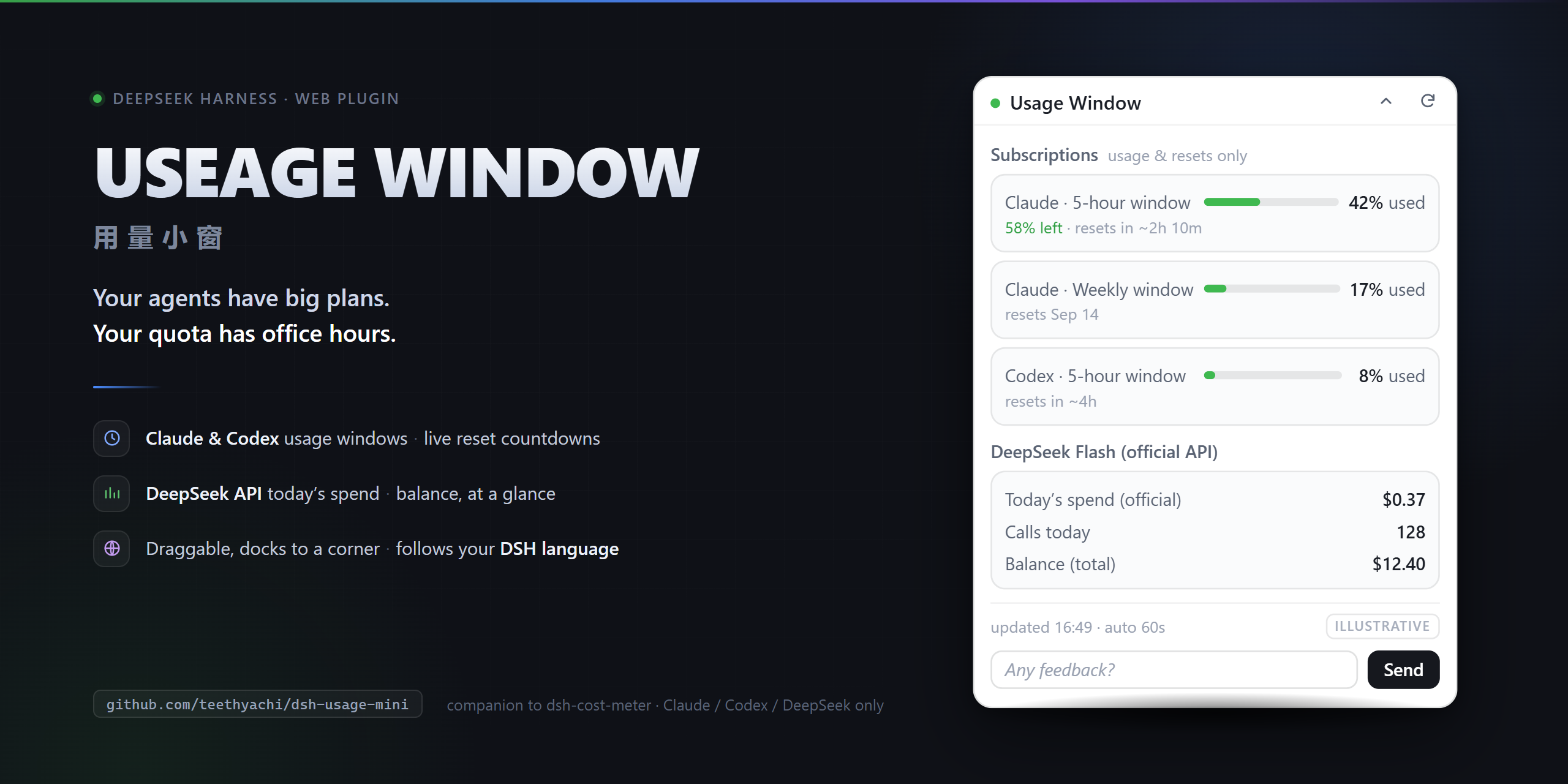
Your agents have big plans. Your quota has office hours.
A companion floating window for dsh-cost-meter and dsh-plugin-subscriptions: they collect the numbers, this one keeps them on screen.
A tiny floating usage dashboard for DeepSeek Harness Web. Check the meter without turning your workflow into a browser-tab scavenger hunt.
Currently supports Claude subscriptions, Codex (ChatGPT) subscriptions, and DeepSeek API only. Not a universal billing dashboard. Not an official Anthropic, OpenAI, or DeepSeek product.
What you get
- Claude + Codex subscriptions: available usage windows, used/remaining percentages, reset times and countdowns. No made-up dollar balance for a subscription.
- DeepSeek API: today's locally recorded official-provider spend and calls, plus the upstream cached official account balance. Includes a Flash breakdown when present.
- Follows your DSH language setting. The widget reads the host's
<html lang>and renders in Chinese or English, switching live when you change Settings → Language. It has no language switch of its own, because you already have one. - Drag it where you want. Collapse it into the nearest corner. It remembers its spot in this browser.
- Settings toggle, manual refresh, and 60-second polling while expanded and the page is visible. Collapsed or hidden? No polling busywork. Your usage monitor should not need its own usage monitor.
- A feedback bar at the bottom of the window. One line, press Send, and a pre-filled GitHub issue opens. Every issue gets a reply; adopted ones ship in the next release with credit. See Feedback.
Install
Requires a DeepSeek Harness Web installation and pnpm. This repository ships ready-to-load JavaScript; no build step or install script. Compatibility with your DSH version is not certified; see Compatibility.
From npm (recommended; also what plugin managers such as dsh-extension-hub use):
dsh plugin --profile web add dsh-usage-mini
From the latest tagged release on GitHub:
dsh plugin --profile web add github:teethyachi/dsh-usage-mini#v0.2.3
Or download the release tarball and run:
dsh plugin --profile web add ./dsh-usage-mini-0.2.3.tgz
To pin an exact commit instead of a tag:
dsh plugin --profile web add github:teethyachi/dsh-usage-mini#<commit-sha>
Restart your existing Web profile, then refresh its page. Open Settings → 用量小窗 to show/hide the widget. Package ID stays dsh-usage-mini for compatibility; USEAGE WINDOW is the requested product spelling.
Required data providers
This is a display plugin, not a replacement account connector. Enable these separately in the same Web profile:
| Feature | Required existing plugin |
|---|---|
| Claude / Codex usage | dsh-plugin-subscriptions, with the relevant subscription signed in |
| DeepSeek spend / balance | dsh-cost-meter, with ledger and official balance configured |
They are not bundled or silently installed. If an endpoint is unavailable, that section shows a notice; the other section can still work. Compatibility depends on these RPC contracts, not merely having a similarly named package installed.
Compatibility (declared in package.json)
| Field | Value | Evidence |
|---|---|---|
Node.js (engines.node) | 22.23.2 (exact) | The only Node version actually exercised (Windows). Other Node versions, including the rest of DSH's own ^22.19.0 || >=24.0.0 range, are untested and therefore not declared. |
DSH (dsh.compatibility.dshReleases) | 0.1.2-rc.1: compatible · 0.1.1-rc.2, 0.1.2-alpha.4, 0.1.2-alpha.5: unknown | 0.1.2-rc.1: full dsh --profile web start from a disposable DSH_HOME, client delivered through the real web module loader, headless-browser render in zh-CN and en-US with zero page errors, clean uninstall — see docs/store-evidence.md. The other three have only install/composition evidence (rc.2) or none (alphas) and stay unknown. |
| Profile | web only | Browser client; no headless/TUI behaviour. |
| OS | Windows (win32) exercised | Nothing OS-specific in the code, but only Windows was exercised. |
Correction (0.1.2, folded into 0.1.3): an earlier revision of this manifest declared engines.node >=22.19.0 and marked two DSH releases compatible. That was overbroad: source-level compatibility and configuration composition are not self-certified full runtime compatibility. The values above are the honest state. They are not a claim that DSH STORE has completed its own Profile install or runtime acceptance, and a store listing may stay guarded or unlisted until real runtime evidence exists.
Permissions, dependencies and failure boundaries
- Lifecycle scripts: none (
preinstall/install/postinstall/prepareabsent). Runtime dependencies: none; onlyreactis required from the DSH web module loader. - Network: the browser client issues same-origin
fetchPOSTs to the current DSH origin only:/subscriptions-auth/status,/subscriptions-auth/usage,/api/costMeter/getState,/api/costMeter/refreshBalance. It never calls an external host itself. Upstream plugins (dsh-plugin-subscriptions,dsh-cost-meter) do contact Anthropic/OpenAI/DeepSeek on your behalf when serving those RPCs; a forced refresh triggers such upstream calls. - Files / commands / credentials: none. The host half is a no-op; the plugin reads no files, spawns no processes and never handles tokens. Credential state stays inside the upstream plugins.
- Local storage: two browser
localStoragekeys:dsh-usage-mini:ui(window position, collapsed state, visibility) anddsh-usage-mini:feedback(last-send timestamp, send count). No usage data is persisted by this plugin. - Feedback bar: pressing Send calls
window.openon ahttps://github.com/teethyachi/dsh-usage-mini/issues/new?…URL. That is a navigation in your browser, not a request made by the plugin; nothing is sent unless you then press Submit on GitHub. See Feedback. - On-screen data: account labels returned by the subscriptions plugin and cached balances can be visible in the widget. Redact screenshots.
- Stale-cache semantics: the DeepSeek balance is the cost-meter cached snapshot. Automatic polling only requests a refresh when no balance was ever fetched; the manual button forces a refresh. If the refresh fails, the previous snapshot stays with its own status message.
- Failure boundaries: an RPC returning HTTP 404 is shown as "channel missing" for that section only; the other section keeps working. Any other error is displayed as text in that section. By design the host entry does nothing and client errors are caught per section, so the plugin is not expected to bring down the host; this is a design statement, not a tested guarantee across DSH versions.
Read the numbers like an adult (tragic, we know)
- Subscription percentages are upstream usage windows, not money and not a per-chat bill.
- Today's DeepSeek spend comes from the cost-meter ledger (
deepseek/deepseek-officialroutes). It is not guaranteed to include every charge on your provider account. Currency conversion uses cost-meter settings. - Balance is a cached snapshot. Manual refresh requests an update; network/provider failures can leave an older snapshot.
- This widget does not enforce budgets, stop agents, switch models, or promise savings.
Privacy & implementation
A no-op host entry plus a browser client using DSH's module loader and settings.section slot. Requests go to the current DSH origin: /subscriptions-auth/status, /subscriptions-auth/usage, /api/costMeter/getState, and /api/costMeter/refreshBalance. Existing host plugins handle upstream authentication. This package adds no external analytics or credential-entry UI.
Browser localStorage keeps display preferences. Account labels and balances can appear on screen: redact screenshots before sharing. Never publish your DSH profile, credentials, ledger, or session history.
Feedback: the widget is built from your issues
The bottom of the expanded window has a one-line input that asks Any feedback? (给点儿意见? in Chinese). Type, press Send, and a pre-filled GitHub issue opens in a new tab. Press Submit there and you're done.
What goes into that URL, and nothing else:
| Field | Value |
|---|---|
feedback | your text, trimmed, max 500 characters |
version | the plugin version string (e.g. 0.2.0) |
title / labels / template | [feedback] … ([反馈] … in Chinese), feedback, feedback.yml |
Never included: usage percentages, balances, spend, account labels, subscription state, tokens, or anything read from the DSH RPCs. A 60-second local cooldown and the 500-character cap are enforced in the browser. If your browser blocks the pop-up, the widget shows a plain link instead.
The loop on the maintainer side:
- Every
feedbackissue gets a reply: adopted, or not adopted with the reason. - Adopted items are implemented on a branch, tested, and merged by a human. No automated commits to
main. - The release that ships them credits the issue number in the CHANGELOG.
- Hard boundaries that will not change regardless of votes: only Claude / Codex subscriptions and the DeepSeek API; no new network endpoints; no credential handling; no changes to the main DSH GUI.
Prefer not to use the widget? Open an issue directly.
Remove
dsh plugin --profile web remove dsh-usage-mini
Restart the Web profile.
Links
- Hugging Face Space (project page / mirror): https://huggingface.co/spaces/BruceWuu/useage-window
- 中文介绍(为什么做这个小窗): docs/blog-zh.md
If this widget saves you a tab, a GitHub Star or a Like on the Hugging Face Space helps other DSH users find it. Bug reports and PRs are more useful still.
Release verification
Run npm test and npm pack --dry-run. With Playwright installed, run npm run test:browser (optionally set PLAYWRIGHT_MODULE and CHROME_PATH). Browser regressions cover pending-request disposal, animation cleanup, remounts, and language-switch positioning. See versioned runtime evidence for the tested DSH build. These checks do not certify live provider accounts or untested browsers.
MIT licensed. Contributions welcome—especially accurate failure states, not confident-looking zeroes.