
 @taoshi1999
dsh-workspace-hygiene
DeepSeek Harness plugin for agent workspace hygiene: artifact value assessment, metadata indexing, and auditable cleanup.
- Stars
- 4
- Language
- JavaScript
- Created
- Sep 2, 2026
- Updated
- Sep 4, 2026
Introduction
dsh-workspace-hygiene
English | 中文
dsh-workspace-hygiene is a DeepSeek Harness plugin for managing the growing collection of intermediate artifacts produced during long-running agent tasks: logs, code and other files.
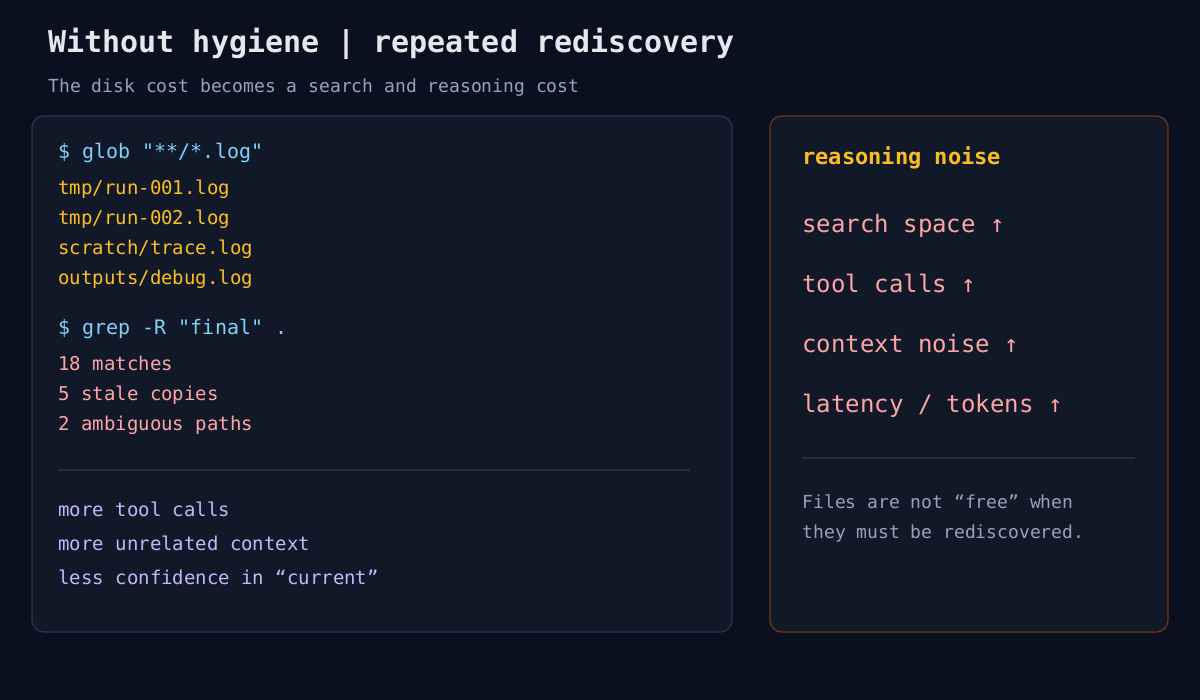
While using different agents, I noticed a recurring problem: long-running tasks produce large numbers of intermediate files, cluttering the workspace and placing a burden on disk space and model context. Files sitting on disk generally do not consume tokens directly. The problem emerges when an agent repeatedly runs glob and grep, lists directories, reads files and reconstructs the meaning of its earlier results. Redundant files can create a chain of effects: a larger search space → more tool calls → more irrelevant content in context → more reasoning noise → higher token costs and latency, and poorer reasoning performance.
How can agents automatically manage the intermediate artifacts that accumulate during long-running tasks, keeping the workspace informative, readable and free of unnecessary redundancy throughout the task lifecycle? This is a research question worth exploring.
DeepSeek Harness already emphasizes mechanisms such as workspace-context budgets. Its filesystem and workspace subsystems primarily address file access, workspace identity, and read/write safety. Three further questions remain: Which files are still worth keeping? How should existing files be named? What directory structure should organize them?
dsh-workspace-hygiene is my initial response to these three questions. Its approach treats the workspace as an organized information space that evolves with the task. The plugin continually asks: Does this file still have value? If so, where should it live and what should it be called? If the answer is not yet clear, how should it be preserved for later assessment?
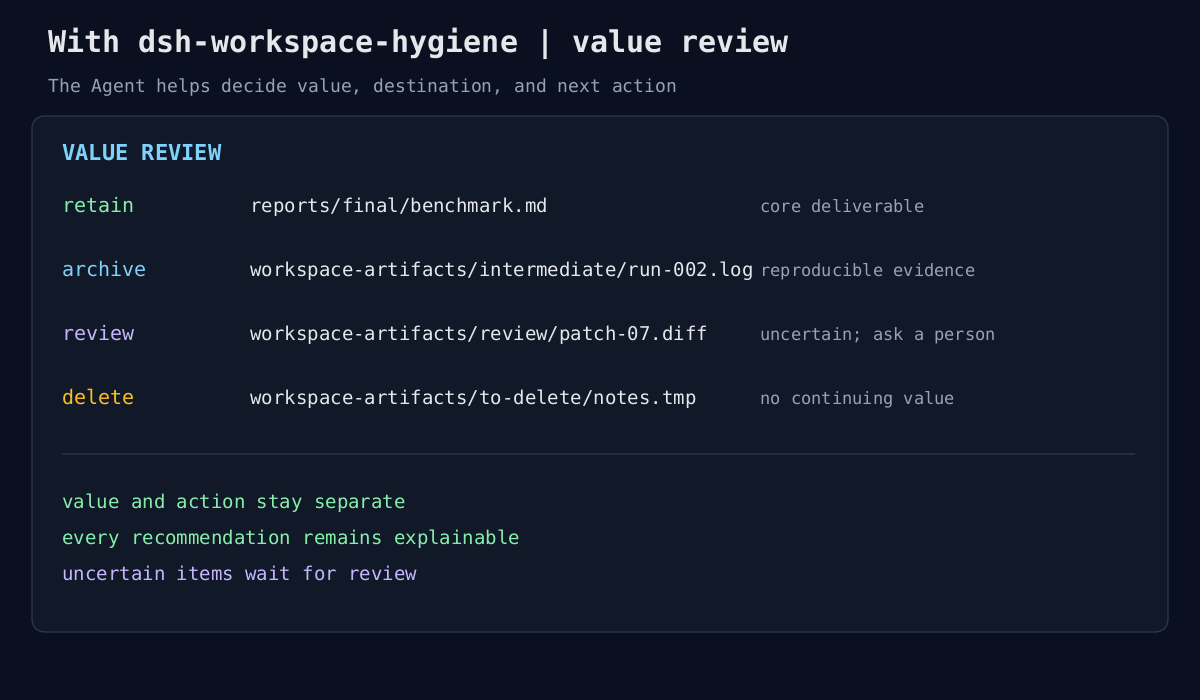
First, the plugin assesses the value of workspace files. It distinguishes core task materials, final deliverables, reusable intermediate results, temporary debugging or process records, and redundant artifacts that no longer serve a purpose. The assessment considers the file's characteristics alongside its place, role and lifecycle within the task, and explains the reasoning to the user. This produces a judgment about file value that people can understand and correct, going beyond simply identifying files that look temporary.
Second, the plugin separates value assessment from action. It recommends keeping valuable files and potentially useful intermediate results, with suggestions for their names and directories. It recommends removal for files that clearly have no further value. When the evidence is insufficient, it leaves the action undecided for user review. Users can accept, revise or reject these suggestions. This lets the agent take an active role in workspace management while keeping a mistaken judgment from directly causing irreversible loss.
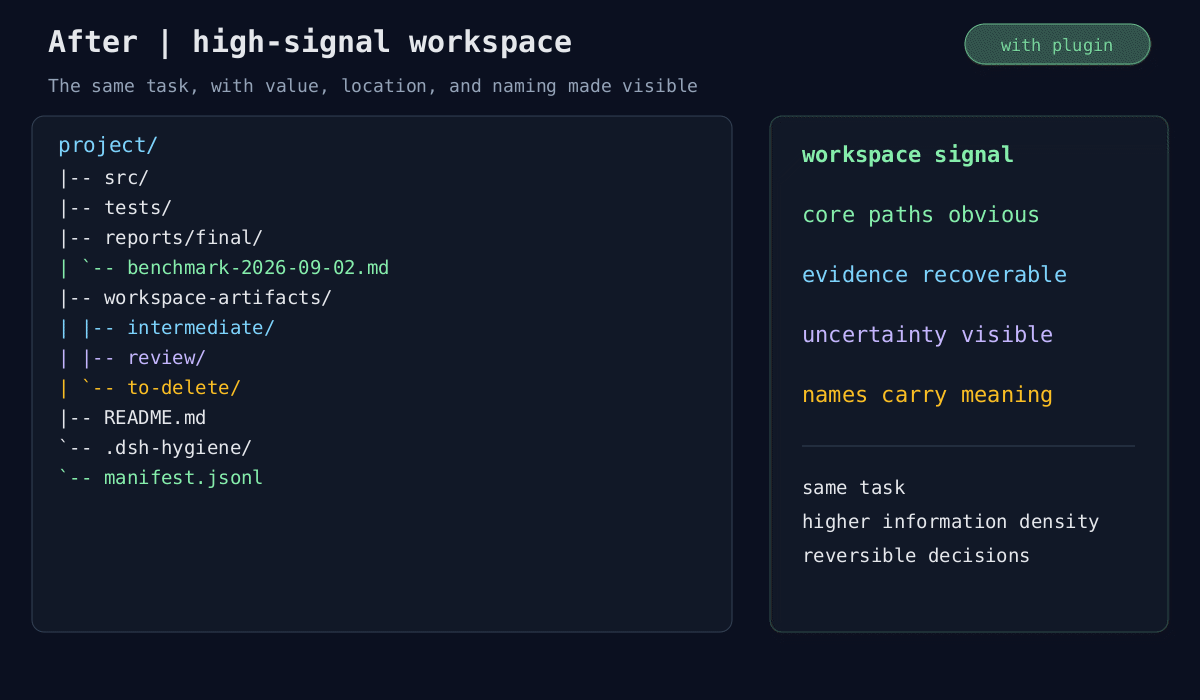
Next, the plugin helps establish a stable, clear and readable organization. Files at different lifecycle stages should occupy distinct directories, making final outputs, intermediate materials, items awaiting review and items marked for removal easy to distinguish. Names should convey useful information about a file's origin and purpose. Consistent naming and directory rules turn scattered files into a structure that both people and agents can quickly browse, search and understand.
Finally, organization should continue throughout the task lifecycle. As the agent creates new files, the workspace needs ongoing assessment, organization and updates: valuable material becomes clearly identified output, intermediate work is managed together, confirmed waste is removed, and uncertain material is preserved for review. The aim is to maintain a high density of useful information and reduce the irrelevant content encountered in subsequent searches and interpretation.
The goal of dsh-workspace-hygiene is a systematic approach to workspace management for long-running agents: make each file's value, location and name clear, reducing disk usage while helping people understand what agents have done and helping agents interpret work left by themselves and other agents more efficiently.
Workspace tab
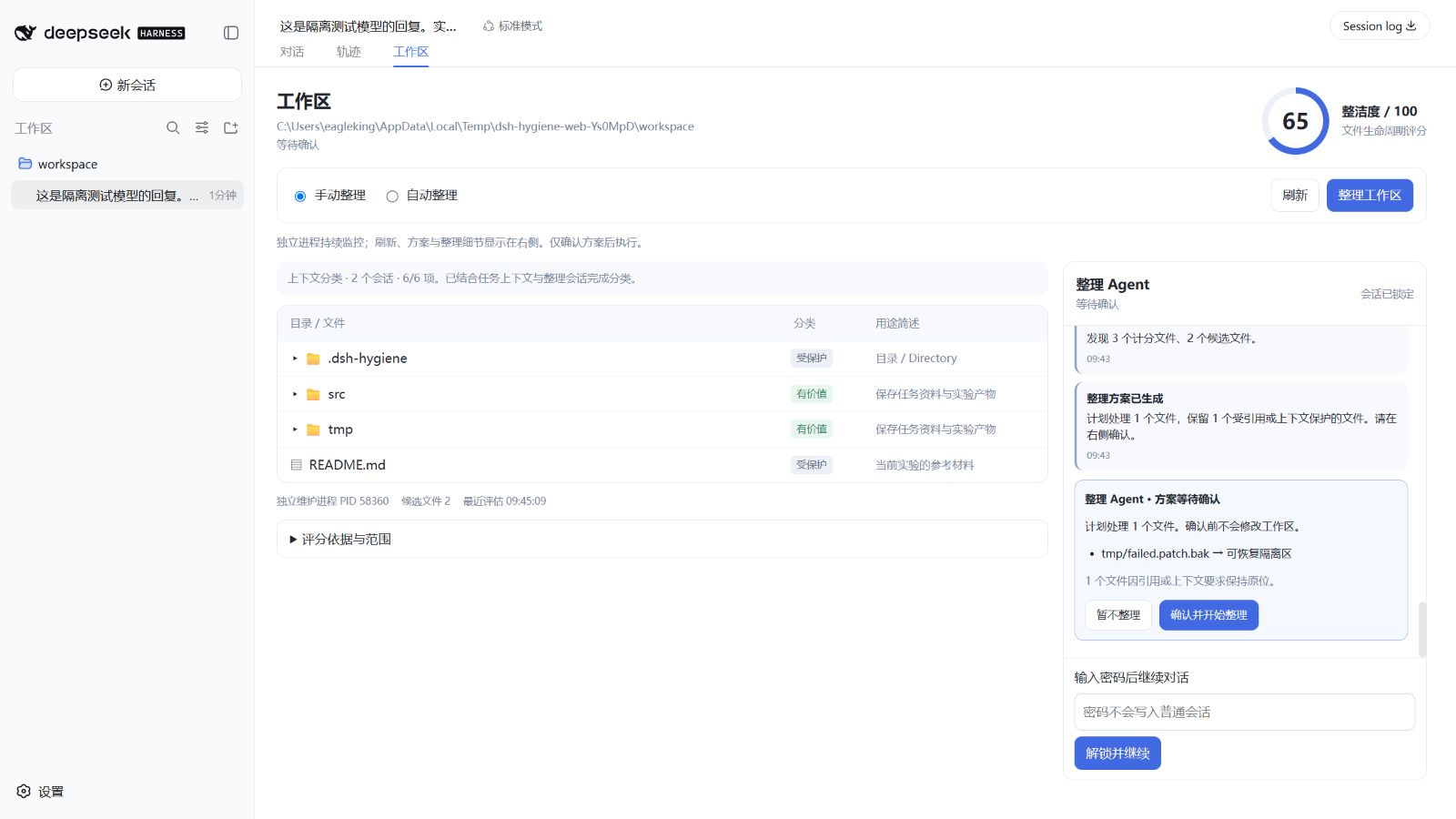
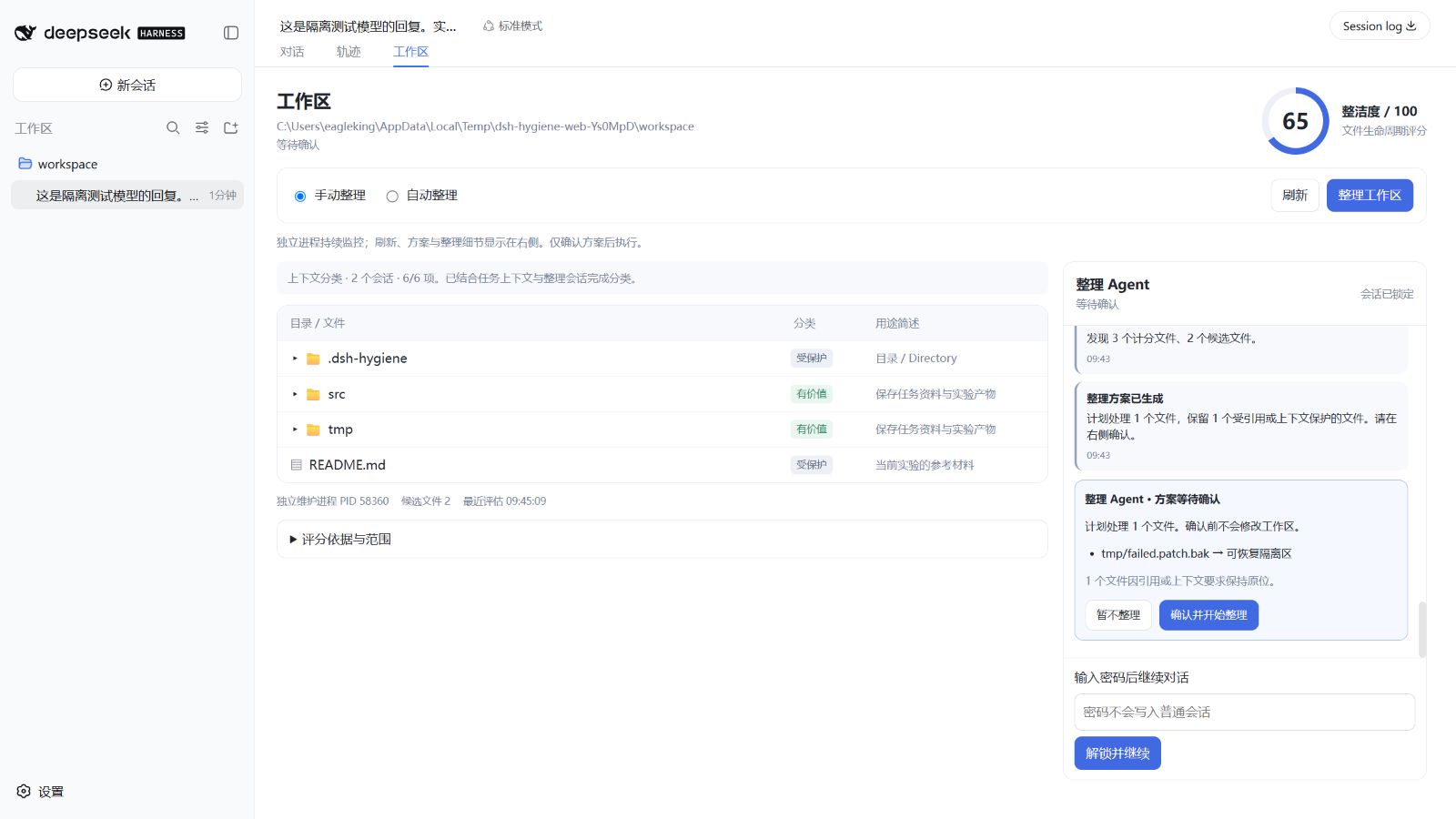
dsh-workspace-hygiene adds a 工作区 (Workspace) tab immediately after 轨迹 (Trajectory) in dsh web. The page uses a two-column layout: the directory tree, classifications, purpose summaries and cleanliness score stay on the left, while a dedicated hygiene-Agent conversation stays on the right. The primary Agent composer is hidden on this page and returns when the user switches back to 对话 (Conversation).
Long agent tasks accumulate logs, failed patches, scratch exports and intermediate results. Their presence on disk does not itself consume context tokens; repeatedly searching and interpreting them does. This plugin makes their lifecycle visible and keeps maintenance separate from the primary agent's conversation.
- Browse every directory and file in the current session's workspace, including hidden files and protected source/dependency directories. Directories load on expansion, with pagination for large folders. Symbolic links are listed but never traversed.
- Inspect file and directory categories: protected / valuable / intermediate / disposable / uncertain; see path protection, classification source, purpose, assessment, suggested path and size. By default the model infers purpose from primary-agent task context and directory metadata. Items awaiting assessment retain their rule-based classification.
- See the cleanliness score, scan time, candidate count, maintenance process PID, and verification/recovery status.
- Select Manual or Automatic mode. The saved choice applies to the workspace and survives a restart.
- Follow refresh, scanning, contextual classification, plan generation, organization, verification, review and rollback events in the fixed right-hand conversation. Unchanged periodic scans do not add repetitive messages; live batch progress remains visible while a large workspace is being assessed.
- Discuss file purposes and preservation requirements with the dedicated hygiene Agent in that same panel. Its independent history is absent from ordinary session lists accessible to other Agents.
- Review each proposed file action in an inline conversation card, send additional requirements before regenerating the plan, then explicitly decline or confirm it from the right panel.
The browser sends a session ID, never an arbitrary workspace root. The host derives the root from that live session and uses DSH's Connection RPC transport and trust checks. An explicit workspaceRoot configuration additionally pins the deployment boundary. Resume a cold session before using the panel.
Real DSH Web integration, using an isolated fixture workspace:
Manual and automatic organization
Manual is the default. A separate maintenance process watches filesystem changes and periodically assesses the workspace. Monitoring does not move source files, inject messages into the primary agent, or reserve its idle phase. Click 整理工作区, review the plan, then click 确认并开始整理 to execute it.
Automatic means assessment and a consent request, not unattended mutation. After each completed primary-agent turn, the process refreshes its assessment. A complete scan below cleanlinessThreshold (default 80) with eligible candidates posts a suggestion to the right-hand hygiene conversation. The user can generate and inspect the detailed plan or decline. Unchanged, declined suggestions are suppressed until the candidates change. Switching to automatic does not immediately organize anything.
Both modes use the same confirmed workflow:
flowchart LR
  A[Independent monitoring] --> B[Tree and score]
  B --> C{Manual click or end-of-turn suggestion}
  C --> D[Plan card and confirmation in right conversation]
  D --> E[Reserve idle workspace]
  E --> F[Baseline checks and reference inspection]
  F --> G[Recoverable organization]
  G --> H[Integrity and project checks]
  H --> I[Independent DSH review]
  I --> J[Primary Agent review]
  H -->|failure| K[Rollback]
  I -->|rejected| K
  J -->|rejected, after turn| K
Only confirmed organization temporarily reserves the idle phase of all live agents sharing that workspace in this DSH host. New input waits while the operation finishes. A busy workspace is refused; cancellation requests rollback after the transaction journal settles. This coordination does not lock unrelated editors or other DSH host processes.
Independent process and two reviews
Each observed workspace owns a Node child process (src/worker.js). .dsh-hygiene/agent/context.json holds public mode, plan and review state only; private conversation history is encrypted separately.
Every scan reads visible messages from sessions loaded in the current DSH host whose canonical workspace path matches, prioritizing the current primary Agent. Hidden reasoning, other workspaces and the plugin's review follow-ups are excluded. Defaults are 40,000 characters overall, the latest 80 messages and at most 20,000 characters per session, and 4,000 characters per message. The UI reports source counts, progress and truncation; this is not a complete archive of every historical session.
When file metadata or task context changes, the independent process uses the host's llm service and the current session's configured model to assess files and directories in batches. Requests carry the hygiene Agent's own context, no primary session ID and no tools; they append no events to the primary conversation. Unchanged scans reuse results; Refresh retries assessment. Contextual classification consumes model tokens and service quota, with multiple batches for large workspaces. Missing task context falls back to rules. Model errors or incomplete directory coverage block organization. Automatic mode waits for classification before deciding whether to ask.
Model judgments can preserve additional candidates but cannot bypass source, path, reference or transaction protections, or promote non-candidates into mutation. Contextually valuable, protected or uncertain candidates stay in place even with physical renaming enabled. Execution compares the current task context and private conversation revision with the approved plan; changes invalidate it.
Organization conversation and one-way isolation
Open Workspace and use the fixed conversation on the right. Set a password of at least 12 characters, then send suggestions and organization requirements to the dedicated hygiene Agent. Refresh and organization progress share the same chronological feed, and a completed proposal appears there as an inline confirmation card. Chat discusses organization but cannot perform file operations. Preservation requests inform subsequent assessments. If a private conversation exists, it must be unlocked before planning/execution so its preservation requirements cannot be silently ignored.
History defaults to ~/.dsh-workspace-hygiene/private/, outside the workspace, encrypted with AES-256-GCM and a scrypt-derived key. Passwords are not stored. The conversation is absent from DSH's ordinary session/Agent registries and is not exposed as a primary-agent tool. Reading, sending and locking require a random capability issued after password authentication, kept only in page memory. Reloading requires unlocking again. Lock conversation or process exit clears the in-memory key and invalidates capabilities. A lost password means the encrypted history cannot be recovered.
Real DSH Web organization conversation using the deterministic test model:
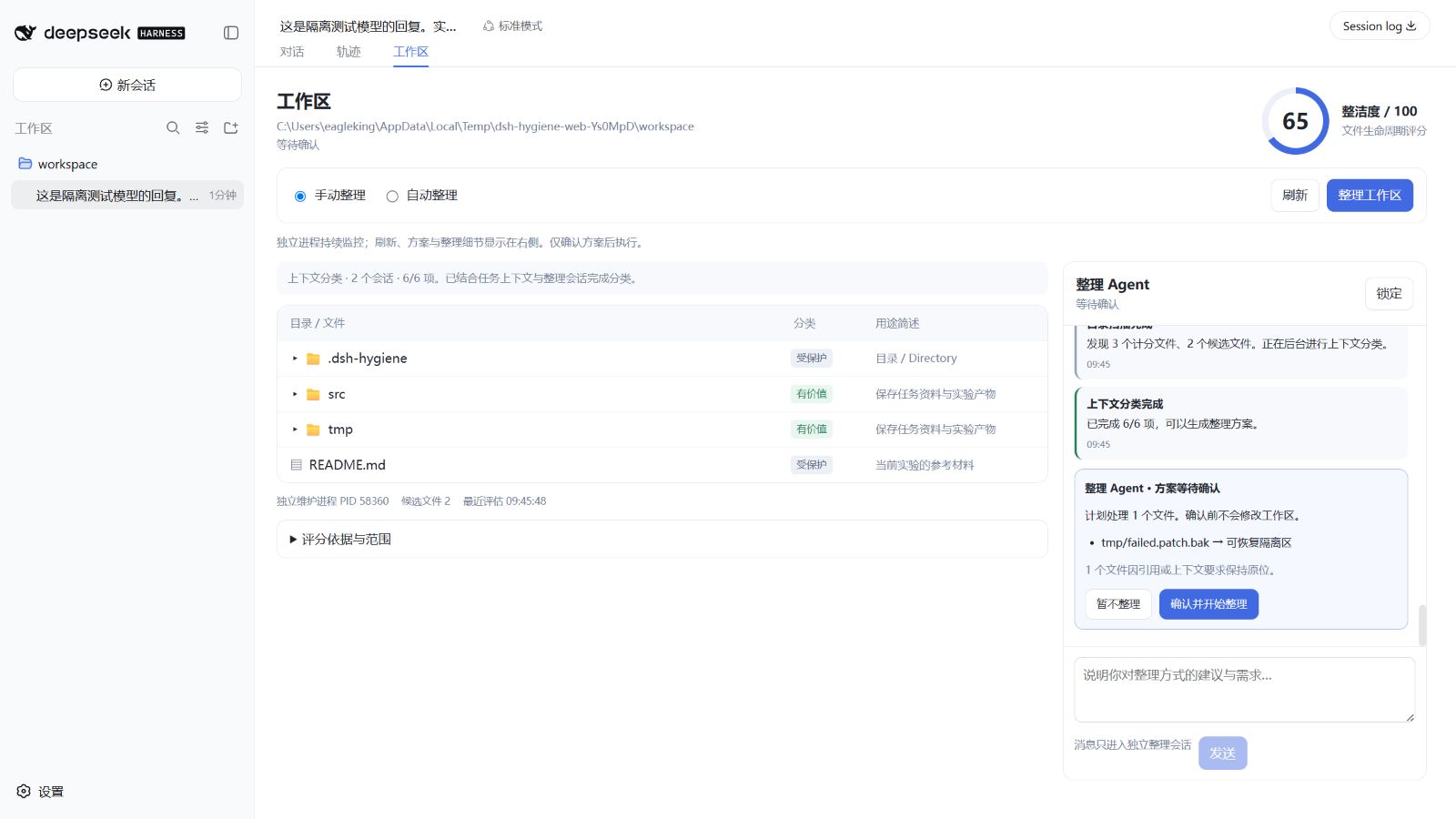
The context flow is other sessions → hygiene Agent. Public purpose descriptions are generated from primary task context without access to private chat. A separate private-preference model decision can return only a validated preservation subset of known paths. File classifications, preservation outcomes and organization results are public; raw chat is excluded from ordinary conversations, public snapshots and organization reports. The configured model provider receives the relevant analysis/chat requests, subject to its own data-handling policies.
This provides isolation at the conversation API and encrypted-storage layers. Agents with unrestricted shell access under the same operating-system account, process-debugging access or trusted host-plugin privileges may still access process memory. The plugin cannot enforce absolute OS-level isolation. That stronger boundary requires a separate account/container and restrictions on other Agents' permissions.
After an approved transaction passes its checks, that process starts a separate dsh --profile headless process and session for evidence review. It uses the configured headless model and credentials. Its context contains the change list, reference/integrity/check evidence and a bounded summary of prior maintenance runs; it does not inherit the primary conversation. All inherited tools are hidden and a dispatch guard permits only hygiene_verdict. The reviewer cannot edit the workspace or run shell commands. A failed, unavailable or negative independent review causes rollback.
Next, the host sends one follow-up to the primary agent with the changes and evidence. The primary agent inspects the outcome and submits workspace_hygiene_review with its verdict and concrete checks. Only the assigned agent can acknowledge that run. The UI remains awaiting primary review until this happens; delivery is not treated as successful verification. A negative primary review triggers rollback when the turn reaches idle. Users can also request rollback from the result panel.
Reference protection and verification
The existing hash-bound, expiring plans, path protections, file/byte budgets, quarantine and restore journal remain the mutation boundary. The Web workflow never permanently deletes files. Source files, tracked files, credentials and protected paths remain protected by policy.
Before planning and again after confirmation, the worker searches project text for candidate paths and filenames. Referenced artifacts are retained and listed in the plan. The inspection is deliberately conservative: a reference in documentation can keep an artifact. References synthesized at runtime or located outside this workspace cannot be proven absent.
Project checks run before and after organization. By default a declared npm test is used; other projects should configure verificationCommands. A failing baseline leaves artifacts in place. Post-check failure, unrelated file changes or independent-review rejection restores the transaction. Changed destination/source files are never overwritten to force a rollback; conflicts remain visible as recovery required.
The evidence pass defaults to 10,000 files and 128 MiB of reference-search text, configurable through maxVerificationFiles and maxReferenceBytes. All files are hashed as streams. Binary files such as PPTX decks and videos do not consume the text budget, so a workspace exceeding 128 MiB overall no longer fails planning for that reason. Dependency/VCS directories and plugin state/catalog directories are excluded. Exceeding the text or file-count limit still refuses organization. Projects without configured checks receive static verification only, displayed as static-only. Successful checks and both reviews provide evidence within their coverage; they are not a mathematical guarantee of zero bugs.
Older versions may show invalid_union / error.details when the organization button fails: the error response omitted the details object required by DSH's protocol, masking the original failure. Version 0.3.0 adds this field and fixes the binary-file budget issue above; other failures display their actual reason.
valuePolicy.organization.moveFiles can additionally enable approved renaming/moving of eligible retain/review artifacts. Source and referenced files still stay put. The plugin avoids risky refactors rather than rewriting arbitrary imports. Suggested metadata catalog paths are never physical file destinations.
Cleanliness score
For the assessed, non-protected file population N:
score = round(100 − 70 × disposable/N − 20 × intermediate/N − 10 × uncertain/N)
The score is bounded to 0–100; an empty assessed population scores 100. The UI exposes counts, penalties and exclusions. It measures artifact lifecycle hygiene, not source-code quality. Protected/dependency/ignored trees are browseable but excluded from the score. An incomplete bounded scan is labeled provisional and cannot trigger automatic organization or an approved plan.
The independent review payload is capped at 20,000 characters. Oversized evidence is rejected in full and the transaction is rolled back; it is never silently truncated.
Install or update
Requires Node ^22.19.0 || >=24 and a DSH Web profile providing conversation.view, connection.rpc and Agent.runMaintenance. The Web integration has been exercised against installed DSH 0.1.1-rc.2; the current upstream extension contracts were also inspected. DSH previews change rapidly, so pin a version when reproducing an experiment.
dsh plugin --profile web add github:taoshi1999/dsh-workspace-hygiene#main
dsh web
For local development, install the checkout by its path and restart DSH Web:
npm ci
dsh plugin --profile web add .
Restart the host and refresh the browser after an update. The package exports ./client and ./package.json and declares dsh.client, so DSH discovers the tab through its native client module loader. No DSH core patch or DOM injection is needed. To remove it:
dsh plugin --profile web remove dsh-workspace-hygiene
Configuration
Override the existing row by ID in the profile's cordis.patch.yml:
- id: workspace-hygiene
  name: dsh-workspace-hygiene
  config:
    mode: manual                 # manual | automatic
    cleanlinessThreshold: 80
    monitorIntervalMs: 30000
    debounceMs: 1500
    contextAware: true
    contextMaxChars: 40000
    contextBatchSize: 60
    contextModelTimeoutMs: 120000
    # Optional: outside the workspace, with no symbolic-link traversal
    # privateStorageRoot: C:/private/hygiene-conversations
    maxVerificationFiles: 10000
    maxReferenceBytes: 134217728
    managedRoots: [tmp, scratch, outputs]
    minAgeHours: 24
    maxScanFiles: 5000
    maxArchiveFiles: 20
    maxArchiveBytes: 104857600
    stateDir: .dsh-hygiene
    verificationCommands:
      - command: npm
        args: [test]
    verificationTimeoutMs: 120000
    reviewerTimeoutMs: 180000
    # Optional absolute path to the installed dsh/lib/bin.js:
    # reviewerCli: /path/to/node_modules/@deepseek-ai/dsh/lib/bin.js
    valuePolicy:
      discardPatterns: ['tmp/**', 'scratch/**']
      retainPatterns: ['outputs/release/**']
      organization:
        moveFiles: false
Commands are trusted deployment configuration, executed without a shell; clients cannot submit commands through the UI. On Windows the npm shorthand is launched through Node's npm CLI. Command timeouts stop the spawned process tree on Windows. autoScan: false disables periodic monitoring; a UI refresh still explicitly scans and automatic mode still evaluates completed turns. enabled: false disables the host integration. A workspace's saved mode takes precedence after its first mode change.
Legacy autoArchive, autonomousMode, notifyAgent and autoScanEveryTurns no longer authorize unattended Web changes or routine main-agent notifications. Migrate to mode: automatic for per-turn suggestions. The six legacy scan/plan/apply/restore/status/explain tool adapters are still available to explicit library consumers, but are no longer installed into the main agent by this bundle. The only registered main-agent tool is workspace_hygiene_review.
See example configuration and value policy configuration. .hygieneignore exclusions continue to govern mutation assessment; the directory browser can still display those paths.
contextAware: false disables model classification in favor of rules. Private chat remains available, but chat requirements no longer influence classification. Contextual metadata traversal includes protected source directories, skips dependency/VCS/plugin-storage directories, and is bounded by maxScanFiles; it does not read every file in full. Chat receives only a bounded inventory, and large histories or directory scopes are truncated. Preservation requests influence model inference; configure explicit retainPatterns for critical files.
CLI and metadata catalog
The standalone CLI remains available for explicit operator workflows:
node bin/dsh-workspace-hygiene.mjs scan ./project
node bin/dsh-workspace-hygiene.mjs plan ./project
node bin/dsh-workspace-hygiene.mjs --help
CLI apply/restore and low-level library consumers retain their existing confirmation and policy contracts; they do not run the Web orchestration or its two-agent review protocol. Prefer the Workspace tab for the complete workflow.
workspace-artifacts/ remains an optional metadata-only catalog for transaction/CLI consumers. It contains path, purpose, value assessment and lifecycle decisions, not source-file copies. The live UI reads current filesystem metadata and the latest independent scan; monitoring does not need to rewrite that catalog or feed it into the main agent's context.
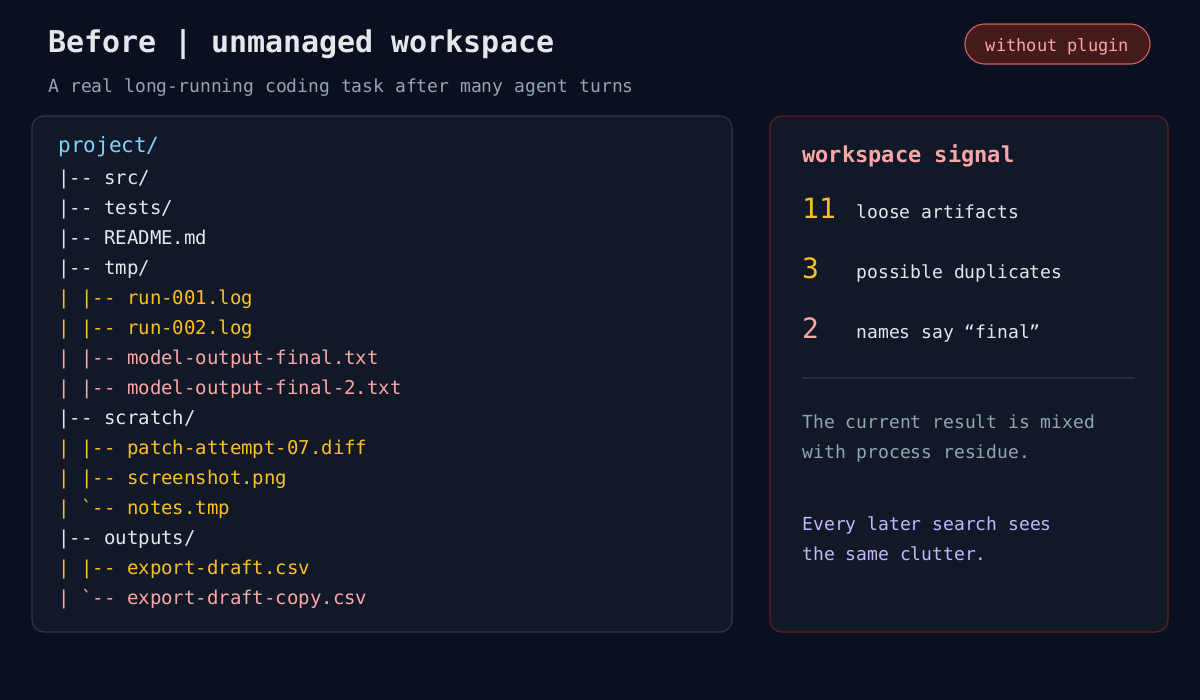
Illustrative workspace lifecycle
These earlier static examples explain the file lifecycle; they are not screenshots of the new live tab.
Development
npm ci
npm run check
npm run pack-check
node scripts/dev-web.mjs
dev-web.mjs boots a real DSH Web instance with a temporary home, profile and fixture workspace; it never edits your normal DSH profile. It requires an installed DSH CLI, optionally selected with HYGIENE_DSH_CLI. No credentials are copied to the fixture home. Stop it with Ctrl+C.
Add --fixture-model to load a deterministic test model for offline contextual-classification and private-chat UI checks. This verifies the interface and protocol, not a real model's classification quality.
Tests cover separate PIDs, context scope and caching, password encryption, unauthorized access, locking/restarts, exclusion of private text from public snapshots, context changes invalidating plans, binary evidence streaming, manual/automatic consent, reference protection, rollback and primary-review acknowledgement. Windows directory-junction tests run without elevation; file-symlink tests explicitly skip if Windows denies creation.
The research motivation and possible experiments remain in research agenda and community research.
MIT License.