
 @qazsedcftg
dsh-user-portrait
Learns your habits, skills and working style from everyday conversations and work summaries - an evidence-backed portrait for resume material, plus a prompt hint and tools that let the model consult it on demand.
- Stars
- 0
- Language
- JavaScript
- Created
- Oct 20, 2026
- Updated
- Oct 20, 2026
Introduction
dsh-user-portrait
A DSH Host/Client plugin that learns your habits, skills and preferences from everyday conversations and work summaries — a reviewable portrait for resumes and self-review, plus a prompt hint and tools that let the model consult it on demand.
English | 中文
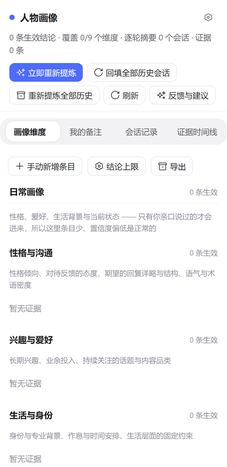
What it does
- Per-turn extraction. After each turn a background job asks the model for a short “what I asked / key points / what you answered / corrections” digest and appends the evidence to a ledger. A turn with no new evidence makes no model call.
- Nine dimensions. Daily life (personality & communication, interests, background, current focus, recent state) and technical (skills & stack, working style, boundaries, sensitivities).
- Resume and self-review material. Skills, working style and background accumulate as evidence and can be exported as Markdown.
- Every conclusion is verifiable. It carries a confidence level, a basis (your words / the model's answer / both) and its source sessions. Similar conclusions are merged; conflicting ones supersede the old entry.
- Reviewable and correctable. The right-side panel has four tabs (dimensions, my notes, session log, evidence timeline) with editing, confidence up/down, retire and restore, permanent delete, search, Markdown export and a conclusion cap.
- Four model tools.
portrait_read,portrait_search,portrait_history,portrait_maintain. - Opt-in prompt hint. The portrait is not injected into the system prompt by default. Turn it on next to the composer and a short “portrait is available” note is added.
Install
# A regular dsh web profile
dsh plugin --profile web add dsh-user-portrait

# The desktop app: the marketplace also installs an exact version
dsh plugin --profile desktop add dsh-user-portrait@0.1.0
Restart DSH or reload the plugin. It is plain ESM with no build step and no extra dependencies.
Using it
- Open it from the User Portrait tab in the right sidebar, the portrait button in the session header, or Settings → User Portrait.
- Dimensions: search, add/edit, conclusion cap and export at the top; the daily and technical groups below.
- My notes: notes outrank automatic conclusions and are never overwritten by extraction.
- Session log: a per-session summary plus each turn's “what I asked / what you answered”.
- Evidence timeline: the evidence ledger, with the original excerpts.
- Two levels of delete: deleting on a dimension card marks an entry retired (restorable); permanent delete in the discard area removes it and blacklists its evidence (with a second confirmation).
| Tool | What it does |
|---|---|
portrait_read | Read the portrait; filter by dimension, include history with includeRetired |
portrait_search | Search the evidence ledger and turn records by keyword |
portrait_history | Read session summaries and per-turn key points |
portrait_maintain | Correct entries and notes, plus backfill / redigest / synthesizeNow |
Configuration
Set these in cordis.patch.yml; changes take effect after a restart.
| Key | Default | Meaning |
|---|---|---|
dataDir | empty (→ DSH_HOME/user-portrait) | Portrait directory; relative or absolute |
enabled | true | Master switch |
loadHint | true | Allow the “portrait is available” prompt section; each session still has to switch it on |
backfillOnStart | true (shipped patch: false) | Process history on startup |
synthesizeEveryTurns | 1 | Merge the portrait every N turns (0 disables automatic merging) |
turnSynthesisDelayMs | 3000 | Coalescing window for the per-turn merge |
minEvidenceForSynthesis | 3 | Skip a merge with fewer new evidence rows |
rollupOnDispose | true | Rewrite a session roll-up when its agent is disposed |
sessionRollupMinTurns | 3 | Sessions with fewer turns get no model-written roll-up |
provider / model | empty | Model route for background extraction; empty means the current default model |
feedbackUrl | empty | Target of the feedback button; empty keeps it disabled |
limits.perUserMessage | 6000 | Character cap for one user message before extraction |
limits.perAssistantTurn | 4000 | Character cap for one assistant turn before extraction |
limits.synthesisEvidence | 80 | Maximum evidence rows per merge |
limits.maxOutputTokens | 4000 | Output cap for an extraction call; a capped reply is discarded |
Data & privacy
- The default data directory is
<DSH_HOME>/user-portrait(~/.dsh/user-portraitwhenDSH_HOMEis unset). - Everything is plain text:
profile.json,profile.md,evidence.jsonl,state.json,blacklist.json,deleted.log, plussessions/,turns/andviews/. - The plugin reads full session transcripts and sends its extraction prompts to the model configured in DSH. It makes no other network requests.
- Secrets are masked before anything is written or sent:
sk-,ghp_,AKIA, JWTs, private keys,password=.
License
MIT © 2026 loliisgood