
 @pei-lin-001
dsh-ollama-cloud
Ollama Cloud for DeepSeek Harness: one API key, auto-pulled model catalog, real thinking levels, hosted web tools, and 5h/7d quota + token usage UI
- Stars
- 0
- Language
- JavaScript
- Created
- Oct 18, 2026
- Updated
- Oct 19, 2026
Introduction
dsh-ollama-cloud
Ollama Cloud for DeepSeek Harness (dsh). One API
key; no local Ollama install.
English | 中文
Install
# desktop app profile and/or web profile
dsh plugin --profile desktop add git:github.com/pei-lin-001/dsh-ollama-cloud
dsh plugin --profile web add git:github.com/pei-lin-001/dsh-ollama-cloud
Open Settings → Ollama Cloud, paste a key from
ollama.com/settings/keys, and press 保存并同步 (save and
sync). The key goes into the credentials service ($DSH_HOME/.credentials.yaml) and never reaches
the browser. The catalog is written to the llm-pi-ai settings section as route ollama-cloud, and
the models appear in the picker.
OLLAMA_API_KEY in the process environment also works. It shadows a stored key, and the credentials
service then refuses writes.
Development checkout:
git clone git@github.com:pei-lin-001/dsh-ollama-cloud.git ~/Dev/dsh-ollama-cloud
cd ~/Dev/dsh-ollama-cloud && dsh plugin --profile web add link:$PWD
./scripts/link-peers.sh   # schemastery, dsh-credentials, dsh-settings, dsh-tools
A linked package resolves peers from its own node_modules, which is why the last step exists.
What it does
On boot, on credential change, and on demand, the plugin pulls the account's catalog and writes it as
an llm-pi-ai route: GET /v1/models for the ids, then one POST /api/show per model. Chat, tools,
vision and thinking are served by dsh-llm-pi-ai (api: openai-completions,
baseURL: https://ollama.com/v1); the plugin supplies the catalog and the credential, and
dsh-llm-pi-ai does the transport.
Model entries come from /api/show:
capabilitiesdecides which models get tools, vision and a thinking set. Models withouttoolsare skipped unlessincludeNonToolModelsis on.<arch>.context_lengthbecomescontextWindow.thinking.valuesbecomesreasoningEfforts.falsemaps tooff: 'none', since sending nothing would fall back to the model default (usually on).truemaps to a singlemediumlevel. Graded names map one-to-one, so a model advertising bothxhighandmaxoffers both.
The list replaces the route's models, and an unchanged section is not rewritten.
Two tools come with it: ollama_web_search and ollama_web_fetch call /api/web_search and
/api/web_fetch with the same key.
Quota and usage come from GET /api/balance (5h session, 7d weekly) and GET /api/usage. A current
plan reports tokens and cost there; a legacy plan reports requests only. For legacy plans the plugin
taps the usage chunk its own requests emit through llm/stream, counts input/cached/output per
model in hourly buckets, keeps 30 days in $DSH_HOME/ollama-cloud-usage.json, and aligns the totals
with the reset times the balance reports. Other clients' traffic stays invisible to that meter, so
server numbers win when they exist.
Every history image is re-sent on every step, and Ollama Cloud rejects an oversized request at the
gateway before the model runs (413, around 12 MB observed). The plugin keeps image base64 under 6 MiB:
on 0.2.x it writes maxRequestImageBytes into the route, so the adapter stops at the bound and the
harness offloads the oldest images and retries with placeholders; on 0.1.0-rc.x, whose adapter has
no such bound, the plugin drops the oldest images from the outgoing request itself. Text is not part
of that budget.
UI
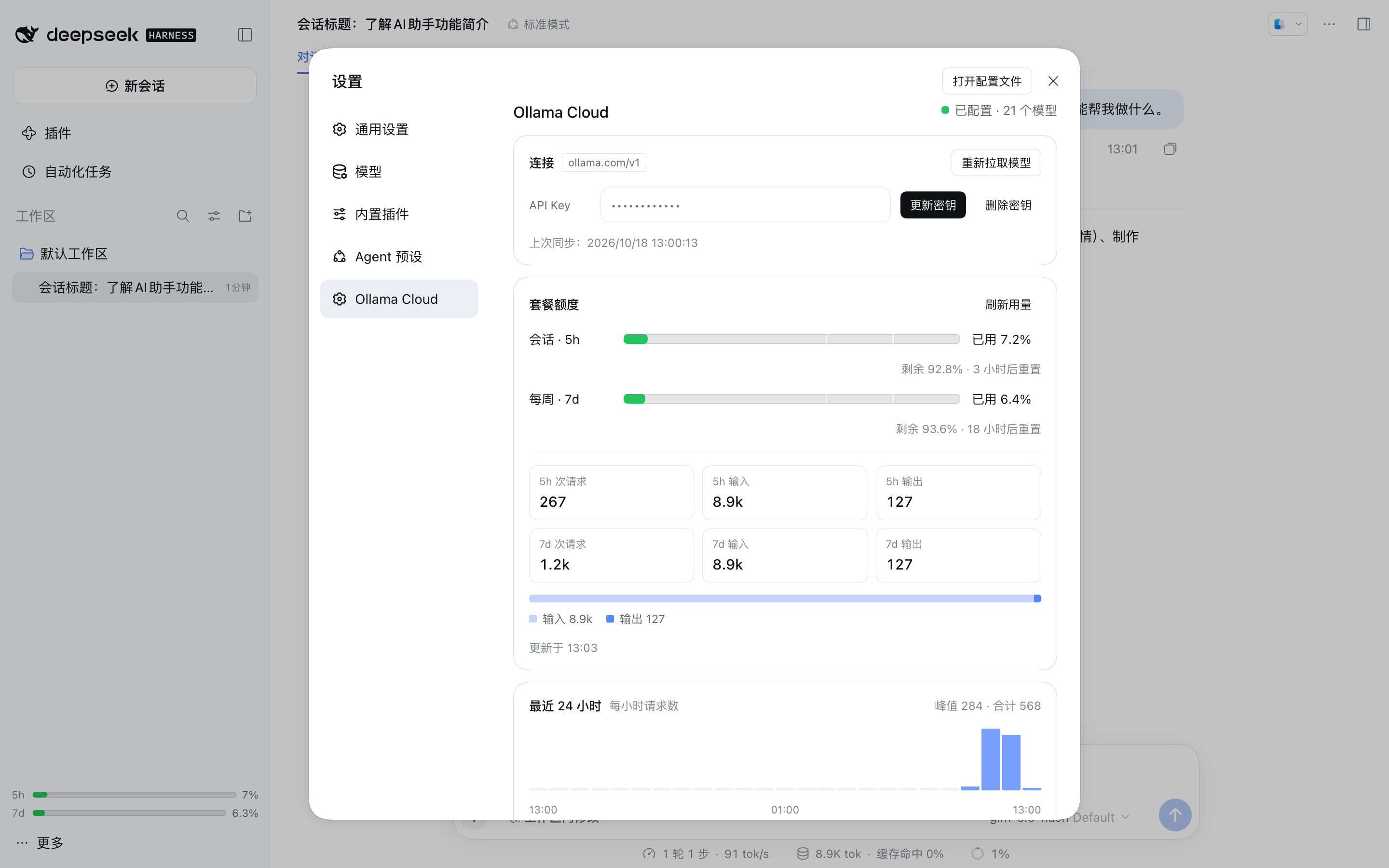
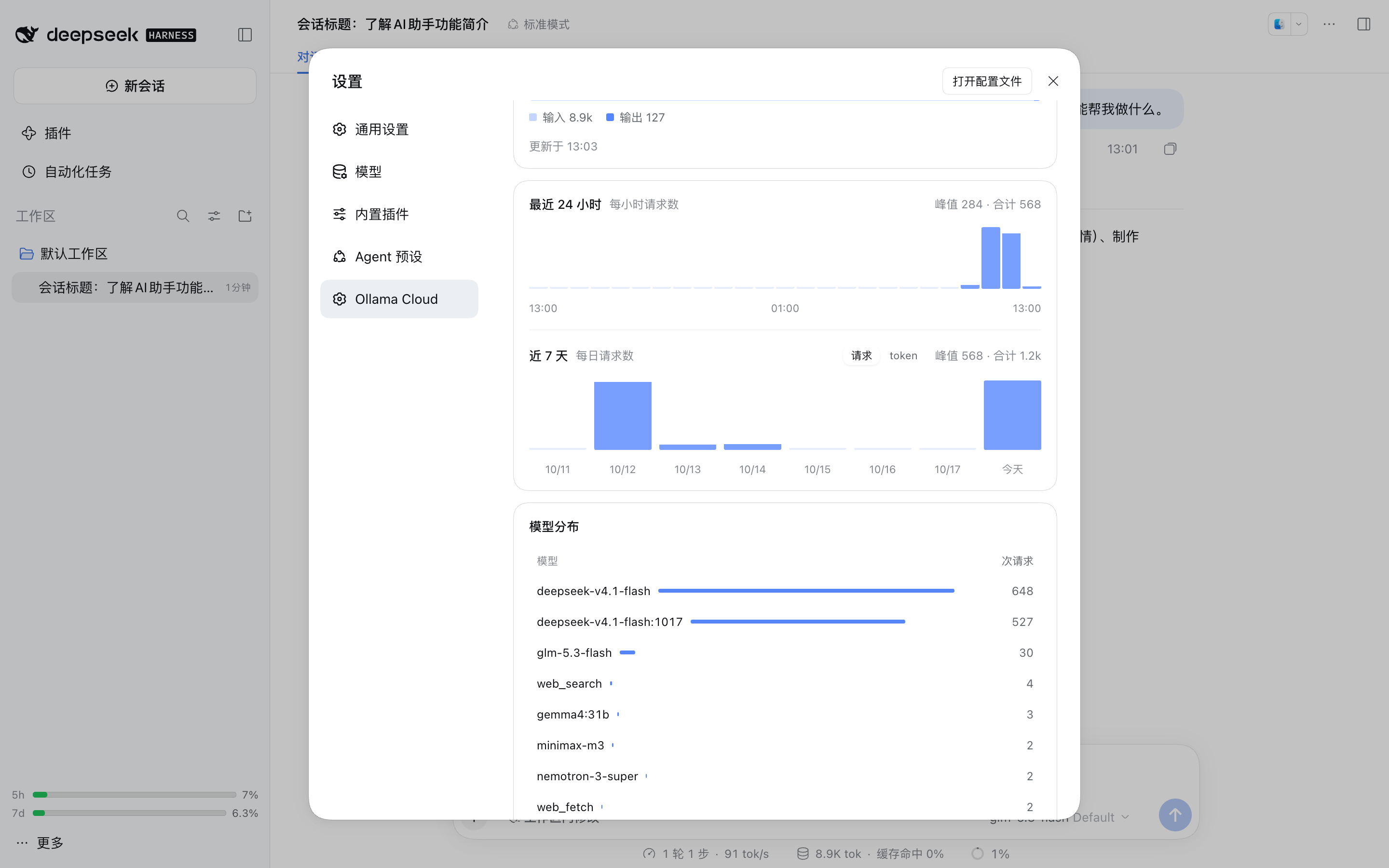
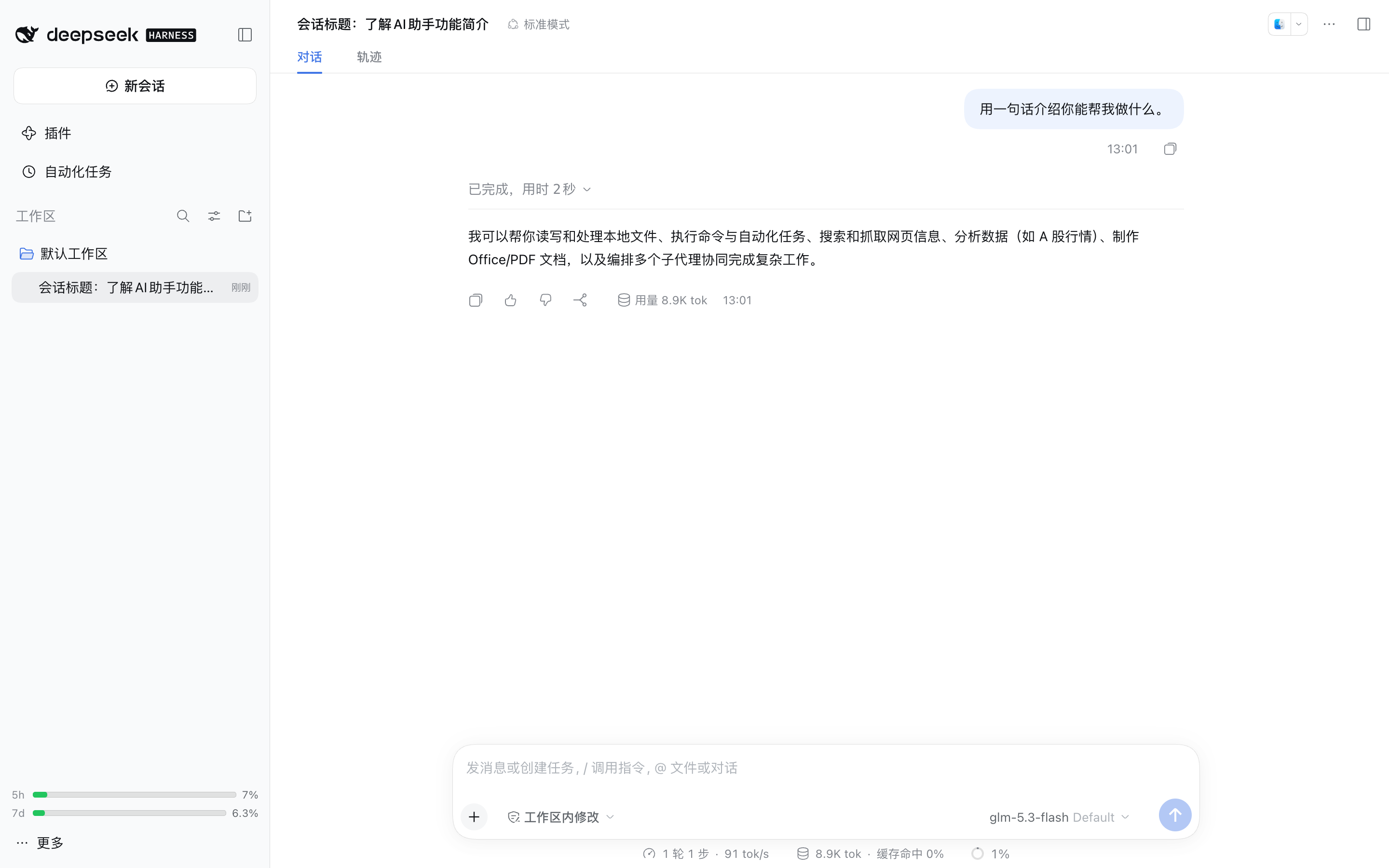
The settings page has four parts: connection, quota bars, charts, per-model table. The 24h chart is hourly requests. The 7d chart switches between requests and tokens, because requests are the series every plan returns. The sidebar footer shows both quota windows. UI copy is Chinese.
Configuration
Entry config is the ollama-cloud settings section; override it in the profile patch:
- id: ollama-cloud
  config:
    provider: ollama-cloud        # llm-pi-ai route name
    displayName: Ollama Cloud
    apiKeyRef: OLLAMA_API_KEY     # credential reference, never the secret
    baseURL: https://ollama.com
    syncOnStart: true             # pull the catalog on boot
    includeNonToolModels: false   # keep tool-less models out of the picker
    webTools: true                # register ollama_web_search / ollama_web_fetch
    maxOutputChars: 20000         # per ollama_web_fetch result
    usageCacheSeconds: 120        # /api/balance + /api/usage cache
    maxRequestImageBytes: 6291456 # base64 image budget per request; 0 = adapter default
A model's contextWindow comes from /api/show. The composer's 上下文 chip beside the model button
overrides it for the selected model only; the choice is kept in $DSH_HOME/ollama-cloud-context.json
and layered on top of every catalog sync. Resetting restores the reported value.
Command and routes
/ollama-cloud [status|sync|usage], defaulting to usage:
Ollama Cloud 用量:
  会话(5h) ▕█░░░░░░░░░▏ 已用 7.2% · 3 小时后重置
  每周(7d) ▕█░░░░░░░░░▏ 已用 6.4% · 18 小时后重置
  5h 统计:267 次请求 · 输入 8.9k · 输出 127
  7d 统计:1.2k 次请求 · 输入 8.9k · 输出 127
The settings page and the sidebar use these routes over the same origin; scripts can too.
| Method | Path | Purpose |
|---|---|---|
GET | /_dsh/ollama-cloud/status | key configured?, route, model count, last sync |
GET | /_dsh/ollama-cloud/usage[?force=1] | balance windows, usage, token totals |
POST | /_dsh/ollama-cloud/key | { "key": "…" } stores and syncs, { "remove": true } deletes |
POST | /_dsh/ollama-cloud/sync | re-pull the catalog |
/key and /sync write. They take the app's own page only (same origin, or an opaque file://
origin) and a loopback or IP-literal Host; everything else gets 403.
Runtime compatibility
| Runtime | Settings seam | Behavior |
|---|---|---|
0.1.0-rc.x | ctx.settings.register / get | the plugin owns the ollama-cloud section; the adapter's section is read with get('llm-pi-ai') |
0.2.x (desktop) | describe / mutate | the entry config is the section; the adapter's entry is read with describe() and written with mutate() |
engines.dsh accepts >=0.1.0-rc.6 <1.0.0, so both runtimes load the bundle. Tested on
0.1.0-rc.6 (CLI) and 0.2.1-rc.2 (the desktop app's bundled runtime). CSS tokens carry literal
fallbacks, so the older runtime renders the same layout with plainer colors.
Known limits
There is no way to cap output from here. pi-ai's compatibility probe sends max_completion_tokens,
which Ollama ignores (it honors max_tokens), and dsh-llm-pi-ai exposes no switch for that field.
The local meter only sees traffic from this harness home. Another machine or another client will not appear in the token totals, and hourly buckets can put a window edge off by up to an hour.
When the catalog changes, the sync replaces llm-pi-ai.providers.ollama-cloud whole, so any hand
edits to that route are lost. syncOnStart: false makes syncing a manual step.
webTools and includeNonToolModels are read when the tools register, so changing them needs a
restart. Client-side changes also need one.
The usage endpoint allows 10 requests per minute per user. One refresh is three calls, which is why the result is cached and the sidebar polls every five minutes.
Development
node test/smoke.mjs # catalog mapping, thinking levels, usage math, meter, route guards
No build step. The host half is plain ESM; the client half is written in the loader's factory form
(window.__ModuleLoader__.load({ id, factory })).
To run the web profile on the desktop app's bundled runtime:
APP="/Applications/DeepSeek Harness.app/Contents/MacOS/DeepSeek Harness"
CLI="$APP/../Resources/app.asar/dsh/node_modules/@deepseek-ai/dsh-desktop-host/lib/cli.js"
ELECTRON_RUN_AS_NODE=1 DSH_HOME=/tmp/probe "$APP" --expose-internals "$CLI" --profile web --port 8130 --no-open
License: MIT.