
 @navid-kianfar
dsh-usage-info
Context occupancy and account balance for the DeepSeek Harness Web Client — a session-header readout with a swappable balance provider.
- Stars
- 0
- Language
- TypeScript
- Created
- Aug 26, 2026
- Updated
- Sep 15, 2026
Introduction
@achasoft/dsh-usage-info
A session-header readout for the DeepSeek Harness (dsh) Web Client. It shows how full the model's context window is, what the current session has cost at the rates you configure, and what your provider account currently holds. Context and cost are computed in the browser from token figures the harness already publishes. The balance is read on the host, so the API key never reaches the browser.
Features
Header readout
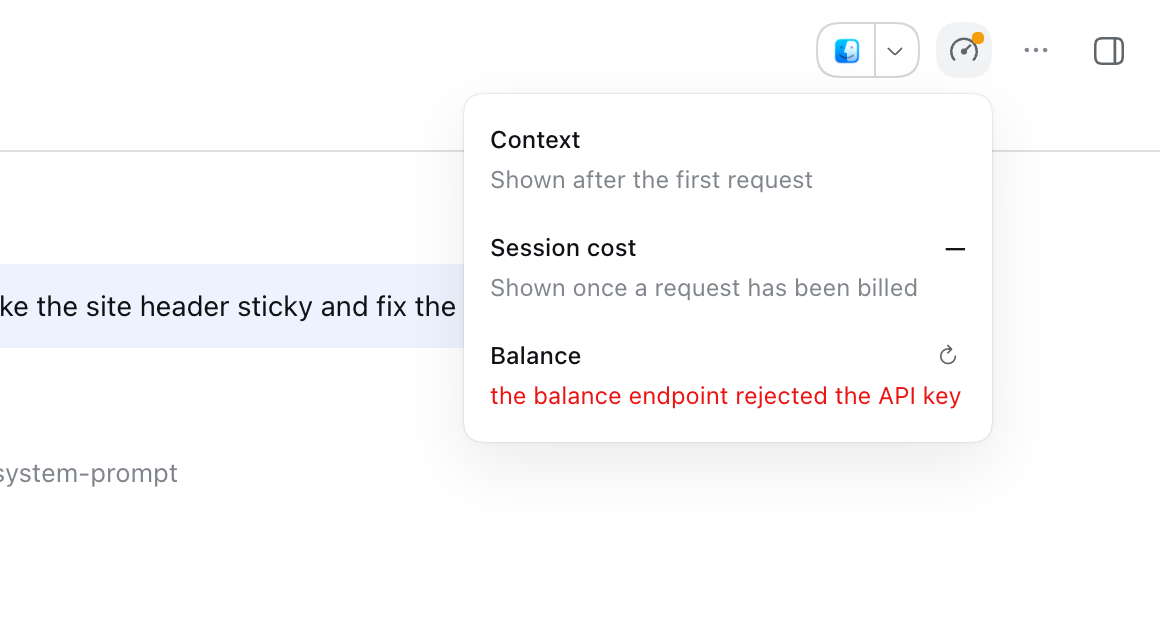
A button in the session header's utilities area. It shows a ring with the context percentage once the session has made a request, and the first currency of the account balance once a reading has landed. Until either exists it shows a gauge icon, with an amber dot when the balance cannot be read (for example on a default install with the provider disabled). The button turns to a warning colour when that balance is at or below lowBalanceThreshold. Click it to open the usage panel; click outside or press Escape to close it.
Usage panel
| Section | What it shows |
|---|---|
| Context | Percent used, ~used / window tokens, a bar split into system prompt, tool definitions and conversation, and a note that the parts are estimates. Before the first request: "Shown after the first request". |
| Session cost | The session's cost in costCurrency, the total token count, and one row per bucket: uncached input, cache write, cache read, output. Before anything has been billed, the token count reads "—" and the section says "Shown once a request has been billed". |
| Balance | Each currency's total, with granted and topped-up portions when the provider separates them, the reading's age ("Just updated", "3 min ago"), and a refresh button that asks the provider immediately. It also warns when the account is suspended or the balance is low, and shows a one-line reason when the balance cannot be read. |
How the figures are made:
- Context percent is the provider's last reported prompt size, adjusted for what the conversation gained or lost since then (a compaction lowers it right away). The three coloured parts use the harness token meter's fixed estimate, so read them as proportions. They will not add up to the total.
- Session cost sums every billed attempt in the session log, retries included. It is
(uncached input + cache write) x input + cache read x cacheRead + output x output, per one million tokens, calculated in exact decimal arithmetic. Cache writes are charged at the input rate. The figure is an estimate. Your provider's bill is the authority. - Balance figures are the exact decimal strings the provider sent. They are never converted to floating point.
Balance states
When the balance cannot be shown, the Balance section says why, and the poll either keeps trying or stops:
| State | Line shown | Polling |
|---|---|---|
| No provider mounted (default install) | no balance provider is mounted; enable one, or hide the balance in settings | Checks every interval for a newly mounted provider |
| Provider mounted, no API key | no API key for the balance provider; this retries once one is stored | Keeps polling, so a key stored later is picked up without a reload |
| Endpoint returns 404 | this endpoint publishes no balance; hide the balance in settings | Stops. A settings change asks again |
| 401 or 403 | the balance endpoint rejected the API key | Keeps polling |
| 408 or 504, or the provider's own timeout | the balance endpoint timed out | Keeps polling |
| 429, 5xx, or unreachable | the balance endpoint is unreachable | Keeps polling |
| Any other status, or a malformed body | could not read the balance | Keeps polling |
Settings card
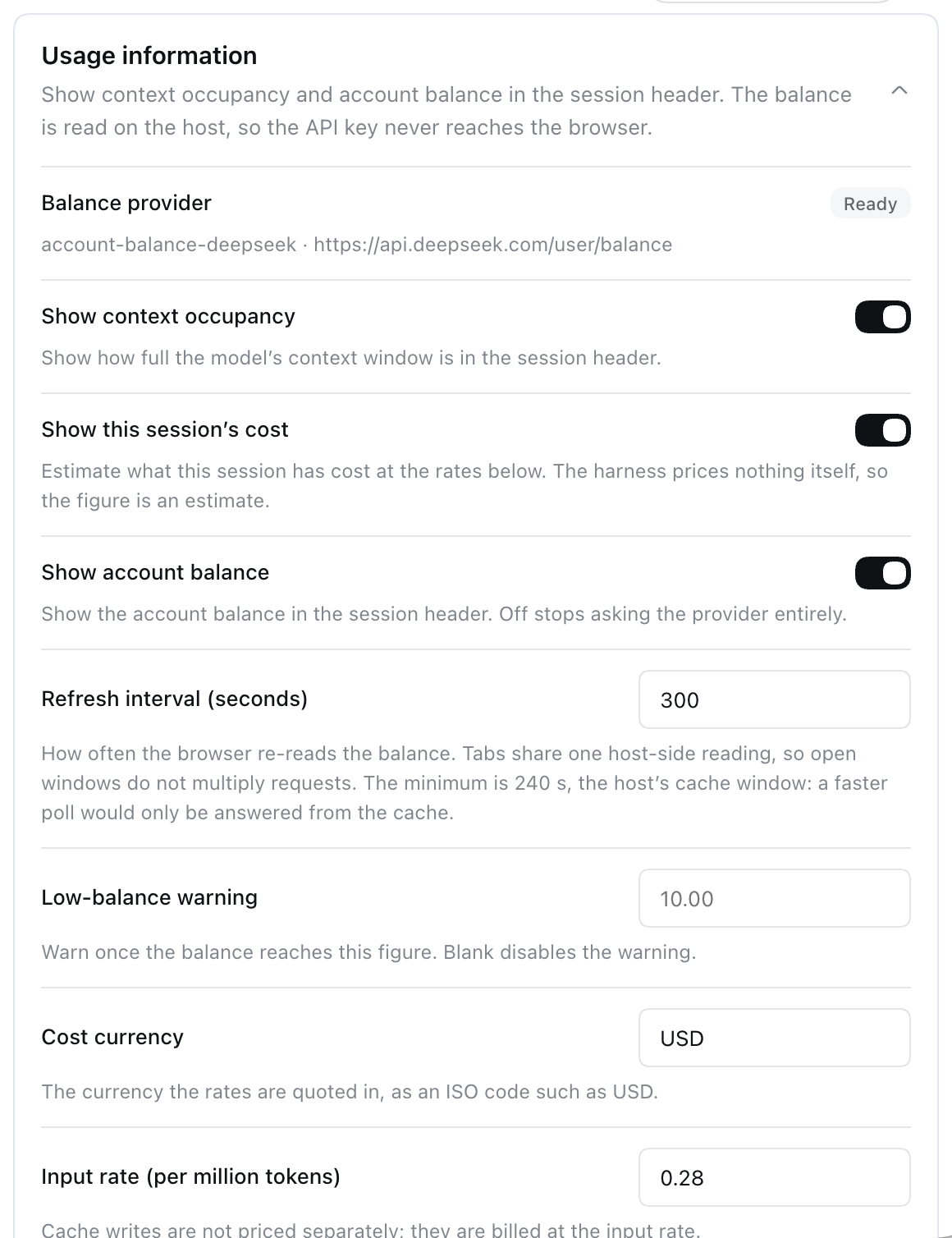
Open Settings > Plugins > Plugin configuration and expand Usage information. The card shows which balance provider is mounted, its endpoint, and a Ready or Not ready badge. It also has switches for the three sections, the refresh interval in seconds, the low-balance threshold, the cost currency, and the three rates.
There is no Save button. A switch or text field is saved as soon as it holds a valid value. The refresh interval is saved on blur or Enter, and it is refused if it is shorter than the host's cache window (cacheTtlMs, 240 s by default). If the host refuses a change, the field says "Not saved: the host refused this change." Changes reach open sessions without a reload.
Requirements
- dsh with the Web Client. This version was tested against dsh
0.1.5-rc.2. - Node.js
^22.19or>=24, as declared inengines. pnpmonPATH.dsh pluginruns pnpm in the profile directory.- Context and cost need nothing more. They read the token-meter projections the harness already publishes.
- The balance needs the bundled DeepSeek provider enabled (see Enable the balance) and a DeepSeek API key the host can resolve.
Supported balance provider
This package ships one provider, usage-info-deepseek. It calls DeepSeek's GET <baseURL>/user/balance with Authorization: Bearer <key>. The key comes from the harness credential seam, using the name given in apiKeyEnv (default DEEPSEEK_API_KEY, the same name the harness DeepSeek model adapter uses). With the harness's local credential store, the first source that has a value wins:
- the environment
dshwas launched in, - the stored credential file (
$DSH_HOME/.credentials.yaml, where$DSH_HOMEdefaults to~/.dsh), .envin the directorydshwas started from,$DSH_HOME/.env.
An OpenAI-compatible gateway in front of DeepSeek usually answers /user/balance with 404. The readout then shows the "publishes no balance" line and stops polling.
To read a different billing backend, implement the AccountBalanceProvider Service Definition exported from the package root, then mount your plugin instead of usage-info-deepseek. Only one provider can be mounted. If two claim ctx.accountBalance, loading fails.
Install
Install into the web profile (the one dsh web boots):
dsh plugin --profile web add @achasoft/dsh-usage-info
dsh plugin passes the arguments to pnpm in $DSH_HOME/profiles/web. Afterwards it adds the package to that profile's dsh.profile.bundles, because the package declares a dsh.bundle patch. Restart dsh web to load it.
Other sources work the same way, because pnpm resolves them:
dsh plugin --profile web add ./dsh-usage-info           # a local checkout, linked; run `npm run build` in it first
dsh plugin --profile web add ./achasoft-dsh-usage-info-0.1.0.tgz
Relative paths are resolved from the directory you run dsh in. A git install builds through the package's prepare script. pnpm blocks that script until you add the package under allowBuilds in the profile's pnpm-workspace.yaml. When the install fails, dsh plugin points you to the key pnpm printed.
Check the composed configuration without booting:
dsh --profile web --dump-config
The output contains a # == @achasoft/dsh-usage-info layer with the rows usage-info, usage-info-ui and usage-info-deepseek.
How the configuration layers
The composed tree is built in this order, and later layers win:
- each bundle's
cordis.patch.yml, indsh.profile.bundlesorder (this package's own patch is one of them), - your profile's
$DSH_HOME/profiles/web/cordis.patch.yml, $DSH_HOME/cordis.patch.yml,- any
--patchoverlays.
A patch entry that targets a row by id replaces that row's whole config. It does not merge, so restate every key you want to keep. Values you change in the Settings card are stored separately as user overrides in the usage-info: section of the harness settings document ($DSH_HOME/settings.yaml by default). Those overrides apply on top of the composed row.
Uninstall
dsh plugin --profile web remove @achasoft/dsh-usage-info
This removes the package from the profile's bundles. Also delete any usage-info* rows from your profile's cordis.patch.yml. A patch that names a missing row only prints a warning, but it is dead configuration.
Enable the balance
The provider row ships disabled, because this package cannot know which endpoint or key name your deployment uses. Enable it in $DSH_HOME/profiles/web/cordis.patch.yml:
- id: usage-info-deepseek
  disabled: false
  config:
    baseURL: https://api.deepseek.com
    apiKeyEnv: DEEPSEEK_API_KEY
    timeoutMs: 15000
Restart dsh web. The settings card badge reads Ready once the key resolves. If it does not, the card shows no value for DEEPSEEK_API_KEY.
Configuration
usage-info (readout preferences)
| Key | Default in cordis.patch.yml | Schema | Settings card |
|---|---|---|---|
showContext | true | required boolean | yes |
showCost | true | boolean, defaults to true | yes |
costCurrency | USD | string, defaults to USD; must match ^[A-Z]{3}$ | yes |
costRates.input | '0.28' | decimal string, defaults to '0.28'; non-negative | yes |
costRates.cacheRead | '0.028' | decimal string, defaults to '0.028'; non-negative | yes |
costRates.output | '0.42' | decimal string, defaults to '0.42'; non-negative | yes |
showBalance | true | required boolean | yes |
refreshIntervalMs | 300000 | required integer, >= 1000 | yes, in whole seconds |
cacheTtlMs | 240000 | required integer, >= 0 | no |
lowBalanceThreshold | unset (commented out) | optional decimal string; blank disables the warning | yes |
- Rates are per one million tokens, written as exact decimal strings. The shipped values are, according to the patch comment, DeepSeek's
deepseek-chatrates. Set them to the model you actually use. showCost,costCurrencyandcostRateshave schema defaults, so a restatedusage-inforow that omits them still loads with the values above. Every other required key must be restated.cacheTtlMsmust not exceedrefreshIntervalMs. Loading fails otherwise, and so does a settings write that would break the rule.refreshIntervalMsis how often each open tab polls.cacheTtlMscontrols how often the provider is actually asked: every tab shares one host-side reading, and a poll inside the cache window is answered from it. The refresh button and changing a stored credential both skip the cache.- Turning
showBalanceoff stops balance requests entirely.
usage-info-deepseek (balance provider)
| Key | Default | Schema | Settings card |
|---|---|---|---|
disabled | true | row flag | no |
baseURL | https://api.deepseek.com | required string; one trailing slash is removed | no |
apiKeyEnv | DEEPSEEK_API_KEY | required credential reference: the key's name, never its value | no |
timeoutMs | 15000 | required integer, >= 1 | no |
RPC and model-facing surface
The browser uses two host methods on the usageInfo namespace:
| Method | Purpose |
|---|---|
describe() | Whether a provider is mounted and ready, its endpoint, the visibility flags, rates, currency, refresh interval and threshold. Rates are omitted while showCost is off. |
balance({ refresh }) | One balance reading, from the cache unless refresh is true. Failures come back as { ok: false, code, message } values rather than thrown errors. |
Nothing is model-facing. The plugin adds no tool, no prompt text and no session event.
Privacy and security
- The API key stays on the host. The provider resolves it per reading and never caches it. It is not part of any RPC response.
describe()reports only whether the key is configured. - One outbound request type:
GET <baseURL>/user/balancefrom the host, at most once percacheTtlMsplus manual refreshes. Nothing else leaves the machine. - Context and cost are computed in the browser from session projections it already receives. They cause no extra requests.
- The settings card shows the endpoint URL and, when the key is missing, the key's name. A failed
balance()call'smessagecan include up to 512 characters of the endpoint's error body. The readout itself shows only the fixed one-line reasons listed above.
Known limitations
- A default install shows a "no balance provider" line. The provider row ships disabled. Enable it as described above, or turn off Show account balance in the settings card.
- Only the first currency is shown in the header. Every currency is listed in the panel, and the low-balance threshold is compared against each amount in its own currency.
- The cache window is not editable in the card. Change
cacheTtlMsin your profile patch, or in theusage-info:section of the settings document.
Development
Development links against a deepseek-harness checkout two directories up (../../deepseek-harness, as set by the link: devDependencies in package.json):
workspace/
├── deepseek-harness/
└── dsh-plugins/
    └── dsh-usage-info/   <- this repository
pnpm install
npm test                 # Typert drift check, then vitest
npm run build            # tsc emit, then tsdown bundle into lib/
npm run check:typert     # only the Typert drift check
npm run typecheck        # tsc --noEmit over src, generated and tests
npm run typecheck resolves harness types from the linked checkout. A checkout older than the harness this plugin targets reports missing-type errors, such as usageInfo on TypertClientRemote or the contextPressure projection key.
generated/ holds the Typert RPC contract. Only the harness generator can produce it, so it is committed. npm test fails when it no longer matches the @Remote methods in src/host/. To regenerate it from a clean harness checkout (this takes several minutes, and must not run alongside another plugin's regeneration against the same checkout):
node scripts/regen-typert.mjs ../../deepseek-harness
License
MIT. See LICENSE.