
 @navid-kianfar
dsh-advanced-sidebar
Advanced sidebar operations for the DeepSeek Harness Web Client: git changes, a terminal, a file browser, a dev-server preview, background tasks, Open in, Archive and Delete.
- Stars
- 0
- Language
- TypeScript
- Created
- Aug 26, 2026
- Updated
- Sep 15, 2026
Introduction
@achasoft/dsh-advanced-sidebar
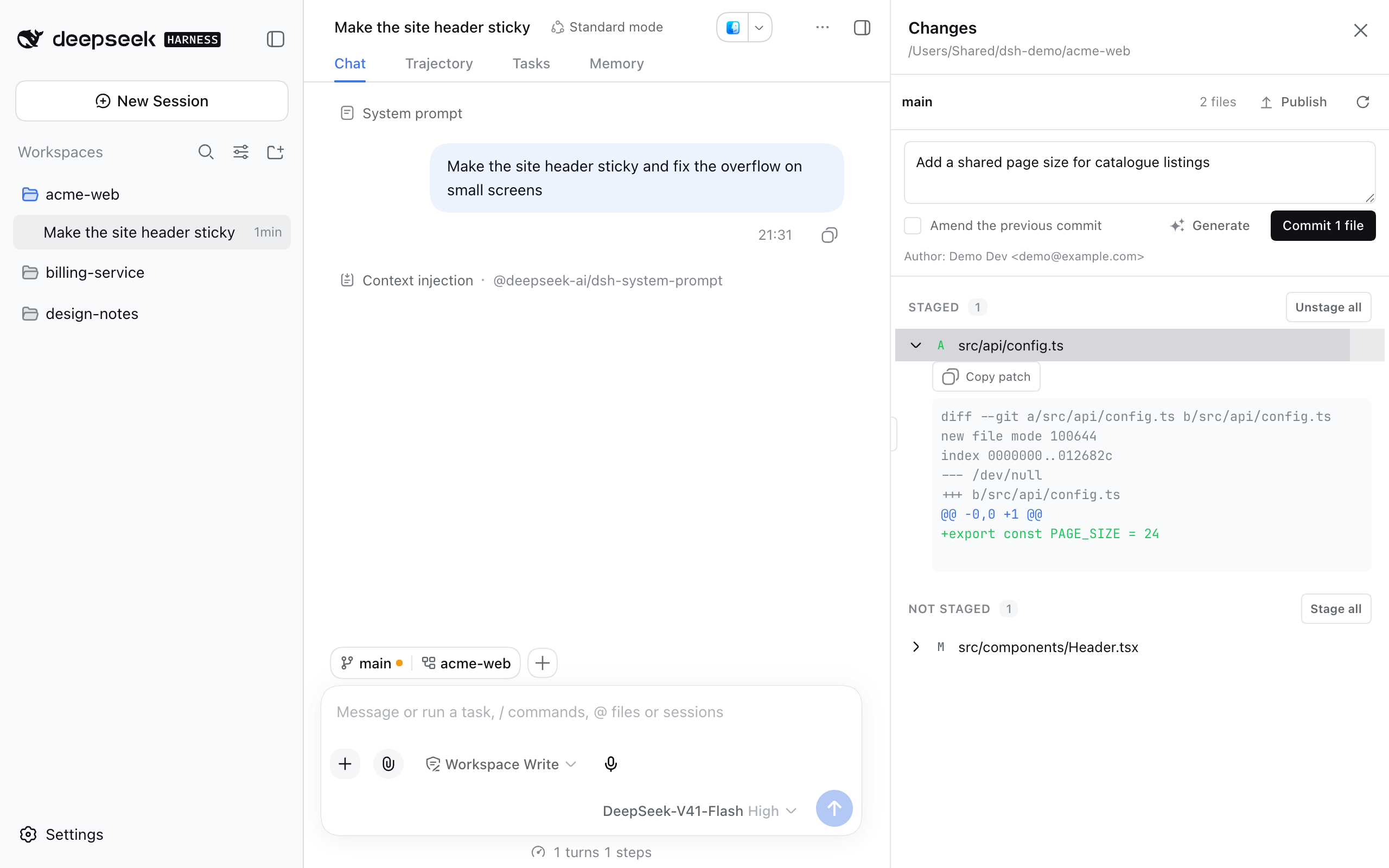
A session menu and a resizable side dock for the DeepSeek Harness (dsh) Web Client. The ⋯ menu in the session header opens these panels in a column to the right of the conversation:
- Changes: git status, diffs, staging, commit, a model-written commit message, and push;
- Terminal: your own shells, in tabs;
- Files: a file browser with text preview;
- Preview: dev servers, workspace files, URLs, or a scratchpad;
- Background tasks: the session's jobs.
The same menu has Open in, Download session log, Archive, and Delete. Work the browser cannot do itself (running git, opening a pseudo-terminal, launching an editor) runs on the host through this plugin's own RPC namespace. One optional model tool, ui_preview, lets the agent inspect and drive the Preview panel.
Features
Session menu
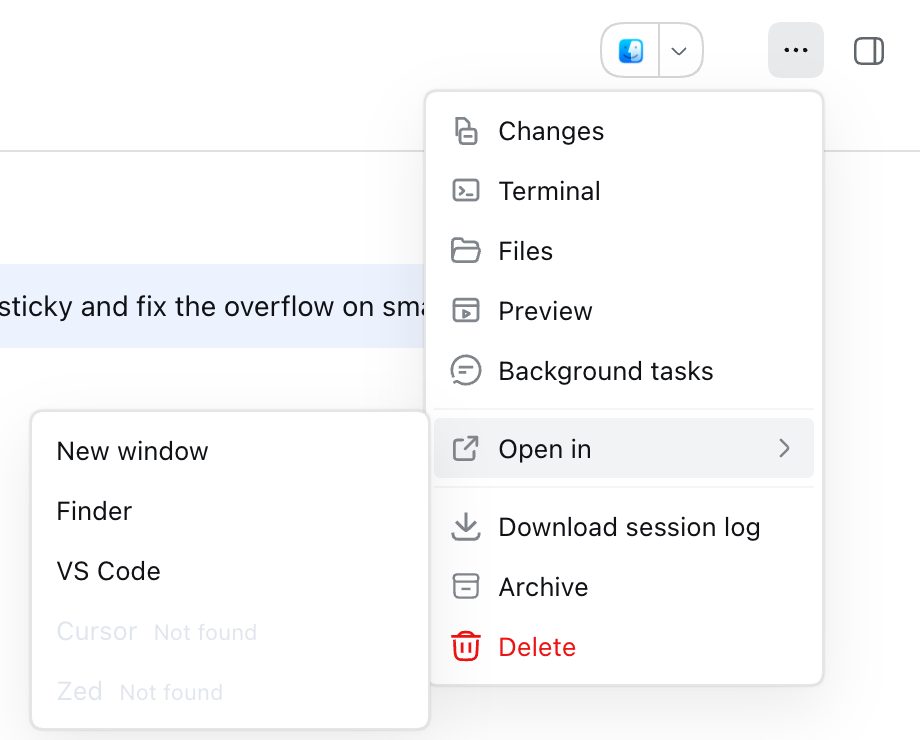
A ⋯ button in the open session's header. It acts on that session, using the session's own working directory, or its workspace path when the session has none.
| Entry | What it does |
|---|---|
| Changes, Terminal, Files, Preview, Background tasks | Opens that panel in the dock. The open panel's entry has a check mark, and choosing it again closes the dock. |
| Open in ▸ | New window (a second tab of the Web Client), each configured editor, and the OS file manager: Finder, File Explorer, or xdg-open on Linux. |
| Download session log | Exports the session as a ZIP through the harness's own exporter. See the note below. |
| Archive | Hides the session. Its log stays on disk. |
| Delete | Asks for confirmation, then archives. See Known limitations. |
When the host cannot serve an entry (git not installed, an editor command not found, no subprocess capability), the entry stays in the menu, disabled, with the reason next to it. An entry switched off in settings is not shown at all. The menu asks the host again each time it opens, so installing git or an editor shows up without a restart.
Download session log. The harness package @deepseek-ai/dsh-session-log-export adds its own ⋯ button, with that single entry, to the same header row. This plugin hides that button: it registers an entry with the same id (session-log-download) at priority -1, and moves the entry into its own menu. Exporting still uses the harness's controller and dialog, so /export keeps working. If the harness package is absent or its controller has a different shape, nothing is hidden and the menu has no Download entry.
The dock
Panels open in a column on the right of the app frame. The conversation narrows to make room, so the dock does not cover it.
- Resizing. Drag the left edge, use Left and Right on the focused handle, or double-click the handle to return to the configured width.
- Width limits. The width is kept between 280 px and 960 px, and never leaves the conversation less than 400 px.
- Narrow windows. When even the minimum width would squeeze the conversation below 400 px, the dock floats over the conversation instead.
Changes
- Status. The working directory's status, grouped as Staged, Not staged, Untracked, and Conflicted, with branch, ahead, and behind counts. Click a file to see its patch, with Copy patch.
- Staging. Stage / Unstage a file, or a whole group with Stage all / Unstage all.
- Commit. Commit records what is staged, with an optional Amend the previous commit. The author git would record (
git var GIT_AUTHOR_IDENT) is shown under the message box, so a missinguser.emailis visible before you commit. - Generate. Writes a commit message with the model the composer is currently set to. The model sees only the staged patch, up to
commitMessageMaxBytes. The message goes into the box for you to edit, and nothing is committed automatically. - Push. Pushes the current branch to its upstream (
git pushwith no arguments). A branch with no upstream shows Publish instead, which pushes toorigin, or to the first remote if there is noorigin, and sets the upstream. Force push, a remote picker, and custom refspecs are not offered. - No discard. There is no way to discard changes from this panel. Use the Terminal panel.
Terminal
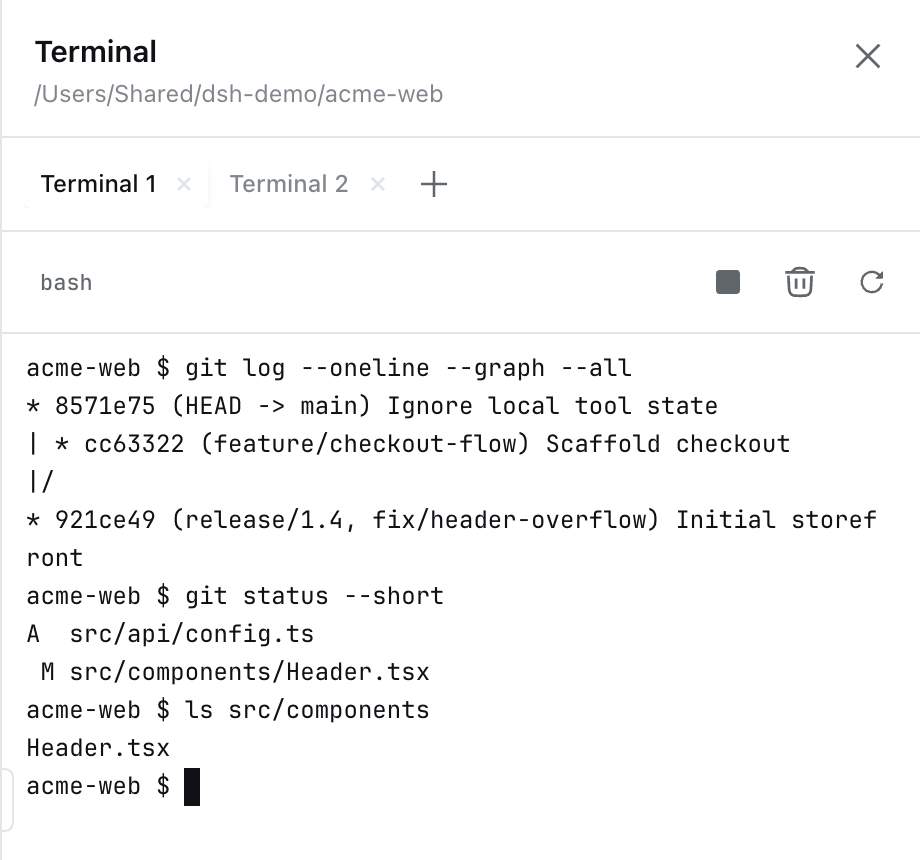
- Your own shells. Interactive shells in the session's working directory, in tabs, up to
maxTerminals. They are separate from the model's terminals. - Controls. Interrupt and Ctrl+C send SIGINT to the foreground process group. Clear clears the screen, and Restart starts a new shell.
- Shells keep running. Closing the dock or switching panels leaves them running. Reopening a tab replays the output the host kept (
terminalScrollback). Closing a tab ends its shell, and so does archiving or deleting the session. - Emulator. The screen is
@xterm/xterm, so colors, line editing, and full-screen programs work.
Files
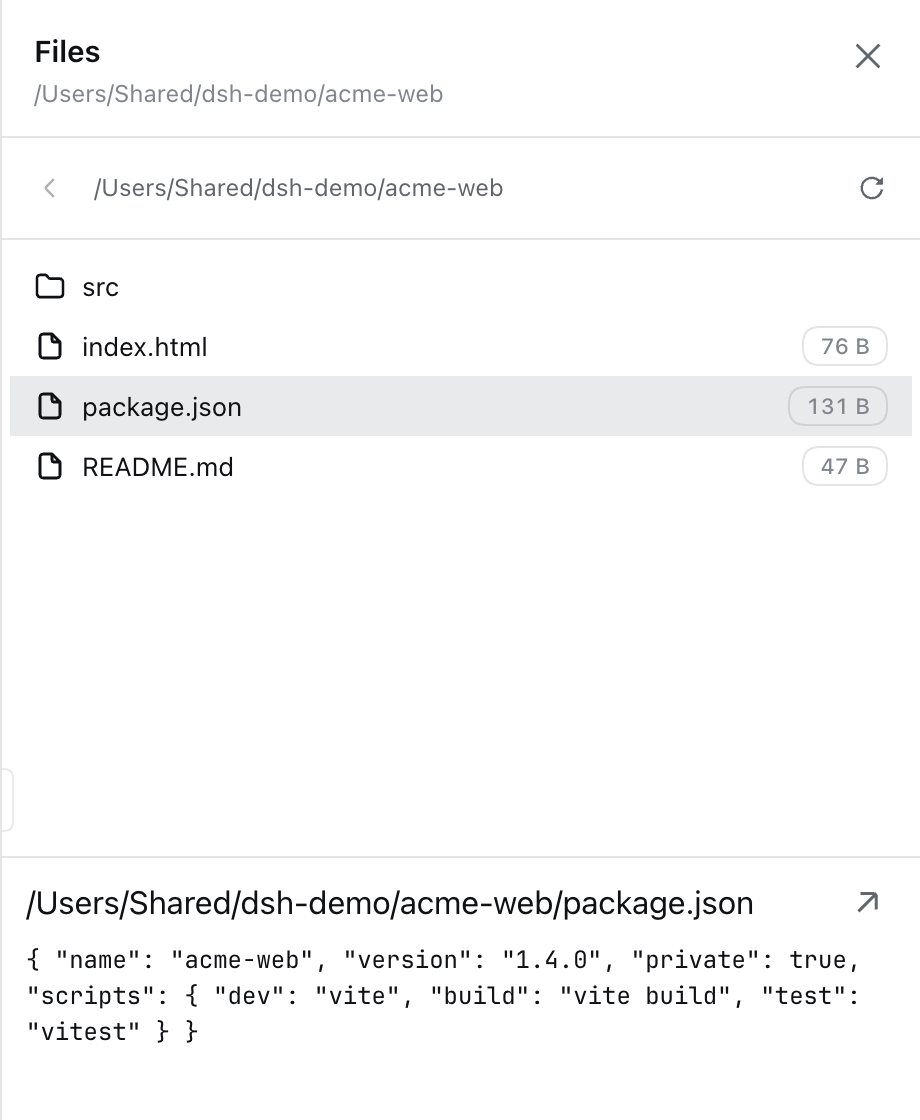
- Browsing. The working directory, one level at a time. Hidden entries are excluded unless
filesShowHiddenis on. - Preview. A text preview up to
filesMaxPreviewBytes. Binary files show their size. - Actions. Open with the default application and Show in file manager.
Preview
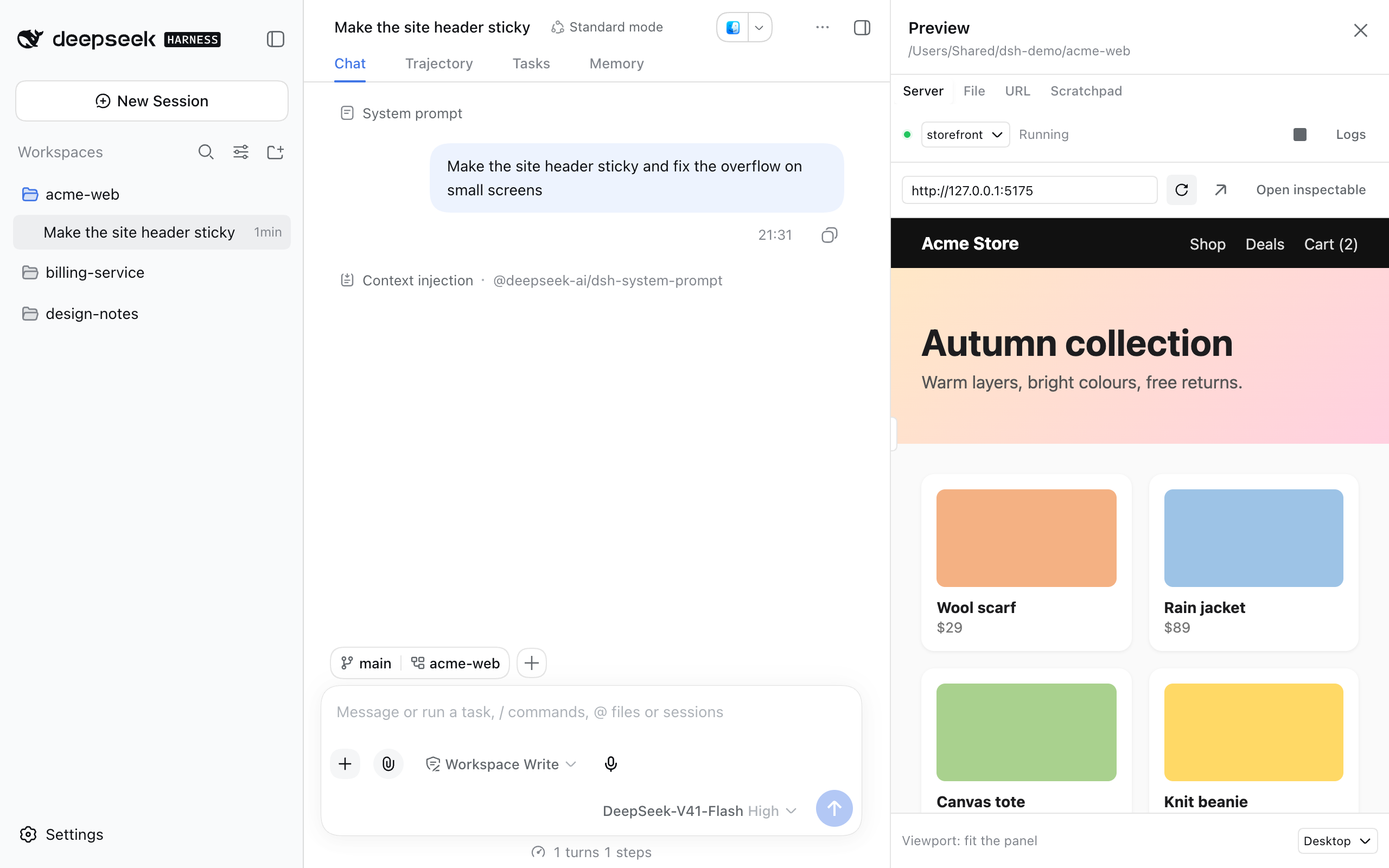
Four modes, with a viewport picker (Desktop, Tablet, Mobile, Custom) in every mode.
| Mode | What it shows |
|---|---|
| Server | Launch configurations from the workspace's .claude/launch.json (Claude Code's format) and the previews setting. The file wins when both define the same name. Start and Stop a server, view Logs (these open automatically when a start fails), Open in a new window, or Open inspectable, which hands the URL to URL mode. |
| File | A workspace file, rendered by type: HTML and SVG in a frame, Markdown rendered, images, audio, video, PDF, and plain text. The panel reloads when the file changes. Files over previewMaxFileBytes, or of unknown types, offer Open with the default application. |
| URL | Any http(s) address. A localhost, 127.x.x.x, or [::1] address is loaded through the host's proxy, so the frame is same-origin and its DOM and console can be read. Other addresses are framed directly and labeled cross-origin. |
| Scratchpad | HTML you type, rendered from a host route. The text is saved per workspace in this browser's localStorage. |
For a launch configuration, readiness means the configured port accepts a TCP connection, checked until previewReadyTimeoutMs. The child process gets PORT, NO_COLOR=1, and FORCE_COLOR=0. Stopping sends SIGTERM to the process tree, then SIGKILL after previewGraceMs.
.claude/launch.json example:
{
  "version": "0.0.1",
  "configurations": [
    { "name": "web", "runtimeExecutable": "npm", "runtimeArgs": ["run", "dev"], "port": 3000 }
  ]
}
Background tasks
- List. The session's background jobs, filtered by text, status, and start date, with duration and status.
- Stop. Requires
allowTaskKill. Stopping a task also suppresses the completion notice the model would otherwise receive. - Output. Requires
showTaskOutput, and appears only after the task has finished and its completion has been reported. Reading output earlier would consume the output the model reads.
Settings card
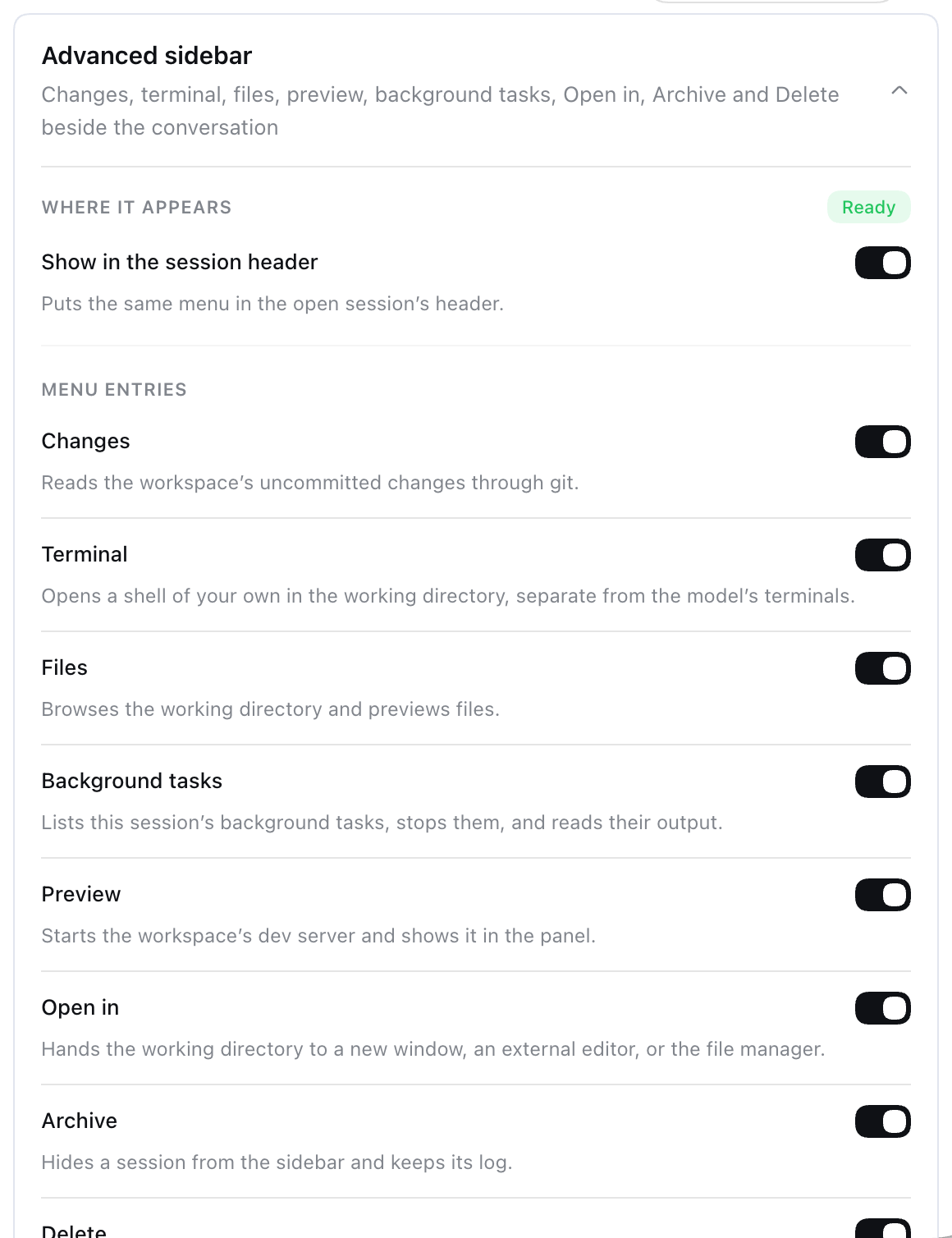
Settings → Plugins → Advanced sidebar edits most settings and shows, for each Open in target and preview configuration, whether it is available on this host. See Configuration.
Requirements
- DeepSeek Harness 0.1.5-rc.2 with the
webprofile. This is the version the plugin is tested against. Node^22.19 || >=24. - pnpm on
PATH, becausedsh pluginruns pnpm. - git 2.23 or newer on the host
PATHfor Changes, because unstaging usesgit restore --staged. - Harness capabilities, each optional. A missing one disables only the entries that need it, with the reason shown:
| Capability | Needed by |
|---|---|
subprocess | Changes, Terminal, Preview servers, Open in |
fs | Changes, Terminal, Files, Preview |
jobs | Background tasks (Stop and Output) |
workspaceRegistry | Delete; Preview File mode (files are served only from registered workspaces) |
llm + agentDefaultModel | Generate commit message |
connection (with requestRejection) + webServer | Preview's same-origin routes: File mode, the loopback proxy, Scratchpad |
tools | The ui_preview model tool |
sessionLogDownload (from @deepseek-ai/dsh-session-log-export) | Download session log |
- OS: developed and tested on macOS. The code has Windows and Linux branches (shell fallback, file-manager command) that are not verified.
Install
dsh plugin --profile web add @achasoft/dsh-advanced-sidebar
dsh web
dsh plugin --profile <name> … runs pnpm with the remaining arguments in $DSH_HOME/profiles/<name> (default ~/.dsh/profiles/web). Afterwards, dsh adds every dependency whose package.json declares dsh.bundle to dsh.profile.bundles. This package declares "dsh": { "bundle": { "patch": "./cordis.patch.yml" } }, so it is enabled with no manual edit. Restart dsh web after installing.
To uninstall, remove the package. dsh also drops it from dsh.profile.bundles:
dsh plugin --profile web remove @achasoft/dsh-advanced-sidebar
How cordis.patch.yml is applied
At boot, dsh builds the configuration from patch layers, in this order:
- Each bundle's
cordis.patch.yml, indsh.profile.bundlesorder. $DSH_HOME/profiles/<name>/cordis.patch.yml.$DSH_HOME/cordis.patch.yml.- Any
--patch <file>overlays.
Later layers override earlier ones by row id. This package inserts three rows:
| id | name | Role |
|---|---|---|
advanced-sidebar | @achasoft/dsh-advanced-sidebar/host | Host service, RPC namespace advancedSidebar, the advanced-sidebar settings section, and the preview routes. |
advanced-sidebar-ui | @achasoft/dsh-advanced-sidebar | Browser half. It must be the bare package name, because the Web Client finds browser code by resolving <row name>/package.json. |
advanced-sidebar-ui-preview | @achasoft/dsh-advanced-sidebar/ui-preview | The ui_preview model tool. |
To keep the sidebar but not give the model a tool, disable the third row in your profile's cordis.patch.yml:
- id: advanced-sidebar-ui-preview
  disabled: true
To see the composed result:
dsh --profile web --dump-config
Configuration
All keys below are in the config of the advanced-sidebar row. A patch replaces a row's whole config, so an override must restate every key. Copy the row from this package's cordis.patch.yml and edit it.
The host schema declares no defaults, and every key except commitMessagePrompt and terminalShell is required. The defaults listed are the values cordis.patch.yml ships. Changes saved from the settings card are stored as a user layer over the patch value. Card marks keys the card can edit. On a Web Client that is not on loopback the harness settings scope is unavailable, so the card and menu show the host's values read-only.
Menu and behavior
| Key | Default | Card | What it does |
|---|---|---|---|
showInSessionHeader | true | yes | Shows the ⋯ menu in the session header. When off, the button still appears if needed to offer Download session log, and nothing else. |
showChanges, showTerminal, showFiles, showTasks, showPreview, showOpenIn, showArchive | true | yes | Shows each menu entry. |
showDelete | true | yes | Shows Delete. When off, the host also refuses deleteSession. |
panelWidth | 460 | yes | Dock width in px (schema allows 280–1400; the dock uses at most 960). Dragging the edge saves here when the scope is writable. |
deleteMode | archive | yes | archive or purge. purge is unavailable on this harness; see limitations. |
confirmDelete | true | yes | Asks before Delete. Must be true when deleteMode is purge. |
allowTaskKill | true | yes | Offers Stop, enforced by the host. |
showTaskOutput | true | yes | Offers Output for finished tasks, enforced by the host. |
git (Changes panel)
| Key | Default | Card | What it does |
|---|---|---|---|
gitMaxFiles | 500 | yes | Most files in one status reading. |
gitDiffMaxBytes | 262144 | no | Largest patch returned for one file. |
gitTimeoutMs | 20000 | yes | Time limit for each read-only git command. |
allowGitStaging | true | yes | Stage and unstage, enforced by the host. |
allowGitCommit | true | yes | Commit, enforced by the host. Also requires staging. |
gitCommitTimeoutMs | 120000 | yes | Time limit for git commit, which runs hooks. |
allowGitPush | true | yes | Push and Publish, enforced by the host. |
gitPushTimeoutMs | 180000 | yes | Time limit for a push. |
allowCommitMessageDraft | true | yes | Generate, enforced by the host. Also requires commit. |
commitMessagePrompt | '' | no | Replaces the built-in commit-message instruction. Empty uses the built-in one. |
commitMessageMaxBytes | 65536 | yes | Largest staged patch sent to the model. A longer patch is truncated, and the model is told it was cut. |
Terminal and Files
| Key | Default | Card | What it does |
|---|---|---|---|
terminalShell | '' | yes | Shell to run. Empty uses $SHELL, then /bin/sh (%COMSPEC% or powershell.exe on Windows). |
terminalScrollback | 200000 | no | Characters of output kept per terminal for replay. |
maxTerminals | 4 | yes | Most panel terminals open at once (1–32). |
terminalGraceMs | 3000 | no | Delay between TERM and KILL when a terminal closes. |
filesMaxPreviewBytes | 262144 | no | Largest file shown in the Files preview. |
filesMaxEntries | 2000 | no | Most entries listed per directory. |
filesShowHidden | false | no | Lists dot-files. |
Preview
| Key | Default | Card | What it does |
|---|---|---|---|
previewsFromLaunchFile | true | yes | Reads .claude/launch.json. |
previews | [] | no (listed) | Extra launch rows: name, runtimeExecutable, runtimeArgs, port, url, cwd. An empty runtimeExecutable makes the row attach-only: it points the frame at url and starts nothing. |
maxPreviews | 3 | yes | Most dev servers running at once. |
previewReadyTimeoutMs | 60000 | yes | How long to wait for the port to accept connections. |
previewScrollback | 200000 | no | Log characters kept per server. |
previewGraceMs | 3000 | no | Delay between TERM and KILL when a server stops. |
previewMaxFileBytes | 33554432 | no | Largest workspace file served to the frame. |
previewProxyTimeoutMs | 30000 | no | Time limit for one proxied request to a loopback server. |
previewCommandTimeoutMs | 15000 | no | How long a ui_preview command other than open waits for the panel. |
previewBindTtlMs | 6000 | no | How long a panel counts as open after its last poll. |
Open in
| Key | Default | Card | What it does |
|---|---|---|---|
editors | VS Code (code), Cursor (cursor), Zed (zed) | no (availability listed) | Rows of id, label, command, args. args go before the path. id must match ^[a-z][a-z0-9-]*$, be unique, and not be reveal. |
The host refuses a configuration at load when:
- an editor id is invalid or duplicated, or an editor command is empty;
- a preview name is empty or duplicated;
- a preview row has no command, no URL, and no port;
deleteModeispurgewhileconfirmDeleteisfalse.
The advanced-sidebar-ui-preview row has one key, commandTimeoutMs (default 15000, range 1000–600000). It is the default wait for ui_preview open when the call passes no waitMs.
Model tool and RPC
ui_preview
Registered only when the advanced-sidebar-ui-preview row is composed. It works only while the Preview panel is open in the same session. Otherwise it returns immediately with a message telling the model to open the panel.
| Action | Arguments | Result |
|---|---|---|
open | url or path; optional workspace, waitMs | Points the panel at an http(s) URL or a workspace file, and reports whether the page can be inspected. |
dom | optional selector | The rendered DOM: tags, ids and classes, text, display, and box metrics, plus the page text, viewport, and URL. |
eval | expression | Runs JavaScript in the frame and returns the value as JSON. |
console | optional cursor | Console messages, uncaught errors, and unhandled rejections logged since cursor. |
click | selector | Dispatches click() on the element. |
type | selector, text, optional key | Sets the element's value, dispatches input and change, then optionally the key. |
reload | none | Reloads the frame. |
resize | width, height | Sets the frame viewport size. |
close | none | Closes the preview. |
dom, eval, click, and type refuse a cross-origin frame by name instead of returning nothing.
RPC namespace advancedSidebar
The browser half calls these endpoints over the harness's client connection:
describegitStatus,gitDiff,gitStage,gitUnstage,gitCommit,gitPush,gitCommitMessageterminalOpen,terminalRead,terminalWrite,terminalSignal,terminalCloselistEntries,readFilepreviewList,previewStart,previewStop,previewLogs,previewFileInfo,previewPoll,previewResult,previewReleaseopenIntaskKill,taskOutputdeleteSession
Every endpoint returns a result value with a failure code instead of throwing. The root export re-exports the types.
Security notes
- git does not run programs the repository configures.
- Every git command passes
-c core.fsmonitor=false. - Every
git diffpasses--no-ext-diff --no-textconv. - Read-only commands (status, diff, log, identity, remote list) switch off
filter.<driver>.clean/processfrom the repository's local and per-worktree config. Global and system filters, such as git-lfs, still run. A driver name that cannot be disabled this way, because it contains=, makes the reading fail instead. - Stage, commit, and push are explicit user actions and keep git's normal behavior, including hooks and filters.
- Every git command passes
- No option injection.
- Paths are checked to be inside the repository and passed after
--. - The commit message is a single
-margument. - Publish checks the branch with
git check-ref-format --branch, checks the remote asrefs/remotes/<remote>/HEAD, and pushes-- <remote> refs/heads/<b>:refs/heads/<b>. - Credential prompts are disabled (
GIT_TERMINAL_PROMPT=0), so a push that needs credentials fails instead of hanging.
- Paths are checked to be inside the repository and passed after
- Host-enforced switches.
allowGitStaging,allowGitCommit,allowGitPush,allowCommitMessageDraft,allowTaskKill,showTaskOutput, andshowDeleteare checked by the host, not only hidden in the UI. - Paths stay inside the workspace. Files, Preview File mode, and
ui_previewfile arguments are resolved through the harness filesystem's containment check, so symlinks cannot escape. - Panel terminals are separate from the model's terminals. They are allocated with
ctx.subprocess.spawnTerminal, not the agent's terminal registry, so your keystrokes never reach a terminal the model controls. - Preview routes are gated. The routes
/advanced-sidebar/preview-file,/advanced-sidebar/preview-proxy(plus its websocket upgrade), and/advanced-sidebar/preview-scratchpadeach call the harness connection'srequestRejectionfirst. That is the same host/origin check and signeddsh-auth-*cookie check that guards/api, and it answers401/403otherwise. If the connection has no such gate, the routes are not registered at all.- Loopback only. The proxy forwards only to literal loopback hosts (
localhost,127.0.0.0/8,[::1]). A hostname that merely resolves to loopback is refused. - No credential forwarding. The harness's
dsh-auth-*cookie is stripped from forwarded requests and from upstreamSet-Cookieheaders. - Registered workspaces only. The file route serves only files inside a workspace in
workspaceRegistry. - Scratchpad size. Scratchpad documents are limited to 1 MiB.
- No caching. Responses are sent with
no-store.
- Loopback only. The proxy forwards only to literal loopback hosts (
- A proxied page runs as the Web Client's origin. Its scripts can call the harness API with your session. Only preview dev servers you trust as much as a browser tab signed in to the harness.
ui_preview openaccepts any http(s) URL, like the address bar. Only loopback URLs become same-origin and inspectable.
Known limitations
- Delete only archives. The harness's session persistence API (0.1.5-rc.2) has no way to remove a session. So
deleteMode: purgeis reported unavailable, the card will not select it, and a configuredpurgearchives and returns the reason the log was kept. - No push channel. An out-of-tree plugin cannot add wire frames, so terminal output, preview logs, and
ui_previewcommands are polled.- The command poll runs every 600 ms while there is work and every 2 s when idle.
- A watched preview file is checked every 900 ms.
- Background tasks are the exception: they use the harness's existing
session/jobspush.
- No terminal resize. The subprocess API has no resize call. The emulator follows the dock, but the shell keeps its starting size until you Restart it.
- Server mode frames are cross-origin. A started dev server's own URL is framed directly. Use Open inspectable to load it through the proxy.
- Websocket proxying works only at the proxy root. A dev server that opens its live-reload socket on a subpath is not tunneled. The page still renders, and HTTP streaming (including SSE) is proxied.
ui_preview evalruns as a function body. Declarations do not persist between calls.- Console capture sees only the page's
consoleand error events, not network failures or workers. - Byte-range requests need
fs.readByteRange. Without it, the file route answers a full200, so media plays but cannot seek. - The dock depends on the frame's DOM. It reserves width by setting a CSS property and a data attribute on the
shell.overlayframe element. A harness layout change could require an update. - Large browser bundle. The terminal emulator makes up most of it, and the harness serves one file per plugin, so it cannot be loaded lazily.
- Generate costs model tokens. Each press calls the deployment's provider. Set
allowCommitMessageDraft: falseto remove it. - Stopping a task hides its completion from the model. Set
allowTaskKill: falseto remove Stop.
Development
The dev dependencies are link: specifiers to a DeepSeek Harness source checkout at ../../deepseek-harness, relative to this directory. Clone the harness there before installing.
pnpm install
pnpm run typecheck
pnpm test              # checks generated/ against src/host, then runs vitest
pnpm run build         # tsc -p tsconfig.build.json, then tsdown -> lib/
generated/ is the committed Typert RPC contract, written by scripts/emit-typert.mjs in the harness generator's format. If you change src/host/types.ts or the @Remote methods, update that script's spec and regenerate:
pnpm run regen:typert  # rewrites generated/ and its fingerprint
pnpm run check:typert  # the same check pnpm test runs first
To load your checkout into a local profile, build it, then add it by path:
pnpm run build
dsh plugin --profile web add "$(pwd)"
dsh web
The profile loads the built lib/ output, so build first. After changing browser code, rebuild and reload the page. After changing anything under src/host/, or regenerating generated/, restart dsh web.
License
MIT