
 @merenguesL
dsh-tool-normalizer
No description
- Stars
- 8
- Language
- TypeScript
- Created
- Aug 25, 2026
- Updated
- Sep 17, 2026
Introduction
dsh-tool-normalizer



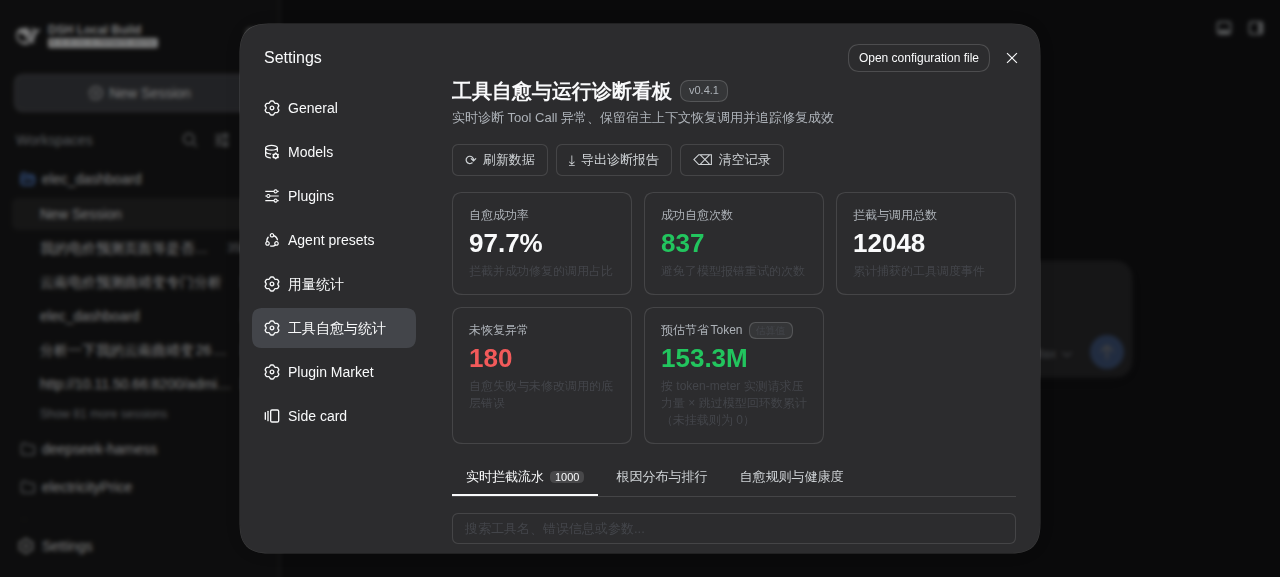
An auto-healing layer for model tool calls: it silently fixes the failures that used to cost you a full retry round-trip, and shows you the receipts.
Why this exists
Every failed tool call costs a full model round-trip: the error comes back, the model re-reads the entire conversation context, and tries again. In a large workspace that retry resubmits ~180k input tokens — so a ~5% tool failure rate quietly inflates your token bill by more than 2× on the affected turns, and your agent visibly stumbles every few minutes.
This plugin sits on the tools/execute pipeline and repairs the failure before it ever reaches the model: a missing description is filled in, a forgotten file read is performed and the edit retried, a relative path is resolved, an unrecoverable error gets an actionable hint appended. Measured across 192 real sessions (15,460 tool calls):
- Surfaced error rate fell from 7.95% → 2.20% (about 72% fewer visible failures).
- About 82% of would-be errors were healed automatically (837 healed vs 182 residual).
- Each heal avoids one full-context retransmission (median ~160k input tokens), totaling ~153M tokens — roughly 115% of what the models actually consumed in the same window, i.e. without healing the token spend would have been ~2.2× (estimated: token-meter pressure × skipped round-trips).
What you get is an agent that stops tripping over its own tool calls — plus a dashboard that proves it:
What it does for you
- Fixes calls before they fail — schema mismatches (
command→code, missingdescription, Markdown fences), Code-Mode inner-call descriptions, relative paths and view ranges. - Retries what is safe to retry — one scoped read-then-retry for guarded file mutations, one bounded range retry; anchor failures are never retried blindly.
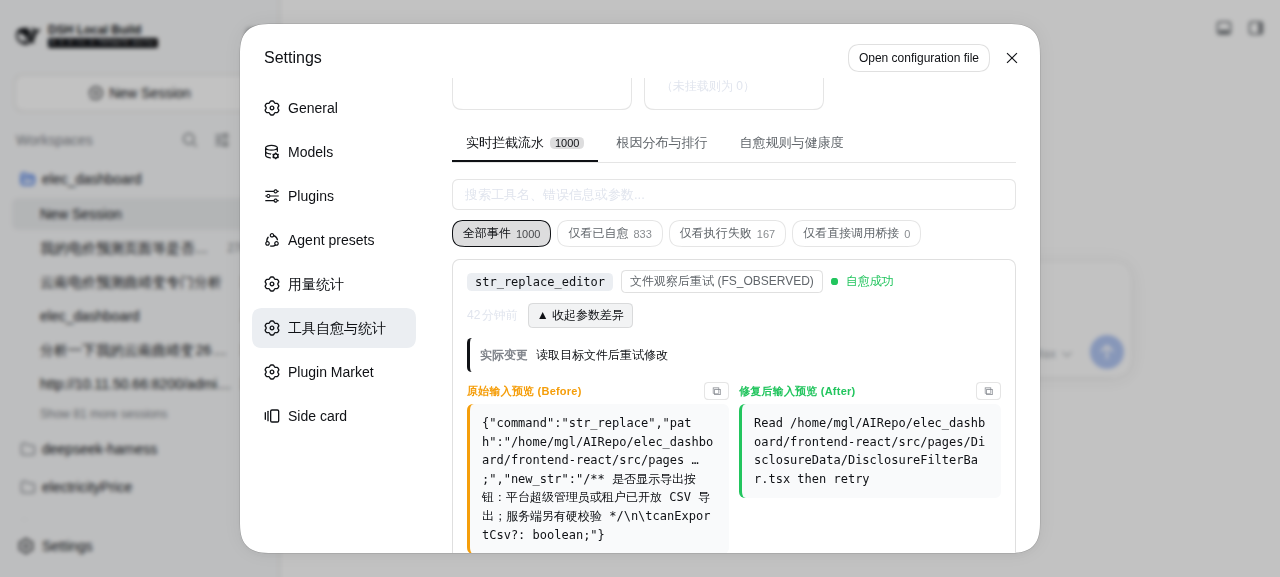
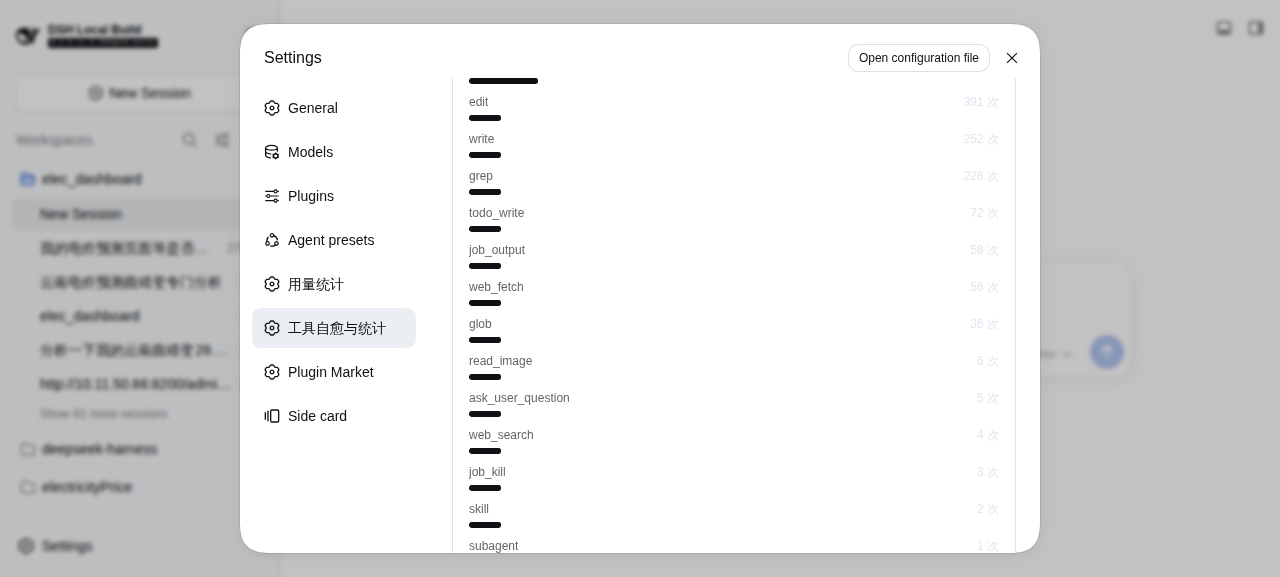
- Shows everything — KPI cards, per-tool and per-category rankings, and a filterable before/after trace, one click away in Settings:
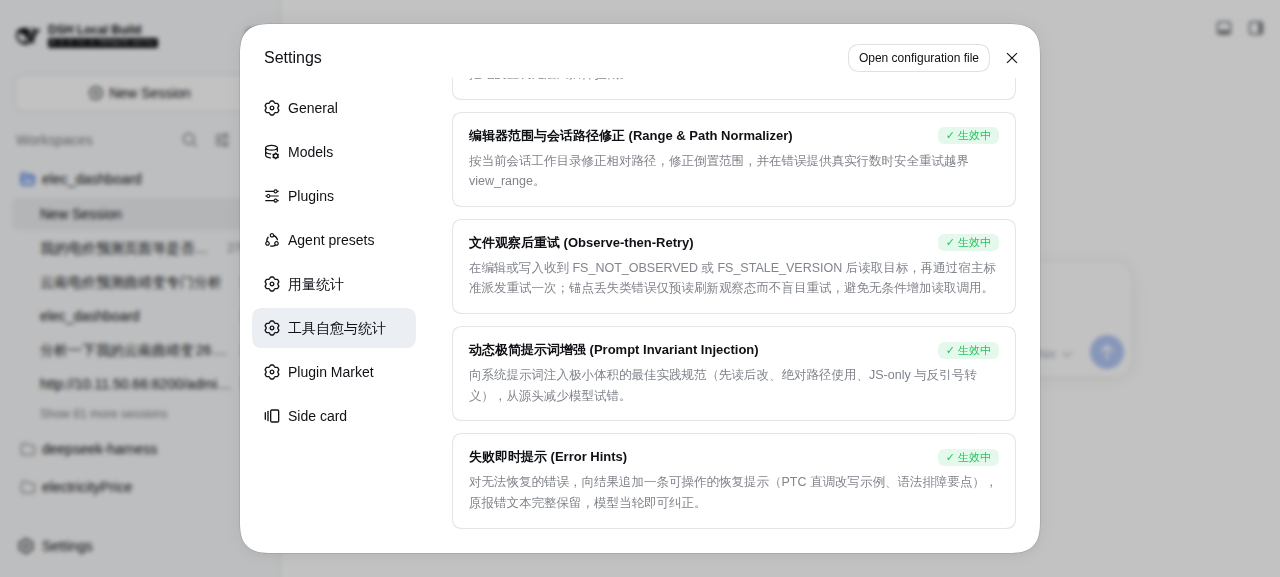
| Rankings & root causes | Healing rules |
|---|---|
 |  |
📖 Background & Empirical Motivation
In DeepSeek Harness, tool execution reliability is critical for autonomous agent loops. An empirical analysis across 111 persisted sessions (containing 11,176 total tool invocations) revealed 543 tool call errors (a 4.86% error rate across 53.2% of sessions).
Detailed root-cause analysis identified four primary structural error drivers:
INVALID_ARGSSchema Incompatibilities (13.6%, 74 cases):- The model frequently treats
run_codeasbash, supplying{"command": "..."}instead of{"description": "...", "code": "..."}. - The model frequently omits the required
descriptionfield inrun_code.
- The model frequently treats
UNKNOWN_TOOLCode-Mode Cognitive Inertia (12.3%, 67 cases):- When Code-Mode is active, only
run_codeis exposed directly to the model. However, the model regularly hallucinates direct tool calls likeread,bash,write, orgrep, which fail immediately withUNKNOWN_TOOL.
- When Code-Mode is active, only
CODE_RUN_FAILEDIn-Sandbox Failures (46.8%, 254 cases):- JavaScript syntax errors caused by multiline shell or Python scripts nested inside JS template strings with unescaped backticks or newlines.
- File System Safety Policy Violations (5.5%, 30 cases):
- Violating DSH's read-before-edit invariant (
FS_NOT_OBSERVED), editorview_rangeline count out-of-bounds, or using relative paths instead of absolute paths.
- Violating DSH's read-before-edit invariant (
Production rollout effects (v0.4.0 · 192 sessions / 15,460 calls)
Sessions before the plugin's first activation (7,182 calls, 7.95% error rate) versus after (8,289 calls, 2.20%):
INVALID_ARGSmissing-description failures fell from 74 to 2 (outerRUN_CODE_DESCplus preemptiveINNER_DESCheals).- Inner
descriptionomissions surfacing asCODE_RUN_FAILEDfell from 45 to 0 (598 preemptiveINNER_DESCsuccesses in the plugin log). FS_NOT_OBSERVEDfell from 10 to 0 (169 observe-then-retry successes).UNKNOWN_TOOLhalved (71 → 35) but persists: PTC-collapsed calls are denied before the waterfall and stay unobservable to any plugin, so v0.4.0 appends a reissue hint to those errors instead of silently dropping them.- Residual
CODE_RUN_FAILEDsyntax failures are semantic breakage no safe rewrite can guess (Python pasted as JS, wrong APIs); v0.4.0 appends a parse-failure hint for those.
Counterfactual upper bound: without the 837 healed successes, the post window would have shown ≈12.3% instead of 2.20%. Token savings sum measured retransmission avoided (token-meter pressure × skipped round-trips), never a hardcoded constant. Since v0.4.0 the plugin's own nested recoveries are excluded from interception counts, so the denominator is user-facing calls only.
🎯 What Problems dsh-tool-normalizer Solves
dsh-tool-normalizer acts as a low-overhead, deterministic safety middleware: normalization and healing on the tools/execute waterfall, statistics in the tools/result observer off the dispatch hot path, paired with an integrated Web UI diagnostics dashboard.
       Model Tool Call
              │
              ▼
   ┌────────────────────────────────────────────────────────┐
   │             dsh-tool-normalizer (Plugin)               │
   │                                                        │
   │  1. run_code Normalizer (command ➔ code, description)   │
   │  2. Safe Direct-Call Recovery (context-preserving nested dispatch) │
   │  3. Range & Path Normalizer (relative paths, real bounds)        │
   │  4. Dynamic Prompt Guidance (minimal token footprint)  │
   │  5. Real-Time Telemetry & Statistics Tracker           │
   └────────────────────────────────────────────────────────┘
              │
              ▼
    Best-effort Recovery of Repairable Errors
              │
              ▼
    [Web UI] Settings ➔ Tool Normalizer & Diagnostics Page
Key Features
- 🛠️
run_codeSchema Auto-Healing:- Automatically wraps
{"command": "git status"}or{"cmd": "..."}into validrun_codeJavaScript dispatches. Empty or non-string commands are left for the host to reject loudly instead of healing into a silent no-op. - Fills in missing
descriptionfields with sensible contextual defaults. - Strips accidental Markdown code block fences (e.g.
typescript ...). - Program syntax self-healing: when the emitted
codedoes not parse, repairs the three mechanical breakage classes the host's async-function executor rejects — truncated tails (code ending inside an unclosed string or call), Python-style triple-quoted strings ('''/"""spans containing a newline) rewritten as escaped template literals, and stray unescaped backticks inside template literals. Every repair is re-verified with the samenew AsyncFunctionparse the host uses; valid programs are never touched.
- Automatically wraps
- 🌉 Code-Mode Direct Tool Bridging:
- When an
UNKNOWN_TOOLresult reachestools/executeand the target is visible in the active agent scope, the plugin re-dispatches it through the host'stools.execute()API as a nested call, preserving agent/session ownership, cancellation, contexts, and terminal state. Bridgeable names coverbash/read/write/grep/edit/glob/str_replace_editor/job_output/job_killplusweb_fetch/web_search/todo_write/skill/ask_user_question. - Scope note: under the PTC (
code) presentation collapse, the host rejects a direct call before any listener runs; a plugin cannot intercept that path. For those errors v0.4.0 appends a ready-to-pasterun_codereissue hint to the original error text instead. The plugin never invokes a tool definition'sexecute()method directly.
- When an
- 💡 Unrecoverable-Error Hints (
errorHints, default on):- PTC-collapsed direct calls and unrepairable
run_codeparse failures keep their original error text with one appended actionable hint, so the model can correct itself in the same round-trip. SeterrorHints: falseto preserve byte-identical host errors.
- PTC-collapsed direct calls and unrepairable
- 🩹 Inner-Call Description Injection:
- Before a
run_codeprogram executes, inserts a generated description only into atools.*()call whose active tool schema marksdescriptionas required. Open schemas such asread,glob, andgrepare left unchanged.
- Before a
- 📐 Editor Parameter & Bounds Normalization:
- Corrects structural and inverted
view_rangevalues instr_replace_editorandedit; when the real error reports a line count, it retries with that bound and preserves the-1end-of-file sentinel. - Resolves relative file paths to absolute paths against the session working directory for
str_replace_editoronly, which rejects relative paths outright. Theedit/read/writefamily resolves them against the session workspace itself, so the plugin leaves those paths untouched (see theread/writenote below).
- Corrects structural and inverted
- 🩹 Observe-then-Retry Recovery:
- After
FS_NOT_OBSERVEDorFS_STALE_VERSION, the plugin reads the target and retries the mutation once through the host dispatcher; anchor failures (FS_EDIT_NOT_FOUND,FS_AMBIGUOUS_EDIT) are never retried blindly — a best-effort refresh updates the observed version so the next model retry is not additionally blocked. Normal calls do not pay for a speculative read.
- After
- 📈 Projected Token Savings:
- Measures the input tokens each successful healing avoids from the host's token-meter: the session's one-request context pressure multiplied by the skipped model round-trips, shown in the dashboard. A composition without
@deepseek-ai/dsh-token-meterreports zero instead of guessing. - Live observability: every settled call updates aggregate counters in the
tools/resultobserver, off the dispatch hot path — including pre-execute/guard denials thetools/executewrapper never sees, counted honestly as untouched failures. Healing attempts and failures append detailed JSONL events to~/.dsh/tool-normalizer-events.jsonl; successful untouched pass-through calls are aggregated intool-normalizer-summary.jsonby default instead of expanding the detail log. The detail log rotates above 2 MB (newest 1 MB retained); the summary coalesces to at most one write per second and debug lines are emitted only for failures and heals. - Diagnostic previews keep both the beginning and end of long arguments and include a bounded summary of the fields or dispatch path that changed.
- The dashboard reads live data from the same-origin feed
GET /plugin-api/tool-normalizer/stats, registered by the node half when a webserver is present.
- Measures the input tokens each successful healing avoids from the host's token-meter: the session's one-request context pressure multiplied by the skipped model round-trips, shown in the dashboard. A composition without
- 📊 Web UI Execution & Diagnostics Dashboard:
- Embedded directly into DSH's Settings (
settings.section) panel. - Displays real-time KPI metrics (Total Interceptions, Auto-Healed Count, Healing Success Rate %, Unrecovered Errors).
- Visual breakdown by tool and category with progress meters.
- Filterable live table of execution logs showing original input vs. normalized payload.
- v0.4.1 UI fixes: active filter pills and tabs no longer render unreadable filled labels under dark themes (tinted ring + brand text instead of filled background); untouched pass-through rows use a neutral tone instead of success green; a sixth rule card documents error hints. Screenshots above were captured from a live deployment (dark hero, light detail views).
- Embedded directly into DSH's Settings (
🧭 UI Location & Design Rationale
Placement: DeepSeek Harness Settings panel (settings.section with ID tool-normalizer, order 25).
Rationale
- Consistency with DSH Architecture: In DSH Web UI, developer diagnostics and usage metrics (like
dsh-usage-atlas, Model configuration, and Plugin inventory) are hosted as first-class sections inside the Settings panel. - Zero Conversation Clutter: Placing diagnostics in Settings keeps the primary agent chat canvas distraction-free while remaining just one click away via the gear icon in the sidebar rail.
- Unified Management: Allows administrators and developers to observe runtime error rates and clear logs in the same panel where they configure models and plugins.
🚀 Installation & Quick Start
In DeepSeek Harness, plugins are managed per composition profile (web, headless, tui, etc.).
Step 1: Install Plugin into your Target Profile
Using the dsh CLI (or pnpm dsh from monorepo root):
# 1. Install into Web UI profile (Includes Settings Dashboard)
dsh plugin --profile web add dsh-tool-normalizer
# (or if running from source repository)
pnpm dsh plugin --profile web add dsh-tool-normalizer

# 2. Install into Headless automation profile
dsh plugin --profile headless add dsh-tool-normalizer

# 3. Install into TUI terminal profile
dsh plugin --profile tui add dsh-tool-normalizer
Local Development Link (Optional)
If you are developing or testing local changes:
pnpm dsh plugin --profile web add ./plugins/dsh-tool-normalizer
Step 2: Launch and Verify
# Boot Web UI mode
dsh web
# (or from source)
pnpm dsh web
Open your browser, navigate to Settings (⚙️) ➔ Tool Normalizer, and observe real-time tool execution metrics and auto-healing in action!
⚙️ Configuration
You can customize plugin behavior in your workspace's cordis.patch.yml or cordis.yml:
- insert:
    - id: tool-normalizer
      name: dsh-tool-normalizer
      config:
        autoWrapRunCode: true
        autoBridgeDirectTools: true
        autoObserveFiles: true
        autoClampRanges: true
        injectPrompt: true
        errorHints: true
        persistPassthrough: false
| Option | Type | Default | Description |
|---|---|---|---|
autoWrapRunCode | boolean | true | Auto-convert command -> code, supply missing descriptions, strip Markdown fences. |
autoBridgeDirectTools | boolean | true | Safely re-dispatch an UNKNOWN_TOOL result that reached tools/execute; host-level pre-dispatch denials cannot be intercepted by a plugin. |
autoObserveFiles | boolean | true | After FS_NOT_OBSERVED, read the target and retry one edit/write through the host dispatcher. |
autoClampRanges | boolean | true | Correct editor ranges; resolve relative paths against the session directory for str_replace_editor only. |
injectPrompt | boolean | true | Register prompt guidelines with ctx.systemPrompt: instructional guidance as a section, top-error diagnostics as runtime context (section fallback on older hosts). Static text only — never breaks prefix caching. |
errorHints | boolean | true | Append one actionable hint to unrecoverable PTC/syntax errors while preserving the original error text. |
persistPassthrough | boolean | false | Persist successful untouched pass-through calls as detailed JSONL events; failures and healing attempts are always retained. |
Healing success rate is healedSuccess / (healedSuccess + healedFailed) and excludes untouched pass-through failures — including pre-execute/guard denials, which are counted in the totals but never attributed to healing. A pre-dispatch normalization whose final error belongs to a different failure class is attributed as an unrelated pass-through failure rather than a failed heal, so the rate measures real efficacy. Successful untouched calls are kept in aggregate counters and the compact tool-normalizer-summary.json, not one detail line per call.
The token-savings KPI sums measured per-heal input tokens: each successful heal credits skipped model round-trips × token-meter request pressure, i.e. the prompt a further request would have re-submitted. It requires @deepseek-ai/dsh-token-meter in the composition; without it the figure stays 0 instead of using a hardcoded per-retry constant.
📦 Release & Publishing Guide
Option 1: Automated Release via GitHub Actions (Recommended)
-
Set your npm access token as a secret in your GitHub repository:
- Go to GitHub Repository Settings ➔ Secrets and variables ➔ Actions ➔ New repository secret.
- Name:
NPM_TOKEN, Value:<your-npm-automation-token>(Ensure 2FA bypass is enabled for write actions).
-
Bump the version and push a release tag:
# Bump version (patch / minor / major) npm version patch # Push commit and tags to GitHub git push origin main --tags -
Create a GitHub Release on the new tag. The GitHub Actions workflow (
.github/workflows/publish.yml) will automatically run tests, build artifacts, and publish to npm!
Option 2: Manual npm Publishing
# 1. Ensure clean build & passing tests
npm run check

# 2. Login to npm (if not already logged in)
npm login

# 3. Publish to npm registry
npm publish --access public
Known Limitations
- No path normalization for
read/write. Theread/write/edittool family resolves relative paths against the session working directory by itself; onlystr_replace_editorrejects them. Normalizing those calls would count heals for invocations that would have succeeded anyway, so the plugin deliberately leaves them untouched to keep the healing rate honest.
🧪 Testing & Verification
# Run all unit tests
pnpm test

# Run tests and compile build artifacts
pnpm run check
📄 License
MIT © merenguesL