
 @linsibin
dsh-task-board
No description
- Stars
- 1
- Language
- JavaScript
- Created
- Sep 7, 2026
- Updated
- Sep 8, 2026
Introduction
dsh-task-board
A task-board client plugin for DeepSeek Harness Desktop. Adds a 「Tasks」 tab next to Chat / Trajectory in the conversation header, with a three-column kanban that can truly execute each task through the DSH agent engine.
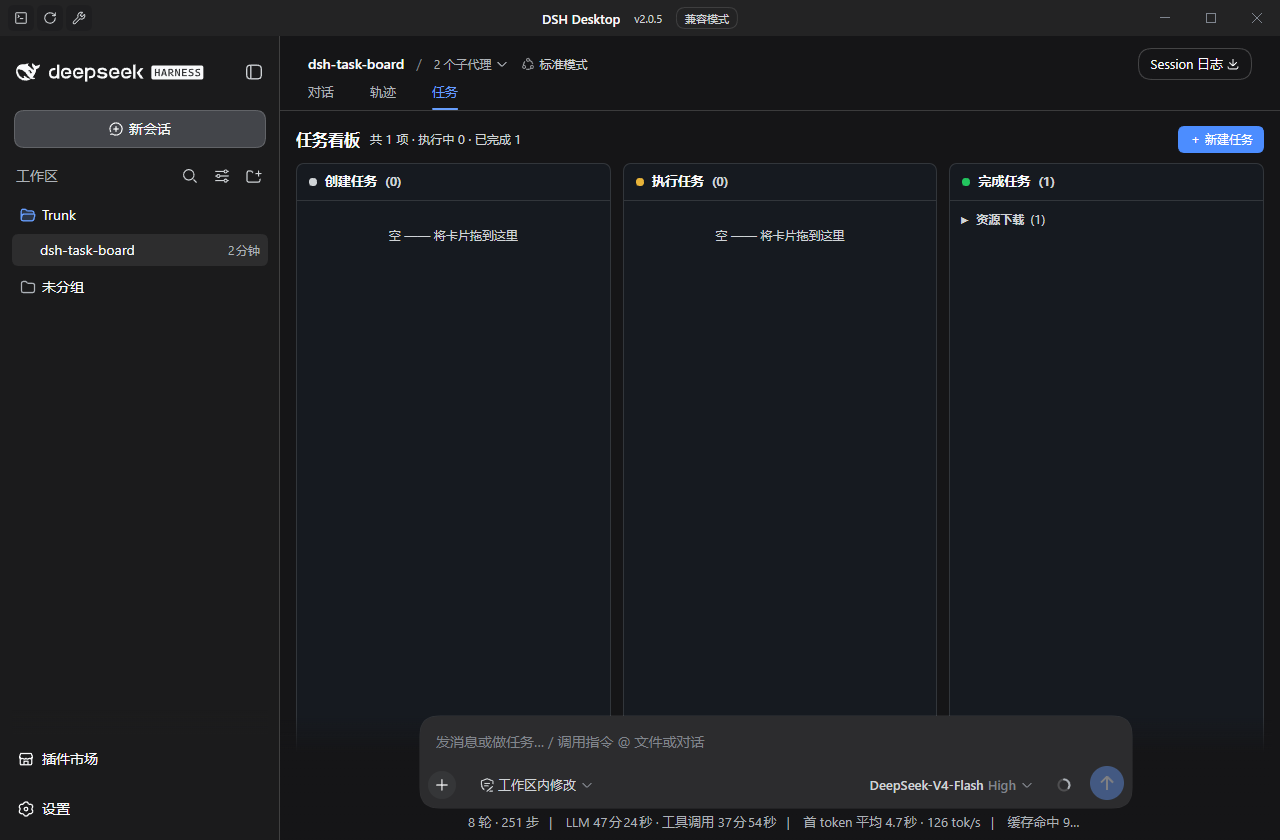
Highlights
- Tab injection — registers into the official
conversation.viewslot, sitting side by side with the built-in Chat (chat) and Trajectory (trajectory) tabs (same mechanism those tabs use). - Three-column kanban —
Backlog/In Progress/Donecolumns, grouped by an arbitrary task group name; group headers collapse/expand all cards underneath. - Rich task cards — UUID
id,title,group, Markdowndescription,workDir,files[]andstatus. - Drag-to-execute — dropping a card into In Progress creates a brand-new DSH session bound to the card's
workDir, sends the card description as a queued prompt, and the agent really does the work. - Live progress — assistant output streams back onto the card in real time while the session runs.
- Automatic lifecycle — when the turn ends and the session idles, the card auto-flows to Done with the final assistant message as its result; failures/timeouts return it to Backlog with a visible error.
- Re-run — drag a Done card back into In Progress to execute it again.
- Local persistence — cards survive reloads (browser
localStorage, keydsh-task-board:v1). - Theme-aware — styled with DSH CSS variables (
--dsw-*), auto light/dark.
How it works (the 5-second version)
A DSH "client plugin" is a single npm package with two halves:
| Half | File | Role |
|---|---|---|
| Host half | lib/index.js | A Cordis plugin the Loader mounts in Node — a no-op for a pure-UI plugin |
| Browser half | lib/client.js | Registered into the Web GUI as { inject: [...], apply(ctx) } |
package.json carries the two declarations the harness looks for:
"dsh": {
  "client": {            // browser-side declaration (platform MUST be "web")
    "platform": "web",
    "inject": [ /* client packages this module depends on in the boot graph */ ]
  },
  "bundle": {            // profile-bundle declaration (provides a Loader patch)
    "patch": "./cordis.patch.yml"
  }
}
Inside apply(ctx), the plugin registers a conversation.view entry:
ctx.slots.inject('conversation.view', () =>
  ctx.slots.register({
    name: 'conversation.view',
    id: 'taskboard',
    order: 20, // chat = 0, trajectory = 10, taskboard = 20
    locale: 'taskboard',
    label: () => t('view.task'),
  }, TaskBoardView),
)
When a card is dropped into In Progress, the browser half runs the real execution pipeline:
ctx.sessions.create({ cwd: task.workDir })— the host accepts any absolutecwd; a new session is created per run (itssessionIdis stored on the card so you can reopen and inspect it later).binding = ctx.sessions.binding(sessionId)→binding.session.open().session.prompt([{ type: 'text', text: taskDescription }], 'queue').- Subscribe to
binding.eventSourceand streamassistant/live-chunktext back onto the card. - Poll the session snapshot: when the window shows
user/message→turn/end,running === false, the queue and pending submissions are empty → mark completed with the lastassistant/messagetext. - Errors (
promptError,lastAgentError) or an 8-hour timeout send the card back to Backlog with the error shown.
Event-window note: session window entries are shaped
{ type: 'event' | 'transient', event: { type, seq, time, data } }— the event kind lives on the innereventobject.
Install
The plugin targets the desktop profile that runs your GUI.
Option A — DSH CLI (recommended)
Run inside a DSH terminal:
dsh plugin --profile desktop add <absolute/path/to/dsh-task-board>
Because the package declares dsh.bundle, the CLI appends it to dsh.profile.bundles in ~/.dsh/profiles/desktop/package.json and installs it as a direct dependency.
Option B — manual
- Edit
~/.dsh/profiles/desktop/package.json:- add the package under
dependencies(afile:spec pointing at the absolute path); - add
"@linsibin/dsh-task-board"todsh.profile.bundles.
- add the package under
- Run
pnpm installinside the profile directory. - Restart DSH Desktop.
Option C — npm
npm install @linsibin/dsh-task-board
Then add "@linsibin/dsh-task-board" to dsh.profile.bundles in your desktop profile and restart DSH Desktop.
Never hand-edit
cordis.yml— it is rewritten on every launch. Usecordis.patch.ymlor the flows above.
Enable
Restart DSH Desktop (bundle-list changes are never hot-applied). After restart, open or create a conversation: the header tab strip (which already shows Chat / Trajectory) will now also show Tasks.
The tab only appears while a conversation is open — that is how the official
conversation.viewmechanism works, not a limitation of this plugin.
Verify
| Acceptance item | How to check |
|---|---|
| Tasks tab appears | Open any conversation → tab strip shows Tasks after Chat / Trajectory |
| Create a card with group & files | + New Task → fill title / group / description / workdir / files (one per line) → card appears in Backlog, grouped |
| Drag triggers a real run | Drag card into In Progress → running indicator + streaming output; console logs [dsh-task-board]; a new session shows up in the session list |
| Auto-flow on completion | Turn ends & session idles → card moves to Done with a result summary |
| Re-run | Drag a Done card back into In Progress |
| Group collapse | Click a group header to collapse/expand its cards |
| Persistence | Reload the page — tasks are still there |
Failure path: a rejected prompt, agent error, or 8 h timeout returns the card to Backlog with a ⚠ message; drag it in again to retry.
Development
node scripts/build.mjs          # rebuild lib/client.js from src/client.tsx
node scripts/build.mjs --watch  # rebuild on changes (for client HMR)
- Offline build — the script uses the TypeScript that ships inside the DSH profile (
~/.dsh/profiles/node_modules/typescript) viatranspileModule(syntax transpilation only, no type-checking, no network). Override with theDSH_TS_LIBenv var if needed. - Bundle purity — at runtime the browser bundle may only
require()platform seed modules (React,@deepseek-ai/cordis, …). This plugin therefore ships zero third-party runtime dependencies; type annotations in the source are for readers only. - HMR — after the first install, editing
src/client.tsxand rebuilding rewriteslib/client.js; the always-on client HMR reloads that plugin in place (plugin React state is lost, sessions/runtime survive). Manifest changes still need a restart.
Project layout
dsh-task-board/
├─ package.json          # dsh.client (web) + dsh.bundle (patch) declarations
├─ cordis.patch.yml      # bundle patch: inserts this plugin as a Loader row
├─ tsconfig.json         # editor/type-reading only; build does not use it
├─ lib/
│  ├─ index.js           # host half (no-op Cordis plugin for the Loader)
│  └─ client.js          # browser half (BUILT artifact — edit src/, then rebuild)
├─ src/
│  └─ client.tsx         # browser-half source: kanban UI, drag & drop, runner
└─ scripts/
   └─ build.mjs          # TSX → CJS + ModuleLoader registration shell → lib/client.js
Notable details
- Because the
file:dependency install is a copy, after changingsrc/client.tsx+ rebuilding you must refresh the profile copy (pnpm installmay say “Already up to date” — copylib/client.jsover manually, or usepnpm linkfor a live dev loop). - Running against an arbitrary
workDir:session.create({ cwd })accepts any absolute path, but whether the host fs/sandbox permits an unregistered directory depends on host configuration — register the directory as a workspace first if it gets blocked. - Every execution creates a new session in the GUI session list; open it anytime to review exactly what the agent did.
Compatibility
Built against DSH Desktop 2.0.5 internals (@deepseek-ai/dsh-* 0.1.2-rc.1) and verified on a live desktop profile. Internal APIs may change across DSH versions.
License
MIT