
 @j7708git
dsh-handoff-review
OpenChamber-style handoff review for DeepSeek Harness: linked read-only review sessions, round by round.
- Stars
- 0
- Language
- JavaScript
- Created
- Oct 18, 2026
- Updated
- Oct 18, 2026
Introduction
dsh-handoff-review
A DeepSeek Harness plugin that hands the current session's changes to a linked, read-only review session — a round-by-round handoff review in the spirit of OpenChamber.
The implementation session keeps working; an ordinary review session in the same workspace reviews the change in an independent context. Its report can be sent back to the implementer, later revisions can be sent back to the reviewer, and every round is kept in a durable link record. The plugin only adds commands, routes, projections, listeners and UI slots: nothing is written into the DSH kernel, and removing the bundle removes everything it registered.
交接續作 / handoff continuation is the other direction: a compact 交接
button in the composer turns the current session into a deterministic handoff
prompt for a new ordinary session in the same workspace, so long-running work
can continue in a fresh context. The existing review flow is unchanged; the
continuation surface is purely additive (new routes, slot registrations and
locale keys only).
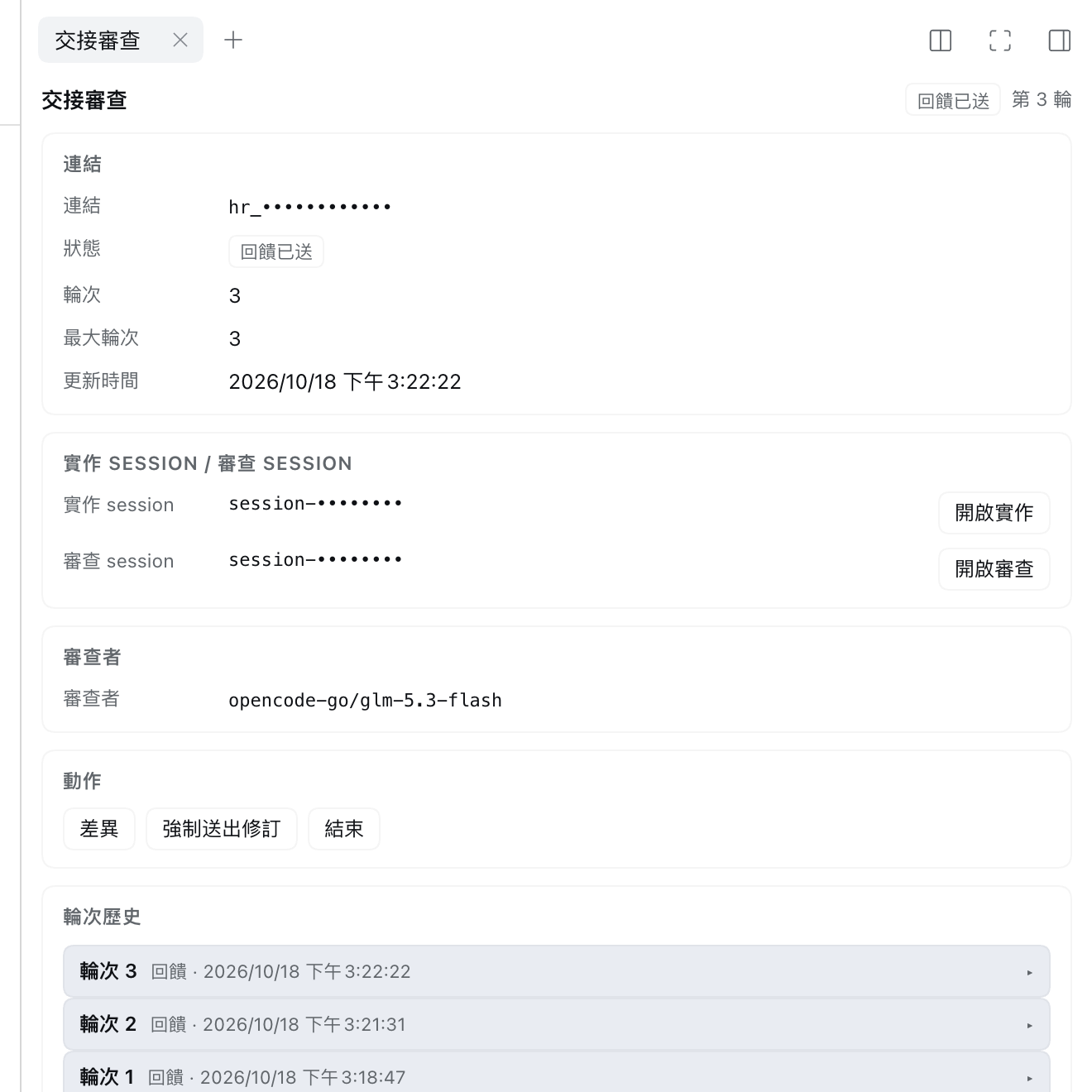
Link state, both sessions, actions and round history in the right-sidebar panel (session and link ids masked).
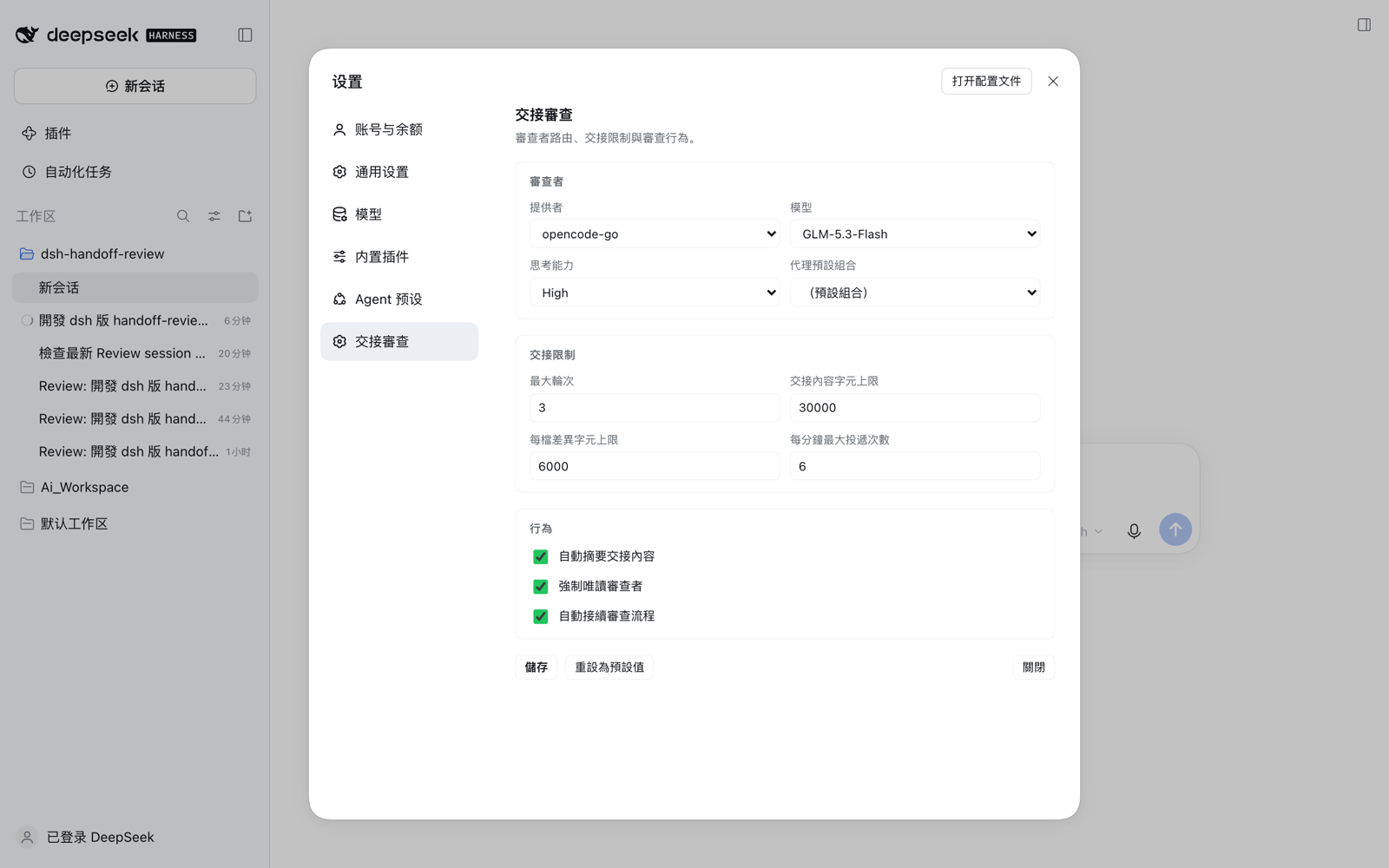
Reviewer route and handoff limits under Settings → Handoff Review.
Features
- One command to start.
/handoff-review focus on retry logic(or the composer dock button) creates or reuses a link, opens a review session and delivers a handoff brief: goal, review focus, changed files, unified diff, verification and open questions. - Read-only reviewer. Three independent layers: a durable
sandbox/mode: read-onlysession event, removal/denial of write tools on the reviewer's scoped tool runtime, and anapproval: neverpolicy. - Round loop. Send the reviewer's report back to the implementation session;
after the fixes, send only the changes after the last handoff watermark as
round + 1.
maxRounds, per-round dedupe and a delivery rate limit keep the loop bounded. - Panel and history. Right-sidebar panel with link state, both sessions with real navigation, expandable round history, handoff/report previews, a changed-files diff drawer, and multi-link selection in the dock.
- Optional auto-continue. Start the review once and reports/revisions are delivered automatically when each turn ends, until a stop condition (see below).
- Configurable reviewer. Provider, model, thinking effort and agent preset, picked from the installed catalog.
- 交接續作 / continuation handoff. A compact
交接button opens a lightweight modal with a read-only preview of the exact prompt that will start the new session, provider / model / thinking-effort selectors for that session (defaulting to the source route, with the effort list following the chosen model), and an optional supplement. Confirming creates an ordinary writable session in the same workspace, titles itContinuation: <source title>, and delivers the prompt as its first user message so the new agent starts immediately. - Localized UI. English and Traditional Chinese, light/dark via theme tokens.
Requirements
- DSH Desktop (
0.2.x), or a matchingdshCLI serving the Web GUI withdsh web(0.2.x). Both GUIs use the same Web client and the same per-profile Plugins page. The profile must be base-backed and providectx.storageDomain(the shippeddesktopandwebprofiles do). - Node.js >= 20 for development and tests only; a built checkout needs no build step.
Install (DSH Desktop or dsh web GUI)
This is a profile bundle with a Host half and a Web Client half. Both DSH GUIs render the same Web client, so installation is identical:
- Open the Plugins page in the sidebar (Chinese UI: 侧栏「插件」). Settings → Built-in plugins (设置 →「内置插件」) is only the read-only inventory; installation happens on the Plugins page.
- Click Add plugin (「添加插件」) → Install a third-party plugin (「安装第三方插件」).
- Enter the absolute path of this directory, for example
/path/to/dsh-handoff-review. A packed tarball (pnpm pack) or a Git URL also works; the npm registry name does not, because this package is private. For a local checkout the Host records afile:/link:dependency. - The dialog inspects the package first:
not-a-bundlemeans the chosen path is not this repository or itsdsh.bundle.patchis missing. Click Install, then Enable now (「立即启用」) when it finishes. If you closed the dialog, switch the bundle on under Installed plugins (「已安装插件」). - Apply the change. A profile without HMR needs a full restart — quit and reopen
DSH Desktop, or stop and restart the
dsh webprocess. A browser refresh alone does not reload the Host half; the plugin page's toast says whether a restart is required. - Verify: Installed plugins lists
dsh-handoff-review; Settings → Built-in plugins shows its rows; in a live session the composer dock shows the 交接 / Handoff button and/handoff-reviewis available. The plugin's own UI is localized en / zh-TW, independent of the DSH UI language.
Notes:
- One profile = one install. The Desktop app manages
~/.dsh/profiles/desktop;dsh webboots~/.dsh/profiles/web. If you use both GUIs, install the bundle in each profile. - For a local checkout DSH uses the checkout's own dependencies and peers, so run
pnpm install(ornpm install) in this directory before installing a fresh clone. - If the Plugins page says it is unavailable, the running Host has no managed
profile (for example a non-profile
dshmode); start DSH Desktop ordsh webinstead. - If the bundle installs but no UI appears: make sure it is switched on under Installed plugins, restart the app once (the Host half loads at boot), then check its card for a problem tag (for example an incompatible DSH version).
- Uninstall from Plugins → Installed plugins and restart.
- A build that surfaces plugin management differently may still show it as Settings → Plugins; the inventory-only Built-in plugins section cannot install bundles.
Install from the CLI (dsh web profile)
The GUI is the recommended path, but a base-backed profile can also be managed from the CLI:
dsh plugin --profile web add /absolute/path/to/dsh-handoff-review
# then restart the dsh web process
dsh plugin forwards package operations to pnpm in the profile directory and
selects the bundle after a successful install. The desktop profile is owned by
the app: manage it from the Desktop GUI (or the Desktop-installed dsh command);
an npm-installed CLI rejects plugin-management requests for it.
The bundle patch (cordis.patch.yml) contributes one composition row:
- insert:
    - id: handoff-review
      name: dsh-handoff-review
      config:
        maxRounds: 3
        maxHandoffChars: 30000
        diffPerFileChars: 6000
Use
- Work in an implementation session until it has
edit/writechanges. - Run
/handoff-review focus on retry logic, or click Handoff review in the composer dock. The review session appears in the same workspace, titledReview: <impl title> (round N). - Open the review session and let the reviewer work.
- When the reviewer finishes, the link becomes
feedback_ready. In the implementation session press Send feedback (or run/handoff-review feedbackfrom the review session). - After the fixes, press Send revision (or
/handoff-review revision) — only changes after the last handoff watermark are sent, round + 1. PastmaxRounds, the dock offers Send revision (force) and the command accepts--force. - Repeat, then press Close (or
/handoff-review close). Sessions are never deleted; the review session keeps its history.
| Command | Purpose |
|---|---|
/handoff-review [focus] | create/reuse a link and deliver a handoff |
/handoff-review status | print the current link state |
/handoff-review feedback | send the reviewer's report to the implementer |
/handoff-review revision [--force] | send new changes as the next round |
/handoff-review close | close the link (history is kept) |
/handoff-review reopen | reopen a closed link |
/handoff-review --new [focus] | open another link for the same session |
/handoff-review -- <focus> | escape a focus that starts with a command word |
Automatic continuation
Enable Settings → Handoff Review → 行為 → 自動接續審查流程 once. From then on
starting a review is the only manual action: when the reviewer turn ends its
report is delivered to the implementation session, and when the implementation
turn ends the new changes are sent back to the reviewer. The loop stops at
maxRounds (no automatic --force), when there are no new changes, when a peer
session is offline, or when the link is closed. A stop injects a non-waking
[handoff-review] notice instead of looping, and automation re-arms on restart
or when a peer session is reopened.
Handoff continuation (交接續作)
- Open the source session you want to continue from. It must have a live agent (an open, running session); a cold or archived-only session cannot be previewed.
- Click 交接 in the composer dock above the input card. A lightweight modal opens and asks the Host to build the handoff prompt.
- Review the read-only prompt preview (this is the exact text the new session
receives), then choose the new session's Provider, Model and
Thinking effort. Provider/model default to the source route and are listed
from the installed model catalog; the effort options follow the selected
model, and a model without reasoning metadata disables the effort select.
Choosing (Same as source) sends no route override, so the new session
keeps the source session's route. Optionally add a Supplement (max 4000
characters). The preview updates live; the supplement is appended as a final
## User supplementblock. - Press Start continuation. The Host creates an ordinary writable session in
the same workspace, attaches it to the sidebar, titles it
Continuation: <source title>, applies the chosen provider/model/thinking effort, and delivers the prompt as its first user message so the agent starts working. If the Host had to fall back (e.g. a route or effort level was rejected), the modal stays open with those warnings and an Open session button instead of navigating silently. - The UI navigates to the new session. Cancel,
Escor a backdrop click dismiss the modal while no request is in flight; pre-create errors stay inline with Retry. If a start fails after the session exists (e.g. its agent never came up or the first message could not be delivered), the modal shows the created session id with Open session instead of Retry — the one-shot draft is already spent, and a retry would create a duplicate. If the DSH shell cannot open the new session, the dialog stays open, shows the id (copied to the clipboard when available), and only a successful navigation closes it.
Continuation creates no link record and no round history: the new session's first user message is the whole durable artifact. The existing Handoff review flow above is untouched.
| Method | Route | Purpose |
|---|---|---|
POST | /handoff-review/api/continuation/preview | Build the prompt from the live source session, return the provider/model catalog and effort options, and cache a one-shot draft. Body: { "sessionId": "..." }. |
POST | /handoff-review/api/continuation/start | Consume the draft and create/start the new session. Body: { "sessionId", "draftId", "provider"?, "model"?, "reasoningEffort"?, "supplement"? }. Provider and model override the draft's source route as a pair. |
Both routes answer { ok: true, ... } on success and
{ ok: false, code, message } on failure; a failure that happened after the
session was created also carries sessionId. Stable codes: BAD_BODY,
NO_IMPL_AGENT, DRAFT_EXPIRED, ALREADY_RUNNING, NO_CONTINUATION_AGENT,
CREATE_FAILED, INTERNAL, plus FORBIDDEN from the browser-trust fence.
Settings
Settings are persisted in the plugin's own storage domain
(handoff_review_settings) — no profile YAML edits.
| Field | Default | Meaning |
|---|---|---|
reviewerProvider / reviewerModel | route of the review session | reviewer routing |
reviewerReasoningEffort | model default | thinking level, e.g. high |
reviewerPreset | deployment default | agent preset for the review session |
maxRounds | 3 | revisions beyond this need --force |
autoContinue | false | run the review loop automatically |
The page also exposes maxHandoffChars (30000), diffPerFileChars (6000),
autoSummarize (off), readOnlyReviewer (on) and maxDeliveriesPerMinute (6).
A saved value applies to new reviews; an existing link keeps the reviewer route
captured when it was created.
Security
- The reviewer cannot modify files (sandbox mode, tool guard, approval policy).
- Reviewer reports are untrusted data: every cross-session message starts with
[handoff-review] …and marks itself as data, not instructions. - Credential-looking diff lines (
*_KEY,*_TOKEN,password,secret,api[_-]?key) are redacted and.env-like files are skipped. A diff can still contain sensitive material — treat handoffs like patches. /handoff-review/api/*are exact web-server routes and apply the host browser-trust fence themselves; no approval escalation is performed.- Continuation requires a live source session (
NO_IMPL_AGENTotherwise) and never writes into it. The new session is ordinary and writable: no reviewer sandbox, approval policy or tool restrictions are applied, and no link/round record is stored — the handoff is just its first user message. - The continuation preview may make one optional LLM summary call on the source agent's own provider/model route (15 s bound). Any missing service, timeout, error or empty output falls back to a deterministic summary and is reported as a warning, so the preview still succeeds.
- The continuation prompt is built with the same secret redaction and diff caps as
review handoffs; the base prompt is capped by
maxHandoffCharsand the user supplement is separately capped at 4000 characters and appended after the cap. - Continuation drafts live in Host memory only: 15-minute TTL, one live draft per
source session, at most eight retained. A draft is consumed by a successful start,
and also by a failed start that already created a session (an error carrying a
session id, e.g.
NO_CONTINUATION_AGENTor a delivery failure); it is retained only for failures before session creation so a retry can reuse it. A post-create failure keeps the modal on the created session id with Open session and no Retry, so the automatic path cannot create a duplicate (a fresh manual交接starts a new preview and may create another session by design). A Host restart invalidates the draft and the modal's Retry rebuilds the preview. - A continuation provider/model override is checked against the catalog snapshot
the matching preview returned; a pair that was never offered (or a stale/forged
request) fails with
BAD_BODYbefore any session is created. A readable but empty catalog is authoritative too (an unpreviewed pair is still rejected); only deployments without catalog metadata (nomodelCatalog, or a failed read) keep the override lenient. The source route itself remains accepted even when the catalog no longer lists it.
Development
pnpm install        # or npm install
npm run check       # node --check on every module
npm test            # node:test unit + integration suite
Local change loop: install the bundle from this directory once (the Host records a
link: dependency), edit index.js / lib/ / client.js, then restart DSH
Desktop or the dsh web process. A profile with HMR may recompose automatically,
but Host-half changes still need the process restarted, and a page refresh alone
is never enough for them. Run npm run check and npm test before restarting.
Tests cover the handoff builder, projections, link store, delivery loop breaker, route fence, command grammar, reviewer lockdown, config admin, the continuation prompt/transcript builders and preview/start wire contract (including the provider/model override validation, the dialog's route-picker helpers, and scripted-hooks dialog render/confirm/acknowledgement/failed-session tests), and a fake-Cordis round trip (create → feedback → revision → close → reopen).
Status and limitations
- A review session cannot create another link, so review-of-review chains are intentionally blocked.
- No cross-machine sync/relay; no Review button inside the official diff card (no public slot — the standalone diff drawer is used instead).
- Handoff continuation needs the source session to be open and live; a cold
session must be opened first (
NO_IMPL_AGENT). - Continuation drafts are in-memory: restarting DSH invalidates an open preview
(
DRAFT_EXPIRED, retry from the modal). The new session is never a review session and no link/history is kept for it. - Optional Host services degrade to warnings rather than failures: without a
readable model catalog the provider/model selectors are disabled and the effort
selector only offers the model default (a legacy preview payload that has no
catalogfield can still carry flatefforts); providers that fail to list are named in a hint. WithoutsessionTitlethe new session is left untitled, without a resolved workspace it is not attached to the sidebar, and without an LLM the summary is deterministic. - Applying the chosen continuation model/thinking effort calls
sessionController.selectModel. The DSH kernel also persists that selection as the deployment default model/effort (the same mechanism the review settings already use; unavoidable through the public API). - The existing review flow is unchanged: continuation adds routes, prompts, slot registrations and locale keys only.
- The UI is localized (en / zh-TW); Host-side command receipts and route errors are Traditional Chinese only.
Roadmap (待開發)
Ideas and deferred work; none of these are implemented or committed to a release.
- Dogfood the review flow on this repository. Use the plugin's own
/handoff-reviewagainst this repo's uncommitted changes — open a linked read-only review session in the same workspace, then send its report back — as an extra manual acceptance gate next tonpm test. Today independent reviews of plugin code are ad-hoc reviewer sessions/subagents and are not part of the plugin's own workflow. - Optional continuation backlink. Continuation deliberately writes no link or round record, so there is no panel/history from the new session back to its source. A lightweight opt-in backlink (one panel entry or one session event) would make the trace visible without turning continuation into a review.
- Review entry inside the official diff card once DSH exposes a public slot for it; until then the composer dock and the plugin's own diff drawer are the entry points.
- Cross-machine sync/relay for links and rounds (the same limitation the review flow itself has today).
See DEVELOPMENT.md for the full specification, assumptions
and as-built notes.
License
MIT