
 @iptton-ai
dsh-plugin-session-notes
Highlight & annotate DeepSeek Harness (DSH) conversations with sticky notes — dynamic Cordis plugin
- Stars
- 2
- Language
- JavaScript
- Created
- Sep 8, 2026
- Updated
- Oct 5, 2026
Introduction
Session Notes — DSH 会话划线便签插件
Unofficial project, independently developed and maintained by community members. 非官方项目,由社区成员独立开发和维护。
English · 中文说明
Highlight any sentence in your DeepSeek Harness (DSH) conversation, attach a sticky note to it, and keep all notes in a right-side panel — filterable by current workspace (directory) or current session. Notes persist across restarts and can be sent straight back into the composer.
在 DeepSeek Harness (DSH) 的会话消息中选中任意句子划线并记一张小便签;右侧面板聚合展示全部便签,支持按当前目录 / 本会话过滤;便签跨重启持久化,还可一键发送到对话框继续追问。
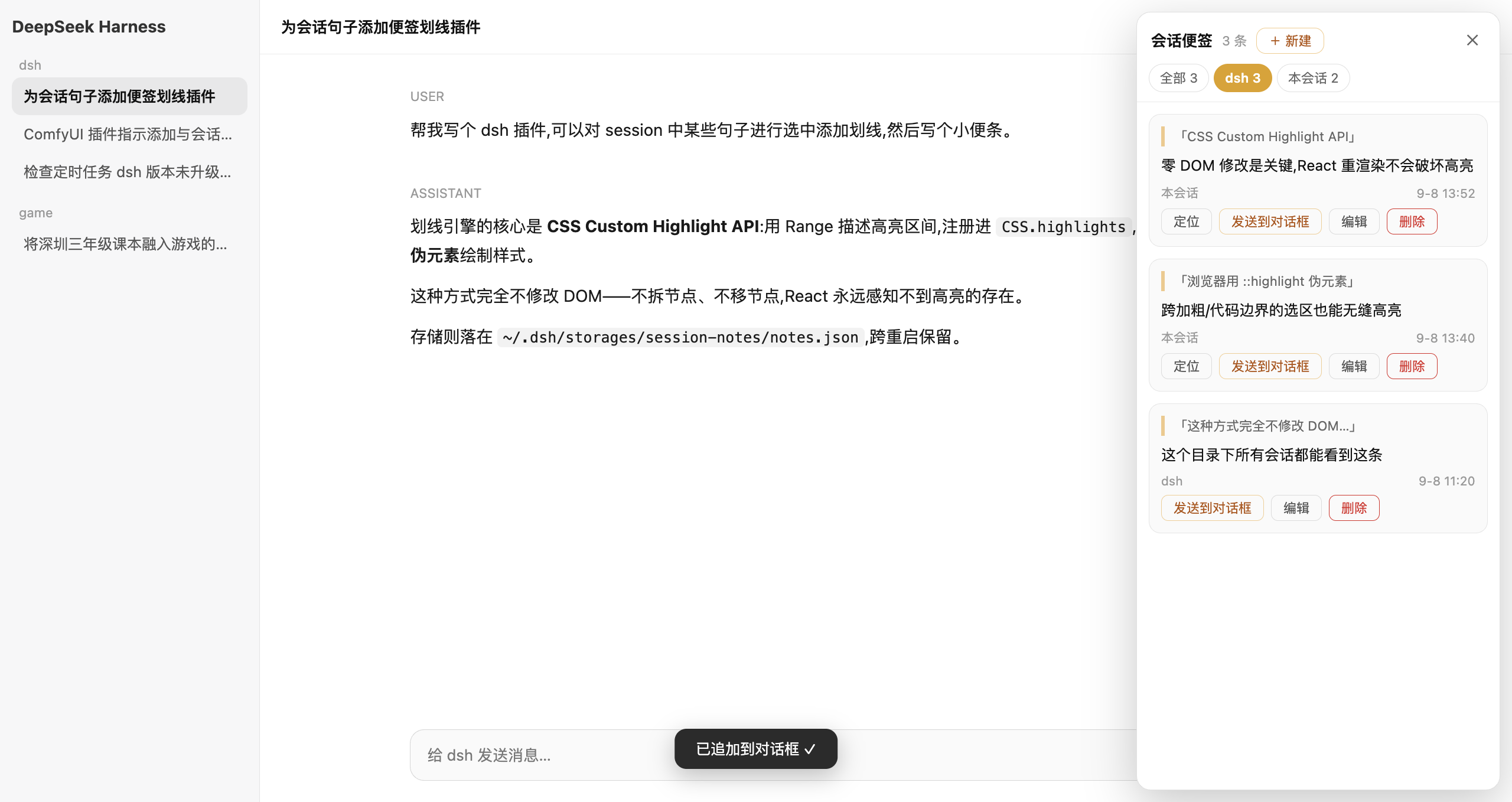
Features
- ✍️ Highlight & annotate — select any text in a message (across bold/code/paragraph boundaries), click the floating 📝 记便签 button, write your note. The selection gets a persistent yellow highlight (CSS Custom Highlight API — zero DOM mutation, React-safe).
- 🗂 Three scopes — every note belongs to this session, this workspace (directory), or global (whole DSH). Create, edit and delete in the panel; scoped notes are visible from any session of that scope.
- 🔍 Filterable panel — toggle between All / current directory / current session, with live counts.
- 📤 Send to composer — append a note (content + quoted source) to the current input draft, ready to send.
- 👀 View-first popup — clicking a highlight opens the note read-only; editing is an explicit action.
- 🔄 Self-healing highlights — MutationObserver + 5s reconciliation re-apply highlights after re-renders, virtualization, or pagination.
- 💾 Durable storage — plain JSON at
~/.dsh/storages/session-notes/notes.json; fs-service write with shell fallback, serialized queue. - 📌 Status note (resident form) — one active per workspace, update = replace (not append); rendered as the Current line atop the panel. See design doc (inspired by project-working-loop).
- ☑ Task notes → new session (resident form) — a task note carries
next(next action),doneWhen(acceptance condition), and a done checkbox. ▶ 新会话 spawns a fresh session whose opening message is the task's entire worldview: task + creation-time three-layer capture (quote / containing message / the question that prompted it) + a spawn-time 30-min tail digest of the origin session + the workspace status snapshot + a "restate, then act; stop if background is insufficient" preamble. Hard cap 8000 chars with a fixed trim ladder. - ⏰ Scheduled spawn (resident form) — set
dueAt(quick picks: tomorrow 9am / in 5 hours); default auto-spawn a new session at due time, or notify-only. One-shot latch with three-phase persistence (never double-spawns across restarts); done tasks never fire; missed auto tasks fire on next boot. - 🛡 Origin-loss defense (resident form) — the host polls
session/listevery 3 min: when a task's origin session is deleted, pending auto-spawns are downgraded to notify with a panel decision card (照常自动跑 / 取消定时 / 编辑); archived origins get a soft badge only. The opening message itself carries the stop-and-ask guard for races the poll missed. Tasks are never silently deleted — the creation-time capture survives session death.
Install
Two forms are supported: A. resident profile plugin(常驻,重启后仍在,推荐)and B. dynamic cordis package(动态,免装即用,重启即失)。
A. Resident — profile bundle (recommended)
This package declares dsh.bundle.patch (→ cordis.patch.yml) in its package.json. That declaration is what makes DSH treat it as a manageable profile bundle rather than a plain dependency — without it, installation ends with "this package declares no bundle, so it cannot be managed as a plugin".
CLI:
# straight from GitHub
dsh plugin --profile web add github:iptton-ai/dsh-plugin-session-notes

# or from a local clone
git clone https://github.com/iptton-ai/dsh-plugin-session-notes
dsh plugin --profile web add /abs/path/to/dsh-plugin-session-notes
GUI: sidebar → Plugins → Add plugin, then paste github:iptton-ai/dsh-plugin-session-notes.
Either way DSH installs the dependency, appends dsh-session-notes to the profile's dsh.profile.bundles, and applies the package's cordis.patch.yml as a bundle layer — which inserts the session-notes row. Restart dsh web. The host half serves /session-notes/api/*; the client half is picked up via the package's dsh.client declaration and bundled for every page load (UI survives refresh).
Manual equivalent (editing the profile yourself)
-
Clone this repo anywhere on disk.
-
Add it as a dependency of the profile and install:
cd ~/.dsh/profiles/web pnpm add link:/abs/path/to/dsh-plugin-session-notes -
Add
"dsh-session-notes"to thedsh.profile.bundlesarray in that profile'spackage.json. -
Restart
dsh web.
Do not hand-insert the session-notes row into the profile's cordis.patch.yml: the bundle's own cordis.patch.yml already inserts it, so duplicating the insertion would register the row twice.
B. Dynamic — cordis_define
Runs in the current dsh web process — no build step, no npm.
-
Clone or download this repo.
-
Open a DSH session (创造模式 / cordis preset — the one with
cordis_define/cordis_runtools) and ask the agent:帮我安装这个插件:仓库 https://github.com/iptton-ai/dsh-plugin-session-notes。 用 cordis_define 定义(读取 src/host.js 作为 code.host、src/client.js 作为 code.client,plugin id 前缀 snote), 然后 cordis_run 激活并批准。
Or, if you prefer doing it by hand: paste the two function bodies from
src/host.jsandsrc/client.jsintocordis_define'scode.host/code.client, thencordis_runthe returned package and approve it in the UI. -
Refresh the page, open a session, and select some message text.
Dynamic plugins live for the lifetime of the
dsh webprocess. After a DSH restart, re-run step 2 (your notes on disk are kept).
How it works
| Piece | Where | What |
|---|---|---|
| Zero-DOM highlight engine | src/client.js | Matches each note's quote against the message flow with whitespace-folding + gap-aware text assembly (block/<br> boundaries insert \n, inline-adjacent nodes join seamlessly — mirrors Selection.toString()), then registers Ranges into CSS.highlights (::highlight(snote-hl)). Falls back to <mark> wrapping on engines without the Highlight API. |
| Message-flow anchor | src/client.js | A hidden entry in the conversation.composer.dock slot walks up to the scroll container — no product class names, no DOM replacement. |
| Side panel / popups / selection button | src/client.js | Additive slot entries only: shell.overlay, conversation.session.header.utilities. |
| Persistence | src/host.js | Package-private RPC (`notes/list |
Sandbox note
The host half explicitly passes sandboxPolicy: { mode: 'danger-full-access' } only for its own storage file (~/.dsh/storages/session-notes/notes.json), because the deployment-default workspace-write fence does not include the DSH home directory. The plugin never touches other paths.
中文说明
Session Notes(会话划线便签) 是一个 DeepSeek Harness (DSH) 的动态 Cordis 插件:像在书上做批注一样,在 AI 会话里边聊边划线、记便签。
功能特性
- ✍️ 划线记便签 —— 在任意消息中选中一段文字(跨加粗/行内代码/段落边界的选区都支持),点选区上方的「📝 记便签」按钮写下想法,选中文本即获得持久的黄色划线。基于 CSS Custom Highlight API,零 DOM 修改,React 重渲染不会破坏高亮。
- 🗂 三种归属 —— 每条便签可归属本会话、当前目录(workspace)或全局(整个 DSH);在面板里可新建/编辑/删除,目录级与全局便签在该范围内所有会话可见。
- 🔍 可过滤面板 —— 右侧面板支持 全部 / 当前目录 / 本会话 三档过滤,实时计数;点击划线默认打开只读查看弹窗,点「编辑」才进入编辑态。
- 📤 发送到对话框 —— 把便签(内容 + 引用原文)一键追加到当前输入框草稿,直接继续追问。
- 🔄 高亮自愈 —— MutationObserver + 5 秒对账,消息重渲染、翻页加载、虚拟化后划线自动恢复。
- 💾 持久存储 —— 纯 JSON 落盘于
~/.dsh/storages/session-notes/notes.json,跨重启保留;fs 服务写入失败时自动降级 shell 通道,写队列失败隔离。 - 📌 状态便签(常驻形态)—— 每个目录一条活跃,更新=替换而非追加;渲染在面板顶部的「当前」状态行,一眼看清做到哪了。设计文档 docs/design-working-loop.md(灵感来自 project-working-loop)。
- ☑ 任务便签 → 新会话(常驻形态)—— 任务便签携带
next(下一步)、doneWhen(验收条件)与完成勾选框。▶ 新会话以任务为世界观开一个全新会话:开场消息 = 任务 + 创建时三层捕获(高亮原文/所在消息/当时的提问)+ spawn 时来源会话 30 分钟尾声摘要 + 工作台状态快照 + 「先复述再执行;背景不足就停下来问」的起手指示;总量 8K 硬顶、固定裁剪阶梯。 - ⏰ 定时启动(常驻形态)—— 设
dueAt(快捷:明早 9 点 / 5 小时后),到点默认自动开新会话,可选仅提醒;一次性闩锁 + 三段落盘,重启绝不双开;已勾完成的任务永不触发;错过的 auto 任务下次启动照常补射。 - 🛡 来源会话失守防线(常驻形态)—— host 每 3 分钟轮询
session/list:来源会话被删时,未触发的 auto 任务自动降级为提醒并浮出决策卡(照常自动跑/取消定时/编辑);归档仅软提示。开场消息自带停止条款兜住轮询缝隙;任务永远不会被静默删除——创建时捕获不随会话消亡。
安装方法
支持两种形态:A. 常驻 profile 组合包(重启后仍在,推荐)与 B. 动态 Cordis 插件(免安装、重启即失)。
A. 常驻 —— 作为 profile 组合包安装(推荐)
本包的 package.json 声明了 dsh.bundle.patch(→ cordis.patch.yml)。DSH 正是凭这一声明把它当作可管理的组合包;缺了它,安装会以「这个包没有声明组合包,不能作为插件管理」结束。
# 直接从 GitHub 装
dsh plugin --profile web add github:iptton-ai/dsh-plugin-session-notes

# 或从本地克隆装
git clone https://github.com/iptton-ai/dsh-plugin-session-notes
dsh plugin --profile web add /abs/path/to/dsh-plugin-session-notes
界面上等价操作:左侧 插件 → 添加插件,粘贴 github:iptton-ai/dsh-plugin-session-notes。
DSH 会把依赖装好、把 dsh-session-notes 追加进 profile 的 dsh.profile.bundles,并把本包自带的 cordis.patch.yml 作为组合包层应用(其中插入 session-notes 那一行)。重启 dsh web 即可。宿主半区提供 /session-notes/api/*,浏览器半区经包的 dsh.client 声明被打进每次页面加载的 bundle(刷新不丢 UI)。
手动改 profile 也可以:把本仓库
pnpm add link:<路径>进 profile,再把"dsh-session-notes"加进dsh.profile.bundles。不要再手动往 profile 的cordis.patch.yml里插session-notes行 —— 组合包自带的 patch 已经插过一次,重复插入会注册两遍。
B. 动态 —— cordis_define
这是一个 DSH 动态 Cordis 插件,直接运行在当前 dsh web 进程里 —— 无需构建、无需 npm。
-
克隆或下载本仓库。
-
打开一个带
cordis_define/cordis_run工具的 DSH 会话(创造模式 / cordis 预设),对 agent 说:帮我安装这个插件:仓库 https://github.com/iptton-ai/dsh-plugin-session-notes。 用 cordis_define 定义(读取 src/host.js 作为 code.host、src/client.js 作为 code.client,plugin id 前缀 snote), 然后 cordis_run 激活并批准。
也可以手动:把
src/host.js、src/client.js两个函数体分别粘贴进cordis_define的code.host/code.client,再cordis_run激活返回的 package 并在界面上批准。 -
刷新页面,打开会话,选中一段消息文字即可开始。
动态插件的生命周期与
dsh web进程一致。DSH 重启后重新执行第 2 步即可(磁盘上的便签数据不会丢)。
工作原理
| 模块 | 位置 | 说明 |
|---|---|---|
| 零 DOM 高亮引擎 | src/client.js | 用空白折叠 + 间隙感知拼接(块级/<br> 边界补 \n、inline 紧邻节点无缝相连,与 Selection.toString() 语义一致)把每条便签的引用文本匹配回消息流,然后构造 Range 注册进 CSS.highlights(::highlight(snote-hl) 伪元素绘制)。不支持该 API 的浏览器自动回退 <mark> 包裹方案。 |
| 消息流锚点 | src/client.js | 在 conversation.composer.dock 插槽注册一个隐藏锚点组件,向上定位消息滚动容器 —— 不依赖产品 class 名,不替换任何产品 UI。 |
| 面板 / 弹窗 / 选区按钮 | src/client.js | 全部为增量插槽项:shell.overlay、conversation.session.header.utilities。 |
| 持久化 | src/host.js | 通过 harness.handle 提供包私有 RPC(`notes/list |
沙箱说明
Host 半仅对自己的存储文件(~/.dsh/storages/session-notes/notes.json)显式传 sandboxPolicy: { mode: 'danger-full-access' },原因是部署默认的 workspace-write 文件围栏不包含 DSH 主目录。插件不触碰其他任何路径。
License
MIT