
 @ice5kysl
dsh-workspace-kit
dsh (DeepSeek Harness) workspace kit: ⌘K Spotlight search, soft workspace archive/restore, per-workspace icons/colors, enhanced sidebar with drag reorder — Cordis bundle plugin (host tools + browser client).
- Stars
- 1
- Language
- JavaScript
- Created
- Sep 4, 2026
- Updated
- Oct 19, 2026
Introduction
dsh-workspace-kit

GitHub: https://github.com/ice5kysl/dsh-workspace-kit | MIT License | Target dsh:
@deepseek-ai/dsh≥ 0.1.1-rc.2 | English · 简体中文
A dsh (DeepSeek Harness) plugin written to official conventions, in the Cordis "bundle" form. It solves two pain points:
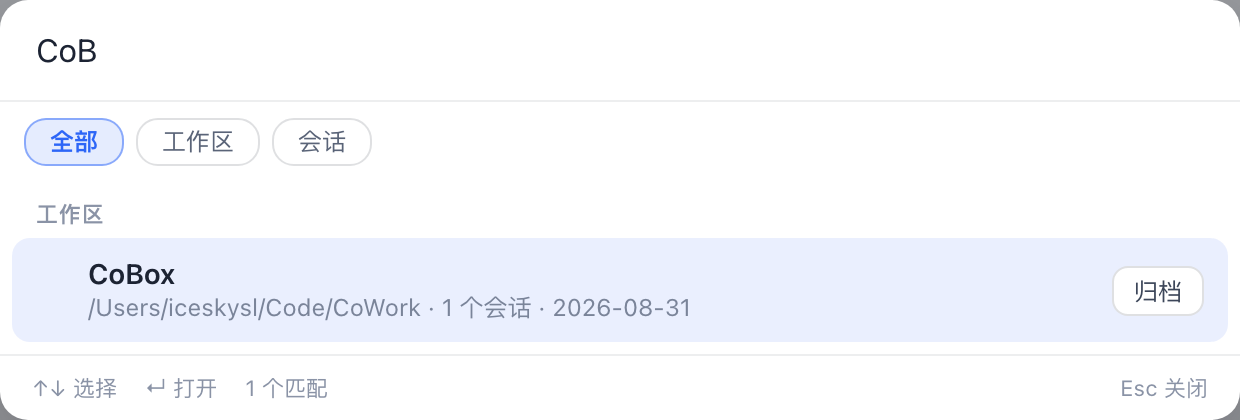
- Too many workspaces, hard to find → ⌘K / Ctrl+K Spotlight search: fuzzy-search all workspaces and sessions (including ungrouped and archived ones), navigate with ↑↓ and press Enter to open / jump directly.
- Want to archive old workspaces → soft archive (hidden + restorable, no data deleted):
- Built-in sidebar: the plugin registers into the
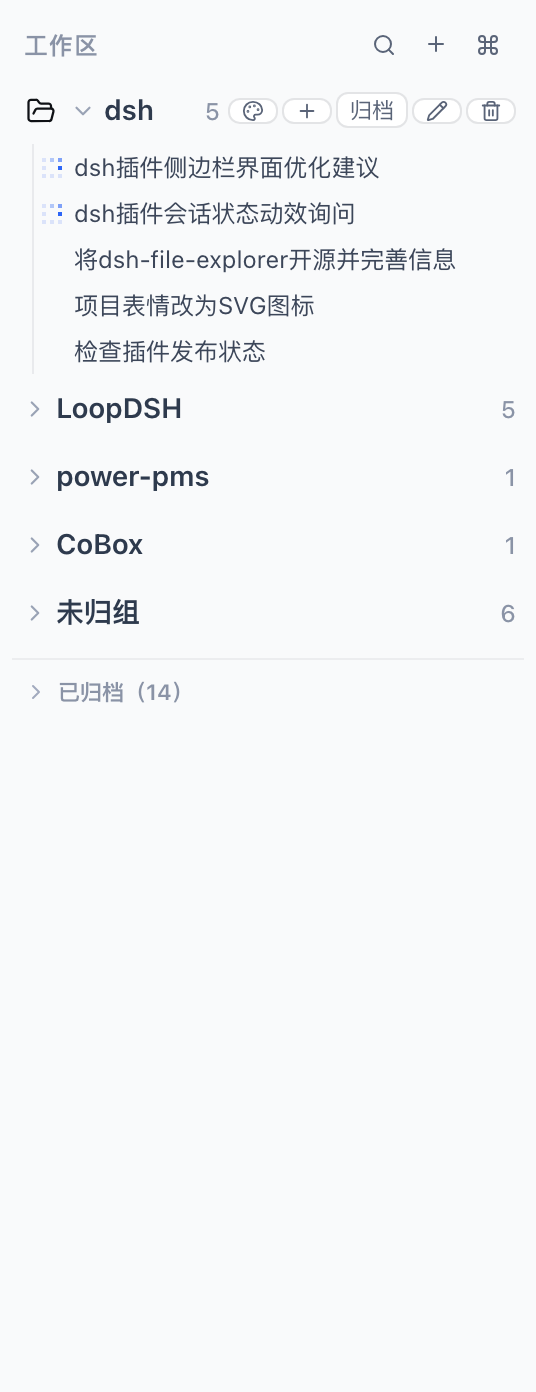
sidebar.workspacesslot at low priority (-1), replacing the shipped workspace browser — archived workspaces leave the "Workspaces" list and move into a collapsible "Archived (N)" section where you can restore / open / start a new session; ungrouped sessions live in their own section too. - Spotlight: the idle list hides archived items; when you type, matching archived items appear with an "Archived" badge so you can locate and restore them.
- Archive / restore is also available on every sidebar row and Spotlight result.
- Built-in sidebar: the plugin registers into the
The plugin ships two faces carried by a single Loader entry (dsh-workspace-kit):
| Face | File | Responsibility |
|---|---|---|
| Host (node) | lib/index.js | workspace_find / workspace_list model tools; /workspace-find, /workspace-list slash commands (read-only lookup; write actions stay in the GUI) |
| Browser (client) | lib/client.js | Spotlight palette (registered into the official, otherwise-empty shell.overlay slot) + soft-archive store (localStorage-persisted) + enhanced sidebar browser |
Design rationale: dsh's official model only has session-level (irreversible) archiving and the shipped sidebar browser has no per-row hide seam, so this plugin takes a "view-layer soft archive + shadow the sidebar browser" approach: archive state is managed by the plugin (browser-persisted) and, by shadowing
sidebar.workspaceswith its own browser that carries the collapsible "Archived" section, archived workspaces truly leave the main sidebar list. The v1 capability boundary of the replacement browser is documented in known-limitations.md.
Beyond archive/restore, the enhanced sidebar (when active) adds:
- New workspace (the plus button next to search) — system directory picker → register → open.
- Row-level quick actions — hovering a workspace shows the frequent verbs inline instead of hiding them in the "···" menu: new session on live rows, restore on archived rows; the menu keeps the occasional actions (icon/color, rename, archive, remove registration).
- Sidebar search (expandable input) — filter workspaces/sessions by title and path, plus full-text session-content search (≥2 chars, debounced, via the official host content index).
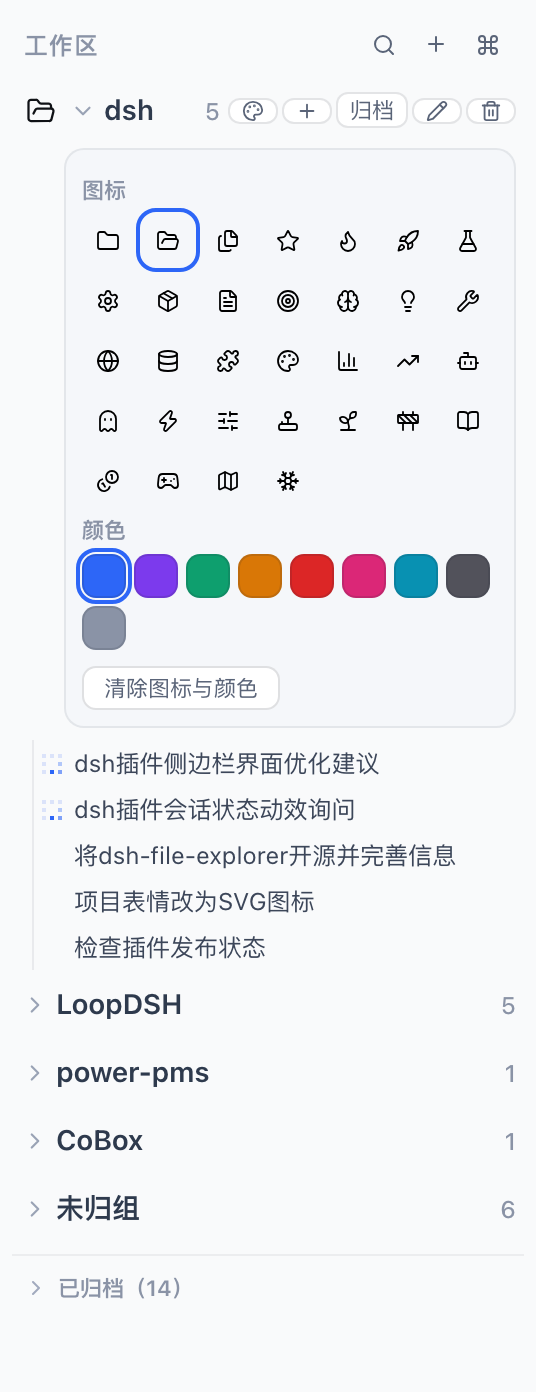
- Per-workspace icon + accent color — hover a row and click the palette button (or the icon itself); 32 SVG icons + 9 colors, "clear" to reset; Spotlight results show the same look (browser-persisted).
- Drag reorder — drag workspace rows → official
insertBefore; drag sessions within their workspace →insertSessionBefore; once a workspace is manually dragged its sessions switch to the manual (account) order, matching the shipped Manual semantics. - Styled dialogs — rename / delete / archive confirmations use in-app styled dialogs instead of
prompt/confirm. - One-click sidebar toggle — a footer button switches between the enhanced sidebar and the official sidebar instantly; the choice persists across restarts.
You can also say things like "use workspace_find to find the pms workspace" in a session, or type /workspace-find pms.
Screenshots
| Enhanced workspace sidebar | Per-workspace icon & color picker | ⌘K Spotlight search |
|---|---|---|
 |  |  |
Languages (i18n)
All user-facing copy is bilingual (Simplified Chinese / English):
- Browser (client): locale is resolved from the
localStoragekeydsh.workspace-kit.locale(zh|en) when set, otherwise fromnavigator.language(s)(zh*→ Chinese, anything else → English). - Host (node): locale is resolved from the
WSKIT_LOCALEenvironment variable (zh|en) when set, otherwise fromLC_ALL/LANG(zh*→ Chinese), defaulting to English. - Translations live at the call site via an
L('中文', 'English', vars?)helper backed bysrc/shared/i18n.ts; see the per-sidesrc/client/locale.tsandsrc/host/locale.tsfor detection.
Quick install (personal dsh)
Published on npm — if you already run dsh Web, install in one line:
dsh plugin --profile web add dsh-workspace-kit
The git route below is for development / running the latest source.
Prerequisites: dsh on PATH (@deepseek-ai/dsh ≥ 0.1.1-rc.2), Node 20+.
# 0. Get the source (or use a local directory)
git clone https://github.com/ice5kysl/dsh-workspace-kit && cd dsh-workspace-kit

# 1. Build (produces lib/index.js + lib/client.js; the prepare hook of
#    npm install already runs the build for you)
npm install                # installs build-time deps (typescript/esbuild/@types …)
npm run build

# 2. Install into your web profile (equivalent to the official `dsh plugin add`)
bash scripts/install-personal.sh
#    The script locates this directory itself and runs
#    `dsh plugin --profile web add .`, which appends the package to
#    `dsh.profile.bundles` in ~/.dsh/profiles/web (after dsh-web-app) and
#    lets the in-package cordis.patch.yml insert the single Loader row.

# 3. Verify the composition (no restart needed)
dsh --profile web --dump-config | grep -n "workspace-kit"

# 4. Restart the GUI to activate
#    Quit the current dsh web (Ctrl+C or kill the process), run `dsh web`
#    again, then refresh the browser at http://127.0.0.1:3080
Also usable as a monorepo subdirectory (e.g.
plugins/dsh-workspace-kit): the install script walks up frompackage.jsonto find the plugin directory, so both layouts need no command changes.
Package / distribute (optional)
npm pack          # produces dsh-workspace-kit-0.1.0.tgz (prebuilt lib/; prepack builds automatically)
# Other machine: dsh plugin --profile web add ./dsh-workspace-kit-0.1.0.tgz
Development
npm run typecheck   # tsc --noEmit (host + client sources)
npm run build       # esbuild: src/host → lib/index.js; src/client → lib/client.js
npm test            # standalone smoke test of the host workspace tools/slash commands
Source layout:
src/host/      Host side: locale.ts (env-based locale), util.ts (search/list pure
               functions), tools.ts (model tools), commands.ts (slash commands),
               index.ts (apply: registers per service availability)
src/client/    Browser side: locale.ts (navigator-based locale), archive-store.ts
               (defineStore soft-archive set + appearance, persist localStorage),
               dialogs.tsx, SidebarToggle.tsx, Spotlight.tsx (⌘K palette),
               WorkspaceSidebar.tsx, index.ts (apply: slot registrations + closures)
src/shared/    i18n.ts (pure locale helpers shared by both faces)
cordis.patch.yml    bundle layer: inserts the single Loader entry `dsh-workspace-kit`
How it works / design notes (based on official docs & source)
- Plugin shape = a bundle package (
dsh.bundle.patch) + a browser face (dsh.client.platform: 'web'+ the./clientexport). The host scans enabled Loader entries; one package provides both the node and the browser side from the same entry, and one package may only have one entry (multiple entries resolving to the same package name are rejected by the client module system). - Spotlight mounts into
shell.overlay(list/root) — the official slot reserved for whole-window custom overlays. The sidebar registers intosidebar.workspaces(single/root) at priority -1 to shadow the built-in occupant (lower priority renders; only equal priorities conflict) — the officially allowed "full replacement" route, at the cost of re-implementing some built-in browser capabilities yourself (see known-limitations). - Data is read through the framework's standard hooks (
useWorkspaces/useSessions/useStore, plususeSessionStatuson dsh ≥ 0.1.6); actions go through registeredinjectclosures that call the official UI services:ctx.uiWorkspace.startSession(workspaceId)(reuse/create and open that workspace's session),ctx.uiWorkspace.openSession(id)(select a session) and the workspace-controller calls for archive/rename/reorder. - The archive set uses the framework's
defineStore+persist(bare JSON in localStorage underdsh.workspace-kit.archive.v1), the same mechanism as built-in view preferences (e.g.dsh.workspace.view.v5). - There is no official registration API for global hotkeys (no keyboard service anywhere in the repo), so, following the convention of built-in plugins, a
windowkeydown listener is attached (⌘K/Ctrl+K); the palette stays mounted and rendersnullwhile closed to keep the listener alive. - The host side is deliberately read-only: archive semantics are view-layer (browser) state; keeping a second copy host-side would drift from the GUI, so it is intentionally not written.
Compatibility
- Target dsh:
@deepseek-ai/dshv0.1.1-rc.2 (dsh web, profileweb). The browser face targets that release'sshell.overlay/IWorkspaces/ISessionscontracts; re-validate against the upstream contract on version upgrades. - Tested against both sides of the 0.1.6 navigation change: dsh ≤ 0.1.5 (session navigation via
ctx.sessions.open) and dsh ≥ 0.1.6 (navigation moved toctx.uiWorkspace.openSession, anduseSessionPendingInteraction→useSessionStatus). The browser face feature-detects both, so one build serves either. Seenpm test(tests/smoke.test.mjs). - Known limitations and the backlog are tracked in docs/known-limitations.md (中文版见 docs/known-limitations.zh-CN.md).