
 @hytime
dsh-discover-index
Aggregate DSH plugin catalogs into a plugin-market index format 1 document for the DeepSeek Harness Discover tab
- Stars
- 1
- Language
- TypeScript
- Created
- Oct 17, 2026
- Updated
- Oct 19, 2026
Introduction
dsh-discover-index
English | 中文
Aggregates the live awesome-dsh-plugin catalog into plugin market index format 1 — the JSON document the DeepSeek Harness (DSH) Discover tab reads.
Published index: https://hytime.github.io/dsh-discover-index/index.json
[!NOTE] Requires a recent DSH, and it is used as a custom market. This index is consumed by the experimental Custom plugin markets feature, not by DSH core. That feature first shipped in DSH 0.2.1-alpha.4 (2026-10-15) and is carried by every 0.2.1 build since; an older DSH has no Discover tab and no way to add an index source. It is still marked experimental upstream, so it is off by default and you switch it on yourself — see Using it in DSH Discover.
Nothing here patches or extends DSH: this repository only publishes a JSON file, and DSH reads it once you point the feature at that URL.
[!IMPORTANT] This project is a conversion and aggregation source, not a security review. Every entry in the index is third-party data republished from upstream. Nothing here audits, sandboxes, or endorses the plugins it lists. Installing a DSH plugin runs third-party code inside your harness; review the plugin's source before you install it.
Status
Published and automated. The index URL above serves a live document, rebuilt daily by
build.yml and deployed only after the real
@deepseek-ai/dsh-plugin-market-index validator accepts it.
| Check | Result |
|---|---|
| TypeScript | compiles clean |
| Tests | Pass offline against fixtures recorded from the live catalog — pnpm test |
| Published index | Format 1, accepted by the real validator, rebuilt daily |
| Automation | daily cron, plus workflow_dispatch for a manual rebuild |
The exact plugin count is deliberately not quoted here: the pipeline reads the live catalog, so it moves by a few entries between runs as upstream gains, loses, and re-pins repositories. Query the index, or read the run summary in Actions, for today's number. See Running locally to build it yourself.
Run your own market
This repository is a template. Fork it, point it at a catalog, and it publishes your own market at your own GitHub Pages URL, rebuilt daily — no server, and nothing hardcoded to this account. Publishing your own plugin market →
What it produces
dist/site/index.json — a single format-1 document, published at
https://hytime.github.io/dsh-discover-index/index.json. Additional profiles declared
in config/config.yml each produce their own document (for example a star-floor subset
published as its own market), and each is validated independently in CI.
Alongside it: stats.html, a statistics page generated from the same document.
dist/site/is what gets published;dist/also holds the compiled JavaScript, which is not. The Pages artifact is thedist/site/directory alone, so the build output is not served as web content.
What the statistics page shows
https://hytime.github.io/dsh-discover-index/stats.html
The market index answers "which plugins exist". The statistics page answers the different question a visitor deciding whether to add this market actually has: how much of it is measured, and how much of it is trustworthy. It shows:
-
Coverage, each figure against its own denominator — how many entries carry a star count, a download count, a version history, an
engines.dshrange, a category, a label, or a risk finding. A single "coverage %" would be a fabricated number here: stars are known for one subset of plugins and DSH ranges for a different one, and dividing both by the same total would invent a fact nobody measured. -
Distributions — versions per plugin, plugins per category, plugins per label.
-
Who uses this index — repositories that mention or consume it, graded by evidence: reads the JSON (the published index URL appears there), mentions only (just the name appears), or a fork, which can publish a copy of its own. The tiers are never summed into one number, because a curated list linking to this repository does not consume the market.
Two honest limits are stated on the page rather than left implied. GitHub Pages keeps no access log, so how many clients actually loaded the index is recorded nowhere — usage leaves no public trace. And GitHub's code search does not index every repository or every recent change, so the reference figures are floors, not totals.
Everything is computed at build time from the document that was just validated, so the page cannot describe a market that differs from the published one, and the numbers are in the HTML rather than behind a script. The page loads no third-party script; the only remote hosts it references are this project's own.
What the market declares
Format 1 lets a market publish its own curated vocabulary, and Discover renders all of it. This market uses each axis:
| Axis | What is declared | What it gives you in Discover |
|---|---|---|
metadata.categories | Upstream's 23 categories, translated | The category pills above the list |
metadata.labels | Permission capabilities, risk findings, popularity buckets | The Labels filter menu and the tags on each card |
metadata.sortKeys | stars, downloads, added | Sort menu entries, each opening descending |
metadata.keywords | Runtime identity, category, and capability words | Free-text search recall |
Labels are the most useful of the four, because they answer questions the upstream catalog cannot. They come from three places:
- Capabilities — upstream's trust scan reports what each plugin's code can reach:
fs-read,fs-write,network,shell,env,credentials,llm,host-runtime,dynamic-code,subagent. Filtering forshellfinds every plugin that can run commands on your machine. - Risk findings, normalised into five classes rather than the 86 raw sentences
upstream publishes (most name a single domain or IP):
risk:credentials-and-network(476 entries),risk:plaintext-http(97),risk:literal-ip(47),risk:install-time-code(22), andrisk:dynamic-code. - Popularity buckets —
stars:1k+/100+/10+/1+/0anddownloads:10k+/1k+/100+/1+/0.
Popularity is bucketed rather than exact, and that is a format constraint: a label id is
declared once and referenced by plugins, so there is no per-plugin label value. Exact
values would need 235 labels for stars and 1,690 for downloads, which turns the filter
menu into an unusable list. The exact numbers are still there where they matter — they
are the stars and downloads sort keys, and DSH hands them to the model through its
plugin_market tool.
Sources
| What | Where |
|---|---|
| Upstream catalog (the data) | https://awesome-dsh-plugin.com/plugins.json · awesome-dsh-plugin/awesome-dsh-plugin |
| Version history (npm) | https://registry.npmjs.org/ — one document per npm package |
| This converter (the code) | https://github.com/hytime/dsh-discover-index |
| Published index (what DSH reads) | https://hytime.github.io/dsh-discover-index/index.json |
The index is a conversion of the upstream list, not an independent registry. Upstream curates and hosts the catalog; this repository only converts it to format 1, checks it against the real validator, and republishes it on a daily schedule. A bad entry should be reported upstream; a bad conversion of a good entry belongs here.
Version history
Upstream names exactly one version per entry. DSH's plugin page lists every version it can
install and refuses those the running DSH does not satisfy through engines.dsh — neither
of which means anything with a single version per plugin. The build therefore reads each
npm package's registry document and lists the versions that declare dsh.bundle, are not
deprecated, and have a publish time (2,607 documents, roughly 150 MB on a cold run).
At most five versions per plugin. A busy package publishes hundreds of releases, and
they add menu rows rather than choices — billion-context alone had 3,781, which was a
tenth of the entire document and a version list nobody can use. The cap keeps the five
most recently published versions, plus two that are never dropped:
- the highest stable version, because DSH prefers a stable release and only falls back to a prerelease when a plugin lists no stable one at all. Measured against the live catalog, capping by publish time alone would have stripped the only stable version from 11 packages, leaving them installable only as prereleases;
- the highest version overall, which the plugin page shows first and which "update available" compares against.
So a plugin lists at most seven versions, ordered newest first. The cap removes about two thirds of the version entries and about a quarter of the document size — stated as proportions rather than figures, because both move as the catalog grows.
Git-resolved plugins still list the one version their pinned commit declares. A registry that cannot be reached is not fatal: the plugin keeps its upstream version, because losing a plugin to a registry outage would be worse than showing one version of it.
Provenance in the document
The published document carries that provenance in its own description, so the source
travels with the data and is visible in Discover without consulting this README:
"description": {
  "en": "The awesome-dsh-plugin list converted to the plugin market index format 1. Source: https://github.com/hytime/dsh-discover-index",
  "zh": "由 awesome-dsh-plugin 列表转换而来的插件市场索引(格式 1)。源码:https://github.com/hytime/dsh-discover-index"
}
How upstream data maps to format 1
Upstream plugins.json is a curated list with its own schema; format 1 has a stricter
one. The aggregator converts entry by entry, and the two install paths differ:
| Upstream entry | Format-1 result |
|---|---|
Names an npm package (npm + version) | One version with source: { "type": "npm" }. The package name is authoritative — it is what the registry actually serves — and installation needs no build step on the user's machine. The name is taken from the package, never inferred from the repository name. |
| Git-only (no npm package) | The repository is resolved, its manifest read, and one version emitted with source: { "type": "git", "url": …, "commit": "<40-hex SHA>" }. The commit is pinned, never a branch or tag, so an index entry always resolves to immutable code. |
| Monorepo subdirectory | The repository and the package directory are split into repository.directory (display) and source.path (install). |
| Cannot be resolved to a real package name and version | Dropped. Format 1 requires a non-empty versions array, so an unresolvable entry is never emitted as an empty shell. node dist/cli.js doctor reports every drop and why. |
Other mapping rules:
- Display metadata — titles, descriptions, icons, author, and repository come from upstream and from the package manifest. Descriptions are kept per language.
- Sort keys —
stars,downloads, and the date the entry joined the list become numeric sort keys, which is what the Discover tab's sort menu lists. A value upstream does not publish is omitted rather than written as0. - Publish time — the registry's own publish time when it is known, falling back to the date the entry joined the upstream list.
- Deny list —
config/config.ymlnames repositories and packages that must never appear. DeepSeek Harness itself is on that list: the harness declares a bundle and would otherwise pass every structural check, and listing the product inside a list of plugins for the product is the one wrong entry every visitor would notice.
Example
This is a representative excerpt of the output. It passes
parseMarketIndex from @deepseek-ai/dsh-plugin-market-index unchanged:
{
  "format": 1,
  "title": { "en": "DSH Plugin Index", "zh": "DSH 插件索引" },
  "description": {
    "en": "The awesome-dsh-plugin list converted to the plugin market index format 1. Source: https://github.com/hytime/dsh-discover-index",
    "zh": "由 awesome-dsh-plugin 列表转换而来的插件市场索引(格式 1)。源码:https://github.com/hytime/dsh-discover-index"
  },
  "metadata": {
    "categories": {
      "agi": { "title": { "en": "AGI Architecture Exploration", "zh": "AGI 架构探索" } },
      "session": { "title": { "en": "Sessions & Messages", "zh": "会话与消息" } }
    },
    "labels": {},
    "sortKeys": {
      "stars": { "title": { "en": "Stars", "zh": "星标" }, "order": "desc" }
    }
  },
  "plugins": [
    {
      "name": "dsh-session-steward",
      "title": { "en": "dsh-session-steward", "zh": "dsh-session-steward" },
      "description": { "en": "Session Steward for DSH.", "zh": "面向 DSH 的会话管家。" },
      "author": "drscrewdriver",
      "homepage": "https://github.com/drscrewdriver/dsh-session-steward",
      "repository": { "url": "https://github.com/drscrewdriver/dsh-session-steward" },
      "metadata": {
        "category": "session",
        "keywords": [],
        "labels": [],
        "sortKeys": { "stars": 1 }
      },
      "versions": [
        {
          "version": "0.5.2",
          "publishTimestamp": 1758153600,
          "source": { "type": "npm" },
          "engines": {}
        }
      ]
    },
    {
      "name": "dsh-quality-review",
      "title": { "en": "dsh-quality-review", "zh": "dsh-quality-review" },
      "author": "CAI-MH",
      "repository": { "url": "https://github.com/CAI-MH/dsh-quality-review" },
      "metadata": { "keywords": [], "labels": [], "sortKeys": { "stars": 2 } },
      "versions": [
        {
          "version": "0.1.0",
          "publishTimestamp": 1757116800,
          "source": {
            "type": "git",
            "url": "https://github.com/CAI-MH/dsh-quality-review",
            "commit": "3f1c9a2b7d4e50618c9b2a7f4d3e1c0b9a8f7e6d"
          },
          "engines": {}
        }
      ]
    }
  ]
}
Note one rule this example has to obey: every plugin category id must appear in
metadata.categories, or the validator rejects the document.
Using it in DSH Discover
The Discover tab is experimental: it is not part of a stock DSH install. It lives in an optional bundle, which has to be present in your profile before the switch in step 1 exists at all.
Prerequisites.
-
A DSH build from 0.2.1-alpha.4 or later — the release that first shipped this feature.
-
The experimental plugin-markets bundle installed into your profile:
dsh plugin --profile web add @deepseek-ai/dsh-experimental-plugin-market-bundledsh pluginforwards to pnpm inside the profile directory, so--profileis required and the rest is pnpm's own syntax. A stockwebprofile ships only the base and web-app bundles, so without this step there is no Custom plugin markets row to switch on.The Desktop app owns its
desktopprofile exclusively and the CLI refuses--profile desktopoutright, so Desktop users install the bundle from the app's own Plugins page instead of the command above.
This index itself is not a DSH plugin and needs no installation — it is one JSON file that DSH reads over https, so the only thing to install is the feature that can read it.
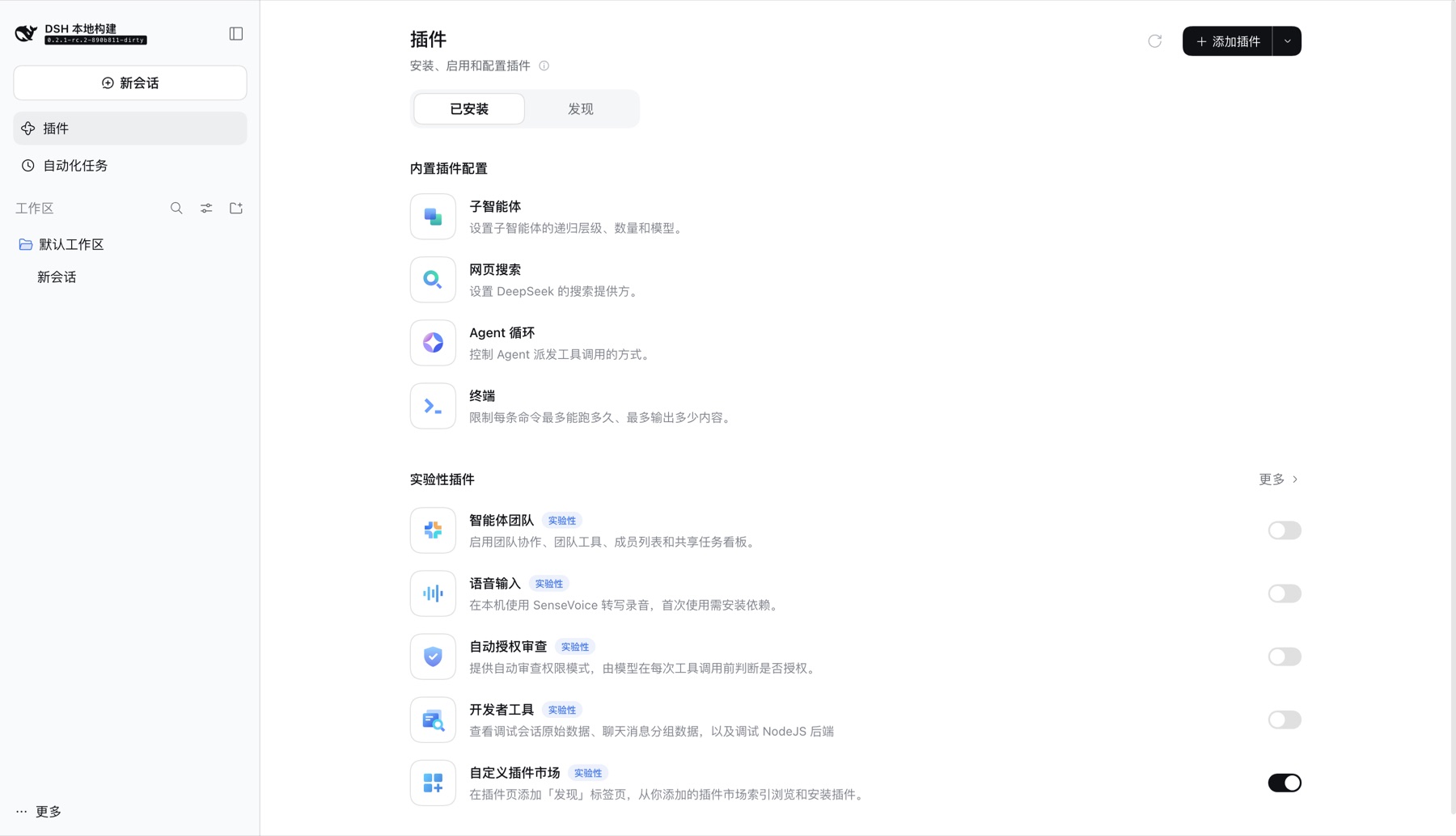
1. Switch on Custom plugin markets
Open Plugins and switch on Custom plugin markets under Experimental plugins. The Plugins page gains Installed and Discover tabs. The switch stays off by default because upstream still marks the feature experimental; switching it on mounts the Discover tab and the market service behind it.
Any bundle whose name starts with @deepseek-ai/dsh-experimental- is listed under
Experimental plugins — that grouping is by name, not a separate registry, which is why
the bundle has to be installed before the row appears.
2. Add the index source
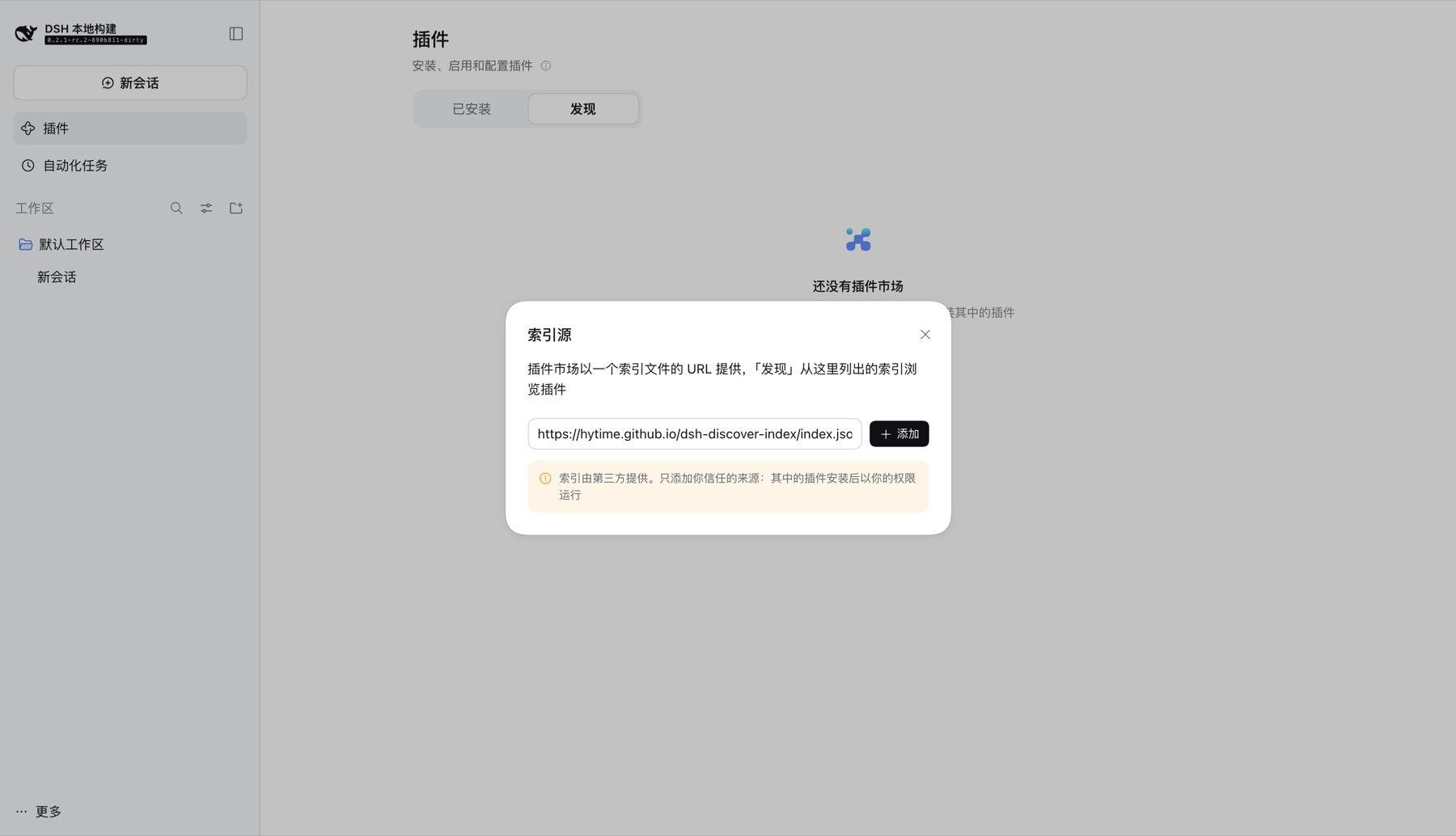
Open Discover → Add index source and paste:
https://hytime.github.io/dsh-discover-index/index.json
That is the only URL needed. It serves a complete format-1 document; there is no companion manifest or API to configure.
3. Browse the market
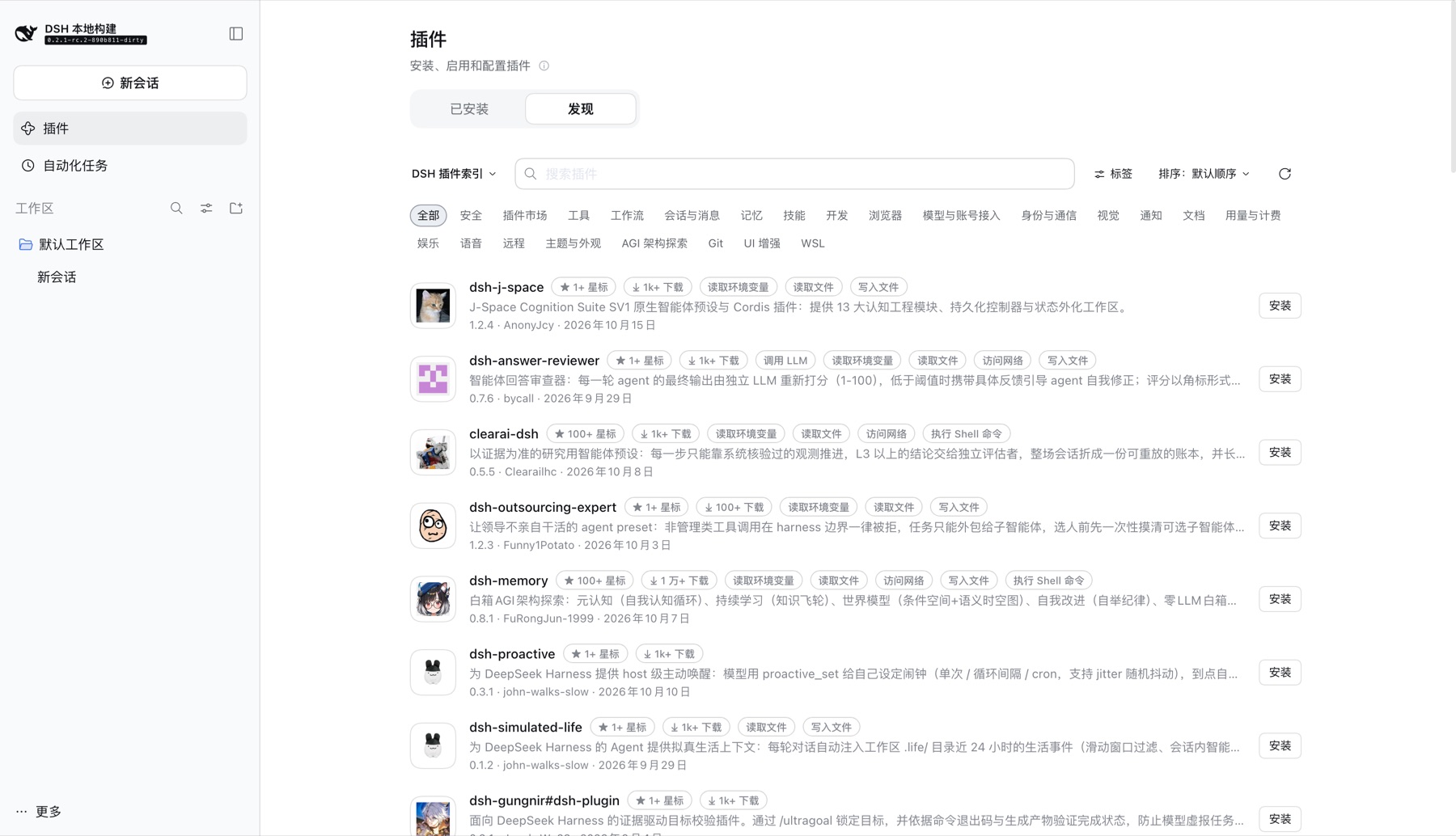
The market is DSH 插件索引. The category pills, the Labels filter, and the Sort menu are all declared by the index itself, so they appear the moment the source is added — nothing in DSH has to know what this market contains.
4. Open a plugin
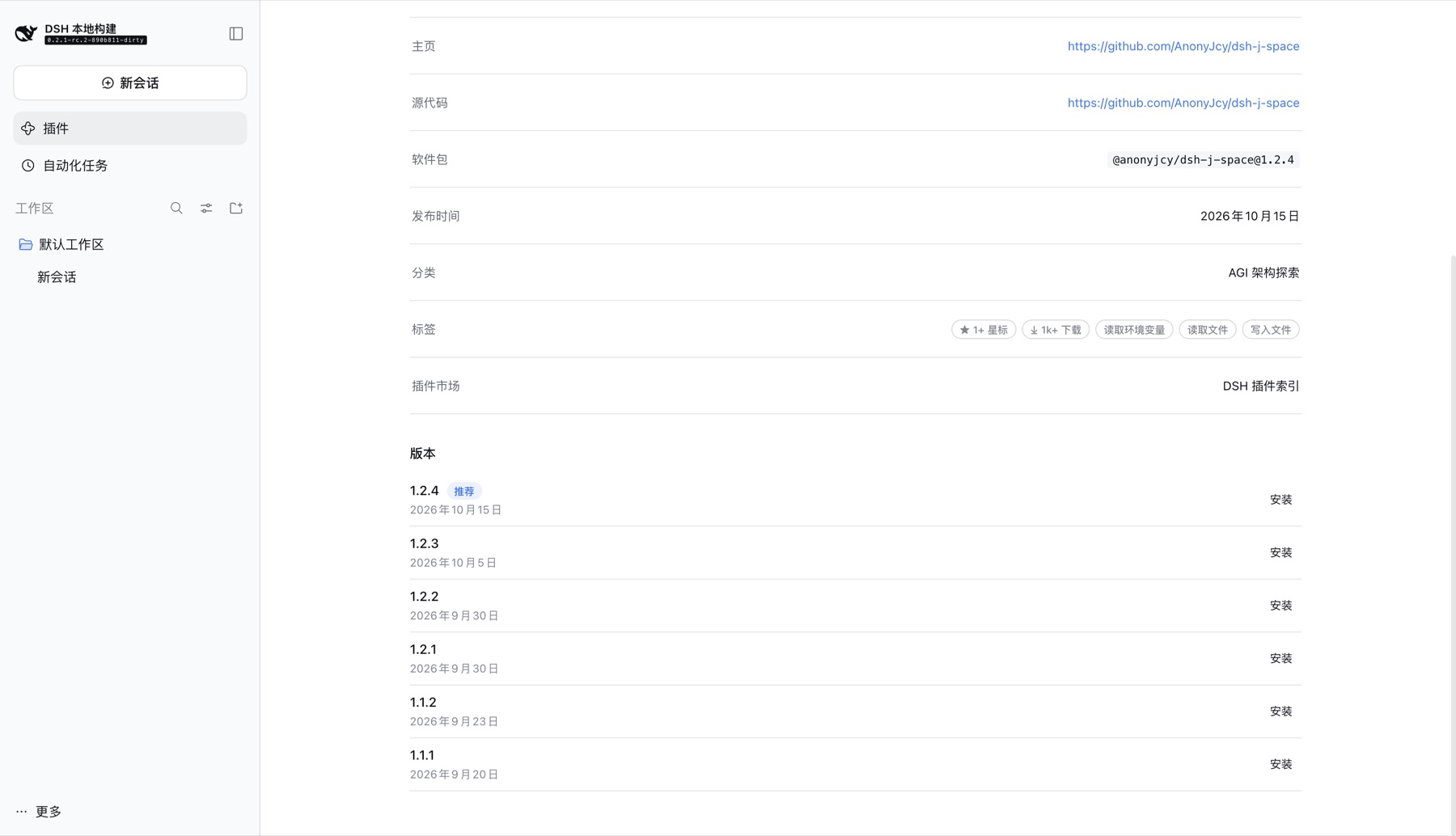
A plugin's page lists every version the index carries, with the recommended one marked, and shows the declared labels under Labels.
Once more than one source is added, use the market menu to switch between them. Each configured profile is a separate index and therefore a separate market.
Switching markets is a client-side operation because each profile is published as its
own complete index — no DSH change is needed to add a market. Marketplace titles,
descriptions and plugin metadata are third-party text and carry no endorsement; the
description above names this repository so the provenance is visible in that list.
These screenshots come from a DSH 0.2.1-rc.2 instance whose only market is this index, so what they show is this index and nothing else. The categories, labels, sort keys, and version list are all rendered from the published document.
Configuring a source
A source is one entry in config/config.yml. Its kind picks the adapter that knows how
to read the document; its fields mapping says where that document keeps the things the
pipeline turns into labels, keywords, and sort keys.
The shipped configuration reads the upstream catalog with no mapping at all, because that adapter already knows the upstream shape:
sources:
  - id: awesome-dsh-plugin
    kind: upstream-catalog
    enabled: true
    url: https://awesome-dsh-plugin.com/plugins.json
    minStars: 0
    priority: 10
Pointing at a document that names things differently
fields is what makes a second catalog a configuration change rather than a code change.
Every path is dot-separated and may be omitted; anything omitted contributes nothing.
This example reads a catalog that nests its trust facts under security and publishes its
own score:
sources:
  - id: other-catalog
    kind: upstream-catalog
    enabled: true
    url: https://example.test/catalog.json
    minStars: 0
    priority: 5
    fields:
      capabilities: security.permissions   # -> labels such as `shell`
      redLines: security.warnings          # -> normalised `risk:` labels
      keywords: topics                     # -> extra search terms
      sortKey:
        path: score                        # -> a numeric sort key…
        id: score                          #    …published under this id
| Key | What it points at | What it becomes |
|---|---|---|
capabilities | An array of permission ids, such as ["shell", "network"] | One label per id, plus each id and its words as keywords |
redLines | An array of prose findings | One risk: label per recognised class; unrecognised sentences are ignored |
keywords | An array of discovery words | Extra search terms, on top of the identity keywords and the category |
sortKey.path | A number | A sort key, so Discover gains a menu entry that orders by it |
sortKey.id | — | The id the key is published and referenced under |
Two rules are enforced at load time, because both failure modes are silent otherwise:
- An empty path segment is rejected.
security..permissionswould resolve to nothing and the source would appear to publish no capabilities at all. - A
sortKeyneeds bothpathandid. A value with no id cannot be referenced; an id with no value would advertise a sort option that orders nothing.
A path that simply does not exist in the document is not an error — the entry keeps its other facts and contributes no labels from that member. That is deliberate: one wrong path should cost you the labels it pointed at, not the whole run.
Declaring what the index publishes
A custom sort key is declared automatically from the candidates that carry it, so a
configured sortKey appears in Discover's Sort menu without further work. The same
applies to labels: every label a plugin references is declared, and every declaration has
a localized title, falling back to the id for a vocabulary this project has not seen.
Adding a source that needs a new adapter
Configuration cannot invent a document format. When the catalog is not one the existing adapters can read:
- Add an adapter module under
src/sources/that turns the fetched document intoCandidate[](seesrc/sources/upstream-catalog.ts). - Register its
kindinKNOWN_SOURCE_KINDSinsrc/config.ts— configuration naming an unregistered kind is rejected on purpose, so a typo cannot silently disable a source. - Add the entry under
sources:and reference itsidfrom aprofiles:entry to publish it, or from an existing profile to merge it into one market. Lowerprioritywins when two sources yield the same package name.
A new source must yield real npm package names and exact versions for npm entries. For git-only entries, pin a commit SHA. Guessing a name from a repository name is wrong twice over: repository names are not unique across owners, and many carry uppercase letters that an npm package name may not contain.
Publishing a second market
Each profiles: entry produces its own document and therefore its own market in Discover:
profiles:
  - id: curated
    title: { en: Curated Plugins, zh: 精选插件 }
    sources: [awesome-dsh-plugin, other-catalog]
    minStars: 100
    output: curated.json
Profiles may share sources; the same plugin appearing in two markets is fine, because the
documents are independent. minStars and each source's own minStars both apply — the
profile uses the higher of the two.
Running locally
Node 22, pnpm 9+.
pnpm install                 # install dependencies exactly as CI does
pnpm run build               # compile TypeScript to dist/
node dist/cli.js build       # fetch upstream, write dist/site/index.json (+ profiles + stats.html)
node dist/cli.js doctor      # per-entry rejections and why
node dist/cli.js sources     # list configured sources
pnpm test                    # unit tests
pnpm run typecheck           # typecheck without emitting
The lockfile is pnpm-lock.yaml and is committed; CI installs with
pnpm install --frozen-lockfile, so a dependency change must update the lockfile in the
same commit.
Nothing requires a local clone of the upstream list: plugins.json is read live, because
a local copy trails the live catalog badly.
DSH_DISCOVER_UPSTREAM_URL overrides the catalog URL, which is useful for testing
against a recorded response without touching config/config.yml.
To reproduce exactly what the workflow gates on, run the validator the way CI does. CI derives the origin from the repository running the job, so this form works for any fork:
GITHUB_REPOSITORY=hytime/dsh-discover-index node -e "import('@deepseek-ai/dsh-plugin-market-index').then(m=>{const fs=require('fs');const [o,r]=process.env.GITHUB_REPOSITORY.split('/');const doc=JSON.parse(fs.readFileSync('dist/site/index.json','utf8'));const v=m.parseMarketIndex(doc,'https://'+o+'.github.io/'+r+'/index.json');console.log('valid, plugins='+v.plugins.length)})"
Automation
| Workflow | Trigger | What it does |
|---|---|---|
build.yml | daily cron, workflow_dispatch | Builds the index, refuses to publish if it holds fewer than 2000 plugins, validates it with the real validator, then uploads dist/ and deploys to Pages. |
validate.yml | pull request, push to main | Typecheck, tests, build, and a full index build that must validate. No deploy, no Pages permission. |
A bad index can never replace a good one: the validation step runs before the artifact
upload, the deploy job needs the build job to succeed, and a new run cancels an in-flight
one via concurrency with cancel-in-progress.
License
MIT © 2026 hytime
Upstream catalog data belongs to its authors and is republished under their terms.