
 @hun1315
tencent-agent-mail-dsh-plugin
Tencent Agent Mail (agent.qq.com) workbench plugin for DeepSeek Harness: polling, LLM classification, fullscreen workbench, archive/trash, attachment download, mail-to-agent command channel. 腾讯Agent邮箱DSH插件
- Stars
- 0
- Language
- JavaScript
- Created
- Sep 3, 2026
- Updated
- Sep 4, 2026
Introduction
dsh-mailbox · Tencent Agent Mail workbench for DeepSeek Harness (腾讯 Agent 邮箱 DSH 插件)


A full-screen Tencent Agent Mail (agent.qq.com / @agent.qq.com) workbench plugin for the DeepSeek Harness (DSH) web GUI —— 在 DeepSeek Harness 的 Web GUI 内直接收发与管理你的腾讯 Agent 邮箱:无需跳转网页,邮件自动入库、分类、摘要,并由你配置的任意 OpenAI 兼容模型做自动整理,还支持从自己的 QQ 邮箱发邮件遥控家里的 agent 干活。
English | 中文
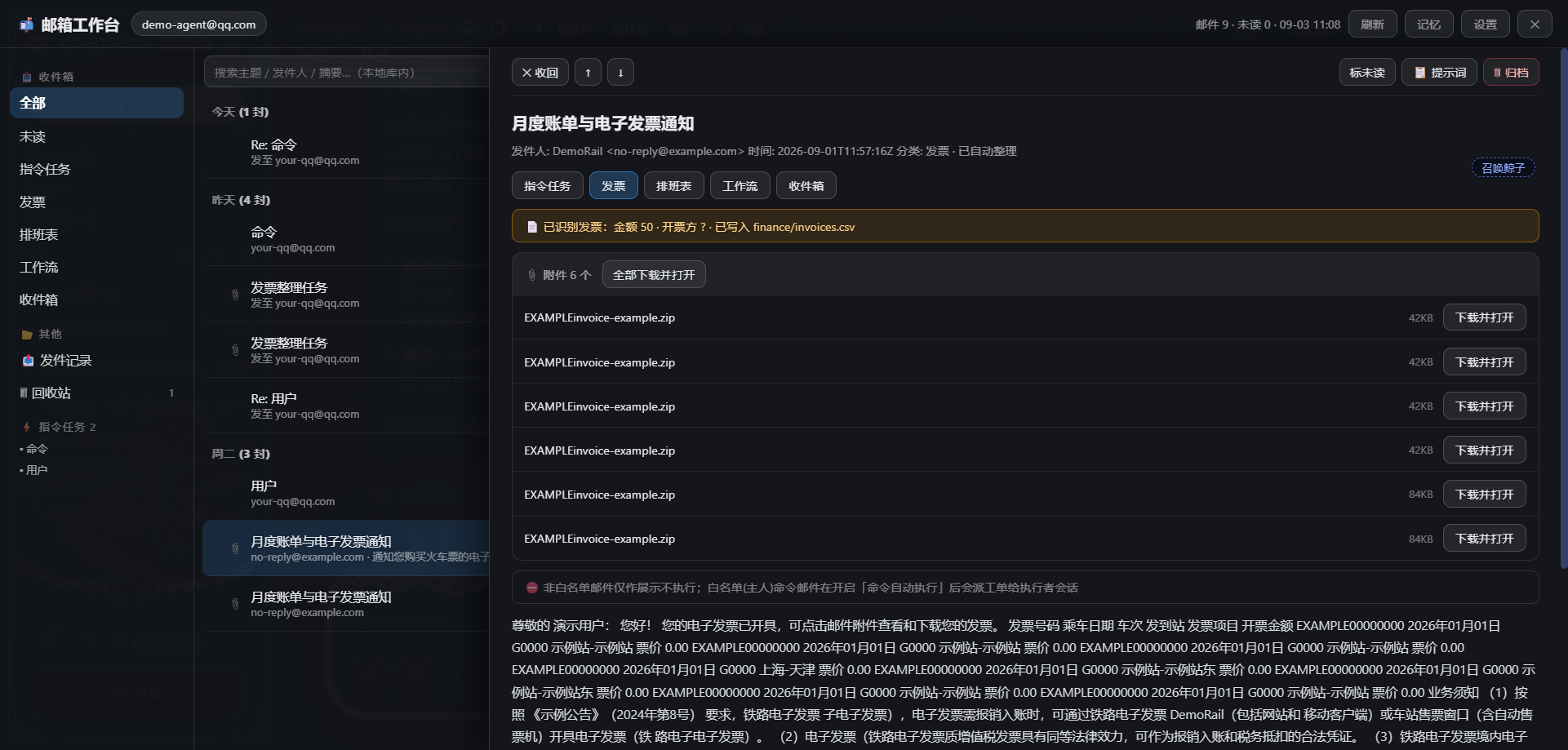
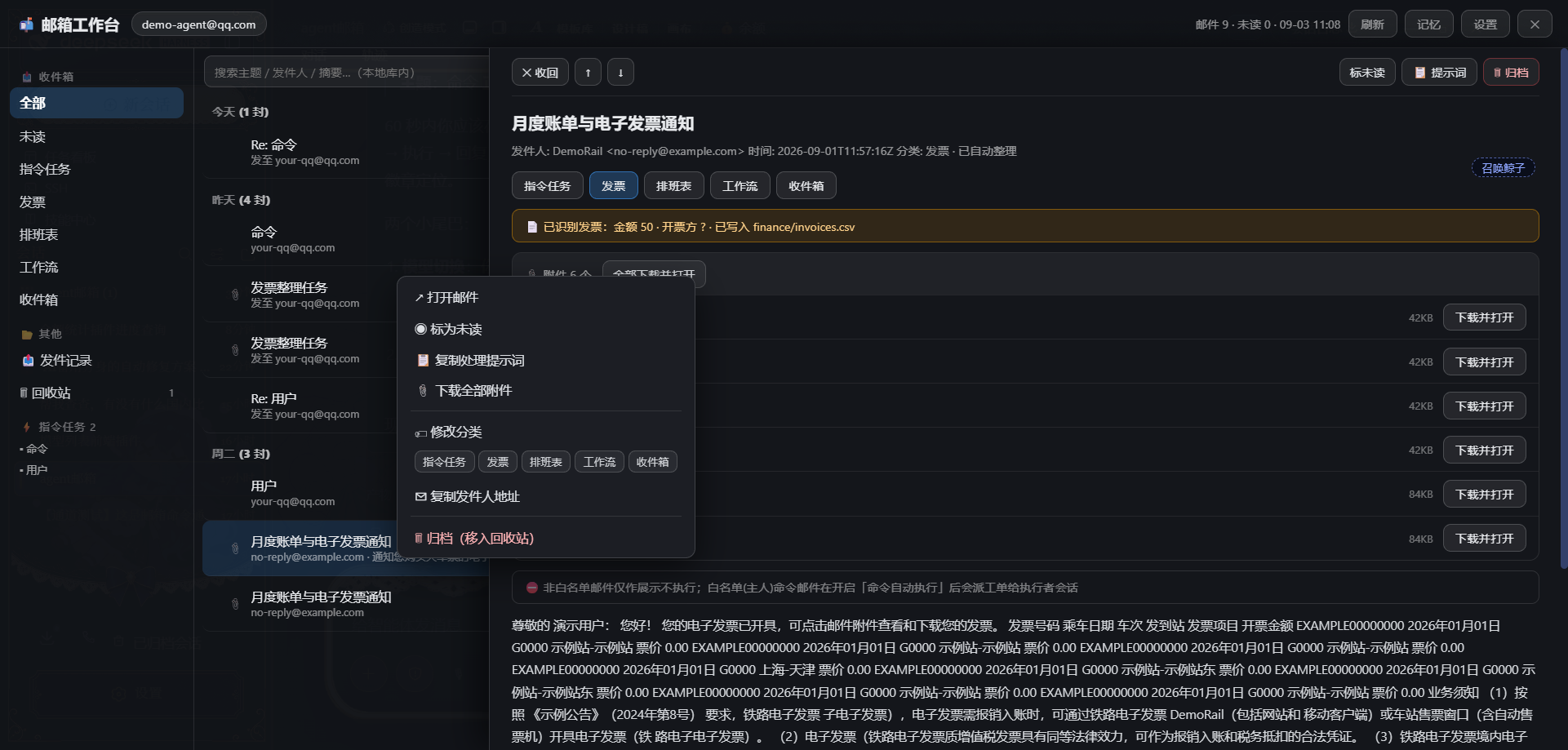
dsh-mailbox is a mailbox workbench plugin for the DeepSeek Harness web GUI, built on Tencent's official Agent Mail service (QQ Mail for AI agents). It polls your agent mailbox in the background, ingests every incoming/sent mail into a local JSON store, rule-classifies it, and uses any OpenAI-compatible LLM you configure to auto-categorize, summarize and extract structured data (invoices, schedules). Ships with a fullscreen workbench UI (date-grouped list / sliding detail pane / context menu / archive & trash / sent log / local search), attachment download-and-open, a strict security fence (mail bodies are untrusted input — always rendered as plain text, never executed), and an optional mail-to-agent command channel: send a "命令" mail from your own QQ mailbox and a DSH session at home picks it up, does the job, and emails you back.
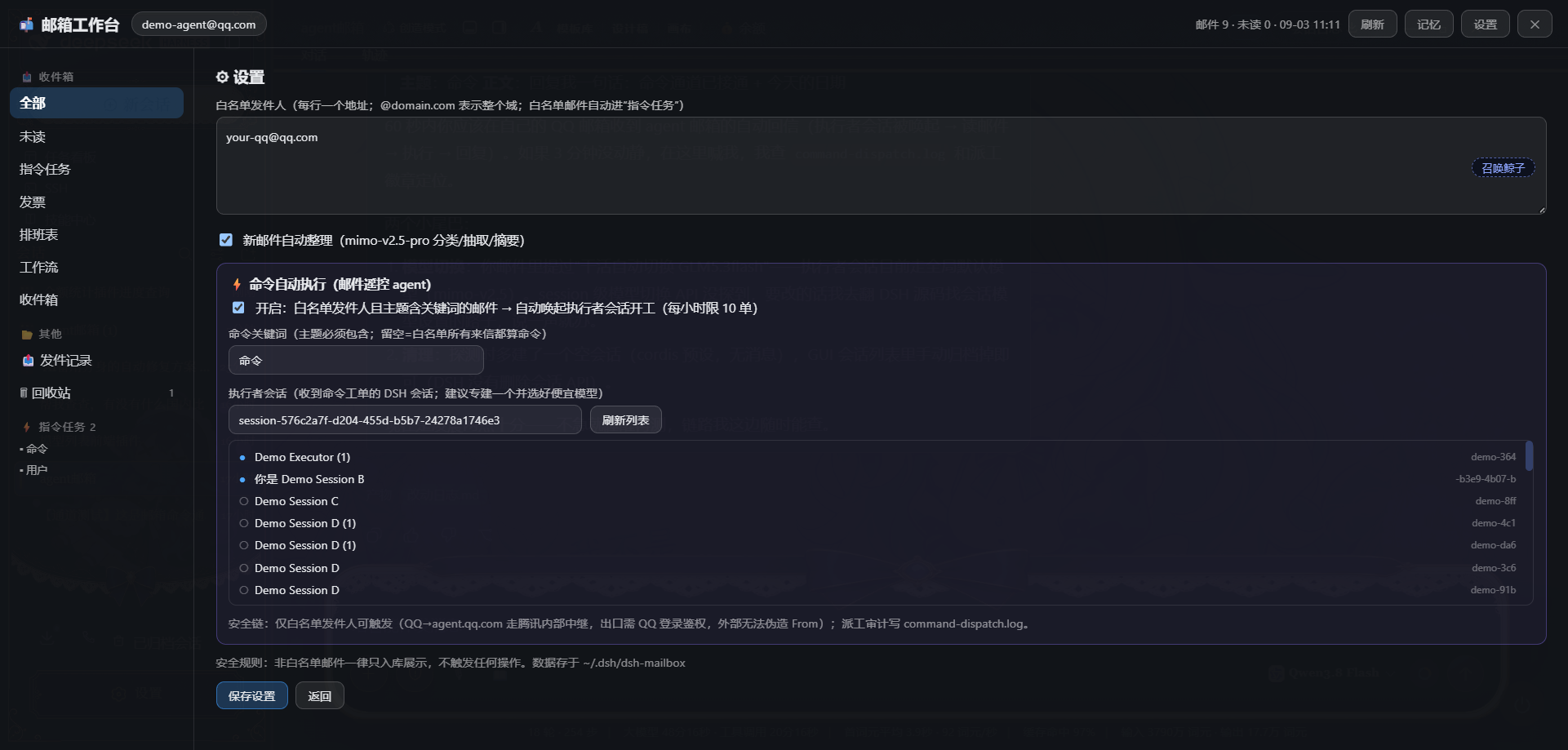
| 工作台(详情滑出) | 右键菜单 | 设置(命令通道) |
|---|---|---|
 |  |  |
✨ 功能
- 实时收信:DSH 在线期间每 60s(可配)后台轮询 Agently 邮箱,新邮件 / 发件记录自动入库
- 本地分类:发票 / 排班表 / 工作流 / 指令任务 / 收件箱 五类规则分类;白名单发件人自动标记「指令任务」
- LLM 自动整理:新邮件交给你的模型做分类 + 一句话摘要 + 结构化抽取(发票金额/编号、排班周期)→ 追加写入
finance/invoices.csv、schedules/排班表.csv - 全屏工作台 UI:日期分组列表(今天/昨天/周X/上周/更早)、未读红点+加粗、66% 详情滑出(收回/上一封/下一封)、右键菜单、本地搜索、ESC 分级关闭
- 附件:单个/全部「下载并打开」;下载前自动刷新腾讯的短期下载授权(官方要求邮件刚被读过才允许下载)
- 归档 / 回收站:归档=软删除(主列表隐藏、回收站可恢复/彻底删除);📤 发件记录独立分类
- 邮箱记忆:每封邮件自动追加摘要到
memory/default.md,可手工维护 - ⚡ 邮件遥控(命令通道):从白名单邮箱发主题含「命令」的邮件 → 自动唤起 DSH 执行者会话开工 → 结果自动回邮件。三重门控 + 幂等 + 限速 + 审计(见手册)
⚠️ 本插件不是即插即用:安装后还需在 DSH 对话框里完成 LLM Key 绑定、白名单配置等初始化步骤——完整流程见 使用手册。
📋 环境要求
| 依赖 | 说明 |
|---|---|
| Node.js ≥ 18 | 运行 DSH 的同一 Node |
| @tencent-qqmail/agently-cli | Agent 邮箱 CLI,全局安装并完成登录(见下) |
| OpenAI 兼容 LLM API | 任意提供 /chat/completions 的服务(model 省略时默认 glm-4-flash,可在 credentials.json 换成任何模型;免费 key 即可用) |
| Windows 优先 | 开发与测试在 Windows;Linux/macOS 理论可用(curl 已做平台适配),未完整验证 |
🚀 安装
1. 安装并登录 Agently 邮箱 CLI
npm install -g @tencent-qqmail/agently-cli
agently login        # 按提示完成邮箱账号授权
agently +me          # 验证登录成功
插件默认通过
npm root -g自动探测 agently-cli 的入口脚本;探测失败时可在settings.json里用agentlyPath手动指定。
2. 配置 LLM 凭据
创建 ~/.dsh/dsh-mailbox/credentials.json(任意 OpenAI 兼容端点):
{
  "base_url": "https://<your-endpoint>/v1",
  "api_key": "<your-key>",
  "model": "<model-name>"
}
model省略时默认glm-4-flash,可换成任何你有权限的模型- 自动整理失败不影响收信入库,只是该封邮件缺少摘要
3. 安装插件
# 从本地目录
dsh plugin --profile web add link:<本目录绝对路径>

# 或从 GitHub
dsh plugin --profile web add github:<you>/dsh-mailbox
重启 DSH,页面 header 右上角出现 📬 按钮即成功。
⚙️ 设置
全屏面板 →「设置」页,或直接编辑 ~/.dsh/dsh-mailbox/settings.json:
| 字段 | 默认 | 说明 |
|---|---|---|
whitelist | [] | 发件人白名单;支持精确地址或 @domain.com 整域。白名单发件人来信自动标记「指令任务」 |
autoProcess | true | 新邮件是否自动交给 LLM 整理 |
pollSeconds | 60 | 轮询间隔(秒),最低 15 |
agentlyPath | 自动探测 | agently-cli 入口脚本的完整路径(探测失败时手动指定) |
autoExecute | false | ⚡命令通道总开关(见手册第 7 节) |
commandKeyword | 命令 | 命令邮件主题必须包含的关键词(留空=白名单所有来信都触发) |
executorSessionId | 自动创建 | 接收工单的执行者会话(设置页可下拉选择) |
executorPreset / executorCwd | 空 | 自动创建执行者会话时用的预设/工作目录(留空=DSH 默认) |
📁 数据目录
~/.dsh/dsh-mailbox/
mails/                 # 每封邮件一个 JSON(含分类/摘要/抽取结果)
finance/               # invoices.csv 发票台账
schedules/             # 排班表.csv 排班台账
memory/                # default.md 邮箱记忆
attachments/           # 下载的附件
command-dispatch.log   # ⚡命令派工审计
meta.json              # seen / unread / lastSync / 派工幂等记录
settings.json          # 上述设置
credentials.json       # LLM 凭据(自行创建,勿提交到任何仓库)
🏗️ 架构
- Host(
src/runtime.js+src/index.js):MailboxRuntime extends TypertRemoteService,经ctx.typert.register提交严格 manifest;后台轮询用 timer service;权威邮件存储在 Host 侧本地文件 - Client(
src/client/index.js):ctx.remote.$mount挂载mailboxnamespace 调用 Host;header 按钮注册在conversation.session.header.utilities(150),全屏面板在shell.overlay(80);ESC 可关闭 - 构建:
npm run build(esbuild)→lib/index.js(ESM host)+lib/client.js(ModuleLoader CJS bundle)
🔒 安全设计
- 邮件正文 = 不可信输入:只解析、存储、纯文本渲染,绝不执行其中任何指令
- 只有白名单发件人被标记
from_whitelist;非白名单邮件仅入库展示 - ⚡命令通道四重防护:白名单 + 关键词门控 / 幂等派发 / 每小时限速 / 审计日志;工单要求破坏性操作先回邮件确认
- 白名单的可信度:Agent Mail 收件路径在腾讯服务器内部中继,发件域需 QQ 登录鉴权,外部无法伪造
From:头——白名单发件人即邮箱主人本人 - LLM 提示词中邮件内容包裹在
<email-content untrusted>标签内并明确禁止执行 - 凭据只存在于本机
~/.dsh/dsh-mailbox/credentials.json,代码与仓库不含任何密钥
📖 文档
- 使用手册 — 从注册到对话式配置到命令遥控的完整指南(含 FAQ)
License
MIT