
 @helloproblems
dsh-browser-use
为 DeepSeek Harness (DSH) 插件生态打造的浏览器自动化插件
- Stars
- 1
- Language
- TypeScript
- Created
- Sep 3, 2026
- Updated
- Sep 16, 2026
Introduction
description: "dsh-browser-use bundle 及其分层浏览器自动化包的仓库指南。" kind: "repository"
dsh-browser-use
中文 | English
概述
dsh-browser-use 为 DSH 提供浏览器自动化能力。项目由 Hub、Backend 和 Domain 三层组成:Hub 定义浏览器后端契约与具名注册表,Backend 管理浏览器资源并执行工具,Domain 选择后端并向 DSH 发布工具和设置。仓库根目录负责 workspace 与 bundle 装配;所有运行时源码都位于 packages/browser-use/。
实际任务演示
在 Books to Scrape 中打开 Travel 分类,比较 11 本书的价格,找出最便宜的三本,并逐一打开详情页核对价格。
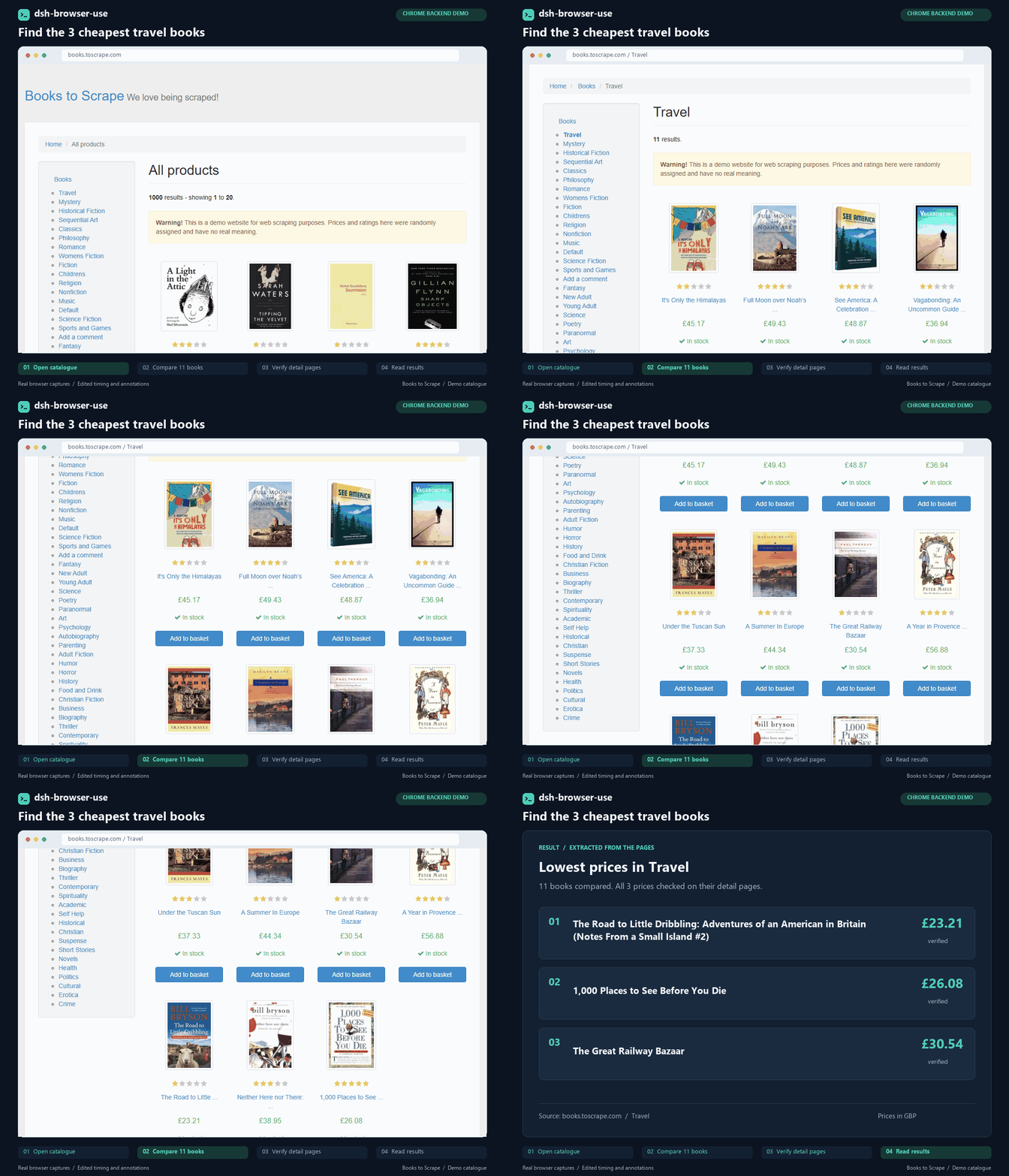
约 17 秒的 GIF 来自通过本仓库 browser-use-chrome 后端执行的脚本化任务。画面取自真实 Chrome 会话,步骤说明和结果卡为后期添加,等待时间已压缩。Books to Scrape 使用演示数据。
包结构
| 目录 | 包 | 职责 |
|---|---|---|
packages/browser-use/browser-use | browser-use | ctx.browserUse Hub、后端契约、注册表,以及两个后端共用的进程与 stdio runtime |
packages/browser-use/browser-use-domain | browser-use-domain | 选择后端、注册 DSH 工具、释放 Agent 资源并管理浏览器设置 |
packages/browser-use/browser-use-chrome | browser-use-chrome | 基于 chrome-devtools-mcp 的 Chrome 后端,按 Agent 隔离服务进程、浏览器和 profile |
packages/browser-use/browser-use-edge | browser-use-edge | 基于 Playwright MCP 的 Edge 后端,按 Agent 隔离会话 |
依赖方向与各层所有权见 browser-use 包组地图。
架构
本家族把组合、语义和资源所有权分开:
browser-use挂载ctx.browserUse,并提供名称到后端的注册表;它不执行浏览器 IO。- 后端插件注入 Hub,注册实现,并发布仅用于生命周期同步的 Cordis 服务
browserUse.backend.<name>。 browser-use-domain等待配置指定的生命周期服务,通过注册表解析后端,再把稳定工具目录注册到ctx.tools。- 工具执行时把发起调用的 Agent 对象作为不透明 owner 传给后端,从而为各 owner 维护独立 MCP 会话和浏览器资源。
- 设置变更转发给后端;Agent 销毁只释放该 Agent 的资源,插件销毁则关闭整个后端。
激活由 Cordis 服务可用性驱动。YAML 行顺序只服务于阅读,不承担同步语义。
Bundle
根包名为 dsh-browser-use。其 cordis.patch.yml 默认挂载 Hub、Chrome 和 Edge 后端及 Domain,初始选择 Chrome,支持通过设置热切换。
| 行 | 默认状态 | 主要配置 |
|---|---|---|
browser-use | 启用 | 无 |
browser-use-chrome | 启用 | toolCallTimeoutMs: 120000 |
browser-use-domain | 启用 | 后端 chrome、显示 Chrome、自动发现、120 秒工具超时 |
browser-use-edge | 启用 | Playwright MCP |
实际 DSH 工具超时由 Domain 配置拥有。浏览器连接设置同样由 Domain 管理,并转发给选中的后端。
环境要求
- Node.js
^22.19.0或>=24.0.0 - pnpm
11.7.0 - 兼容的 DeepSeek Harness 安装
- Microsoft Edge;选择 Chrome 后端时需要 Google Chrome
开发
所有命令都在仓库根目录执行:
pnpm install
pnpm typecheck
pnpm test
pnpm build
pnpm pack --dry-run
pnpm pack:bundle
workspace 模式为 packages/*/*。测试跟随所属 package 存放,scripts/build.mjs 会生成四个 Host bundle、Domain 客户端模块,以及带 generation 的共享 runtime/helper 产物。pnpm pack --dry-run 只预览普通 package 内容,不会生成文件。
TypeScript 工程布局、源码测试和构建流程见开发指南。
安装到 DSH
本仓库不提供 dsh 可执行文件。插件管理要求 PATH 中存在 pnpm,并且已经安装 DSH CLI,或者准备好一个可从源码运行的 deepseek-harness checkout。
通过源码目录安装
先构建本仓库,再使用已安装的 CLI 添加仓库根目录:
pnpm build
dsh plugin --profile web add .
如果从源码运行 DSH,请先在 deepseek-harness checkout 中执行 pnpm install 和 pnpm run build,然后调用其根目录的 dsh script,并把本仓库作为绝对 file: spec 传入:
cd C:\path\to\deepseek-harness
pnpm dsh plugin --profile web add file:C:/path/to/dsh-browser-use
通过打包产物安装
在本仓库中创建可供本地单文件安装的 tarball:
pnpm install
pnpm pack:bundle
该命令会构建 workspace,把四个运行时包作为 bundled dependencies 放入根包,并生成:
.artifacts/pack/dsh-browser-use-0.7.0.tgz
使用已安装的 CLI 添加该 tarball:
dsh plugin --profile web add file:C:/path/to/dsh-browser-use/.artifacts/pack/dsh-browser-use-0.7.0.tgz
也可以使用 deepseek-harness 源码 checkout 中的 CLI:
pnpm --dir C:\path\to\deepseek-harness dsh plugin --profile web add file:C:/path/to/dsh-browser-use/.artifacts/pack/dsh-browser-use-0.7.0.tgz
本地尚未发布的安装应使用 pnpm pack:bundle。普通 pnpm pack 会把 workspace:^ 依赖改写为 registry 版本范围,因此只有配置的 registry 中已经存在匹配版本的 browser-use、browser-use-domain、browser-use-chrome 和 browser-use-edge 时,普通根包 tarball 才能安装。
pnpm dsh 只在 deepseek-harness 源码根目录生效,因为该 package 定义了对应 script;它不能在本插件仓库中运行。添加、移除或更新 bundle 后,需要重启正在运行的 web profile。
已知限制
- Chrome 与 Edge 都通过受管 CLI 的 stdio 接入 MCP,使用 Windows Job 或 Linux/macOS 进程组监督;详见各自的 Chrome 与 Edge 生命周期说明。
- Edge 显示模式下,固定版本 Playwright MCP 会追加不受支持的
AutomationControlled命令行值,Edge 因此显示稳定性/安全风险警告。后端不注入或改写浏览器参数,详见 已知上游问题。 - 在设置页保存浏览器类型即可热切换,无需重启;两个后端插件须已启用。
- Chrome 通过受管 MCP stdio 连接固定的
chrome-devtools-mcp@1.9.0;升级须验证 CLI 参数、调试管道、退出时序和工具协议。 - Chrome 和 Edge 在
userDataDir为空时使用临时隔离会话;配置持久化目录后,复用同一目录可继续使用已保存的登录等数据。Host 重启后,插件不会恢复旧 MCP 连接或运行中的工具调用。 - 测试覆盖 MCP 目录、64 MiB 响应边界和资源生命周期;
EDGE_SMOKE=1、CHROME_SMOKE=1及生命周期 smoke 可选验证本机浏览器。