
 @hehf21
dsh-sysmon
Host CPU / memory rings under the DeepSeek Harness composer, with a one-minute trend panel on click.
- Stars
- 0
- Language
- JavaScript
- Created
- Oct 17, 2026
- Updated
- Oct 17, 2026
Introduction
dsh-sysmon
在 DeepSeek Harness(dsh)输入卡片正下方显示本机 CPU / 内存 的圆环水位,点一下展开一分钟走势与明细。
English | 中文
… 费用明细 本会话 ¥0.5181 · 命中 98.8% │ CPU ◔ 26% │ 内存 ◕ 56% │ ◯ 28%
                                       └── 本插件 ──┘

中文
功能
- 行内:
CPU ◔ 26%+内存 ◕ 56%两个小圆环 + 百分比。圆环几何照抄宿主自带的上下文用量圆圈 (ContextMeter):14px 视框、半径 5.5、2px 描边、底环--dsw-alias-border-l3、从 -90° 顺时针画。 - 警示:正常走中性色,≥75% 转黄(
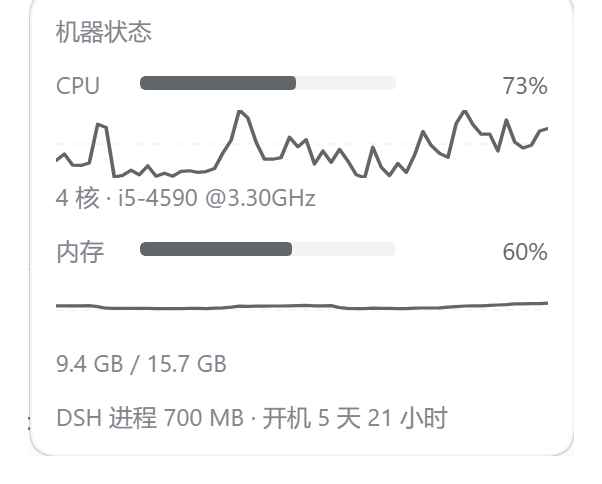
--dsw-alias-state-warn-primary)、≥90% 转红(--dsw-alias-state-error-primary),环和数字一起变色。 - 点开:面板里给 CPU / 内存各一条一分钟走势(带 50% 虚线参考线),外加核数与 CPU 型号、 内存已用/总量、磁盘占用、DSH 进程常驻内存、开机时长。点面板外面或按 Esc 收起。
- 省电:前台每 2s 取一次数,标签页隐藏降到 15s,连续失败退避到 10s;采样在宿主侧按 1s 走。
- 双语:文案跟随 DSH 界面语言(中/英),取不到语言服务时中文兜底。
- 零依赖:只有
node:os/node:fs,不装任何第三方包,不起子进程。
安装
从 GitHub 直接装(web 换成你的 profile 名):
dsh plugin --profile web add github:hehf21/dsh-sysmon
装完刷新页面。卸载:
dsh plugin --profile web remove dsh-sysmon
桌面版(Electron)的 profile 由应用独占,CLI 装不了——改在侧栏 插件 页里安装/启用/停用。
注意:浏览器半边改动关一下插件再开就重新组合、刷新即见;宿主半边(index.js)是进程内 ESM 模块,
改了必须重启 dsh 才换代。
实现
浏览器 client.js                        宿主进程 index.js
┌─────────────────────┐    GET      ┌──────────────────────────────┐
│ conversation        │ ──────────► │ /sysmon/stats(精确路由)      │
│ .composer.dock      │ ◄────────── │  ├ node:os  cpus() 时间片差    │
│ 两个圆环 + 点开面板  │    JSON     │  ├ node:os  totalmem/freemem  │
└─────────────────────┘             │  ├ node:fs  statfs 磁盘        │
                                    │  └ 1s 采样 → 60 格走势窗口     │
                                    └──────────────────────────────┘
| 文件 | 作用 |
|---|---|
index.js | 宿主半边:1s 采样 CPU 时间片差、内存占用、每 15s 采一次磁盘,维护 60 格走势窗口,注册 GET /sysmon/stats。 |
client.js | 浏览器半边:window.__ModuleLoader__.load 注册工厂,ctx.slots.inject('conversation.composer.dock', …) 挂条目,轮询渲染。 |
cordis.patch.yml | 插入宿主插件行 sysmon;行 id 决定浏览器半边的加载地址 /plugins/sysmon/client.js。 |
取值口径
- CPU:两次
os.cpus()累计时间片之差,1 - idleΔ/totalΔ,跨全部核心加权;采样间隔内没有新时间片时保留上一次读数,避免曲线出现假谷底。 - 内存:
(totalmem - freemem) / totalmem。Windows 上freemem是「可用」内存,与任务管理器「使用中」同口径。 - 磁盘:
fs.promises.statfs(<用户主目录所在盘>),Windows 上即C:\;读取失败时该行不显示。 - 走势窗口是宿主侧的 60 格(约一分钟),客户端只读不算。
边界
- 只在会话视图渲染:
conversation.composer.dock的渲染条件是会话已存在,欢迎页(新会话空态)不显示。 /sysmon/stats不在/api前缀下,因此不走连接插件的浏览器信任栅栏:能打开本机页面的本机进程都能读到 这几个数字(CPU/内存/磁盘占用率,无敏感信息)。dsh 桌面版只绑127.0.0.1;如需收紧,在index.js的handle()里加 Host / Origin 白名单。- 无配置项。采样与轮询间隔是源码常量:宿主
SAMPLE_MS、客户端POLL_MS。
与同类插件
同类开源实现另有 hnmrxz/dsh-plugin-sysmon(同槽位的状态胶囊)、
AKS1st/dsh-sysmon(右下角悬浮窗)、
Small-Miao/dsh-statusbar(shell.overlay 整条底栏)。
本插件的磁盘 / 点击刷新 / 双语思路参考了第一个。
English
Host CPU / memory rings under the dsh composer, with a one-minute trend panel on click.
- Inline: two 14px rings (same geometry as dsh's own context meter) plus percentages; amber at ≥75%, red at ≥90%.
- On click: a panel with a one-minute trend line per metric (dashed 50% reference), core count and CPU model, memory used/total, disk usage, the dsh process RSS, and host uptime.
- Cost-aware: 2 s polling in the foreground, 15 s while hidden, 10 s back-off after repeated failures; sampling happens host-side at 1 s.
- Zero dependencies:
node:os/node:fsonly — no third-party packages, no subprocesses.
Install (replace web with your profile name):
dsh plugin --profile web add github:hehf21/dsh-sysmon
Then refresh the page. The Electron desktop profile is managed by the app, so install it from the sidebar Plugins page instead. Client-half changes reload by toggling the plugin; host-half changes need a dsh restart (the host module is an in-process ES module cached by URL).
License
MIT