
 @haruri03
dsh-todo-ledger
todo-ledger for DeepSeek Harness: persistent task state, 12 native tools, and cross-session context in a repo-local _todo/ directory.
- Stars
- 0
- Language
- JavaScript
- Created
- Oct 22, 2026
- Updated
- Oct 25, 2026
Introduction
dsh-todo-ledger


Repository: https://github.com/haruri03/dsh-todo-ledger
A host-level DSH plugin that turns the todo ledger workflow into a resident prompt section,
a set of native tools, and context stored inside the repository's _todo/ directory.
It addresses the failure mode where rules live in a skill or AGENTS.md, the model forgets to
read them, and the task list has to be rewritten every turn:
| Before | This plugin |
|---|---|
Rules live in AGENTS.md / a skill and stop working when the model does not read them | A host-level systemPrompt.section is present every step of every session, with no load step to forget |
The system todo_write list is overwritten each turn and progress is lost | Authoritative state lives in the repository's _todo/ files and survives sessions and compaction |
| Context exists only in conversation history and disappears after compaction | todo_checkpoint / todo_note write conclusions and next steps into _todo/context/, and a snapshot is injected on every prompt assembly |
| The model has to assemble shell commands itself | 12 native tools with schema validation and readable errors |
The file format is fully compatible with an external todo CLI: the plugin and the original CLI can
both write the same repository and both can run doctor on it.
The ledger scaffold follows the caller's choice: todo_init and todo_add accept an optional
language (en or zh), and the plugin writes the chosen form for the files of that ledger. It
defaults to English, so a caller outside a Chinese-speaking locale always gets an English ledger.
Both written forms are read, so a ledger written in either language — including one created by an
earlier version — keeps working, and content inside the sections is free-form.
Register before implementation
When a ledger exists, the prompt instructs the agent to reuse a matching task or call todo_add for substantive new work requested by the user before editing deliverables, changing configuration, or running state-changing commands. Register the requested outcome, not each implementation step. Brief read-only scope inspection may come first; trivial Q&A and read-only checks need no task. Unclear scope calls for clarification, not an invented task. Historical checkpoints and inferred follow-ups do not authorize new work. Missing ledgers are initialized only when the user asks or confirms.
This is prompt guidance, not a runtime execution block or automatic task-creation mechanism.
Install (manual)
Choose one:
Human: copy this directory to $HOME/.dsh/profiles/<profile>/node_modules/dsh-todo-ledger,
then append this row to the profile's cordis.patch.yml:
- insert:
    - id: todo-ledger
      name: './lib/index.js'
Agent: run plugin_manager install_bundle --target "<path-to-plugin>".
Install from Git
When the repository root is the package (it contains package.json and dsh.bundle), install it
directly from its Git URL:
plugin_manager install_bundle --target "git+https://github.com/haruri03/dsh-todo-ledger.git"
The same operation is available to humans through the Web plugin page ("Add plugin") or the CLI:
dsh plugin --profile <profile> add "git+https://github.com/haruri03/dsh-todo-ledger.git"
Install from npm
The package is published as dsh-todo-ledger, so the npm name alone installs it:
plugin_manager install_bundle --target "dsh-todo-ledger"
dsh plugin --profile <profile> add dsh-todo-ledger
Tarball URLs are accepted too. To update, remove and reinstall, or wait for an upstream release.
After installation, every new session carries a [todo-ledger · cross-session tasks and context]
prompt section, and the tool list gains:
todo_context / todo_list / todo_add / todo_show / todo_status / todo_complete / todo_archive / todo_note / todo_checkpoint / todo_snapshot / todo_doctor / todo_init
No restart is required.
Layout
Inside the repository root (the directory that contains _todo/; a repository that already keeps todo/ keeps working, the plugin accepts either name):
_todo/
├── todo.md              queue: `- [status] slug`
├── tasks.md             index: `- [status] **slug** — title → [details](tasks/slug.md)`
├── tasks/<slug>.md      details: goal / subtasks / acceptance / progress / blockers / files
├── archived/<slug>.md   completed + ## Delivery record (includes the sign-off quote)
├── AGENTS.md            directory notes generated by todo_init
└── context/             added by this plugin
    ├── now.md           current goal / next step / key files (overwritten by todo_checkpoint)
    └── log.md           append-only log (automatic tool trace + todo_note)
States are todo / doing / blocked / review; there is no done. review means work is
finished and waiting for the owner's sign-off. Closing a task requires both evidence and
signoff (the owner's own words); neither may be omitted. This is a hard rule of the todo ledger
workflow.
How it works
flowchart LR
  subgraph host["DSH host"]
    prompt["system prompt assembly"]
    tools["native todo_* tools"]
    cli["todo-context CLI"]
  end
  subgraph plugin["dsh-todo-ledger"]
    section["prompt section + snapshot"]
    store["lib/store.js"]
    reader["lib/context-reader.js"]
    format["lib/format.js<br/>EN/ZH templates + alias table"]
  end
  subgraph repo["repository"]
    files["_todo/<br/>todo.md · tasks.md · tasks/*.md<br/>archived/ · context/now.md · context/log.md"]
  end
  prompt --> section
  section -->|reads| store
  tools --> store
  cli --> reader
  reader --> store
  store -->|reads and writes| files
  store --> format
The prompt section is assembled from the ledger, not stored in it: every prompt gets a fresh snapshot, so a stale session cannot revive a stale task list.
stateDiagram-v2
  direction LR
  [*] --> todo: todo_add
  [*] --> blocked: todo_add + depends_on
  blocked --> todo: every predecessor completed
  todo --> doing: todo_status / todo_note state
  doing --> blocked: todo_status + blocker_cause
  blocked --> doing: todo_status
  doing --> review: work finished, awaiting sign-off
  todo --> review: todo_status
  review --> archived: todo_complete + evidence + signoff
  todo --> archived: todo_archive + reason
  doing --> archived: todo_archive + reason
  archived --> [*]
There is no done. A predecessor in review does not unblock a dependent — only todo_complete
does.
flowchart TD
  snapshot["injected snapshot<br/>totals · review and blocked · doing progress<br/>now.md · last 3 log summaries with refs"] --> overview["todo_context overview<br/>tasks.total · log.total · revision"]
  overview --> tasks["action: tasks"]
  overview --> logs["action: logs (limit, cursor)<br/>ref · time · summary"]
  overview --> task["action: task slug"]
  overview --> checkpoint["action: checkpoint"]
  logs --> log["action: log, ref #N<br/>that one entry in full"]
The same four actions exist as todo-context subcommands. Nothing returns the whole log by
accident: the index is bounded, and a full entry needs its ref.
flowchart LR
  init["todo_init / todo_add<br/>language: en or zh, default en"] --> langfile["_todo/context/language"]
  langfile --> tmpl["template(lang)"]
  tmpl --> written["headings · placeholders · index link label<br/>· delivery record fields"]
  written --> files["ledger files"]
  alias["alias table<br/>EN + legacy ZH"] --> read["snapshot · reader · CLI"]
  files --> read
Tools
| Tool | Purpose |
|---|---|
todo_list | List tasks and states (optionally filtered); call it before starting work |
todo_show | Show one task's details |
todo_add | Create a task (unique kebab-case slug) |
todo_status | Change state and sync the task frontmatter, index, and queue |
todo_complete | Close and archive a task; requires evidence + signoff |
todo_archive | Abandon a task; additionally requires reason |
todo_note | Append to context/log.md; with slug, insert at the end of that task's ## Progress section (the placeholder is removed on first write); with state, advance the state machine in the same call |
todo_checkpoint | Overwrite context/now.md: current goal / next step / key files |
todo_snapshot | Read-only: return the snapshot that would be injected into the prompt (check whether the ledger is stale) |
todo_context | Bounded reads for progressive disclosure: overview first, then logs (summaries with stable refs and a cursor), log (one entry in full), task, or checkpoint |
todo_doctor | Two-way consistency check; returns errors and warnings |
todo_init | Create the _todo/ skeleton (only when the user asks) |
Every tool accepts an optional root, so it can operate on repositories outside the workspace:
todo_doctor { root: "<repo-root>" }.
Command line
The package installs a todo-context binary for scripts, editors, and agents that prefer a shell
over a tool call. It prints compact text by default; --json prints the same envelope the tool
returns.
todo-context --action overview --root <repo-root>
todo-context --action logs --limit 5 --root <repo-root>
todo-context --action log --ref "#42" --root <repo-root>
todo-context --action task --slug <slug> --root <repo-root>
todo-context --action checkpoint --root <repo-root>
--action is one of overview / tasks / task / checkpoint / logs / log. Exit codes:
0 success (a missing ledger also exits 0 and reports it), 1 inconsistent ledger or internal
error, 2 invalid arguments. --root defaults to the current directory, and a ledger in a parent
directory is found automatically.
The binary and the tool share one implementation, so both apply the same bounded-detail rules: no command returns the whole log by accident.
Sidebar panel
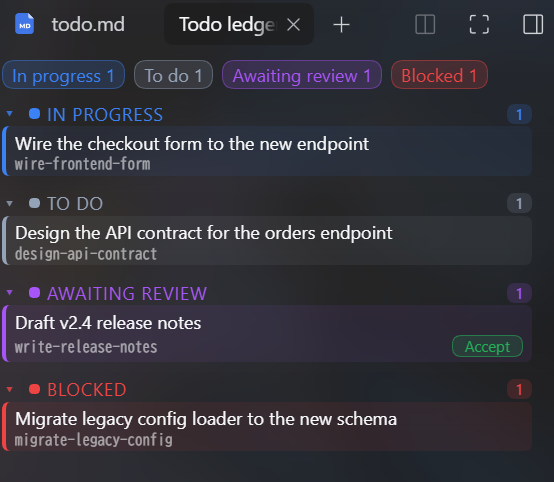
The plugin also serves a sidebar panel for the ledger of the current session working directory: browsing is read-only, and the panel's only action is accepting a review task. It is opt-in: nothing is injected into the layout until a user opens the panel from the right sidebar's guide capsule (named after the plugin); it then renders as a sidebar tab.
- Four sections —
doing,todo,review,blocked— with a count each, plus a per-state colour so the shape of the ledger reads at a glance. - Ordering is fixed:
doingfirst, thentodo,review,blocked; an empty section still shows. - The panel reads; it does not write task content. Polling runs only while the panel is visible (every 5 s), so a closed or backgrounded tab costs nothing.
- When a session has no ledger above its working directory, or the ledger files disagree, the panel
says so instead of guessing. Run
todo_doctorto repair the latter.
Each row under review carries an accept action. Accepting a review task from the panel archives
it through the same path as todo_complete, recording the panel click as both the evidence and the
sign-off (accepted from the ledger panel at <ISO timestamp>). Only review tasks can be accepted
this way; any other state is refused with an inline error rather than an alarm.
Floating panel
A book launcher below the composer opens a movable, resizable Todo Ledger floating panel. Drag its header to move it and drag the bottom-right grip to resize it. It is an additional way to view the ledger; the original right-sidebar panel remains available. The floating panel's labels follow the host locale, and its body starts directly with the status counts because the window header already names it. Every surface, border and state colour comes from the host theme tokens, so the window follows the active theme — light, dark or a custom one — instead of carrying its own palette.
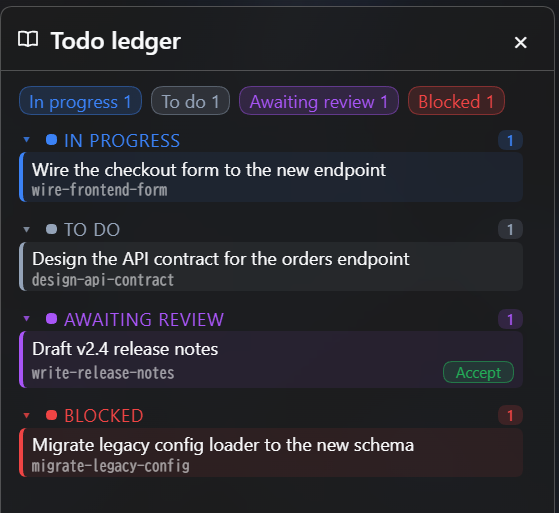
Each status group is collapsible: click a group header to fold it. Clicking a status count expands that group and scrolls its header to the top of the list, which is how a long queue stays navigable. Only the task list scrolls; the counts row and the footer stay put.
The panel is bound to the session it is shown in: switching to a session in another workspace re-reads that workspace's ledger instead of keeping the previous one, and returning focus to the window re-reads it again. The floating panel follows the session in front, so it re-targets when the session changes instead of staying on the one that opened it.
The viewport-clamped box (position plus size) is saved in browser local storage and restored when the panel opens again. Visibility and ledger content are not saved there: opening the panel reads the current ledger rather than restoring a previous view.
The panel talks to two host routes, both read-only in intent and dispatched as GET:
| Route | Purpose |
|---|---|
/todo-ledger/projection?sessionId=<id> | Ledger projection for that session's working directory |
/todo-ledger/complete?slug=<slug>&sessionId=<id> | Accept one review task; the only side-effecting call |
A host restart is required after installing or updating the host-side code; the panel itself is plain client JavaScript shipped by the package, so it needs no build step and appears after a page refresh.
Dependencies
Tasks can wait for other tasks. Pass depends_on (a list of slugs) to todo_add, and the task is
created blocked with blocker_cause: dependency until every predecessor is formally completed.
If the predecessors are already completed, the task is created as todo straight away.
graph LR
  spec["Design the API contract<br/>todo"] --> impl["Implement the endpoint<br/>blocked"]
  spec --> form["Wire the form to it<br/>blocked"]
  impl --> notes["Draft the release notes<br/>blocked"]
  form --> notes
  legacy["Migrate the legacy config loader<br/>blocked, manual"]
Completing spec promotes impl and form to todo in the same call. notes stays blocked until
both of its predecessors are completed — one is not enough. legacy has no predecessor: its
blocker_cause: manual means nothing unblocks it automatically.
- Completion only. A predecessor in
reviewdoes not count; neither does an archived task that was dropped instead of completed. Onlytodo_complete— or the panel's accept — unblocks. - Validated at creation. Unknown, already-dropped, self-referential and circular predecessors are
rejected, as is a
dependencyblocker with no predecessor. - Repairable.
todo_doctorreports dependency fields that disagree with the archives.
How context survives
- On each system-prompt assembly the plugin finds the nearest
_todo/above the session working directory and injects:- Ledger last written: N ago (the newest mtime among
context/log.md,tasks.md, andnow.md); - Session staleness: how many tool calls happened since the last
todo_*write and how many of them were writes; 3 or more writes adds a ⚠ telling the agent to update the ledger first; - Task totals (four states), review items (with
(Nd)days waiting) and blocked slugs; - Progress of doing tasks: the last real line of the task's
## Progresssection (≤80 chars); the whole line is omitted when there is no progress; a state unchanged for 2+ days is markedstate Nd unchanged; template placeholders are filtered out; - The body of
context/now.mdand the last 6 log entries.
- Ledger last written: N ago (the newest mtime among
- At every turn end (
agent/turn-stopping) the plugin counts write-class operations per turn boundary. At 3 or more it appends a factual log entry (tool calls / writes / state changes) without inventing semantics. If the turn only wrote notes and never advanced a state, the entry says the state machine did not advance. It deliberately does not measure from the lasttodo_*write, because a finaltodo_notewould reset the counter and hide a turn that edited many files but left a single note. todo_checkpointrecords conclusions, not long excerpts;todo_noterecords small findings; writes append a trace automatically.- After compaction, a new session, or a DSH restart, the next prompt still carries the snapshot, so work can continue.
- Without a
_todo/directory the plugin only injects the rules and mentionstodo_init; it never creates the directory on its own.
The unsolved half: the semantic summary is still written by the model. The plugin turns "the ledger is stale" into a visible fact and a ⚠ instead of inventing conclusions for the model.
Configuration
This row in cordis.patch.yml can be adjusted:
- id: todo-ledger
  name: './lib/index.js'
  config:
    root: "<repo-root>"                # optional: pin the repository root
    sectionOrder: 180                  # prompt section order, default 180
    maxSnapshotChars: 4000             # snapshot size limit, default 4000
Without root, the plugin searches upward from the session working directory for
_todo/tasks.md; if that fails it uses the TODO_ROOT environment variable.
Verification
node test/smoke.mjs
Coverage: prompt section registration and snapshot rendering, the schemas of all 12 tools, the full
init → add → status → note → checkpoint → doctor → complete/archive flow, and rejection of a close
without signoff. When TODO_CLI points at an external todo.js, the test also verifies
list/doctor interoperability.
Uninstall
plugin_manager remove_bundle --target dsh-todo-ledger
The plugin removes only its own registrations; the _todo/ directory (including context/) is left
untouched.