
 @fl0-0wer
dsh-wallpaper
Photo wallpaper plugin for DeepSeek Harness: pick an image in Settings and let it shine through the whole GUI.
- Stars
- 0
- Language
- JavaScript
- Created
- Oct 24, 2026
- Updated
- Oct 25, 2026
Introduction
dsh-wallpaper
简体中文 · English
A wallpaper plugin for DeepSeek Harness — put a photo behind the whole GUI.
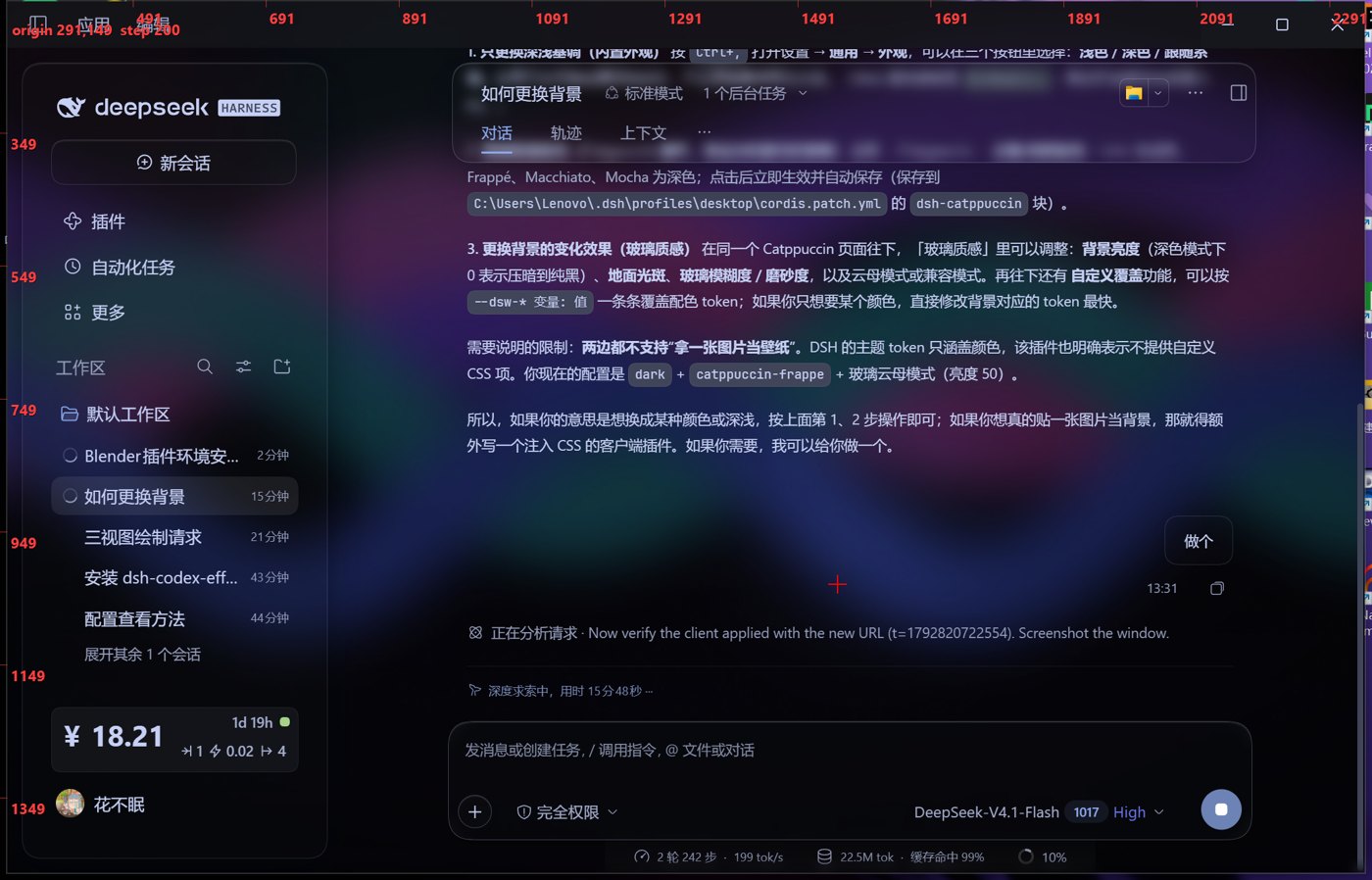
DeepSeek Harness ships three appearance modes (light / dark / follow system), and its theme tokens only carry colours — there is no wallpaper feature and no custom-CSS box. This plugin adds one: a real image behind the sidebar, the conversation and the composer, with the surfaces turned into translucent glass so the photo shows through.
What it does
- Host half (
lib/index.js) registers a small API on the DSH web server:GET /dsh-wallpaper/config.json— the settings file, plus the image's mtime;GET /dsh-wallpaper/image— the image itself (jpg / jpeg / png / webp / avif / gif / svg);POST /dsh-wallpaper/config— merge a patch into the settings (clamped to sane ranges);POST /dsh-wallpaper/upload— store an uploaded photo (magic-byte check, 40 MB cap) and point the config at it.
- Client half (
lib/client.js) injects one<style>element and paints the photo on<html>as a fixed background, then overrides five surface tokens with translucent versions of a neutral palette:--dsw-alias-bg-base,--dsw-alias-bg-layer-1,--dsw-alias-bg-layer-2,--dsw-alias-bg-layer-3,--dsw-alias-bg-module-platform. It also registers a 设置 → 背景壁纸 page, so the whole thing is driven from the GUI.
Overlays, masks and modals (--dsw-alias-bg-overlay, --dsw-alias-bg-mask-*) are deliberately left alone so dialogs stay readable.
Everything is wrapped in try/catch: a client entry that throws aborts the whole web boot and makes the desktop disable every third-party plugin, so this one must never throw.
Install
Requires a DSH build with client-plugin support (the desktop app or dsh web), and a plugin profile — desktop by default.
git clone https://github.com/fl0-0wer/dsh-wallpaper.git
cd dsh-wallpaper
Copy the package into the profile and the settings into the wallpaper folder — $DSH_HOME/wallpaper, or ~/.dsh/wallpaper when DSH_HOME is unset:
PROFILE="${DSH_PROFILE:-${DSH_HOME:-$HOME/.dsh}/profiles/desktop}"
WALL="${DSH_WALLPAPER_DIR:-${DSH_HOME:-$HOME/.dsh}/wallpaper}"
mkdir -p "$PROFILE/node_modules/dsh-wallpaper" "$WALL"
cp -r package.json lib "$PROFILE/node_modules/dsh-wallpaper/"
[ -f "$WALL/config.json" ] || cp config.json "$WALL/"
[ -f "$WALL/current.jpg" ] || cp current.jpg "$WALL/"
Then append this block to $PROFILE/cordis.patch.yml (or run tools/install-wallpaper.sh, which does all of the above and backs the file up first):
- insert:
    - id: dsh-wallpaper
      name: dsh-wallpaper
No restart needed: the loader hot-applies the new entry and the page picks the module up on its own.
Use it
Open 设置 → 背景壁纸 (Settings → Wallpaper): pick a photo with 选择图片…, turn the wallpaper on or off, and drag the sliders. Every change is saved immediately and the running app repaints behind the panel — no restart, no reload.
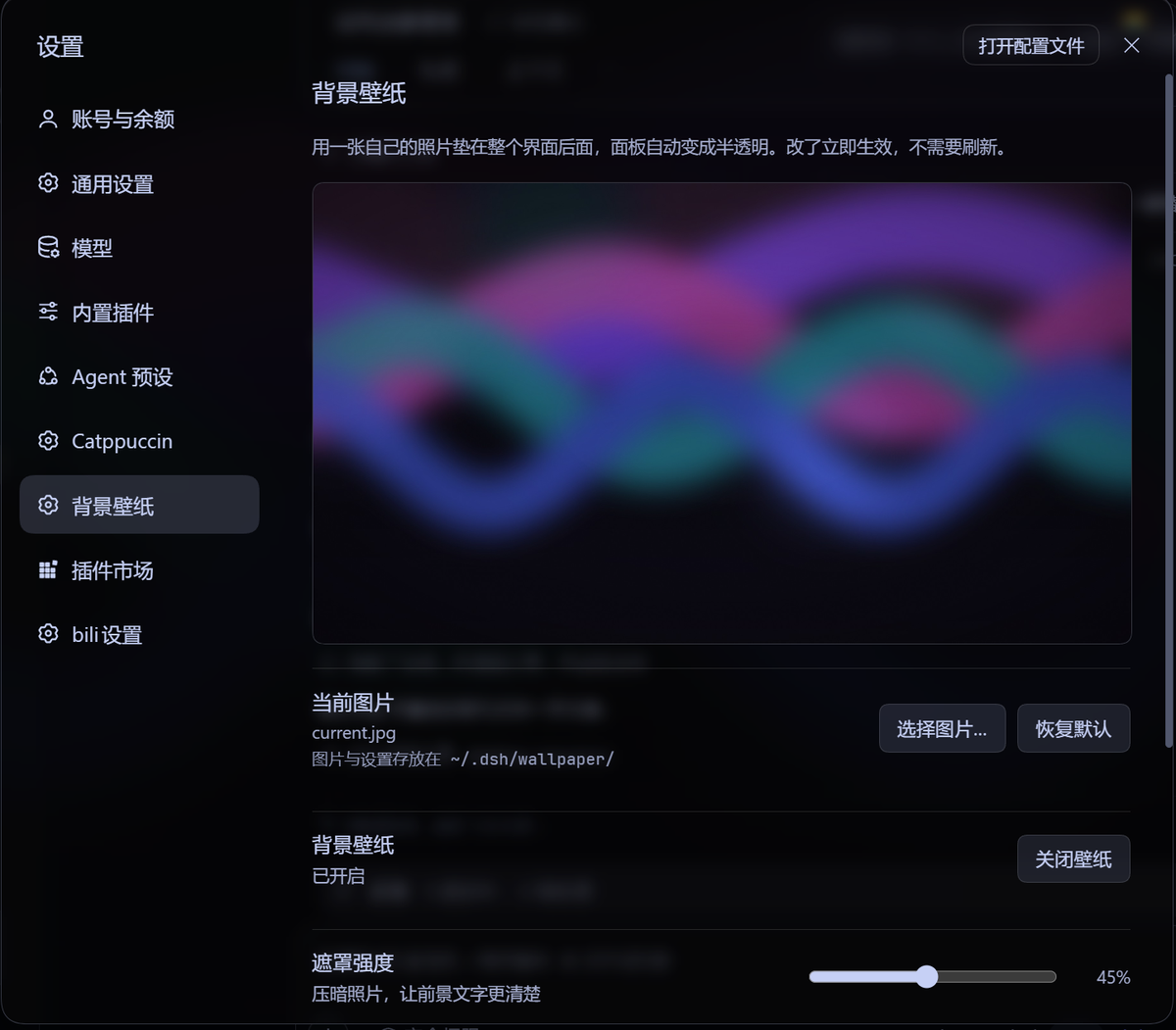
Drop a photo into the wallpaper folder and point config.json at it:
{
  "enabled": true,
  "image": "my-photo.jpg",
  "scrim": 0.45,
  "blur": 0,
  "saturation": 1,
  "translucency": 0.5
}
Switch to another window and back — the plugin re-reads the settings whenever the window regains focus, and the image is cache-busted by its modification time, so no reload is required.
| Key | Default | Meaning |
|---|---|---|
enabled | true | false removes the layer and the style, i.e. temporarily off |
image | current.jpg | file name inside the wallpaper folder; without an extension it tries jpg → jpeg → png → webp → avif |
scrim | 0.45 | black veil over the photo, 0–1. Raise it if text feels washed out |
blur | 0 | blur radius in px, 8–24 gives a frosted look; above 0 the photo moves to a filtered layer |
saturation | 1 | 0.6 for a muted look, 1.4 for punchier colours |
translucency | 0.5 | how much of the photo comes through the UI surfaces; 0 = almost opaque, 1 = strongest |
Light and dark
The plugin ships two neutral palettes and switches on the theme's own body[data-ds-dark-theme] attribute, so it follows 设置 → 通用 → 外观 (light / dark / follow system) automatically. Accent colours, syntax highlighting, borders and text colours are untouched — only the surfaces change.
If you also run a glass theme (for example Catppuccin), the wallpaper takes over the surfaces; the theme keeps its accents and text palette.
Uninstall
- Remove the
- insert: dsh-wallpaperblock from$PROFILE/cordis.patch.yml. - Delete
$PROFILE/node_modules/dsh-wallpaper/.
The wallpaper folder can stay where it is; it does nothing on its own.
Project layout
dsh-wallpaper/
├── lib/index.js        host half: /dsh-wallpaper/* routes
├── lib/client.js       client half: style + layer + Settings page
├── config.json         default settings
├── current.jpg         default wallpaper (generated by make-default.py)
├── make-default.py     regenerates current.jpg with numpy + Pillow
├── docs/               screenshots used by this README
└── tools/              install / toggle scripts, smoke tests
tools/install-wallpaper.sh installs into a profile, tools/toggle-wallpaper.py unloads and reloads the entry so a changed lib/ is picked up without restarting the app, and tools/test-client.mjs + tools/test-host.mjs are dependency-free smoke tests.
License
MIT