
 @etShaw-zh
dsh-db-studio
Connect to databases in DeepSeek Harness (DSH), then query and edit data right in the conversation.
- Stars
- 1
- Language
- JavaScript
- Created
- Oct 24, 2026
- Updated
- Oct 25, 2026
Introduction
dsh-db-studio
简体中文 | English


在 DeepSeek Harness(DSH)里连接数据库,直接在对话中查数据、改数据。
能做什么
浏览和管理数据库
- 左侧栏「数据库」面板:浏览连接、表结构、分页数据,执行 SQL。
- 支持 SQLite / PostgreSQL / MySQL,SQLite 无需额外安装驱动。
在对话里直接用
- 对话内「数据库」标签:在当前对话里直接查看和操作已选数据库。
- 输入框旁多选下拉:选择本次对话要使用的数据库,支持多选。
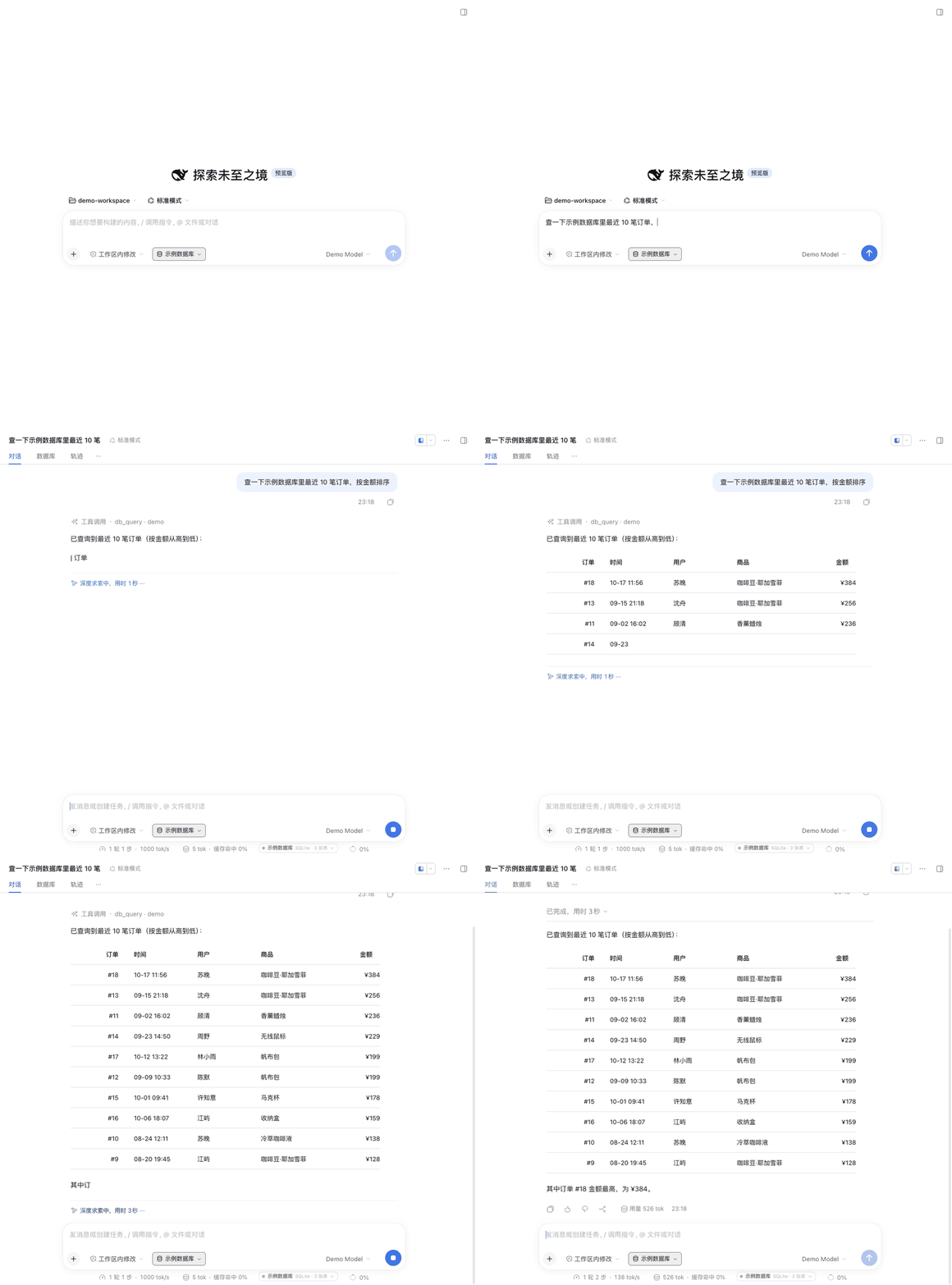
- 对话中直接操作:内置 4 个助手工具,可以帮你查询、建表、写数据。
/db指令:输入/,在指令列表里选择「数据库」,直接打开数据库面板。- 查询历史:对话数据库面板新增「查询历史」tab,按用户对话轮次分组、支持折叠,记录 SQL、连接、耗时和影响行数,点击即可复现;左侧全局面板的查询历史按对话分组,点击可进入对应对话。
安装
从 npm 安装:
# macOS 桌面端
DSH_CLI="/Applications/DeepSeek Harness.app/Contents/Resources/runtime/cli/bin/dsh"
"$DSH_CLI" plugin --profile desktop add dsh-db-studio@1.0.3
也可以直接从 GitHub 安装:
"$DSH_CLI" plugin --profile desktop add github:etShaw-zh/dsh-db-studio
安装后重启 DeepSeek Harness。稳定版见 Releases。Windows / Linux 使用本机对应的 dsh 路径即可。
从源码安装:
git clone https://github.com/etShaw-zh/dsh-db-studio.git
"$DSH_CLI" plugin --profile desktop add "$PWD/dsh-db-studio"
开始使用
- 左侧栏点击「数据库」,新建连接,或使用内置示例数据库。
- 在对话框里选中要用的数据库;也可以直接在对话里让助手操作:
查一下示例数据库里最近 10 笔订单,按金额排序
把 users 表里杭州的用户城市改成「杭州·西湖区」
给 orders 表加一个备注字段
助手只能访问当前对话选中的数据库;没选数据库时会先提示你选择。
配置
插件配置写在 profile 的 cordis.patch.yml,常用项:
| 配置 | 默认 | 说明 |
|---|---|---|
demo | true | 没有连接时自动创建示例数据库 |
allowWrite | true | 是否允许写操作 |
agentTools | true | 是否注册对话工具 |
maxRows | 200 | 查询最多返回行数 |
数据与安全
- 连接信息保存在
~/.dsh/dsh-db-studio/connections.json,文件权限为0600。 - 密码只保存在本机,不会发送到浏览器或模型上下文。
- 生产库建议使用只读账号、只读连接,或设置
allowWrite: false。
开发
npm install
npm test
欢迎提交 Issue 或 PR:https://github.com/etShaw-zh/dsh-db-studio
License
MIT