
 @dp419936514
dsh-plugin-updater
Safe one-click plugin updater for DeepSeek Harness (dsh): backup, verified update with real boot smoke test, auto-rollback, and a launch-aware restart button. 深度求索 Harness 插件安全一键更新器
- Stars
- 1
- Language
- JavaScript
- Created
- Sep 9, 2026
- Updated
- Sep 14, 2026
Introduction
dsh-plugin-updater
-3370ff)



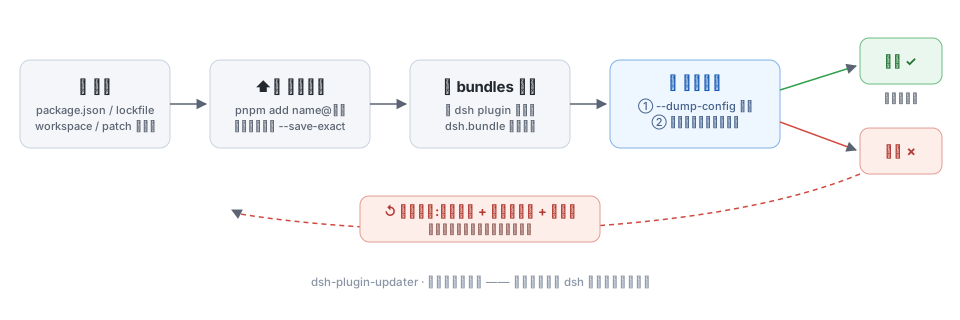
给 dsh 的 profile 更新和卸载插件。每次动手前先把四件套备份下来,动完先在临时端口真启动一次,起不来就还原回去。
为什么需要它
dsh 的插件是 profile 目录里的 pnpm 依赖,再通过 dsh.profile.bundles 叠进 cordis 组合。直接 pnpm up --latest,或者某些市场插件的“一键更新”,这几个地方容易做一半:
| 容易出事的地方 | 这里怎么处理 |
|---|---|
| pnpm 装到一半失败,profile 处于半成品状态 | 动手前备份 package.json / pnpm-lock.yaml / pnpm-workspace.yaml / cordis.patch.yml |
| 装完了不验证,重启才发现起不来 | 更新后在临时端口真启动一次,看到 dsh web: 才算通过(约 1 至 2 秒),之前先用 --dump-config 过一遍组合 |
新版插件不再声明 dsh.bundle,层列表没跟着改 | 复刻 dsh plugin 的 bundles 对账规则 |
卸载后 dsh.profile.bundles 还留着它的层,重启起不来 | 卸载后重新对账,并断言没有无依赖的层 |
| 校验没过却没有退路 | 任何一步失败就还原备份、用冻结锁重装、再校验一遍 |
--latest 把精确锁定改写成范围 | 按原 pin 风格分组执行,精确锁定的用 --save-exact;锁定插件默认不勾选 |
| 误动内置包 | 只改第三方依赖,内置 @deepseek-ai/* bundle 不是依赖 |
功能
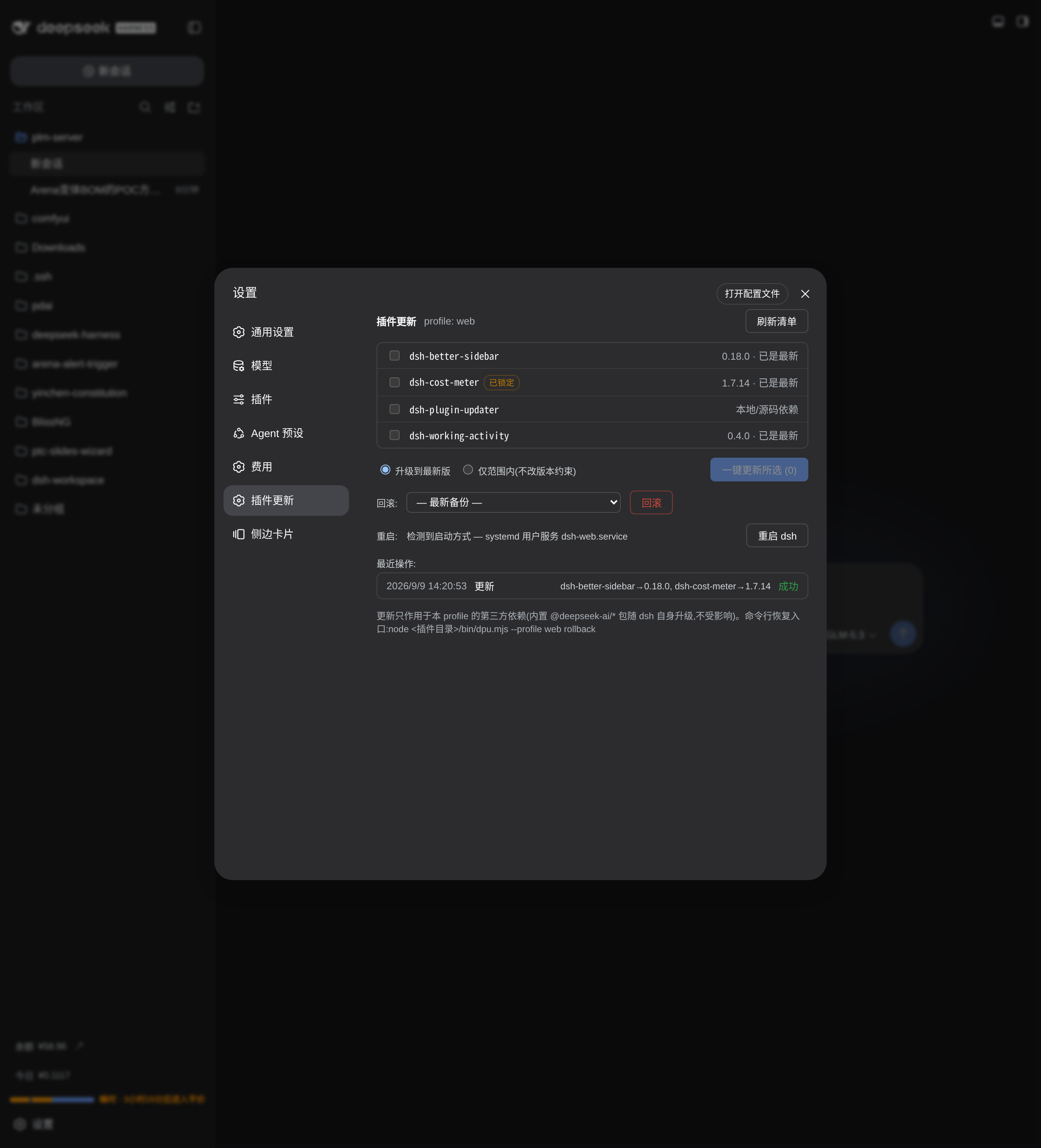
- 插件清单:名字、当前版本、可升级版本,以及
已锁定、已弃用、本地依赖标记;可按pnpm outdated刷新。 - 两种更新模式:升级到最新版,或者只在原版本约束内升;跨大版本时在页面上提示。
- 一键更新所选:勾选、二次确认、实时进度、逐插件报告
旧 → 新。 - 逐项卸载:每个插件行一个「卸载」按钮,二次确认后走
备份 → pnpm remove → bundles 对账 → 组合校验 + 临时端口启动验证,失败自动回滚。内置@deepseek-ai/*、不在依赖里的名字、更新器自身都会先被拦下并说明原因。link:/file:/git:这类本地依赖请走命令行。 - 回滚:失败自动还原;也可以在设置页里挑一个历史备份手动回滚,保留最近 10 份,回滚同样过校验。
- 重启:先判断 dsh 是怎么启动的。systemd 用户服务交给
systemctl --user restart;前台、nohup、tmux 启动的用一个分离进程等旧进程退出,再以相同的 argv / cwd / env 拉起。重启期间页面断连是正常的,服务回来后会自己刷新。 - 操作历史:每次更新、卸载、回滚的结果写进
<profile>/.dsh-plugin-updater/history.jsonl,设置页能看。
安装
以 web profile 为例(dsh ≥ 0.1.0-rc.5,Node ≥ 20):
# 从 GitHub 安装
dsh plugin --profile web add github:dp419936514/dsh-plugin-updater

# 或者 clone 下来按本地路径装,方便自己改
git clone https://github.com/dp419936514/dsh-plugin-updater ~/.dsh/plugins/dsh-plugin-updater
dsh plugin --profile web add ~/.dsh/plugins/dsh-plugin-updater
重启 dsh web,设置里会多出一个「插件更新」分区。卸载更新器自身:dsh plugin --profile web remove dsh-plugin-updater。
按本地路径安装时是一个
link:依赖。改完源码要重新跑一次add(或者在该 profile 目录里pnpm install)再重启才生效。从 GitHub 更新本插件,重跑方式一的add命令。
使用
设置页
- 打开分区时会自动读一次清单,也可以点右上角「刷新清单」;
- 勾选要更新的插件(精确锁定的默认不勾,标了
已锁定),选模式; - 点「一键更新所选」,点一次是确认,再点一次开始执行。进度日志里能看到 pnpm 输出、组合校验和启动冒烟;
- 成功后点「重启 dsh」生效。失败会自动回滚,原因写在日志里;
- 卸载在插件行右侧,同样是点两次确认,进度日志和更新共用一套;
- 需要时在回滚区挑一个备份回滚。
命令行
dsh 起不来时用这条通道:
cd ~/.dsh/plugins/dsh-plugin-updater   # 或者 clone 目录
node bin/dpu.mjs check                  # 清单与可更新项,profile 自动检测
node bin/dpu.mjs update --yes           # 更新所有可更新项,精确锁定的跳过
node bin/dpu.mjs update --targets dsh-cost-meter --yes     # 只更新一个,含锁定插件
node bin/dpu.mjs uninstall --targets dsh-cost-meter --yes  # 卸载,加 --force 才能卸更新器自身
node bin/dpu.mjs rollback               # 回滚到最新备份
node bin/dpu.mjs backups                # 备份列表与操作历史
node bin/dpu.mjs restart [--unit dsh-web.service] --yes    # 重启 systemd 用户服务
行内配置(可选)
在 profile 的 cordis.patch.yml 里覆盖:
- id: plugin-updater
  config:
    profile: web         # 管理哪个 profile,默认自动检测本插件所在的 profile
    bootVerify: true     # 改完是否真启动一次,关掉就只做组合校验
环境变量 DPU_RESTART_MODE=self|systemd 和 DPU_RESTART_UNIT=<name> 可以强制重启方式。
工作原理
lib/engine.js   纯 Node 管线:清单、备份、pnpm add/remove 分组、bundles 对账、双重校验、回滚、历史
lib/index.js    宿主半:webServer 前缀路由 /plugin-updater/api(loopback 加同源检查,与 /api 网关同款)
lib/client.js   浏览器半:lazy-CJS 工厂格式,注册「插件更新」设置分区
bin/dpu.mjs     CLI 恢复通道
校验分两步。--dump-config 把每一层 bundle 组合一遍,缺包、坏 patch、配置 schema 不认都在这里报出来;--port 0 --no-open 在临时端口把插件树真的拉起来,web profile 看到 dsh web: 才算通过。非 web 的 profile 启动时没有输出,就等一个存活窗口,提前退出即失败。
它不做什么
只管 profile 的第三方依赖。不升级 dsh 本体,不动 agent preset,不碰会话和凭据,也不替你装新插件。更新是“更新你勾选的那些”,不会自动追新。内置 @deepseek-ai/* 的更新归 dsh 自己,也不在卸载范围里。
FAQ
和直接 pnpm up --latest 有什么不一样?
多了备份、锁定风格保持、bundles 对账、双重校验、失败回滚这几步。pnpm up 只改文件,后面几件事它不做,而出问题通常就发生在这里。
更新或卸载到一半断电、被杀了怎么办?
备份目录 <profile>/.dsh-plugin-updater/backups/<时间戳>/ 里躺着四件套,node bin/dpu.mjs rollback 一条命令还原,再冻结锁重装、校验。
卸载和更新一样安全吗?
走的是同一条管线。卸载反而更容易出事:带 dsh.bundle 的插件被删掉之后,如果层还留在 dsh.profile.bundles 里,下一次组合会因为找不到 patch 文件直接失败。本插件在卸载后重新对账,并断言没有残留的无依赖层,才允许报告成功。
为什么内置 @deepseek-ai/* 不能卸?
它们不是 profile 的依赖,而是 dsh 自带的 bundle,删掉会把 dsh 本体拆了。它们随 dsh 自身升级。
为什么更新器自身不能在设置页里卸?
卸载动作由这个页面发起,删掉它页面会当场断掉。命令行一条命令即可:dsh plugin --profile web remove dsh-plugin-updater,重启后分区消失。
为什么改完要重启?
运行中的 dsh 已经把旧版本加载进内存,重启后才生效。设置页的「重启 dsh」按钮会按检测到的启动方式替你完成。
参与开发
改文案或代码之前请过一遍 CONTRIBUTING.md 里的清单;里面的自检脚本可以查破折号密度、加粗密度、列表密度和句长变化。
English
A plugin updater and uninstaller for DeepSeek Harness (dsh) profiles. It backs up the four files an update or removal can touch, then verifies the profile twice: dsh --profile <p> --dump-config composes every bundle layer and reports missing packages, unreadable patches, and config-schema rejections; dsh --profile <p> --port 0 --no-open boots the real app on an ephemeral port and waits for the dsh web: URL, which is the same gate a manual restart passes. Any failure after the backup restores those files, reinstalls from the frozen lockfile, and verifies again.
Removal runs through the same pipeline with pnpm remove, then re-derives dsh.profile.bundles so a departed package takes its patch layer with it: a leftover layer points the next composition at a patch file that no longer exists and the profile stops booting.
Also shipped: a settings-page section listing each plugin with its current and available version, a restart button that detects how dsh was launched (systemd user unit, or a detached relauncher that re-execs the same argv, cwd, and env), and bin/dpu.mjs as a recovery channel usable when a profile no longer boots.