
 @dougen
dsh-deepseek-usage
DeepSeek Harness sidebar plugin: your account balance, the active model's unit prices and a peak/off-peak indicator. / DeepSeek Harness 侧边栏插件:账号余额、当前模型档单价与峰谷时段指示灯。
- Stars
- 3
- Language
- JavaScript
- Created
- Sep 24, 2026
- Updated
- Oct 25, 2026
Introduction
@dougen/dsh-deepseek-usage
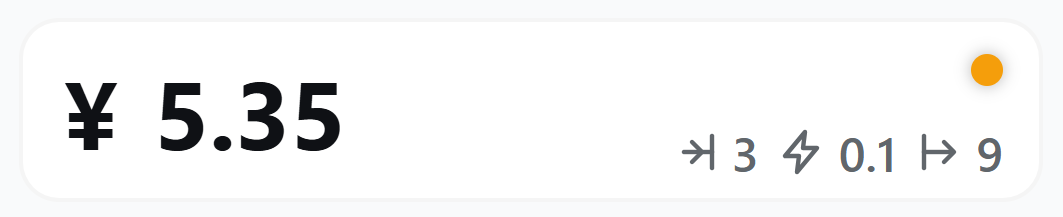
A sidebar plugin for the DeepSeek Harness (DSH) Web UI that answers two questions without leaving the app: how much is left on the active provider's account, and what the model costs right now — the second one for official DeepSeek models, whose prices the built-in table and DeepSeek's peak/off-peak windows cover.
What it does
- The active provider's account, in the sidebar footer: a balance with its currency symbol (
¥/$), or — for subscription plans that publish no balance — the tightest usage window as a percentage (5-hour 23%). The card follows the model you have selected, so switching provider switches the reading. - Unit prices of the active model: input / input cache / output for the billing window in effect right now. They change when you switch models and when the peak/off-peak window flips.
- Peak / off-peak dot with a countdown: orange during peak hours (Mon–Fri, excluding Chinese public holidays, 9:00–12:00 and 14:00–18:00 Beijing Time), green otherwise — weekends, public holidays and the make-up workdays that fall on a weekend are all off-peak; next to it, the time left until the next switch (
2d 15h,5h 47m,23m). - Unit prices and the peak/off-peak dot are for official DeepSeek routes only. The plugin prices a model only when it is served by DeepSeek's own route (
deepseek-official/deepseek-account) and its model id is in the built-in table. A third-party route that happens to offer a model calleddeepseek-flashis priced by its own contract, so the built-in table and DeepSeek's peak/off-peak windows do not apply to it — the card then shows the account reading alone, because any figure derived from them would not match your bill. An official model that is newer than this plugin release is also left unpriced until the table catches up. - A query-status page on the plugin's own page in Plugins: every provider DSH knows about that is configured, supported, or current gets a small card with its reading or the reason it cannot be read. When DSH detects Claude Code or OpenAI Codex, a token card appears for it and accepts a pasted OAuth token.
- Refreshes every 30 seconds, and immediately when you click the card or switch models. Follows the app light/dark theme and the DSH language (Chinese / English).
- While the first response is still in flight the card shows a placeholder (
—) rather than a number it does not have yet.
Supported providers
| Provider (route id) | Kind | Endpoint | Credential reference |
|---|---|---|---|
DeepSeek (deepseek-official, deepseek-account, deepseek) | Balance | GET https://api.deepseek.com/user/balance (honours DEEPSEEK_BASE_URL) | DEEPSEEK_API_KEY |
Moonshot / Kimi (moonshotai, moonshotai-cn) | Balance | GET /v1/users/me/balance — USD on api.moonshot.ai, CNY on api.moonshot.cn | MOONSHOT_API_KEY |
Z.ai / GLM (zai, zai-coding-cn) | Balance | GET /api/biz/account/query-customer-account-report — Bearer on api.z.ai, raw key on open.bigmodel.cn | ZAI_API_KEY |
OpenRouter (openrouter) | Balance | GET /api/v1/key, falling back to GET /api/v1/credits when the key carries no limit | OPENROUTER_API_KEY |
Kimi For Coding (kimi-coding) | Subscription usage | GET https://api.kimi.com/coding/v1/usages | KIMI_CODING_API_KEY |
OpenCode (opencode, opencode-go) | Subscription usage | GET https://opencode.ai/zen/go/v1/usage | OPENCODE_API_KEY |
MiniMax (minimax, minimax-cn) | Subscription usage | GET /v1/token_plan/remains | MINIMAX_API_KEY / MINIMAX_CN_API_KEY |
Claude Code (anthropic) | OAuth subscription | GET https://api.anthropic.com/api/oauth/usage | DSH_USAGE_CLAUDE_OAUTH_TOKEN |
OpenAI Codex (openai-codex) | OAuth subscription | GET https://chatgpt.com/backend-api/wham/usage | DSH_USAGE_CODEX_OAUTH_TOKEN + DSH_USAGE_CODEX_ACCOUNT_ID |
The reference each provider reads is the one the Models page writes for that route (<ROUTE>_API_KEY), then the adapter's own environment name, so a key you typed on the Models page and one you exported in your shell both work. The status page names the references it looked at, so a missing key tells you which one to set.
OAuth tokens for Claude Code and Codex
These two providers publish their subscription usage only to an OAuth token, which DSH never holds for them — the routes authenticate with an API key. Open the plugin's page in Plugins, paste a token, and the card plus the status table start reporting:
- Claude Code — on a machine signed in to Claude Code, copy
claudeAiOauth.accessTokenfrom~/.claude/.credentials.json(on macOS: theClaude Code-credentialskeychain item). A token minted byclaude setup-tokenalso works, but it carries onlyuser:inference, so the plugin reads the 5-hour and 7-day windows from the rate-limit response headers instead of the full usage body. - OpenAI Codex — copy
tokens.access_tokenfrom~/.codex/auth.jsonand puttokens.account_idin the account ID field, which is sent as theChatGPT-Account-Idheader.
Tokens are stored through DSH's credential service (~/.dsh/.credentials.yaml) and stay on this machine: no response, log line, or page element ever carries one back. Clear removes them again.
Providers that cannot be read
The status page lists these with the reason rather than leaving a silent gap:
- GitHub Copilot, Google, Google Vertex, Amazon Bedrock, Azure — either OAuth-only or signed with cloud-provider AK/SK credentials this plugin deliberately does not handle.
- Volcengine Ark (字节方舟) — quota lives behind an AK/SK-signed OpenAPI (
GetCodingPlanUsage), and DSH's provider directory carries no Ark route to key on. - OpenCode's Zen wallet balance — OpenCode has no API-key-readable balance endpoint (anomalyco/opencode#44189); only the Go subscription usage windows above are available.
DSH compatibility
| DSH | Plugin version |
|---|---|
0.2.x (0.2.0-rc.1 and later) | 0.11.0 and later |
0.1.x (0.1.0-rc.6 and later) | 0.10.x, or 0.11.0 and later |
dsh --version prints your DSH version. Installing without a version picks the newest compatible release; name an exact version (@dougen/dsh-deepseek-usage@0.10.2) when the newest does not match your DSH.
Install, uninstall, common errors
Install
- Configure the API key for your provider in DSH (model settings) —
DEEPSEEK_API_KEYfor DeepSeek, and so on. dsh plugin --profile web add @dougen/dsh-deepseek-usage- Restart
dsh weband open the URL it prints — the card sits at the bottom of the sidebar, below the Cordis panel button.
Uninstall
dsh plugin --profile web remove @dougen/dsh-deepseek-usage
Then restart dsh web.
A blank card means the account could not be read
The card then shows the reason instead of numbers:
DEEPSEEK_API_KEYis not configured — set it in DSH settings and restart.- The key contains characters an HTTP header cannot carry (a stray newline from a copy-paste) — re-copy it without the line break.
- The account request failed or timed out — click the card to retry.
- The account is reported as unavailable — the balance API answered, but with
is_available: false. DEEPSEEK_BASE_URLpoints at a third-party gateway — the official balance endpointhttps://api.deepseek.com/user/balancemay be unavailable or answer differently; only DeepSeek's official platform is supported.<Provider> has no balance or usage API to read— the active provider is one of the unreadable kinds above; the card stays blank instead of showing a figure from the wrong account.- This provider has no OAuth token yet (Claude Code / Codex) — paste one on the plugin's page.
The card never shows an upstream error message verbatim: transport details stay in the host's log, and the card carries a short, actionable line instead.
Prices differ from the official page
- Prices are the built-in table
PRICE_TABLEinlib/pricing.js, a snapshot of the official pricing page. It changes only when a new version of the plugin ships — there is no local price file and no background sync. - The card shows unit prices and the peak/off-peak dot only for a model served by DeepSeek's own route (
deepseek-official/deepseek-account) whose id is in the table (deepseek-flash,deepseek-v4-pro,deepseek-chat,deepseek-reasonerand the legacy names). A third-party route offering a model with the same name is priced by its own contract, so the card hides both instead of showing a figure that would not match your bill. - An official model newer than this plugin release is not in the table either, and the card hides prices for it until the table is updated — the plugin does not guess a price from the model name.
- Off-peak days come from the holiday table
HOLIDAY_RANGESinlib/pricing.js. The State Council usually publishes next year's arrangement in November; update it then, together withHOLIDAY_TABLE_THROUGH_YEAR. Until you do, holidays are treated as ordinary workdays and the card shows peak prices during them; the host logs a warning once a day while the table does not cover the current year.
A reading looks wrong for a gateway route
Models reached through a third-party gateway (Workbuddy, a relay, a self-hosted endpoint) are billed by that gateway. A vendor API reports your own account at that vendor, which is a different fact: if your DeepSeek key is configured and the active model runs on Workbuddy, the card shows Workbuddy's status — not your DeepSeek balance, and not what the gateway is charging. The status page repeats this note for the same reason.
How it works
- The host half (
lib/index.js,lib/accounts.js,lib/pricing.js) registersGET /api/deepseek-usage,GET /api/deepseek-usage/accounts, andPOST /api/deepseek-usage/token. Per request it resolves the active model's provider fromagentDefaultModel, resolves that provider's credential reference through DSH's credential service, asks the matching endpoint, and answers with the reading plus the price and peak facts.GET /api/deepseek-usage/holidayshands the browser half the same public-holiday table. Readings are cached for 10 seconds and keyed by provider, endpoint, and credential, so a second tab or a click does not repeat the upstream call. - The browser half (
lib/client.js) renders that answer into thesidebar.footer.actionslot, re-reads it every 30 seconds, and refreshes on click or on a model change. The peak state and the countdown come from the same answer, so the card itself holds no pricing logic. It also renders the query-status table intoplugins.detail.sectionon the plugin's own page, where the OAuth token cards write throughPOST /api/deepseek-usage/token. - Every route answers only to local callers: the
Hostheader must name a loopback address (or the address the server is bound to), cross-site browser requests and foreignOriginheaders are refused, and only the documented methods are accepted. A local process on the same machine can still read the route — that is inherent to a local tool. - Credentials never cross to the browser. The browser asks only
configuredfacts and writes tokens through the host; no response carries a key, a token, or an upstream error message.
中文文档
一个 DeepSeek Harness(DSH)网页界面的侧边栏插件:不离开 DSH 就能知道当前模型提供商的账号还剩多少钱;当前用的是 DeepSeek 官方模型时,还能看到它现在什么价——内置价格表与官方峰谷时段覆盖的正是这些模型。
这个插件做什么
- 当前提供商的账户读数:侧边栏底部显示余额(符号随币种
¥/$);订阅制(没有余额接口)则显示最紧窗口的已用百分比(如5 小时 23%)。读数跟随当前选中的模型,切换提供商即切换读数。 - 当前模型的档单价:输入 / 输入缓存 / 输出,按此刻生效的计费时段显示;切换模型、跨过峰谷切换点时会跟着变。
- 峰谷指示灯 + 倒计时:高峰(周一至周五、不含中国法定节假日,9:00–12:00、14:00–18:00 北京时间)橙色,其余时间绿色——周末、法定节假日全天,以及调休上班的周末都是空闲;指示灯旁给出距下次切换的剩余时间(
2d 15h、5h 47m、23m)。 - 档单价与峰谷指示灯只对 DeepSeek 官方路由上的官方模型显示。只有模型由 DeepSeek 自有路由(
deepseek-official/deepseek-account)提供、且模型 id 在内置表里,卡片才给价。第三方路由上恰好也叫deepseek-flash的模型按它自己的合约计费,内置价格表与官方峰谷时段对它不成立,卡片只显示账户读数——据此算出的数字与实际账单不符。比本插件版本更新的官方模型同样不估价,直到价格表更新:插件不会按模型名猜价格。 - 查询状态页:在 Plugins 面板里本插件的详情页上,DSH 已配置的、受支持的、以及当前的每个提供商各占一张小卡片——能查的显示数值,不能查的写明原因。DSH 里检测到 Claude Code 或 OpenAI Codex 时,对应的卡片旁出现令牌填写卡,粘贴 OAuth 令牌后即可查询。
- 每 30 秒自动刷新;点击卡片或切换模型时立即刷新。跟随应用明暗主题与 DSH 语言(中文 / English)。
- 第一次响应还没回来时,卡片显示占位符
—,而不是一个它并不拥有的数字。
支持的提供商
| 提供商(路由 id) | 类型 | 接口 | 密钥引用 |
|---|---|---|---|
DeepSeek(deepseek-official、deepseek-account、deepseek) | 余额 | GET https://api.deepseek.com/user/balance(遵循 DEEPSEEK_BASE_URL) | DEEPSEEK_API_KEY |
Moonshot / Kimi(moonshotai、moonshotai-cn) | 余额 | GET /v1/users/me/balance——api.moonshot.ai 为 USD、api.moonshot.cn 为 CNY | MOONSHOT_API_KEY |
智谱 Z.ai / GLM(zai、zai-coding-cn) | 余额 | GET /api/biz/account/query-customer-account-report——api.z.ai 用 Bearer、open.bigmodel.cn 用裸 Key | ZAI_API_KEY |
OpenRouter(openrouter) | 余额 | GET /api/v1/key;该 Key 无限额时回落 GET /api/v1/credits | OPENROUTER_API_KEY |
Kimi For Coding(kimi-coding) | 订阅用量 | GET https://api.kimi.com/coding/v1/usages | KIMI_CODING_API_KEY |
OpenCode(opencode、opencode-go) | 订阅用量 | GET https://opencode.ai/zen/go/v1/usage | OPENCODE_API_KEY |
MiniMax(minimax、minimax-cn) | 订阅用量 | GET /v1/token_plan/remains | MINIMAX_API_KEY / MINIMAX_CN_API_KEY |
Claude Code(anthropic) | OAuth 订阅 | GET https://api.anthropic.com/api/oauth/usage | DSH_USAGE_CLAUDE_OAUTH_TOKEN |
OpenAI Codex(openai-codex) | OAuth 订阅 | GET https://chatgpt.com/backend-api/wham/usage | DSH_USAGE_CODEX_OAUTH_TOKEN + DSH_USAGE_CODEX_ACCOUNT_ID |
每个提供商读取的引用顺序是:模型页为该路由写入的 <路由名>_API_KEY,然后是适配器自己声明的环境变量名。所以无论密钥是当初在模型页键入的,还是在 shell / .env 里导出的,都能读到。状态页会列出它查过哪些引用,缺密钥时直接告诉你该配哪一个。
Claude Code 与 Codex 的 OAuth 令牌
这两家的订阅用量只对 OAuth 令牌开放,而 DSH 里这两条路由走的是 API Key,拿不到订阅令牌。DSH 里检测到 Claude Code / Codex(这两条路由已注册、或在目录里已配置、或是当前选中的提供商)时,插件页就会出现对应的令牌填写卡;粘贴令牌后卡片与状态卡即可显示:
- Claude Code——在已登录 Claude Code 的机器上,从
~/.claude/.credentials.json的claudeAiOauth.accessToken复制(macOS 在钥匙串项Claude Code-credentials里)。claude setup-token产生的令牌也能用,但它只带user:inference权限,插件改为从推理响应的限流头读取 5 小时与 7 天两个窗口,拿不到完整用量体里的分模型周限额。 - OpenAI Codex——从
~/.codex/auth.json的tokens.access_token复制,并把tokens.account_id填进账号 ID 一栏(它会作为ChatGPT-Account-Id请求头发送)。
令牌经 DSH 的凭据服务保存在本机(~/.dsh/.credentials.yaml),不出这台机器:任何响应、日志、页面元素都不会把它带回来。点清除即可删除。
查不到的提供商
状态页会列出它们并写明原因,不留空档:
- GitHub Copilot、Google、Google Vertex、Amazon Bedrock、Azure——要么只有 OAuth,要么需要云厂商 AK/SK 签名,本插件有意不处理。
- 火山方舟(字节方舟)——配额在 AK/SK 签名的 OpenAPI(
GetCodingPlanUsage)后面,且 DSH 的提供商目录里没有方舟路由可对应。 - OpenCode 的 Zen 钱包余额——OpenCode 没有可用 API Key 读取的余额接口(anomalyco/opencode#44189),只有上面的 Go 订阅用量窗口可读。
DSH 版本对应关系
| DSH | 插件版本 |
|---|---|
0.2.x(0.2.0-rc.1 起) | 0.11.0 及以后 |
0.1.x(0.1.0-rc.6 起) | 0.10.x,或 0.11.0 及以后 |
dsh --version 查看当前 DSH 版本。不带版本号安装会取最新的兼容版本;最新版与你的 DSH 不匹配时,用 @dougen/dsh-deepseek-usage@0.10.2 这样的完整版本号指定。
安装、卸载与常见错误
安装:
- 在 DSH 设置(模型页)里配置你要查的提供商的 API Key——DeepSeek 是
DEEPSEEK_API_KEY,其余同理。 dsh plugin --profile web add @dougen/dsh-deepseek-usage- 重启
dsh web,打开它打印的地址:卡片位于侧边栏底部、Cordis 面板按钮下方。
卸载:
dsh plugin --profile web remove @dougen/dsh-deepseek-usage
然后重启 dsh web。
卡片空白说明账户读数没拿到,此时卡片会写明原因:
- 没有配置
DEEPSEEK_API_KEY:在 DSH 设置里配置后重启。 - Key 里含有 HTTP 头带不了的字符(比如粘贴时带进一个换行):重新复制,去掉换行。
- 账户接口失败或超时:点击卡片重试。
- 账户当前不可用:余额接口有响应,但
is_available为 false。 DEEPSEEK_BASE_URL指向第三方中转:官方余额接口https://api.deepseek.com/user/balance可能不可用或返回异常,本插件只支持 DeepSeek 官方平台。<提供商> 没有可查询余额或用量的接口:当前提供商属于上面"查不到"的那几类,卡片留空而不是显示一个来自错误账户的数字。- 尚未填写该提供商的 OAuth 令牌(Claude Code / Codex):到插件页面,在该提供商的卡片旁粘贴一个。
卡片不会原样显示上游的错误消息:传输层细节留在宿主日志里,卡片上只放一句简短、能行动的话。
价格与官方不一致时:
- 价格是
lib/pricing.js的内置表PRICE_TABLE(官方价格页的快照),只在发布新版本时更新——没有本地价格文件,也没有后台同步。 - 只有当前模型由 DeepSeek 自有路由(
deepseek-official/deepseek-account)提供、且模型 id 在内置表里(deepseek-flash、deepseek-v4-pro、deepseek-chat、deepseek-reasoner及旧名),卡片才显示档单价与峰谷指示灯;第三方路由上同名模型按它自己的合约计费,没有官方峰谷定价,卡片把这两项都隐藏,而不是显示一个与实际账单不符的数字。 - 比本插件版本更新的官方模型同样不在表里,卡片会隐藏价格,直到价格表更新——插件不按模型名猜价。
- 放假日期维护在
lib/pricing.js的HOLIDAY_RANGES。国务院办公厅通常在前一年 11 月发布次年安排,届时更新,同时把HOLIDAY_TABLE_THROUGH_YEAR往前推一年;未更新前,节假日会按普通工作日处理,白天显示高峰价,宿主日志会每天提醒一次。
网关路由的读数为什么"看起来不对"
经第三方网关(Workbuddy、中转、自建端点)访问的模型由网关计费。厂商接口反映的是你自己在该厂商的账户,这是另一件事:配了 DeepSeek Key 而当前模型跑在 Workbuddy 上时,卡片显示的是 Workbuddy 的状态——既不是你的 DeepSeek 余额,也不是网关在扣多少。查询状态页同样写着这句话,理由相同。
简单的工作原理
- 宿主侧(
lib/index.js、lib/accounts.js、lib/pricing.js)注册GET /api/deepseek-usage、GET /api/deepseek-usage/accounts与POST /api/deepseek-usage/token。每次请求从agentDefaultModel解析当前模型的提供商,经 DSH 凭据服务解析该提供商的密钥引用,请求对应接口,返回账户读数与价格、峰谷事实;GET /api/deepseek-usage/holidays把同一份法定节假日表交给浏览器侧。读数缓存 10 秒,并按"提供商 + 端点 + 凭据"分桶,多标签页或重复点击不会重复打上游。 - 浏览器侧(
lib/client.js)把这份响应渲染进sidebar.footer.action槽位,每 30 秒重新读一次,点击卡片或模型变化时立即刷新;峰谷状态与倒计时同样来自这次响应,界面自身不做计价逻辑。它还把查询状态表渲染进插件页的plugins.detail.section,令牌卡通过POST /api/deepseek-usage/token写回宿主。 - 所有路由只回答本机请求:
Host必须是回环地址(或服务器绑定的地址),跨站浏览器请求与异源Origin一律拒绝,且只接受文档声明的方法。同一台机器上的本地进程仍能读到该路由——这是本地工具的固有边界。 - 凭据从不下发到浏览器:浏览器只问"配没配",写令牌也经宿主转发;任何响应都不带 Key、令牌或上游错误原文。
License
MIT