
 @bululuburuarua666
dsh-herald
🔔 Herald 传令官 — DSH 三通道任务通知:页内浮层、浏览器横幅、宿主直发系统通知(浏览器关闭也送达) | Tri-channel task notifications for DeepSeek Harness: in-page toasts, browser banners & host-direct OS toasts that survive a closed browser
- Stars
- 2
- Language
- JavaScript
- Created
- Sep 6, 2026
- Updated
- Sep 6, 2026
Introduction
Herald · 传令官 — dsh-herald
English | 中文




Task notifications for DeepSeek Harness (DSH) — delivered even when the browser is closed. Approval requests · awaiting-your-reply · finished background jobs / subagents / workflows — pushed to your desktop through three independently switchable channels, with in-page toasts & chimes, a premium bell panel, and persistent history.
Herald, the medieval messenger who crossed the city walls — because that is literally what this plugin does: the DSH host process raises the OS notification itself (PowerShell WinRT on Windows, osascript on macOS, notify-send on Linux). Browser open, hidden, or fully closed — the toast still lands.
The three channels, live
Channel A · In-browser alerts — the in-page toast (top-right, 6s, hover to pause), on the real DSH workspace:
Channel B · Browser OS banners — a banner the page requests through the browser Notification API (active while you browse; auto-backstop when host-direct is unavailable):
Channel C · Host-direct OS toasts — raised straight from the DSH host process (via the Windows PowerShell WinRT channel — no browser involved, lands with the browser closed):
The panel
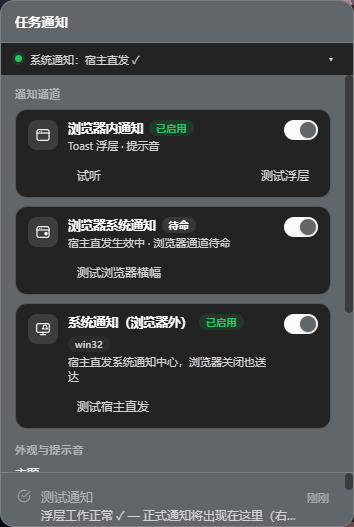
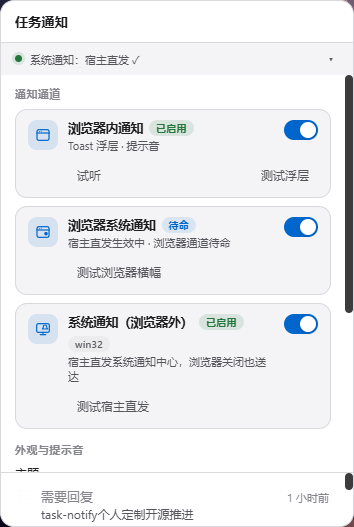
The bell panel in dark (follows the DSH theme) and light — card-based channel settings, per-channel test buttons, segmented theme control. Bilingual 中/EN UI.
Why Herald
DSH runs long agent turns, background jobs, subagents and workflows. You step away for two minutes and miss the approval prompt. Notification plugins that rely on the browser's Notification API die silently when the page is hidden (background tabs pause polling), throttled, or the browser is closed. Herald fixes the delivery architecture itself — the host is the notifier.
Tags: DSH plugin · task notifications · approval alerts · desktop notifications · system notification center · Windows toast · background job alerts · subagent / workflow completion · in-page toasts · bell panel · notification history.
The three channels
| Channel | What it is | Switch lives in | Delivers when |
|---|---|---|---|
| A · In-browser alerts | Toast overlays + chimes rendered by the page | per-browser (localStorage) | switch on |
| B · Browser OS banners | Banners the page requests via the browser Notification API | per-browser (localStorage) | switch on and host not delivering (stands by — never double banners) |
| C · Host-direct OS toasts | The DSH host process raises OS-center toasts itself | host-side (settings.json, cross-browser, works headless) | switch on + platform adapter |
| C host | B browser | OS banner source | Browser closed? |
|---|---|---|---|
| ON | ON | host only (B stands by) | ✅ still notified |
| ON | OFF | host only | ✅ still notified |
| OFF | ON | browser, only while browsing | ❌ |
| OFF | OFF | none (bell still records) | ❌ |
C off + B on is a real preference Herald makes expressible — browser-branded banners while you're at the page, silence when you're not (also right for remote GUI access: host toasts land on the server machine, browser banners on yours). DSH_TASK_NOTIFY_OS=0|1 in the host environment overrides and locks channel C for headless operations.
Features
- 🔔 Tri-channel delivery — per-channel switches with per-channel test buttons and instant switch feedback
- 🖥️ Host-direct OS toasts — PowerShell WinRT (zero dependencies) /
osascript/notify-send, graceful degradation when no adapter exists - 🛡️ Anti-bombardment — serialized spawns, 1.2s min gap, bursts fold into summary toasts (approvals are exempt), 5s timeout kill, one retry
- 🔒 Injection-safe — text travels base64(UTF-16LE); tags sanitized; spawns without a shell
- 🎨 Premium panel — status-dot health strip, segmented theme control, custom slider/switches, entrance animations (reduced-motion safe), 中/EN
- 🔊 Direction-encoded chimes — approvals double-tap, replies ascend, failures descend
- 💾 Persistent history — 300 records, atomic writes, corrupt-file recovery; channel settings and history live under
<profile>/data/task-notify/, surviving reinstalls and the rename from upstream - ⚡ Incremental sync —
pullSincechange feed, adaptive polling 1.5→5s, legacy-host fallback - 🧪 108 tests, zero runtime dependencies beyond DSH's own packages
Install
Requires Node.js + pnpm. After installing: restart dsh web, then hard-refresh the page (Ctrl+F5).
npm (recommended)
dsh plugin --profile web add dsh-herald
From GitHub
dsh plugin --profile web add git+https://github.com/bululuburuarua666/dsh-herald.git
Manual (offline)
Download dsh-herald-1.0.1.zip from the releases, extract, and copy lib/, package.json, cordis.patch.yml into ~/.dsh/profiles/<name>/node_modules/dsh-herald/. Then append to ~/.dsh/profiles/<name>/cordis.patch.yml:
- insert:
    - id: herald
      name: 'dsh-herald'
Upgrading from upstream dsh-task-notify
Remove the old package and its composition row, then install Herald. History (records.json), channel settings (settings.json) and per-browser preferences carry over — the data directory resolves independently of the package name, and localStorage keys are unchanged from upstream.
First run
Click the 🔔 bell → expand the drawer (▸) → 通知通道 holds all three switches with test buttons. Host-direct toasts need no permission; channel B asks for the browser grant via its own test button.
How it works
events (approval/request · agent/turn-stopping · subagent/end ·
        workflow/end · jobs.onJobDone)
   │
   ▼
push() ── new record ──► queue (persistent, cap 300) ──► pullSince polling
   │                                                        │
   └─► osnotify adapter ──► OS notification center          ▼
       (settings.json gate,                          browser page
        win32/darwin/linux)                    ├─ A: toasts + chimes
                                              └─ B: browser banners (standby
                                                   while the host delivers)
The host half (lib/index.js · lib/osnotify.js · lib/settings.js · lib/store.js · lib/typert.js) listens across all sessions, persists records, raises host-direct toasts for genuinely new records (key-touch dedupe), and serves the taskNotify Remote service plus the ntfy_status agent tool. The client half (lib/client.js) is a zero-build module loader entry — incremental polling, bell/panel/toasts UI, channel gating. Client↔host RPC rides the raw connection seam (/api/taskNotify/…) — a deliberate design avoiding the self-mounting-namespace inject deadlock.
Client-only changes take effect on page refresh; host-side changes need a DSH restart (typert manifests are cached per package name).
Tests
npm test
Node's built-in runner, no extra dependencies: client logic against mocked window/React/Notification, host queue + persistence + RPC wire-shape contracts, the OS adapter under a virtual clock, and the settings store. Host tests need the peer packages resolvable — a junction/symlink to an installed DSH profile's node_modules suffices.
Relation to upstream
Herald began as kaotusi/dsh-task-notify (MIT) and grew a reworked delivery architecture, tri-channel model, and UI system. Upstream bugs found and fixed along the way (see CHANGELOG.md): the web-composition inject deadlock, and a gateway parameter-dispatch mismatch that silently degraded incremental pulls, cross-tab acks, and settings writes. Herald is an independent community project compatible with DeepSeek Harness; it is not an official DeepSeek product.
License
MIT — © 2026 kaotusi (upstream), bululuburuarua666 & contributors.