
 @airainal
dsh-codex-mode
Codex mode for DeepSeek Harness: durable progress commentary, turn continuation, and a switch at the top of the permission menu.
- Stars
- 2
- Language
- JavaScript
- Created
- Oct 25, 2026
- Updated
- Oct 26, 2026
Introduction
Codex Mode for DeepSeek Harness
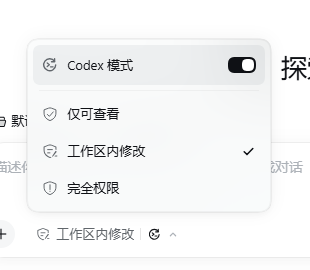
A Codex-style execution mode for DSH. It adds a switch at the top of the permission menu, keeps a durable plan, emits visible progress while tools run, and continues a turn that stops with unfinished work.
The important difference from a prompt-only mode: if the model emits a tool call without text, the host driver commits a short progress message before the tool runs, as part of the durable assistant message. A long turn is not a silent tool loop.
What it does
- Codex switch at the top of the permission menu, above a divider. The switch does not change the sandbox or approval level.
- Remembered globally: the last state is stored in the profile's
codex_modestorage domain. Turning it on or off applies to every live root session; new and resumed sessions inherit it automatically. - Visible progress before every tool batch. The model's own commentary is kept; a missing one is inserted by the driver in the user's language.
- Turn continuation when the todo list still has unfinished work and the assistant is not asking a question.
- Durable per-session identity stored as
codex-read-only,codex-workspace-write, orcodex-danger-full-access, so the mode appears in the session log and survives resume. - Same safety gates for Full access and Auto review as the stock permission control.
Requirements
- DSH Desktop or Web with the Plugin Manager. Tested with DSH
0.2.1-rc.3. - The package declares
engines.dsh: ^0.2.1-rc.1; install it on a 0.2.1-rc.x runtime. - Git and network access to GitHub for the first install.
Install
Option 1: give DSH the GitHub link
Start a new DSH session and send:
Install this DSH plugin bundle from GitHub: https://github.com/airainal/dsh-codex-mode
The agent can call the plugin_manager tool with that URL. The manager checks
the GitHub repository, installs the bundle, and enables it. You can also open
Plugins → Install bundle and paste:
https://github.com/airainal/dsh-codex-mode
If your DSH version wants an explicit git spec, use:
github:airainal/dsh-codex-mode
Option 2: install the release tarball
Download the asset from
Releases and paste either
the release asset URL or the downloaded .tgz path into Plugins → Install
bundle:
https://github.com/airainal/dsh-codex-mode/releases/download/v1.1.0/dsh-codex-mode-1.1.0.tgz
After installing
- Open any session.
- Click the permission control at the bottom of the composer.
- Turn on Codex Mode at the top of the menu.
- Pick
Read Only,Workspace Write, orFull accessexactly as before. The mode and the permission level are independent.
HMR applies the change immediately in the desktop app. If your profile has HMR disabled, restart DSH after installation.
To remove it, open Plugins → Codex Mode → Remove, or ask the agent to remove the bundle.
Use
The menu has two dimensions:
- the Codex switch controls the execution protocol;
- the permission choices control the sandbox and approval policy.
Turning Codex on while Workspace Write is selected moves every live root
session to its matching codex-workspace-write identity, but each sandbox stays
workspace-write. The last switch state is remembered; a new or resumed session
is moved to its matching codex-* identity automatically. Changing permission
while the mode is on keeps the global mode and changes only that session's
permission base.
The same toggle is available as a Host command:
/codex-mode on
/codex-mode off
Auto review is disabled while Codex is on because there is no codex-auto
identity. Turn Codex off first if you want Auto review.
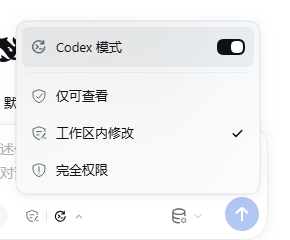
The trigger shows a Codex mark on the right when the mode is on. It slides out with a 240 ms width/opacity transition, and the menu stays open while switching.
How it works
The package is a DSH bundle with a Host half and a Web client half.
cordis.patch.ymladds the threecodex-*permission presets and mounts the Host plugin.- A profile-level
codex_modestorage domain keeps{ enabled, updatedAt }. The/codex-mode on|offcommand writes it first, then applies the matchingcodex-*or base preset to every live root session. Theagent/createdlistener applies the remembered value to new and resumed root agents. - The Host plugin adds the
codex:modesystem-prompt section and wraps each live agent's step. In Codex mode, anassistant/messagethat contains only tool calls gets a leading progress text block before it is committed; the matchingtext-chunksrecord is added to the stream and tool-call block indexes are shifted so content and stream stay aligned. agent/turn-stoppingprovides one continuation steer when the plan is unfinished and the reply is not a question.- The Client plugin replaces the current-session permission control with the same control plus the Codex row, keeping the original permission glyphs and the Full-access/Auto-review risk dialogs.
This is a Codex step driver, not a second tool runtime. DSH still owns turn construction, tool dispatch, approvals, retries, compaction, and the event log. A full fork of those systems would duplicate a large amount of tested infrastructure; the driver changes the part users actually see: progress output and turn continuation.
Why the progress line is provable
The line is not a UI status chip. In a test turn that explicitly told the model
not to emit text, the model's stream contained only reasoning and tool-call
chunks, with no text-chunks. The committed assistant message was:
[reasoning, "我先读取 `dsh-codex-mode/client.js`。", tool-call]
The matching stream indexes were reasoning 0, text 1, tool-call 2. The
text could only come from the Host driver. The test was run locally against DSH
0.2.1-rc.3; the session log itself is not published.
Scope and limitations
- The package targets DSH
0.2.1-rc.x. It uses the live agent'sstepand the session append boundary; a future DSH release can change those internals. - It is not a complete Codex engine. Freeform
apply_patch, Codex-style one-tool scheduling, shell/output limits, and Codex compaction thresholds are not implemented. - The bundle overrides the
permissionrow to add thecodex-*presets. If you maintain custom permission presets in a profile, carry them into cordis.patch.yml before installing. - The built-in
/permissioncommand also lists thecodex-*identities. Use the composer menu or/codex-mode on|offfor the global switch; a direct/permissionchange is a per-session override. - The Settings default-permission selector lists the
codex-*presets because they are ordinary permission presets; the composer menu is the intended place to switch a running session.
Screenshots
| Menu, light | Trigger |
|---|---|
|  |
| Dark risk gate | Narrow layout |
|---|---|
 |  |
Development
There is no build step.
git clone https://github.com/airainal/dsh-codex-mode.git
cd dsh-codex-mode
Install the directory as a bundle through Plugins → Install bundle, or ask a
DSH agent to install that path with plugin_manager. The Host plugin exports
apply(), the client is a plain window.__ModuleLoader__ module, and the bundle
patch is cordis.patch.yml.
To build the release tarball:
pnpm pack
中文快速安装
把下面这句直接发给新的 DSH 会话:
安装这个 DSH 插件 bundle:https://github.com/airainal/dsh-codex-mode
装好后打开任意会话,点输入框下方的权限按钮,在菜单顶部打开 Codex 模式。 开关状态会被记住并同步到所有会话,新会话自动继承;权限级别不会改变。
License
MIT. See LICENSE.