
 @Wha1eChai
dsh-cross-session
Same-runtime cross-Session discovery and communication for DeepSeek Harness
- Stars
- 2
- Language
- TypeScript
- Created
- Aug 13, 2026
- Updated
- Aug 14, 2026
Introduction
dsh-cross-session
English | 中文
Let live DeepSeek Harness Sessions discover, message, and coordinate with each other inside the same running DSH process.
- Runs inside the existing
dshruntime - Starts no daemon, second agent runtime, or separate network port
- Installs as a normal DSH plugin
Current release: @wha1echai/dsh-cross-session@0.1.0-rc.1 for DSH 0.1.0-rc.6.
This is an independent community project and is not affiliated with or endorsed by DeepSeek AI.
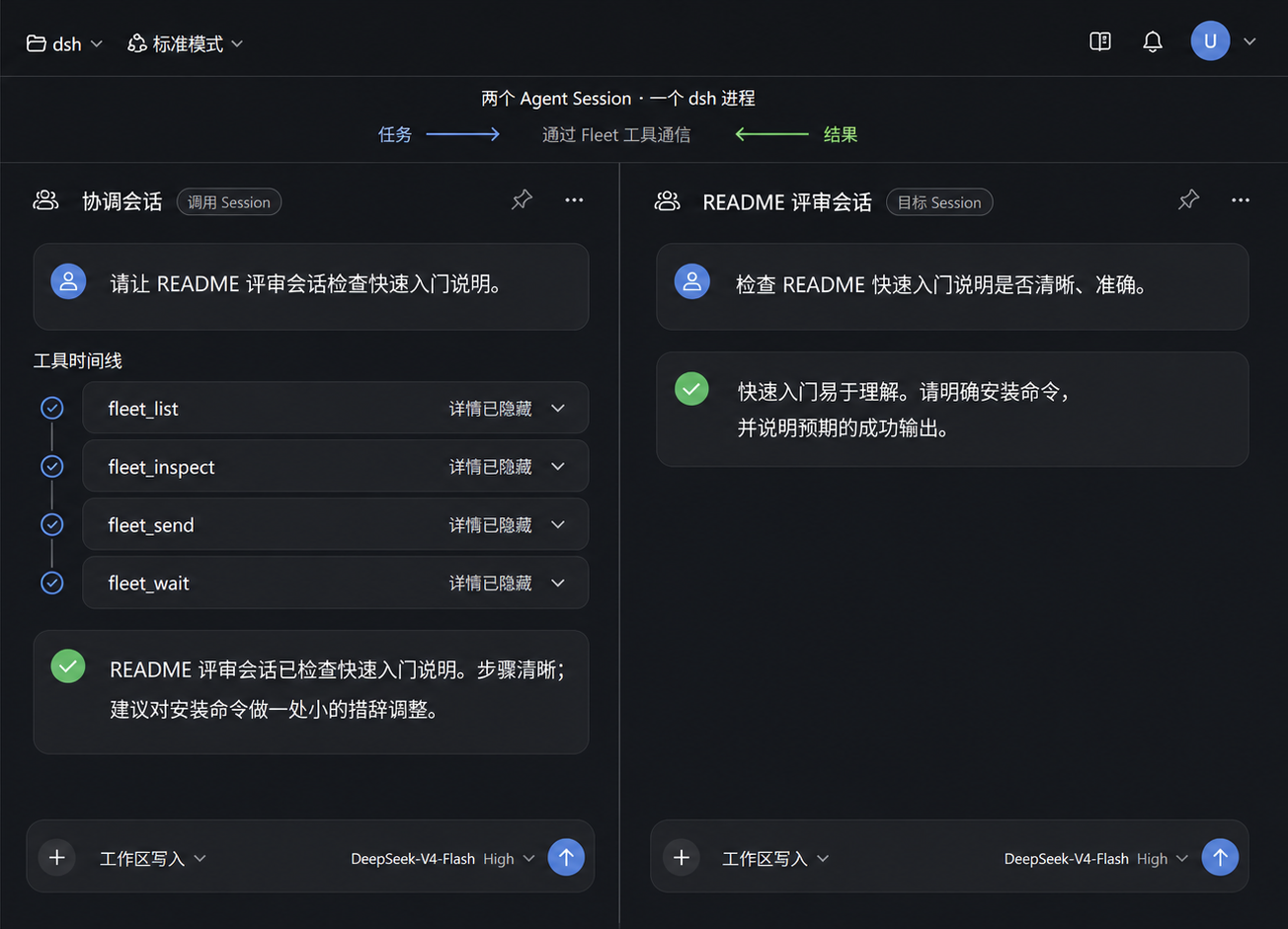
Composite of two real DSH Session views for readability. The plugin provides the Fleet communication tools, not a split-screen or multi-Session UI.
Why cross-Session communication?
A Session often already has the context you need: an implementation in progress, an investigation with useful evidence, or a review that should stay separate from the main conversation. Copying that history into another chat can lose context and creates more coordination work.
dsh-cross-session lets one live Session work with another without creating a second harness:
- Continue work where the context already exists. Send follow-up work to the Session that owns the task.
- Coordinate parallel work. Check another Session's state, add direction, and observe the resulting turn.
- Keep responsibilities separate. Use dedicated Sessions for implementation, review, research, or long-running work while they remain in one DSH runtime.
What it can do
| Action | What it means | Tool |
|---|---|---|
| Discover | List live Sessions in the current dsh process | fleet_list |
| Inspect | Read a bounded summary of another live Session | fleet_inspect |
| Send | Queue follow-up work for the target's next turn | fleet_send |
| Steer | Change direction at the target's next step boundary | fleet_steer |
| Wait | Observe the completed turn that claimed a sent message | fleet_wait |
| Cancel | Stop active root-Session work when explicitly enabled | fleet_cancel |
Send vs. steer: use fleet_send when work should wait for the target's next turn. Use fleet_steer to change the direction of its current turn at the next step boundary. If the target is idle, steering wakes it and begins a turn with that input.
Quick start
1. Install the prerelease
dsh plugin --profile web add @wha1echai/dsh-cross-session@0.1.0-rc.1
dsh --profile web --dump-config
Use an isolated DSH_HOME when evaluating the plugin without changing an existing profile.
npm requires every package to retain latest. Because this is currently the only published version, both latest and next resolve to 0.1.0-rc.1; using the exact version or next makes the prerelease intent explicit.
2. Enable messaging
The Bundle defaults to read-only discovery. Add this to the profile's cordis.patch.yml to enable fleet_send and fleet_steer:
- id: dsh-cross-session-tools
  name: '@wha1echai/dsh-cross-session/tool'
  config:
    controlMode: message
Tool visibility modes:
controlMode | Available tools |
|---|---|
read-only | fleet_list, fleet_inspect |
message | Read-only tools plus fleet_send, fleet_steer |
full | Message tools plus fleet_cancel |
Use full only where model access to cancellation is intended. Optional reply waiting is configured with the official Jobs tools in Waiting for a reply.
3. Start DSH
dsh --profile web
Open two live root Sessions in that runtime. The plugin uses the same process as the Web profile; if DSH listens on port 3080, the plugin does not open another port.
Try it
In the target Session:
When contacted through Fleet, summarize the request, complete it normally,
and reply with a short result.
In the calling Session:
Find another live root Session, inspect it, and send it a small task.
If fleet_wait is available, wait for the turn that receives the message.
The expected flow is:
caller discovers target
  → caller inspects and confirms it
  → target receives follow-up work
  → target completes its next turn
  → caller optionally observes the claimed turn through fleet_wait
Operational safety
fleet_sendandfleet_steercan start model requests and tool calls, so they may consume model and tool resources.fleet_cancelinterrupts active work but cannot roll back work already accepted by a model or tool.- Enable write modes only in agent compositions that should receive them.
controlModecontrols model-visible tools; it does not replace DSH approval,tools/pre-execute, orctx.tools.guard()policy.
See the Fleet reference for complete side-effect and late-abort semantics.
Confirmed targeting
Model tools do not write directly to an arbitrary Session ID. They follow a short confirmation flow:
fleet_list
  → choose a live target

fleet_inspect
  → confirm the exact target

fleet_send / fleet_steer / fleet_cancel
  → act on the confirmed selection
Target references and selections are short-lived, caller-bound, and fail closed. A selection cannot silently switch to another Session if the target disappears, is replaced, expires, or the Provider unloads. Write selections are single-attempt.
Trusted programmatic Consumers can still use sessionId through the direct ctx.fleet Service API. The confirmed-target flow is the model-facing safety path.
Waiting for a reply
fleet_send returns a caller-bound reply receipt. The optional reply-job Consumer adds fleet_wait, which starts an owner-scoped DSH Job and observes the complete turn that claimed the exact sent message.
Mount the Consumer in the same composition scope as the official Jobs tool Consumer. In a Web profile that uses agent presets, copy a shipped preset to a user-owned preset, add this row beside its @deepseek-ai/dsh-tool-jobs row, and select that preset for the calling Session:
- id: dsh-cross-session-reply-job
  name: '@wha1echai/dsh-cross-session/reply-job'
User-owned presets normally live under $DSH_HOME/.agent-presets/<id>/agent.cordis.yml. Do not edit the preset files shipped inside the DSH installation, and do not mount reply-job globally when the official Jobs tools are preset-scoped. Tool visibility follows the Cordis context where each Consumer registers.
The result belongs to the claiming turn. It does not claim that every assistant token in that turn was caused exclusively by one message.
Timeout, abort, or job cancellation stops observation only. It never cancels, steers, or substitutes the target Session. The official Jobs capability continues to own job output, listing, cancellation, and completion notices.
Scope
Supported now
- live Sessions in one running
dshprocess; - root-Session discovery and bounded inspection;
- confirmed send, steer, and optional cancel;
- exact claimed-turn reply observation;
- optional display titles already recorded by DSH;
- normal DSH Web, CLI, or other host compositions.
Not provided
- a second harness, agent runtime, or daemon;
- a separate network port;
- cross-process, cross-device, or multi-runtime communication;
- remote-control gateway behavior;
- a dedicated multi-Session Web or desktop UI;
- delegated-Session writes, which remain future work through the official subagent capability.
How it fits into DSH
Model tools ───────┐
Future UI ─────────┼──> FleetService (`ctx.fleet`) <── InProcessFleetProvider
Other plugins ─────┘                                      │
                                                          └── live Agent registry
Consumers depend on ctx.fleet; they do not call Agent methods directly. The current Provider operates on live Agents in the same process. Delegated-Session control remains owned by ctx.subagents, orchestration remains owned by ctx.workflowEngine, and background lifecycle remains owned by ctx.jobs.
See the architecture and Fleet reference for lifecycle rules, configuration limits, APIs, error codes, and extension points.
Compatibility
| Component | Supported version |
|---|---|
dsh-cross-session | 0.1.0-rc.1 |
| DeepSeek Harness | 0.1.0-rc.6 |
| Node.js | ^22.19.0 or >=24.0.0 |
| Repository package manager | pnpm 11.7.0 |
Release candidates are pinned intentionally. Compatibility with later DSH versions is not implied until tested.
Other installation options
Local checkout
git clone https://github.com/Wha1eChai/dsh-cross-session.git
cd dsh-cross-session
pnpm install
pnpm run build

dsh plugin --profile web add /absolute/path/to/dsh-cross-session
Commit-pinned GitHub source
dsh plugin --profile web add github:Wha1eChai/dsh-cross-session#<commit>
Git installs run prepare to build TypeScript. pnpm 10 and later require explicit permission in the profile's pnpm-workspace.yaml:
allowBuilds:
  '@wha1echai/dsh-cross-session': true
Review and pin the source before granting install-time execution permission. If the first add is rejected, add the exact package key printed by pnpm to the profile's pnpm-workspace.yaml, then rerun the same dsh plugin --profile web add command.
Development
pnpm install
pnpm run typecheck
pnpm test
pnpm run build
pnpm pack --pack-destination .pack-output/dev
pnpm run check:packed -- .pack-output/dev
Tests use the real DSH ToolRuntime and Loader composition. They cover targeting, lifecycle invalidation, relay attribution, reply observation, scoped tool visibility, unload behavior, and packed JavaScript/declaration entries.
See CONTRIBUTING.md, SECURITY.md, and release and rollback.
Roadmap
- delegated-Session messaging through the official subagent capability;
- clearer supervisor-oriented presets that compose existing DSH capabilities;
- a first-class multi-Session Web experience;
- additional Providers for carefully designed multi-runtime communication;
- compatibility testing for later DSH release candidates.
Detailed delivered milestones, future layers, and non-goals are maintained in docs/plan/.
Project status
dsh-cross-session is an independent community project. It is not affiliated with or endorsed by DeepSeek AI.
Licensed under the MIT License.