
 @Trouvaille-xx
dsh-StardewValley-UI
Stardew Valley themed plugin bundle for DeepSeek Harness (DSH): pixel UI presets, reminder SFX, OST, token heatmap calendar, Canvas particle weather.
- Stars
- 1
- Language
- JavaScript
- Created
- Sep 6, 2026
- Updated
- Sep 9, 2026
Introduction
dsh-stardew
把星露谷物语的像素风和音效带进 DeepSeek Harness(DSH) 的 Web GUI。设置页新增「星露谷 Stardew Valley」分页。
Bring the Stardew Valley pixel vibe and sounds into the DeepSeek Harness (DSH) web GUI, via a new "Stardew Valley · 星露谷" page in Settings.
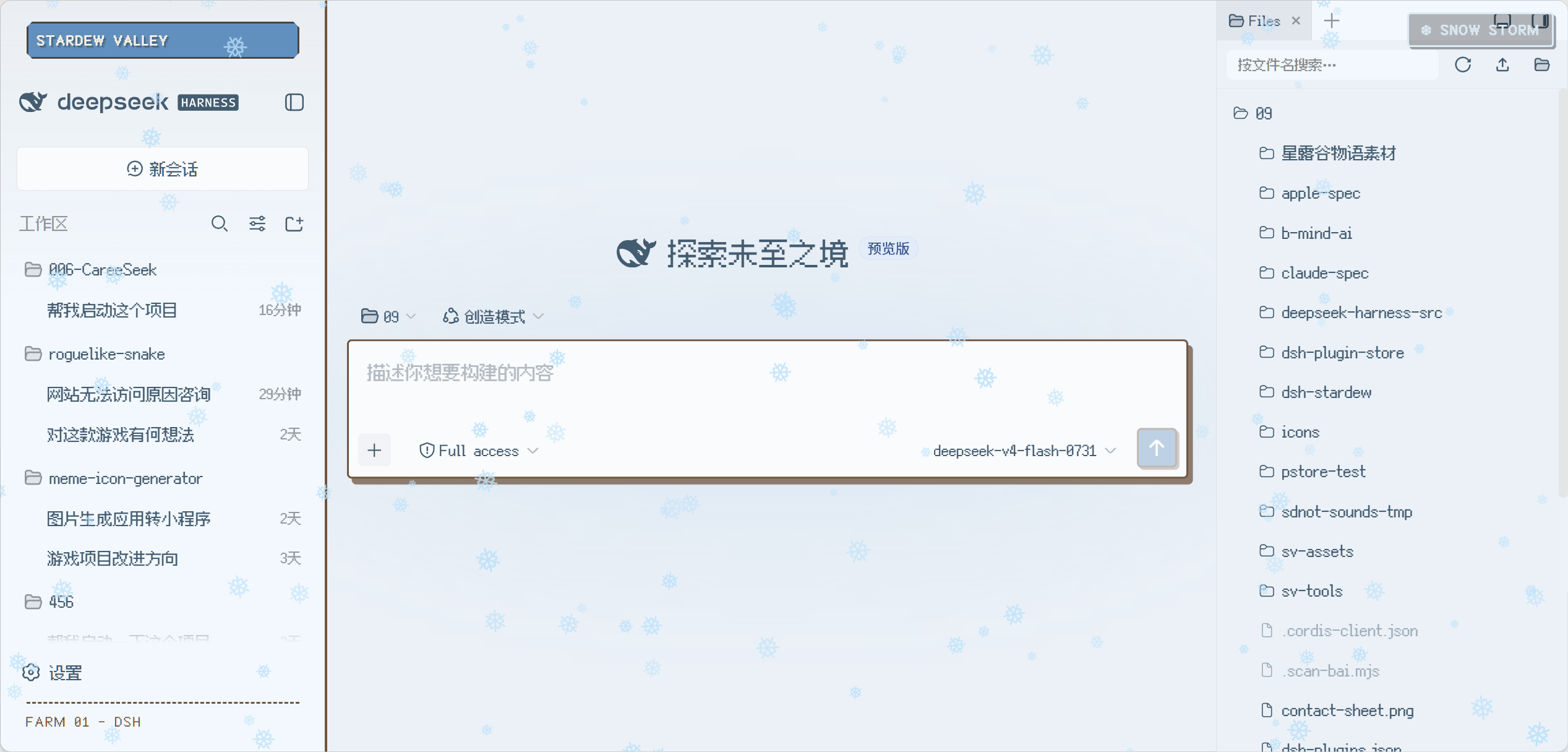
截图:冬 Winter 预设 + 大雪天气(Canvas 六角雪花 / 侧栏像素横幅 / 右上 SNOW STORM 徽章)。 Screenshot: Winter preset with heavy snow — Canvas hexagon flakes, pixel sidebar banner, top-right SNOW STORM badge.
功能 Features
- UI 风格 / UI style:11 个像素预设 —— 春 / 夏 / 秋 / 冬 + 海边(白天/夜晚)、沙漠、姜岛、谜语森林、温馨小家、丰收秋田。横幅颜色跟随各主题主色,带像素切角与像素投影。 11 pixel presets — Spring/Summer/Fall/Winter + Beach (day/night), Desert, Ginger Island, Mystic Forest, Cozy Home, Pumpkin Harvest. The sidebar banner follows each theme's primary color, with pixel bevel corners and pixel text shadows.
- 提醒音效 / Reminder SFX:五类可开关自动触发音效(常驻 / 注意 / 完成 / 错误 / 点击),点击「新会话」响起木箱放置音效(
openBox)。 Five toggleable auto-triggered SFX groups (ambient / attention / done / error / click); clicking "New Session" plays the chest-put sound (openBox). - 背景 OST / Background OST:默认开启并循环播放所选曲目;点击曲目试听/切换。 On by default and looping the selected track; click a track to preview or switch.
- 像素字体 / Pixel font:默认关闭(保持默认字体),一键切换全局像素字体(需自备 Fusion Pixel SC / Silkscreen)。 Off by default (keeps the DSH default font); one-click global pixel font (bring your own Fusion Pixel SC / Silkscreen).
- 总 Token 计数 / Token stats:GitHub 风格热力图 + 月历;点击日期同时展示 当天 / 当周 / 当月(数字 + 占比进度条),按会话日期聚合真实用量(总计 / 输入未命中 / 输入缓存命中 / 输出)。 GitHub-style heatmap + month calendar; clicking a date shows day / week / month consumption at once (numbers + ratio bars), aggregated by session date (total / input-miss / input-hit / output).
- 天气 / Weather:Canvas 像素粒子 —— 雨(蓝色斜丝 + 落地涟漪)、雪(冰蓝六角雪花自转);「冬」预设自动大雪,切其他预设回到晴天;雨/雪环境音低音量常开。 Canvas pixel particles — rain (blue slanted streaks + ground ripples), snow (ice-blue hexagonal flakes, self-rotating). The Winter preset auto-enables heavy snow; other presets reset to sunny. Rain/snow ambience stays at low volume once active.
早前还做过一个对话/轨迹旁的像素农场视图,因像素美术太糙已被移除(
git log可考古)。/ An earlier pixel-farm view next to Chat/Trajectory was removed for crude pixel art (git logcan dig it up).
安装 Installation
三种方式任选。Choose any of the three.
方式一:手动克隆 Manual clone
# macOS / Linux
git clone https://github.com/Trouvaille-xx/dsh-StardewValley-UI.git "$HOME/.dsh/profiles/web/node_modules/dsh-stardew"

# Windows PowerShell
git clone https://github.com/Trouvaille-xx/dsh-StardewValley-UI.git "$env:USERPROFILE\.dsh\profiles\web\node_modules\dsh-stardew"
把 "dsh-stardew" 加进 profiles/web/package.json 的 dsh.profile.bundles,然后完全重启 DSH:
"dsh": {
  "profile": {
    "bundles": ["dsh-skin-longterm", "dsh-stardew"]
  }
}
方式二:让 DSH 帮你安装(推荐)Install via a DSH chat prompt (recommended)
把下面整段发给你的 DSH 智能体,它会执行克隆与配置修改,并提醒你重启:
请帮我安装 dsh-stardew 插件(星露谷主题 bundle):
1. 运行:git clone https://github.com/Trouvaille-xx/dsh-StardewValley-UI.git "$HOME/.dsh/profiles/web/node_modules/dsh-stardew"
   (Windows:把 $HOME 换成 $env:USERPROFILE)
2. 编辑 profiles/web/package.json,在 dsh.profile.bundles 数组中加入 "dsh-stardew"(如果已有其他 bundle 就追加)。
3. 校验:对 lib/index.js 和 lib/client.js 分别运行 node --check。
4. 完成后告诉我:需要完全重启 DSH 才能生效,重启后打开 设置 → 星露谷 Stardew Valley。
方式三:Zip 下载 + 让 DSH 解压安装 Install from a zip via a DSH chat prompt
请帮我安装 dsh-stardew 插件:
1. 下载 https://github.com/Trouvaille-xx/dsh-StardewValley-UI/archive/refs/heads/main.zip 到临时目录并解压。
2. 把解压出的 dsh-stardew-main 目录整体复制到 "$HOME/.dsh/profiles/web/node_modules/dsh-stardew"(Windows 用 $env:USERPROFILE)。
3. 编辑 profiles/web/package.json,在 dsh.profile.bundles 中加入 "dsh-stardew"。
4. node --check 校验 lib/*.js,然后提醒我完全重启 DSH。
说明:
profiles/web是你的用户目录($DSH_HOME 下的),DSH 官方 bundle 目录也在这里;不要把插件装进随发行版安装的agent-presets等只读目录。 /profiles/webis your user-owned directory under$DSH_HOME; never install into the deployment's read-onlyagent-presets.
音效准备 Audio assets(重要 Important)
仓库不含任何星露谷音频 —— 音频版权归 ConcernedApe,MIT 不覆盖。你需要自备 ~/.dsh/sdnot-sounds/(= $DSH_HOME/.dsh/sdnot-sounds),规则:
The repo contains no Stardew audio — audio copyright belongs to ConcernedApe and is not covered by MIT. Bring your own ~/.dsh/sdnot-sounds/ ($DSH_HOME/.dsh/sdnot-sounds):
- 音效 SFX:
perm--*.wav/attn--*.wav/done--*.wav/error--*.wav(在设置页挑选) - 音乐 OST:
bgm--*.mp3 - 天气 Weather ambience:
bgm--rain.wav、bgm--winter_day.wav
推荐:从你本机的游戏提取(vgmstream 直接解析 Content/XACT/Wave Bank.xwb,437 条音效几秒抽完)→ 见 tools/extract_sounds.md。
Recommended: extract from your own game install with vgmstream (parses Content/XACT/Wave Bank.xwb, all 437 effects in seconds) → see tools/extract_sounds.md.
结构 Structure
dsh-stardew/
├── cordis.patch.yml      # bundle 挂载补丁(插入 stardew-ui 行)/ mount patch
├── lib/
│   ├── index.js          # 宿主 host:/@stardew/sounds、token-stats、pending-sounds 路由 + 事件监听
│   └── client.js         # 客户端 client:设置页 UI、音效引擎、天气粒子、Token 月历
└── tools/
    └── extract_sounds.md # vgmstream 提取指南 + cue 索引表
- 宿主注册三个 HTTP 端点;启动早期可能先于
fs/webServer就绪,内置 1s/次轮询重试。The host registers three HTTP endpoints and polls once per second untilfs/webServerare ready (they may appear after the bundle loads at boot). - 客户端三通道播放(音效/背景乐/天气环境音)+ 代际计数器防串扰 + 手势续播(规避自动播放策略)。The client uses three audio channels with generation counters and resumes playback on the first user gesture (autoplay policy).
许可 License
MIT —— 仅本仓库代码。未获 ConcernedApe 授权,亦与其无关(fan-made)。字体、音频等第三方资产请自行准备。
MIT — this repository's code only. Not affiliated with or endorsed by ConcernedApe (fan-made). Third-party assets (fonts, audio) are your responsibility.