
 @The-Focus-AI
dsh-plugin-sidebar-workspace-names
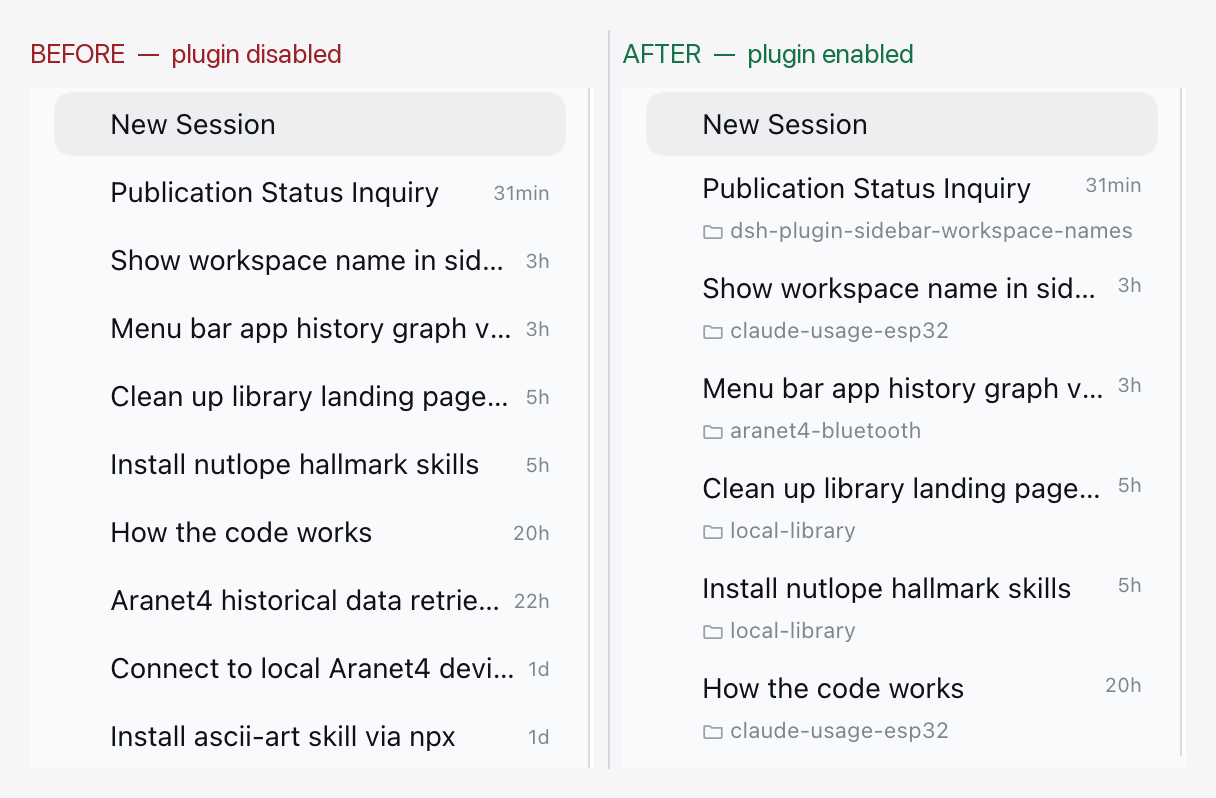
DeepSeek Harness sidebar plugin: shows the owning workspace name on a second line under each session title in the In one list view.
- Stars
- 0
- Language
- JavaScript
- Created
- Oct 23, 2026
- Updated
- Oct 23, 2026
Introduction
Sidebar Workspace Names — DeepSeek Harness
See which workspace a session belongs to, without leaving the sidebar's In one list view.
┌──────────────────────────────────┐
│ Fix the sidebar labels        3h │
│ 📁 claude-usage-esp32            │
├──────────────────────────────────┤
│ Add the cost pill              2h │
│ 📁 focus-desk                    │
└──────────────────────────────────┘
The flat session list mixes sessions from every workspace, so a title alone does not say where the session lives. This plugin puts the owning workspace on a second line under the title, and keeps the full, untruncated name in the row's hover card.
What you get
- In one list (
View options → Group by → In one list) renders each session as a two-line row: title and relative time on top, the workspace name below. - Sessions that belong to no registered workspace read Ungrouped.
- The automatic default workspace reads as a localized "Default workspace".
- Grouped and Workspace Tree views are unchanged — their workspace headers already name the workspace.
- Hovering a row shows the full workspace name in the hover card, even when the second line had to truncate a long name.
Install
From npm:
dsh plugin --profile desktop add dsh-plugin-sidebar-workspace-names
You can also install it from the Plugins page in the desktop app. Restart the profile and refresh the page once.
From a checkout instead (no build step, no dependencies):
git clone https://github.com/The-Focus-AI/dsh-plugin-sidebar-workspace-names
dsh plugin --profile desktop add ~/The-Focus-AI/dsh-plugin-sidebar-workspace-names
How it works
It is an ordinary Cordis client plugin bundle — no harness source is patched, forked, or monkey-patched:
sidebar.workspaces.session.row.actionhosts the workspace chip.sidebar.session.row.hoverhosts the full name inside the hover card.- A small stylesheet turns flat-view session rows into two-line rows and scopes every rule to the flat list, so grouped views keep their shipped 32px rows.
client.js ships as plain JavaScript on purpose: the harness injects client plugin
bundles into the page as a classic script, so the file reaches the JS engine verbatim.
There is no build step and no runtime type stripping in the browser.
Known limits
- Row DOM coupling. The chip is placed relative to ui-workspace's session row
(
[data-row-key="session:…"]) and the always-mounted row action strip. That is a decoration contract, not a public API;engines.dshpins the tested range, and a harness change should get a plugin version bump. - The strip's own controls are hidden while the chip shows. Because the chip shares the strip with archive/pin, those buttons are suppressed on flat rows and come back on hover; a harness change to the strip's markup can strand them visible.
:has()is required for the flat-view scoping (Chromium 105+, Safari 15.4+). Without it the chip simply stays hidden.- Fixed two-line height. Workspace names longer than the line ellipsize; the hover card carries the full name. Rows are 48px tall in the flat view.
- Blank New Session rows have no action strip, so they keep the single-line height.
- No visual test. The suite covers name resolution only; the layout is CSS against another package's DOM.
Development
mise trust
mise install
mise test          # node --test
npm pack --dry-run # verify the published file list
The package has no runtime dependencies and no build step.
License
MIT — see LICENSE.