
 @RyabykinIlya
dsh-openrouter-spend
DeepSeek Harness plugin: real OpenRouter spend — today's cost under the composer, per-key and per-model analytics and prepaid balance in Settings. Install: dsh plugin add dsh-openrouter-spend
- Stars
- 0
- Language
- JavaScript
- Created
- Oct 5, 2026
- Updated
- Oct 6, 2026
Introduction

dsh-openrouter-spend
OpenRouter spend inside DeepSeek Harness — billed USD from OpenRouter's own analytics API, not token estimates priced from a local table.



What you get

The chip under the composer: this chat's spend over the day's total, next to the session's token and context stats.
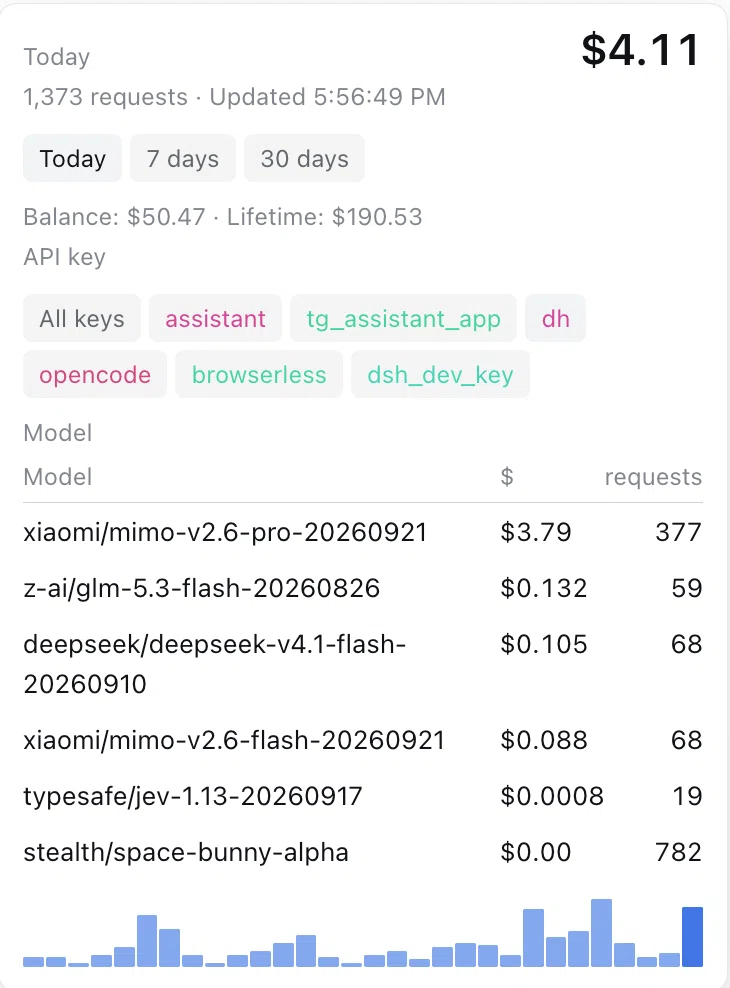
The popover: range and API-key filters, today's spend per model, daily bars, prepaid balance and lifetime spend.
- Chip under the composer —
session/day: what this chat spent today over the whole day's spend, for the selected range and API key (today, 7 days, or 30 days). - Chip popover — range and API-key filters, today's spend per model, a daily bar chart across the window, prepaid balance and lifetime spend.
- Settings → OpenRouter spend — store or clear the management key, pick the display currency (USD, or RUB at the cbr.ru rate), set the refresh interval, filter by API key.
The host half caches the summary for refreshSeconds and coalesces concurrent refreshes, so any number of open tabs cost one OpenRouter query per refresh window. When a refresh fails, the last good figures stay on screen and the reason is shown instead of an empty panel.
Requirements
- DeepSeek Harness web profile. The plugin needs the
credentials,webServer, andconnectionservices and stays inactive in profiles without them (for example, headless). - An OpenRouter Management API key — OpenRouter dashboard → Settings → Management API Keys → Create New Key (OpenRouter docs). A regular inference key is rejected:
403 Only management keys can perform this operation.
Install
From npm (web is the default web-GUI profile; use your own profile name instead if you run one):
dsh plugin --profile web add dsh-openrouter-spend
From GitHub (plain JavaScript, no build step and no build-script permission):
dsh plugin --profile web add github:RyabykinIlya/dsh-openrouter-spend#v0.3.1
Then open Settings → OpenRouter spend and paste the management key.
Configuration
Every field can be overridden in the profile's cordis.patch.yml row; the schema validates the row at activation and names the offending field.
| Field | Default | Bounds | Meaning |
|---|---|---|---|
credentialRef | OPENROUTER_MGMT_API_KEY | non-empty string | Credentials reference holding the management key |
apiBase | https://openrouter.ai/api/v1 | https:// URL | OpenRouter REST API root |
refreshSeconds | 60 | 10–3600, integer | Seconds between OpenRouter refreshes |
historyDays | 30 | 2–366, integer | Days of history the summary window covers, today included |
cbrUrl | https://www.cbr.ru/scripts/XML_daily.asp | https:// URL | CBR daily-rates sheet read for the RUB rate |
rateRefreshSeconds | 3600 | 60–86400, integer | Seconds between cbr.ru rate reads |
timeoutMs | 15000 | 1000–120000, integer | Per-request deadline against OpenRouter and cbr.ru |
Viewing preferences (display currency, per-key filter, refresh interval override) are browser-local (localStorage).
What the numbers are
- Figures are
total_usage— USD OpenRouter actually billed — fromPOST /api/v1/analytics/query, grouped per UTC day by API key and model. - "Today" is the current UTC day.
- Balance is
total_credits − total_usagefromGET /api/v1/credits: what remains of prepaid credits. - The 7-day and 30-day ranges cover at most
historyDaysdays; keephistoryDays ≥ 30for full coverage. - RUB display converts those USD figures at the cbr.ru daily rate, read host-side and cached for
rateRefreshSeconds. When cbr.ru cannot be reached, the figures stay in USD and the panel says so, with the fetch reason and a hint to check the connection. - The chip's session half comes from the same
analytics/query, grouped bysession_id. The harness stamps each request with its Session id (x-session-id), so a chat's cost is its own figure; the chip showssession/day. Thenonebucket (requests sent without a session) is excluded — it belongs to no chat.
Security
- The management key is stored through the Harness credentials service (
credentials.set), not in this package's files, and is never echoed back to the browser. - The summary and credential routes are fenced by the connection trust check. Anyone who passes that check — by default, the browser session on your local Harness port — can read your spend figures. Do not expose the Harness web port publicly without its own authentication.
License
MIT. Unofficial plugin; not affiliated with OpenRouter or DeepSeek.
По-русски
Плагин для DeepSeek Harness показывает реальные списания аккаунта OpenRouter (данные из аналитики OpenRouter, в долларах, по UTC-дням): чип под полем ввода — сегодня по чату / всего за сегодня, в поповере — выбор периода сегодня / 7 дней / 30 дней, разбивка по моделям за сегодня, график по дням, фильтр по API-ключам и остаток предоплаченных кредитов. В Settings → OpenRouter spend задаётся управляющий ключ, валюта отображения (USD или RUB по курсу ЦБ РФ), интервал обновления и фильтр по API-ключу. Если cbr.ru недоступен, суммы остаются в USD, а панель просит проверить подключение к cbr.ru. Установка: dsh plugin --profile web add dsh-openrouter-spend; нужен Management API key из кабинета OpenRouter (Settings → Management API Keys) — обычный ключ модели для аналитики не подходит.