
 @Ravomi
dsh-graphify-skill
DeepSeek Harness bundle: graphify knowledge-graph MCP server + packaged graphify skill, installed together
- Stars
- 0
- Language
- JavaScript
- Created
- Oct 22, 2026
- Updated
- Oct 22, 2026
Introduction
dsh-graphify-skill
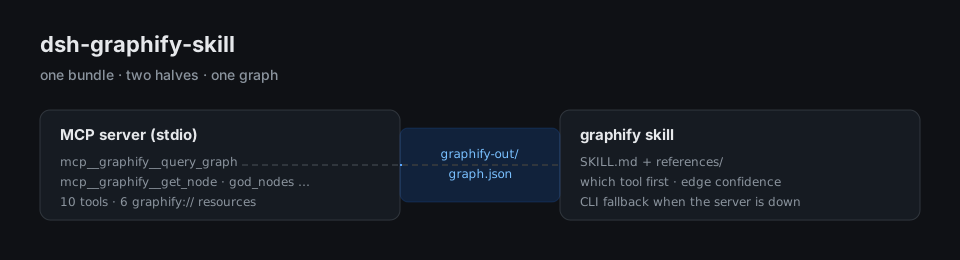
A DeepSeek Harness bundle that installs graphify's knowledge graph into an agent session as two parts that are set up together: the MCP server that can query the graph, and the skill that tells the agent when and how to query it.
What you get
| Part | Where it lands | What it does |
|---|---|---|
| MCP server entry | DSH loader tree (this bundle's cordis.patch.yml) | Registers graphify's stdio server as @deepseek-ai/dsh-mcp-client. The tools appear as mcp__graphify__query_graph, mcp__graphify__get_node, mcp__graphify__get_neighbors, mcp__graphify__shortest_path, mcp__graphify__get_community, mcp__graphify__god_nodes, mcp__graphify__graph_stats, and the three PR tools mcp__graphify__list_prs / get_pr_impact / triage_prs. Six graphify:// resources come with them. |
| graphify skill | <DSH_HOME>/skills/graphify/SKILL.md (+ references/) | Tells the agent to treat a codebase question as a graph query first when graphify-out/ exists, which tool to call first, how to read EXTRACTED / INFERRED / AMBIGUOUS edges, and how to fall back to the graphify CLI when the server is down. |
Both halves come from this repository, so they stay on one version. Nothing is published
to npm: the package is a bundle, and its install-time files are cordis.patch.yml plus
skills/, which dsh plugin add (a pnpm install of the git repo) already puts on disk.
Install
Install the MCP entry first, then the skill beside it — both in the same step, so the
skill and the server describe the same graphify release. <checkout> is the profile's
copy of this repository (~/.dsh/profiles/<profile>/node_modules/dsh-graphify-skill).
# 1. The MCP entry and its future updates
dsh plugin --profile <profile> add github:Ravomi/dsh-graphify-skill

# 2. The skill into DSH's skill root, from the copy just installed
CHECKOUT="${DSH_HOME:-$HOME/.dsh}/profiles/<profile>/node_modules/dsh-graphify-skill"
mkdir -p "${DSH_HOME:-$HOME/.dsh}/skills"
cp -R "$CHECKOUT/skills/graphify" "${DSH_HOME:-$HOME/.dsh}/skills/graphify"
Then install the graphify runtime itself, which the server runs:
uv tool install 'graphifyy[mcp]'
graphifyy ships the graphify-mcp entry point (a stdio server equivalent to
python -m graphify.serve); the bundle calls it by name.
Serving a graph
The stdio child inherits the active workspace as its working directory, so with no
configuration the server serves <workspace>/graphify-out/graph.json — the graph that
/graphify or graphify extract . wrote for the repository you are in.
Two environment variables override that, for a graph somewhere else:
| Variable | Default | Meaning |
|---|---|---|
GRAPHIFY_GRAPH | unset (workspace-relative) | Absolute path to a graph.json the server serves instead. |
GRAPHIFY_MCP_COMMAND | graphify-mcp | Program to launch. Set it when graphify lives in a virtualenv that is not on PATH, e.g. /home/me/.local/share/uv/tools/graphifyy/bin/graphify-mcp. |
Start DSH from the repository you want to explore, or set GRAPHIFY_GRAPH before
starting it.
Build a graph first
There is nothing to query until the graph exists:
cd /path/to/repository
graphify extract . --code-only    # AST only, no API key, no LLM calls
Drop --code-only to also index docs, papers, and images (that pass sends them to a
model). The skill and the tools are both useless against an empty graph — the server
answers "graph.json not found" rather than inventing an answer.
Verify the install
In a DSH session:
- the tool list contains
mcp__graphify__graph_stats— call it; it returns node and edge counts; - the skill catalog contains
graphifywith the description fromskills/graphify/SKILL.md.
If the tools are missing, gs in the DSH logs names the failed server; the two usual
causes are graphify-mcp not on PATH (set GRAPHIFY_MCP_COMMAND) and the workspace
having no graphify-out/graph.json (build it, or set GRAPHIFY_GRAPH).
Updating
- MCP entry:
dsh plugin --profile <profile> update dsh-graphify-skill. - Skill: re-run step 2 after the update, so the skill body catches up with the bundle.
skills/graphify/is the canonical copy in this repository; the copy under~/.dsh/skillsis a deployment of it, never the other way round.
Uninstall
dsh plugin --profile <profile> remove dsh-graphify-skill
rm -rf "${DSH_HOME:-$HOME/.dsh}/skills/graphify"
License and provenance
The skill text and the references under skills/graphify/ are graphify's packaged
skill-agents.md and its references/ sidecar, reproduced from
Graphify-Labs/graphify under Apache-2.0 (see
LICENSE). The bundle glue — package.json's dsh.bundle and cordis.patch.yml — is
this repository's own work.