
 @Moonquake-9
dsh-feiyu-desktop
Desktop companion for DeepSeek Harness / DeepSeek Harness 桌面小鲸鱼挂件:跟随心情、免开窗口聊天、情绪与温层记忆. PowerShell + WPF, MIT.
- Stars
- 0
- Language
- PowerShell
- Created
- Oct 26, 2026
- Updated
- Oct 26, 2026
Introduction
Feiyu Desktop — a desktop companion for DeepSeek Harness
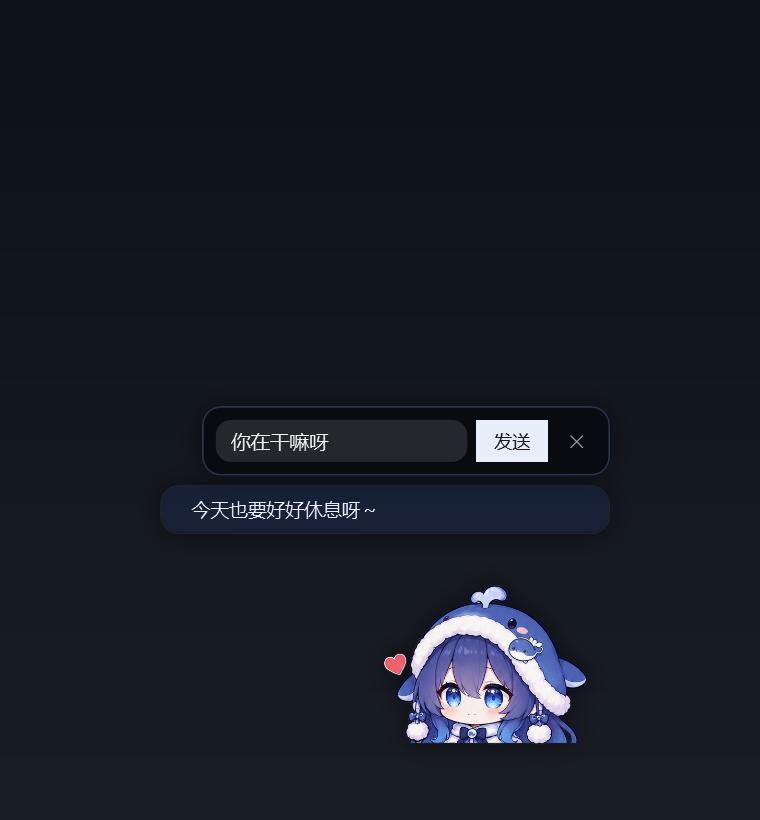
A small, always-on-top whale girl that lives in the corner of your Windows desktop, mirrors the
mood of the dsh-feiyu-mood plugin, and — this is the fun part — talks to you without you opening
the DSH window.
Built with nothing but Windows PowerShell 5.1 + WPF. No installer, no Electron, no background service.






If this project makes your desktop a little less lonely, a ⭐ helps other people find it.
Why a separate program
dsh-feiyu-mood renders the companion inside the DSH web UI. This project lifts the same character
out of the app window: a transparent, per-pixel hit-tested, always-on-top WPF window that reads the
plugin's state file. Chat goes through a tiny Cordis plugin (bridge/) that runs one-shot model
calls inside the DSH Host process — the pet never touches your conversation context.
Features
- Mood mirror — reads
<DSH_HOME>/feiyu-mood/state.jsonevery 1.2 s; five faces, seven emotion bars, last judgement reason, recent history (click the pet to open the panel). - Idle motion — gentle breathing scaled from the feet (no floating), slow gaze drop every few
seconds, a springy hop on click. Blinking is intentionally off: the upstream plugin ships no
closed-eye frame that matches the open-eye sprites (see
CREDITS.md). - Chat without DSH in the foreground — write a line, the bridge runs one model call and streams the answer back into her speech bubble, one character at a time.
- Emotion memory — persistent affection/trust/energy that drift over time, plus a hot layer (last N turns) and a warm layer (model-compressed notes every M turns). No cold diary yet.
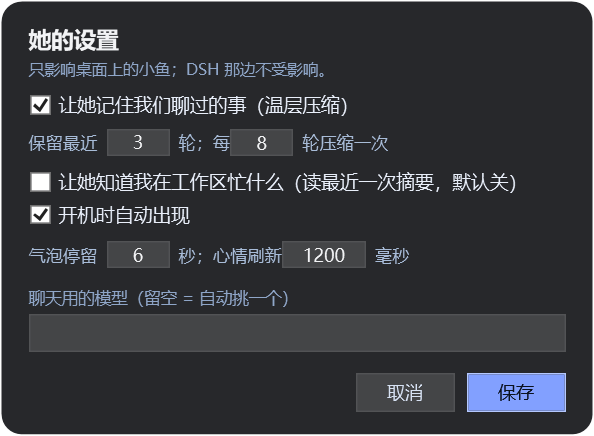
- Her own settings window (right-click → settings): memory on/off, retain/compress cadence,
“know what I'm busy with”, autostart, bubble seconds, refresh interval, model override.
Saved to
widget/pet-settings.json; both the widget and the bridge read it live. - English interface — her settings window has an “English interface” checkbox that flips every
label (panel, menus, tray, balloon, chat bar, idle lines) between 中文 and English. The same switch is
langinwidget/pet-settings.json("auto"/"zh"/"en");autofollows the Windows UI language. - Edge snapping — drop her within 20 px of a screen edge and she glides into place (120 ms ease-out).
- Fullscreen auto-hide — when a real fullscreen window covers the monitor (video, game, borderless app), she hides herself and comes back when it ends.
- Click-through transparency — pixels that are transparent ignore the mouse; only her body reacts to clicks and drags.
- Tray icon — so you can always bring her back or quit cleanly.
Requirements
- Windows 10 / 11
- Windows PowerShell 5.1 (built in)
- DeepSeek Harness desktop app with the
dsh-feiyu-moodplugin installed — that plugin writes the mood state and ships the character art this widget uses - For chat: the
bridge/plugin added to the same DSH profile
Install
Grab the prebuilt bundle from Releases (dsh-feiyu-desktop-v1.0.0.zip), or clone the
repo and follow the steps below (the zip is just this repo's widget/ + bridge/ folders).
-
Copy
widget/somewhere permanent, for example:Copy-Item -Recurse .\widget D:\Desktop\feiyu-desktop -
Edit
bridge/cordis.patch.ymlso the three paths point at that folder (see below), then add the bundle to your DSH profile:dsh plugin --profile desktop add file:D:/Desktop/DSH/dsh-feiyu-bridge(Or: DSH → Settings → Plugins → install a local
file:bundle.) -
Start her:
wscript D:\Desktop\feiyu-desktop\launch.vbsOr right-click the tray icon → “开机自启” to make her start with Windows.
Bridge paths
bridge/cordis.patch.yml is the only file that needs editing:
dir: 'D:/Desktop/feiyu-desktop/bridge'        # where the widget polls for messages
widgetVbs: 'D:/Desktop/feiyu-desktop/launch.vbs'
widgetPid: 'D:/Desktop/feiyu-desktop/widget.pid'
Keep hideInAppWidget: true if you do not want a second copy of the character inside the DSH window.
Usage
| Action | Result |
|---|---|
| Left click | hop + open chat input |
| Double click | she says a random line |
| Right click | menu: panel, settings, say something, autostart, restart, quit |
| Drag | move; snaps to screen edges; position remembered |
| Click the tray icon | bring her back / menu |
Panel shows the mood value and face (≥80 delighted · ≥62 happy · ≥42 okay · ≥25 worried · else sad), the last judgement reason, seven emotion bars and the latest history entries.
Settings (widget/pet-settings.json)
| Key | Meaning |
|---|---|
memory.enabled | read/write bridge/memory.json |
memory.keepTurns | hot-layer turns kept in the prompt (1–12) |
memory.compressEvery | compress into warm notes every N turns (2–40) |
memory.maxPoints / warmPoints | size of the warm layer |
knowWorkspace | include the latest mood-file reason (“what I'm busy with”) in the prompt |
bubbleSeconds | default time a speech bubble stays |
refreshMs | mood state polling interval |
autostart | toggle the Startup shortcut |
model | force a model id; empty = auto-pick a chat/flash model |
How chat works
widget -> bridge/inbox/<id>.json -> bridge plugin (ctx.llm.stream) -> bridge/outbox/<id>.json -> widget
The bridge also writes alive.json (heartbeat) and bridge.log, hides the in-app widget via an
injected stylesheet, and can relaunch the desktop widget 4 s after DSH starts (autoStartWidget).
A watchdog in the bridge respawns the widget if its process dies, so quitting DSH no longer leaves you with no way to bring her back.
Files
widget/FeiyuMoodDesktop.ps1   main program (PowerShell + WPF, transparent top-most windows)
widget/launch.vbs             console-less launcher
widget/assets/                feiyu.png + five faces
widget/pet-settings.json      her settings (shared with the bridge)
bridge/                       Cordis bundle: file bridge, emotion and memory layers
docs/                         preview images
Privacy
- The widget only reads local files (
state.json,config.json,pet-settings.json) and the bridge directory. - Chat text goes to the model provider configured in your DSH profile; nothing is sent anywhere else.
- Memory is plain JSON on your disk (
bridge/memory.json); delete it to forget everything.
Updating your copy
The widget/ and bridge/ folders here are copies of the ones that actually run on the author's
machine. After editing the live script, sync it into the repo and commit:
powershell -ExecutionPolicy Bypass -File scripts\sync-from-live.ps1
The helper keeps LF in git / CRLF on disk and re-adds the UTF-8 BOM that PowerShell 5.1 needs for the Chinese strings. Then commit in GitHub Desktop and press Push origin.
Where this comes from — and what is ours
This project is a fork-and-extend of someone else's work, and we want that to be obvious before anything else.
Standing on: dsh-feiyu-mood by
Yuuyuko-uu (MIT license). From that project we take:
- the character 「小鱼 / 肥鱼」 and the five expression illustrations in
widget/assets/; - the mood model itself (seven emotions, decay, the state file this widget reads);
- the idea of a small companion living in the corner of the UI.
If you reuse the artwork or the mood system, credit that project too — it is the foundation.
Added here: the standalone WPF desktop widget (widget/), the file-bridge Cordis plugin
(bridge/) that allows chatting without opening DSH, the emotion/relationship layer, the hot-and-warm
memory compression, the settings window, edge snapping, fullscreen auto-hide, tray/watchdog and
system-wide packaging.
Build on it — suggestions are welcome
Please treat this repository as a starting point, not a finished product:
- Fork it, hack it, publish your own version. MIT license, no permission needed — just keep the attribution to the upstream project and the artist.
- Issues and PRs are welcome. Good first ideas we would genuinely like help with:
- a proper set of closed-eye frames for the five expressions (the reason blinking is disabled now);
- macOS / Linux desktop ports;
- a cold-layer diary for long-term memory;
- more idle animations, petting/feeding interactions, sound.
- Be kind to the original author. If our changes are useful upstream, open an issue there too instead of only forking silently.
- If you improve the artwork or the mood model, consider sending it to
dsh-feiyu-moodfirst — that is where the character lives.
Credits & license
Character art, the mood system and the dsh-feiyu-mood plugin are by
Yuuyuko-uu (MIT). Please keep that credit when you
fork. Everything in this repository is released under the MIT license — see LICENSE and
CREDITS.md.
中文说明见 README.zh-CN.md。