
 @LongSir0419
dsh-git-branch-manage
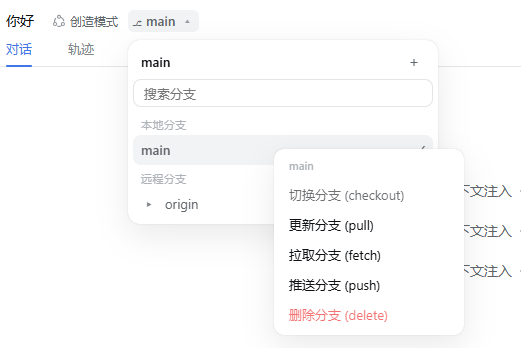
DSH bundle: 当前 Git 分支徽标。在会话 header 与新会话欢迎页显示当前分支,支持切换、新建、更新、拉取、推送、删除(仅本地分支,IDEA 风格目录树)。
- Stars
- 1
- Language
- JavaScript
- Created
- Aug 24, 2026
- Updated
- Aug 26, 2026
Introduction
dsh-git-branch-manage
A DeepSeek Harness (DSH) bundle — Git branch badge: shows the current git branch in the session header and the new-session hero page. Click the badge to switch / create / pull / fetch / push / delete local branches (IDEA-style directory tree, 7-day active branches).
Installation
dsh plugin --profile web add @wanghailong0419/dsh-git-branch-manage
Or install it together with the toolkit:
dsh plugin --profile web add @wanghailong0419/dsh-toolkit
Screenshots
| Git Branch Badge | Branch menu |
|---|---|
 |  |
Features
- Current branch shown in the session header and the new-session hero page
- Left-click: branch menu (local / remote, IDEA-style tree; local shows only branches active in the last 7 days)
- Right-click: switch / pull / fetch / push
- Create branch: pulls the current branch first, then creates and switches (with prefix suggestions)
- Delete branch: local-only, safe delete (
-d); refuses the current branch and remote branches - Switch confirmation dialog; dot-spinner loading while an action runs
Structure
lib/index.js    host half: BranchBadgeGateway (TypertRemoteService + @Remote)
lib/client.js   client half: badge / menu / hero chip (ctx.remote.$mount)
cordis.patch.yml bundle patch (auto-activated by dsh plugin add)
License
MIT