
 @Kevoyuan
dsh-trading212
Read-only Trading 212 portfolio dashboard and dsh tools for holdings, history, risk, and trade markers.
- Stars
- 0
- Language
- HTML
- Created
- Aug 24, 2026
- Updated
- Sep 11, 2026
Introduction
dsh × Trading 212

A read-only Trading 212 portfolio workspace for dsh. Configure your API credentials once, then inspect holdings, performance, allocation, transaction history, and stock-level trade markers in a responsive dashboard—or ask questions about your portfolio in any dsh conversation.
For personal research and information only. This plugin does not provide investment advice and cannot place, modify, or cancel orders.
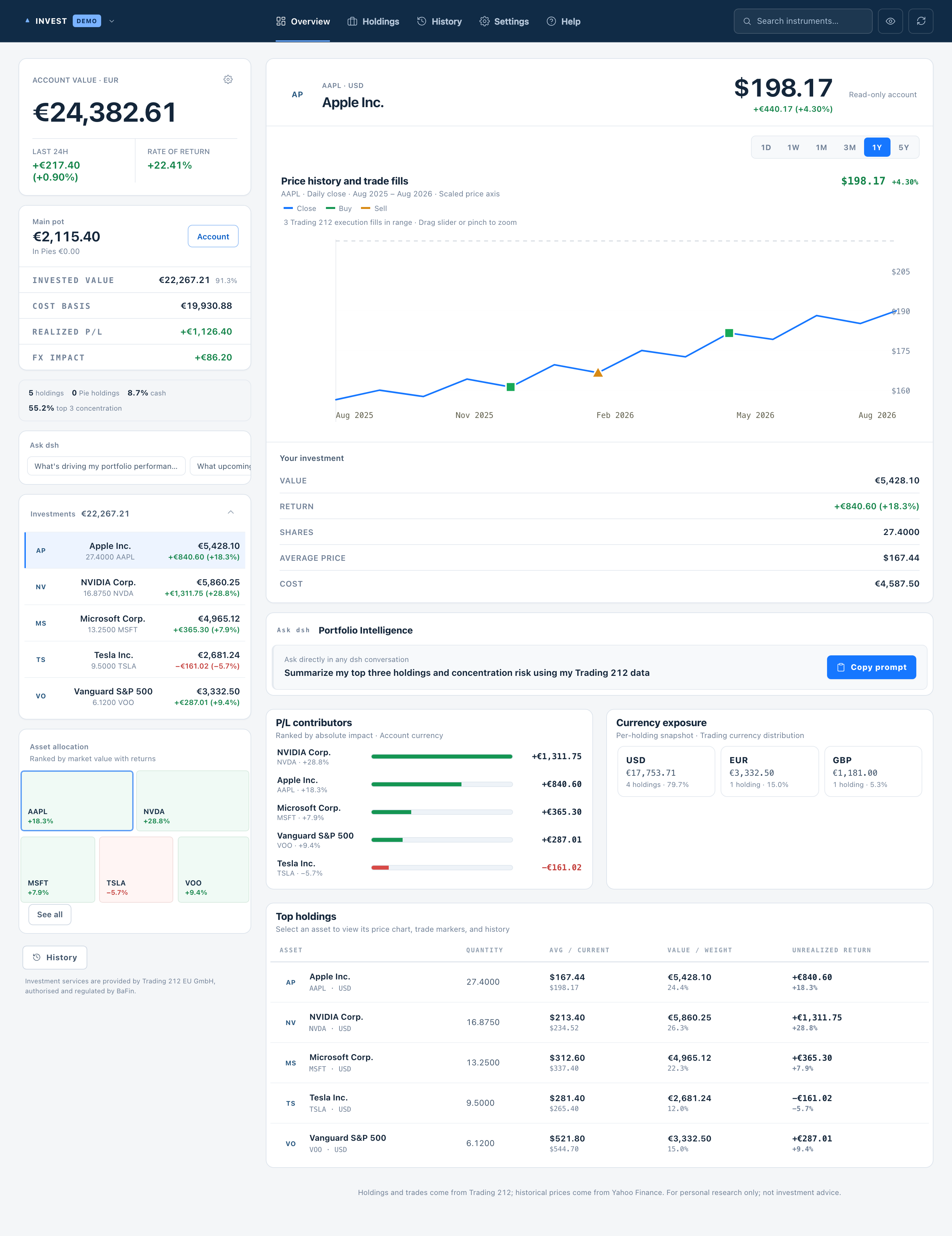
Product interface shown with synthetic demo data. Includes a one-click privacy toggle (eye icon) that completely masks balances, stock values, share quantities, and returns.
Features
- Guided Demo or Live API setup with persistent dsh credential storage
- Portfolio value, cash, returns, FX impact, concentration, and pending-order overview
- Responsive desktop and mobile dashboard with overview, holdings, history, settings, and help views
- One-click privacy masking (eye toggle) to hide all balances, holding values, share quantities, average purchase prices, and returns
- Holdings, order history, cash transactions, and dividends
- ECharts price history from 1 day to 5 years, including minute-level short ranges and actual Trading 212 buy/sell fills
- English and Chinese UI that follows dsh by default, with a manual override in Settings
- Read-only
trading212_portfolioandtrading212_historytools for normal dsh conversations - Sanitized errors for authentication, permission, rate-limit, timeout, and upstream failures
Quick start
Requirements
- A working dsh installation.
- A Trading 212 API key and API secret. Start with a Demo key if possible.
Install
dsh plugin --profile web add --save-exact dsh-trading212@latest
Fully quit and reopen dsh. A native T212 tab appears next to Chat / Trajectory in the session header — click it to open the dashboard inside the chat panel.
Alternatively, download the .tgz package from GitHub Releases and install it locally:
dsh plugin --profile web add --save-exact ./dsh-trading212-<version>.tgz
Connect Trading 212
- Open the
T212dashboard and select the Demo or Live environment. - Paste your API key and API secret, then select Test and save.
- Open the dashboard or return to dsh and ask a portfolio question.
Grant read-only access to:
- Account data / account summary
- Portfolio / positions
- Orders / history
Do not grant permission to place, modify, or cancel orders. Trading 212 displays an API secret only once; create a new key if the secret is lost.
Official English documentation: Trading 212 API documentation · How can I generate an API key? · dsh plugin development guide
Ask from dsh
Example prompts:
Summarize my three largest positions and concentration risk.
Which positions are dragging down my unrealized return?
What currency exposure do I have, and are any orders still pending?
dsh calls the read-only tools when needed and receives normalized portfolio data. The plugin does not register any trading action.
Data and privacy
| Source | Purpose | Data sent |
|---|---|---|
| Official Trading 212 API | Account, positions, orders, fills, cash transactions, and dividends | API key and secret are used only to authenticate with Trading 212 |
| Unofficial Yahoo Finance endpoint | Intraday and historical prices for individual stocks | Public instrument identifiers only; no credentials, quantities, or account values |
Historical market prices may be delayed, incomplete, or temporarily unavailable. Trading 212 holdings and execution history remain available when Yahoo Finance fails.
Development
pnpm install
pnpm typecheck
pnpm test
pnpm pack --pack-destination dist
This repository follows the Harness plugin contract: src/index.ts exports name, inject, a same-name Config schema, and apply(ctx, config); tools are registered with ctx.tools.register(defineTool(...)); cordis.patch.yml is the bundle patch used for publishing.
For a local Harness Web run directly from source:
pnpm harness:dev
The command generates the ignored cordis.local.patch.yml, disables any installed trading212 entry for that run, inserts the repository's absolute src/index.ts path as trading212-local, and starts pnpm dsh web --patch ./cordis.local.patch.yml. Git installs run prepare to build lib/; the published bundle patch and package metadata are declared through dsh.bundle in package.json.
Main directories:
src/index.ts: dsh host, HTTP API, and read-only toolssrc/portfolio-service.ts: credential persistence, caching, and request coordinationsrc/trading212.ts: Trading 212 client and response validationsrc/market-data.ts: Yahoo Finance historical market datasrc/client/index.tsx: nativeT212conversation-view tab hosting the dashboardsrc/app/: setup, portfolio, history, and instrument UI
Contributing
Issues and pull requests are welcome. Never include an API key, API secret, real account value, or real portfolio position in issues, screenshots, fixtures, or commits.
License
Licensed under the MIT License.