
 @JerryXst
dsh-codex-web-auth
ChatGPT / Codex browser sign-in for DeepSeek Harness's built-in openai-codex provider — no OpenAI API key required.
- Stars
- 1
- Language
- JavaScript
- Created
- Sep 1, 2026
- Updated
- Sep 2, 2026
Introduction
dsh-codex-web-auth
Browser-based ChatGPT / Codex sign-in for the built-in DeepSeek Harness (dsh) openai-codex provider.
This bundle fills the Web UI gap between DSH's existing authorization flow and the Models settings page. It lets eligible ChatGPT / Codex subscribers authorize DSH without creating or entering an OpenAI API key.
Pre-release status: the repository is being prepared for public testing. Do not treat
0.1.0as production-ready until the release checklist has passed against a clean DSH Web profile.
What it does
- Adds a ChatGPT / Codex Web sign-in panel to the
openai-codexprovider card. - Starts the authorization flow already registered by DSH's built-in
llm-pi-aiprovider. - Relays browser links, device codes, selections, and text/secret prompts between the authenticated DSH Web client and the Host.
- Keeps the resulting OAuth grant on the DSH Host; access and refresh tokens are not returned in browser status or progress frames.
- Enables the
llm-pi-ai.providers.openai-codexroute after a successful sign-in. - Supports cancellation, reauthorization, and deletion of the stored Host credential.
This plugin does not create an OpenAI API key, proxy requests through a third-party server, or add a new model adapter. Model availability, quotas, eligibility, and provider behavior remain controlled by OpenAI, the user's account, and DSH's installed llm-pi-ai version.
Requirements
- A DSH Web profile with the built-in
llm-pi-aiprovider and Web settings UI. - A DSH release compatible with the peer API train declared in
packages/plugin/package.json. - An OpenAI account whose plan and region are eligible for the Codex sign-in flow exposed by the installed provider.
- A writable DSH Host credential provider.
This is a Web-only UI bundle. Headless and terminal-only profiles need a Host-side authorization surface instead.
Installation
The commands below are intended for use after the package has been published and the clean-profile tests have passed.
dsh plugin --profile web add dsh-codex-web-auth
dsh web
Open the DSH Web page after restart. DSH installs out-of-tree plugins into the selected profile and activates this package through its dsh.bundle.patch manifest.
To update later:
dsh plugin --profile web add dsh-codex-web-auth@latest
Quick start
After installing the plugin and restarting DSH:
1. Select openai-codex
Open Settings → Models. If the route has not been added yet, select Add provider, then choose openai-codex. This provider uses Codex Web sign-in, so no API key or custom provider settings are required.
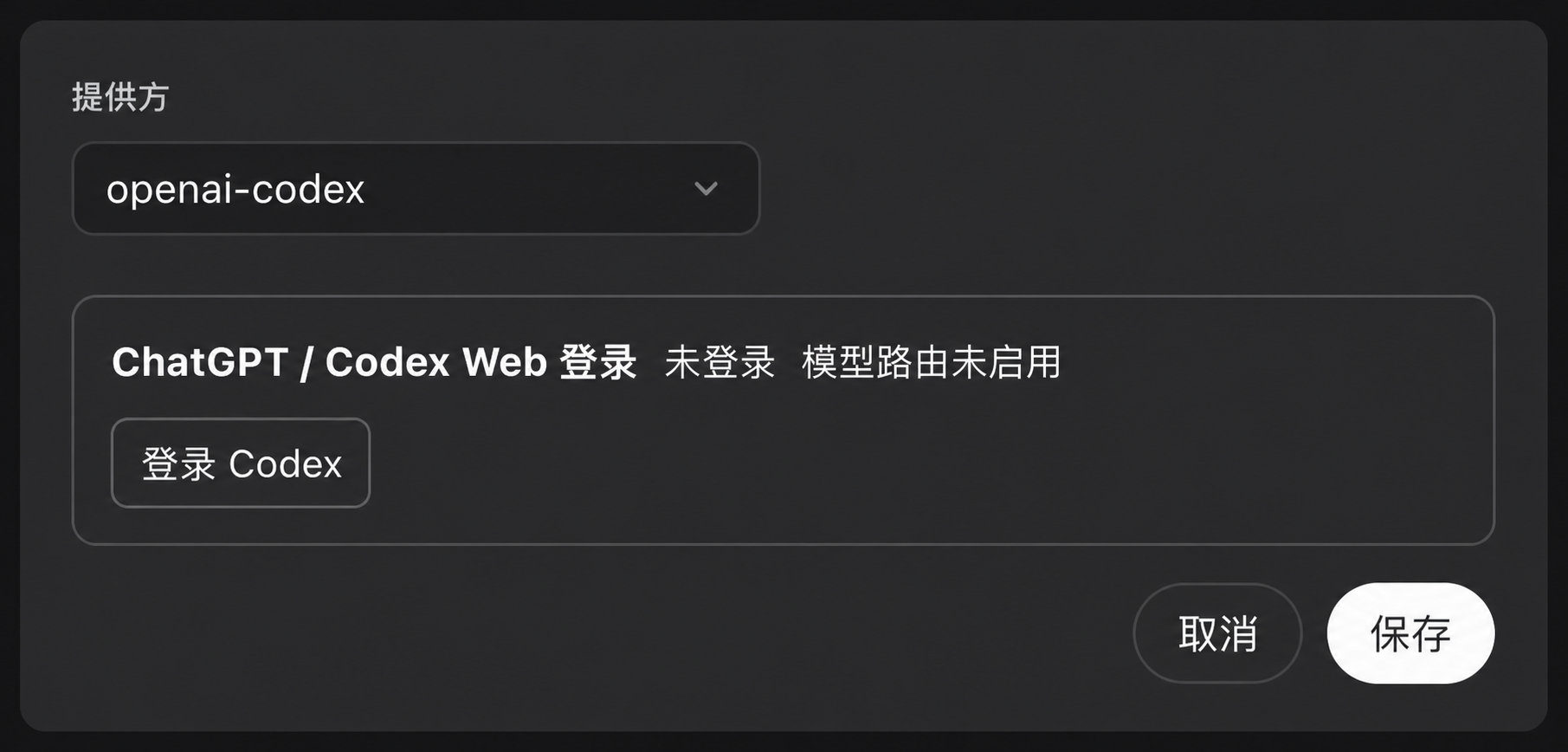
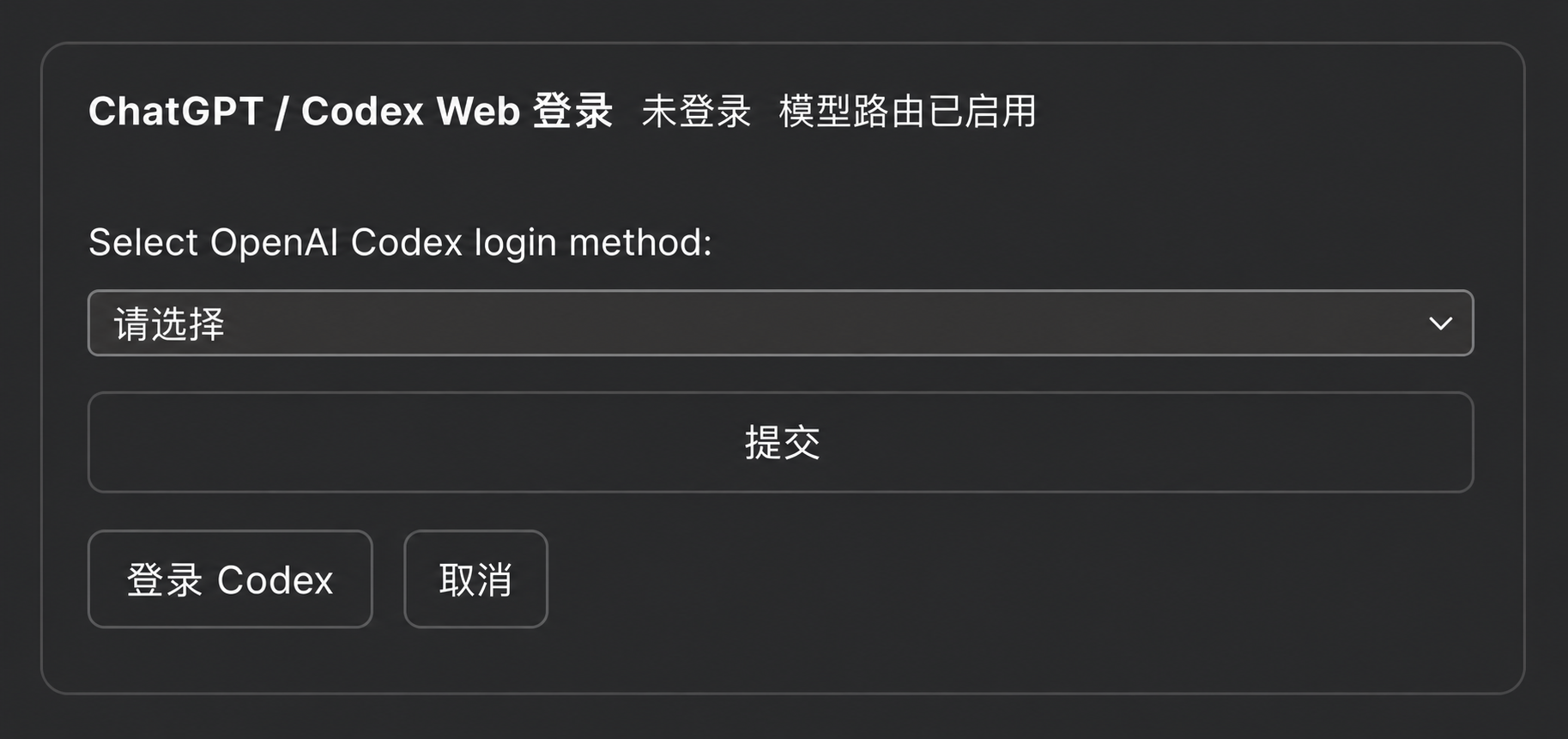
2. Start sign-in and choose a method
Select Sign in to Codex. When the login-method picker appears, choose the method you want to use and select Submit.
3. Complete authorization
Follow the OpenAI browser or device-code instructions supplied by the DSH Host. If the browser does not open automatically, use the manual authorization link shown in the panel. Return to DSH after authorization and confirm that the card reports Signed in and Model route enabled. If you are adding the provider for the first time and the editor remains open, select Save.
The images above are documentation illustrations edited from real DSH screenshots. Exact labels and spacing may vary with the DSH version and interface language.
Usage details
Available actions:
- Sign in again replaces or refreshes the existing authorization through the provider flow.
- Cancel withdraws the active authorization attempt.
- Delete local sign-in removes the
llm-pi-ai/openai-codexcredential record from the active DSH credential provider.
Uninstall
Delete the local sign-in from the provider card before uninstalling if you also want to remove the stored OAuth grant. Removing the bundle alone may leave an orphaned credential record.
dsh plugin --profile web remove dsh-codex-web-auth
Restart DSH after the profile has been updated.
Security and privacy
- The plugin does not include telemetry or analytics.
- The plugin itself makes no direct OpenAI network request. The installed DSH
llm-pi-aiauthorization flow owns provider communication and token exchange. - OAuth tokens are not included in the plugin's browser-facing status, notice, prompt, or settlement frames.
- Authorization prompts and answers do cross the authenticated DSH browser-to-Host channel because the human must complete the flow.
- DSH protects browser RPC with its browser session and Host/Origin trust checks. Do not expose a DSH instance as an unauthenticated shared service.
- With DSH's default file credential provider, grants are stored in
$DSH_HOME/.credentials.yamlwith owner-only filesystem permissions, but are not encrypted at rest and remain readable to processes running as the same OS user.
Read SECURITY.md and PRIVACY.md before deployment.
Never submit real access tokens, refresh tokens, authorization callback URLs, cookies, or credential files in issues, screenshots, logs, or test fixtures.
Troubleshooting
The sign-in panel does not appear
Confirm that:
- the active profile is the Web profile where the bundle was installed;
llm-pi-aiis loaded;- the Models settings page contains the
openai-codexprovider; - the installed DSH version satisfies this package's peer dependencies.
“Authorization flow is not registered”
The installed llm-pi-ai version did not register an openai-codex login flow, or the authorization service was not mounted. Check the effective DSH configuration and version compatibility.
The login succeeds but the route is not enabled
The settings revision may have changed while the flow was running, or the settings provider may be read-only. Enable llm-pi-ai.providers.openai-codex manually and retry.
Login works locally but not through a remote URL
Use HTTPS and preserve DSH's WebSocket and browser-authentication behavior through the reverse proxy. Treat remote DSH access as a security-sensitive deployment; this plugin does not add a second authentication layer.
Development
npm install
npm run build
npm test
npm pack --workspace packages/plugin --dry-run
The current build toolchain requires Node.js ^22.18.0 or >=24.11.0. The published runtime package declares its broader Host runtime requirement separately.
Generated files under packages/plugin/lib/ are part of the published package. Do not edit them manually; rebuild them from packages/plugin/src/.
The current tests use an in-memory credential provider and harmless fake token values. A release also requires a clean DSH Web-profile installation test; see docs/MARKETPLACE.md.
Package layout
packages/plugin/
├── cordis.patch.yml       # DSH bundle layer
├── package.json           # publishable npm package
├── src/index.ts           # Host authorization controller
├── src/client/index.tsx   # Models-page UI
└── lib/                   # generated publish artifacts
Contributing
See CONTRIBUTING.md. Security reports follow SECURITY.md.
License
This is a community plugin and is not an official OpenAI or DeepSeek product. OpenAI, ChatGPT, Codex, DeepSeek, and DeepSeek Harness are trademarks of their respective owners.