
 @HarmlessFunny
dsh-pet-in-frame
DeepSeek Harness 宠物
- Stars
- 0
- Language
- JavaScript
- Created
- Aug 16, 2026
- Updated
- Sep 13, 2026
Introduction
dsh-pet-in-frame
A single-package DeepSeek Harness plugin: a small desktop pet that floats in the corner of the Web GUI and reacts to what the agent is doing — thinking, searching the web, reading code, running commands, editing files, hitting an error, or idling.
One package = one bundle = one loader row. The host half listens to the agent lifecycle (agent/status, tools/execute, tools/result, agent/error), watches the assets/ directory for image and manifest.json changes, and serves five HTTP routes (/dsh-pet-in-frame/state, /texts, /frames/<action>, /assets/<file>, /wake). The browser half registers the pet into shell.overlay, polls state, and swaps static poses or cycles frame animations.
The differentiator: the assets directory is the config. Drop a bash.png into assets/ and the pet shows it whenever a command runs; add a frame list plus one manifest.json line and you get an animation. No rebuild, no code change — changes hot-reload within a few seconds.
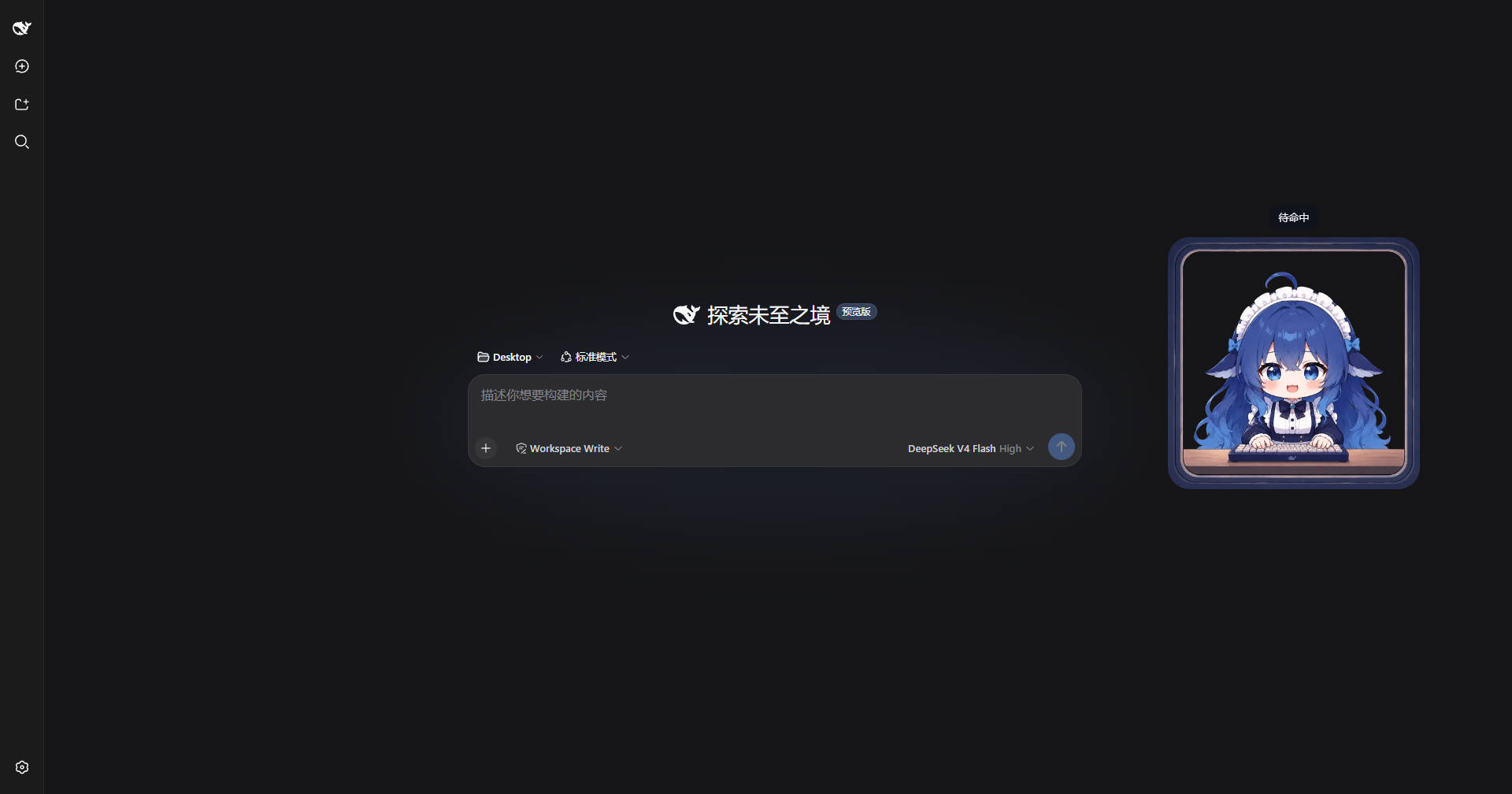
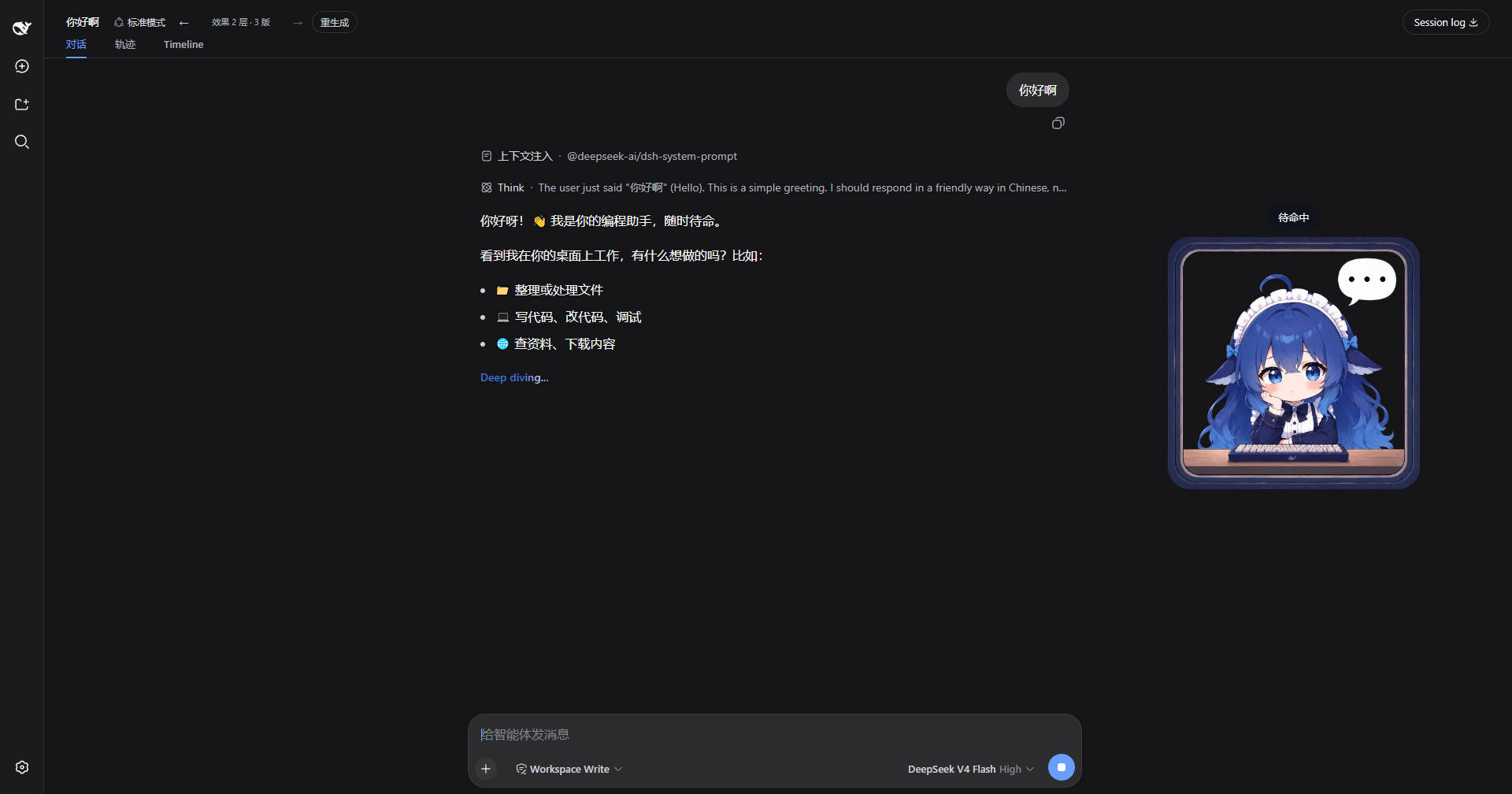
Screenshots
Explore screen — the pet idles in the bottom-right corner:
In a conversation — the pet switches poses with the agent's activity and shows a status bubble on click:
Features
-
Poses switch with agent state and tool calls:
Action Triggered by Image thinkrunning, no active tool think.png/{imgs:[...],delay}searchweb_fetchsearch.pnglearnweb_search,skilllearn.png→default.pngreadread,glob,grepread.png→search.png→default.pngbashbash,pwshcommand.png/command.webp, plus a pinnedbash_comp/pwsh_compbadgeeditedit,writeedit.png→default.pngplantodo_*, goal tools,workflow, andgoal/changedevents (brief flash)plan.png/plan.webpaskask_user_questionask.png→default.pngsubagentsubagent/start,subagent/endevents;subagent/subagent_fork/send_message/interrupt_agent/reporttool dispatchsubagent.png→default.pngcordiscordis_define,cordis_run,cordis_stop,cordis_undefine,cordis_inspect_*cordis.png/cordis.webppermissionwhile an approval request is pending (sandbox escalation / sandbox_permissions)permission.png/permission.webperroragent/error; tool results withisError(failed operations, a failed subagent run);bash/pwshnon-zero exit (foreground result or background job); cancelled calls are excludedoops.webpidle/defaultnothing active default.pngsleepafter 30 s of continuous idle sleep.png/{imgs:[...],delay} -
Subagent working indicator: while any subagent is running, a badge pinned inside the pet image (top-left at ~4.63% / 31.66% of the pet, sized ~26.63% × 36.92% — matching a 334×463 badge on a 1254×1254 pet sprite) cycles the
subagent_comp1~3frames (500 ms interval). Because it lives inside the pet's own container it follows drag and resize. At start/end the pet flashes thesubagentpose for ~2 s, and the badge lingers ~2 s after the last subagent settles so both disappear in sync. The pose flash and the running indicator are independent. If the main agent calls a tool during the flash, the pet switches to that tool's pose immediately (the flash is cancelled); pure thinking keeps thesubagentpose until the window ends, then switches tothink. -
Subagent isolation: tool calls, status and error events originating from live subagents are ignored — only the main agent's activity drives the pet pose. So a foreground subagent keeps the pet in the
subagentpose for its whole run, and a background subagent never steals the pose from the main agent's ongoing work. -
Command badge: while the main agent runs a foreground
bash/pwshtool, the pet switches to thecommandpose and pins the matching badge inside the pet image —bash→bash_comp1~2frames,pwsh→pwsh_comp1~2frames (500 ms interval; badge top-left at 74.24% / 45.61% of the pet, sized 15.95% × 15.95%). The badge and the pose stay in sync: both hold for ~1.5 s after a quick command settles (MIN_TOOL_SHOW_MS), so even a sub-second command shows its badge. Shell calls from inside subagents never trigger it (subagent isolation). -
Background commands: when the main agent dispatches
bash/pwshwithrun_in_background: true, the pet mirrors the subagent pattern — it flashes thecommandpose for ~2 s and pins the matching comp badge (bash_comp/pwsh_comp) while the job runs; when the job settles (done or killed) it flashescommandagain for ~2 s, and a job that failed (explicitfailedstatus, or a completed job with a non-zero exit code) shows theerrorpose for ~6 s instead. The badge lingers ~2 s after the last job so both disappear in sync. Job lifecycle comes fromctx.jobs.onJobDone(deployments without the jobs service skip background tracking; the foreground badge is unaffected). -
Fast state polling: the client polls
/stateevery 250 ms, so pose switches land within ~0.25 s (average ~0.125 s). Each tool pose (and its comp badge) is additionally held for ~1.5 s (MIN_TOOL_SHOW_MS) as a readable display duration, so even a sub-second tool call is visible. -
Idle sleep: after 30 s of continuous idle the pet falls asleep (
sleepframes, 500 ms interval) and stays asleep; click the pet to wake it back todefaultand restart the countdown — 30 s later it sleeps again. Any tool call, thinking, or error also interrupts sleep and restarts the timer. -
Two ways to configure each action:
"action": "image.png"(static) or"action": { "imgs": [...], "delay": 1000 }(frame animation, delay in ms, default 500). -
Hot reload: edit an image or
manifest.jsonand the pet updates within ~3–4 s. No restart. -
Draggable with viewport clamping, hover
−/+size control (100–320 px), click for a status bubble,×to hide / 🐾 to bring back. -
No build step: plain JavaScript (Node ESM host +
window.__ModuleLoader__client).
Install
Prereqs: a running dsh web profile, pnpm available to the dsh CLI.
From npm (recommended):
dsh plugin --profile web add dsh-pet-in-frame
From GitHub (pin a commit for auditability):
dsh plugin --profile web add github:HarmlessFunny/dsh-pet-in-frame#<commit-sha>
From a local checkout (development):
dsh plugin --profile web add file:E:/path/to/dsh-pet-in-frame
Then restart the dsh web process — new plugin entries load at boot. The package's cordis.patch.yml inserts its own loader row, so no manual cordis.yml edits are needed.
Assets & configuration
Images live in the package's assets/ directory. You can point elsewhere with the DSH_PET_ASSETS environment variable or a config.assetsDir on the loader row:
- id: dsh-pet-in-frame
  name: dsh-pet-in-frame
  config:
    assetsDir: C:/path/to/your/assets
Convention mode (zero config) — assets/<action>.<ext>, extensions png/jpg/jpeg/gif/webp/svg:
assets/
├── default.png   # fallback
├── think.png     # thinking
├── search.png    # web search / code reading
└── bash.png      # optional; falls back to default.png
manifest.json — explicit control, including animations:
{
  "default": "default.png",
  "think": { "imgs": ["think1.png", "think2.png", "think3.png"], "delay": 1000 },
  "sleep": { "imgs": ["sleep1.png", "sleep2.png", "sleep3.png"], "delay": 500 },
  "bash": "bash.png",
  "read": "search.png"
}
- String = static single image; object
{imgs, delay}= frame animation. - Files that don't exist are skipped; a malformed manifest is ignored and the filename convention is used instead.
- Actions missing from the manifest still resolve via the convention → fallback chain.
Asset optimization: originals are usually 1254px+ while the pet displays at most 320px — shipping them raw slows first load noticeably. Run scripts/optimize-assets.cjs to downscale to 512px WebP (~1/10 the size) in place, then update manifest.json to the .webp names.
How it works
The host half exposes five loopback routes:
| Route | Returns |
|---|---|
/dsh-pet-in-frame/state | { status, action, tool, error, idleMs, rev } |
/dsh-pet-in-frame/texts | bubble copy for each action |
/dsh-pet-in-frame/frames/<action> | { frames: [url...], delay } (URLs carry the current rev) |
/dsh-pet-in-frame/assets/<file> | image bytes |
/dsh-pet-in-frame/wake | POST; wake the pet and reset the idle countdown on click |
The client polls state every 250 ms and refetches frames whenever rev changes, so pose switches are near-instant and image/manifest edits propagate without a reload.
Security
- Only the configured assets directory is served; filenames must match
[\w.-]+, so no path traversal. - The manifest is parsed with
JSON.parseand treated as data only; a bad manifest degrades to the convention mode. - Routes are read-only GETs except
POST /wake, which only resets a timer (no request body read, nothing written).
Known pitfalls
- Restart required after install — new bundle entries load at boot; the browser bundle also needs a page refresh.
- The assets directory is the source of truth after install. If you previously pointed a dynamic plugin at
~/Desktop/assets, copy those files into the package'sassets/(or setDSH_PET_ASSETS). - Pet display is process-wide. This is a host-plane plugin, so events from all sessions contribute to the same pet — fine for a single-user deployment.
- Frame animations are flipbook-style: several static images cycled by a timer. For many frames prefer a single sprite/GIF.
License
MIT. Copyright (c) 2025 dsh-pet-in-frame contributors.