
 @HarmlessFunny
dsh-background-by-model
DeepSeek Harness 背景随当前模型而切换
- Stars
- 14
- Language
- TypeScript
- Created
- Sep 13, 2026
- Updated
- Oct 7, 2026
Introduction
dsh-background-by-model


English | 中文
Forked from
Tkingxiao/dsh-any-backgroundand renamed todsh-background-by-model.
A DeepSeek Harness appearance plugin built around an ordered list of model rules: each rule carries its own images, opacity and blur, and each image its own layout mode, framing and theme color. Switch the model and the background switches with it, through the global switch effect you choose on the Config page.
v0.3.0 was a breaking release — video wallpapers, generated backgrounds and the single global theme color were removed. See the v0.3.0 entry in CHANGELOG.md.
How Model Rules Work
A rule is a match string plus one complete set of background settings. On a model switch the plugin reads the current session's model name, scans the list top-down, and applies the first rule whose match string appears anywhere in it (case-insensitive) — with rule 1 as the fallback when nothing matches.
Example list:
| # | Match string | Wallpaper |
|---|---|---|
| 1 | deepseek | Image A |
| 2 | flash | Image B |
| 3 | glm | Image C |
| Current model | Result | Why |
|---|---|---|
DeepSeek-Flash | Rule 1 → Image A | deepseek matches first |
GLM-Flash | Rule 2 → Image B | flash is earlier in the list than glm |
Qwen-Flash | Rule 2 → Image B | flash matches |
GLM-Turbo | Rule 3 → Image C | only glm matches |
Kimi-K3 | Fallback → Rule 1 → Image A | no rule matches |
- Order matters — the first match wins, not the best match; drag rules to reorder them.
- An empty match string makes a rule skip matching and act purely as a fallback, so a single rule with an empty match string is "one wallpaper everywhere".
- The match string is compared against provider, model id and display name concatenated, so any of the three can select a rule.
- The current model is read from this session's durable model selection (the
modelSelectionprojection the composer's own picker renders), so switching models inside a session takes effect immediately; the page shows what was read, and marks it host default when only the host-wide default was available.
The example above has no
kimientry, so Kimi falls back to rule 1 = Image A and looks like "nothing happened" — add a rule with the match stringkimi.
Screenshots
One interface, one config — only the current model differs:
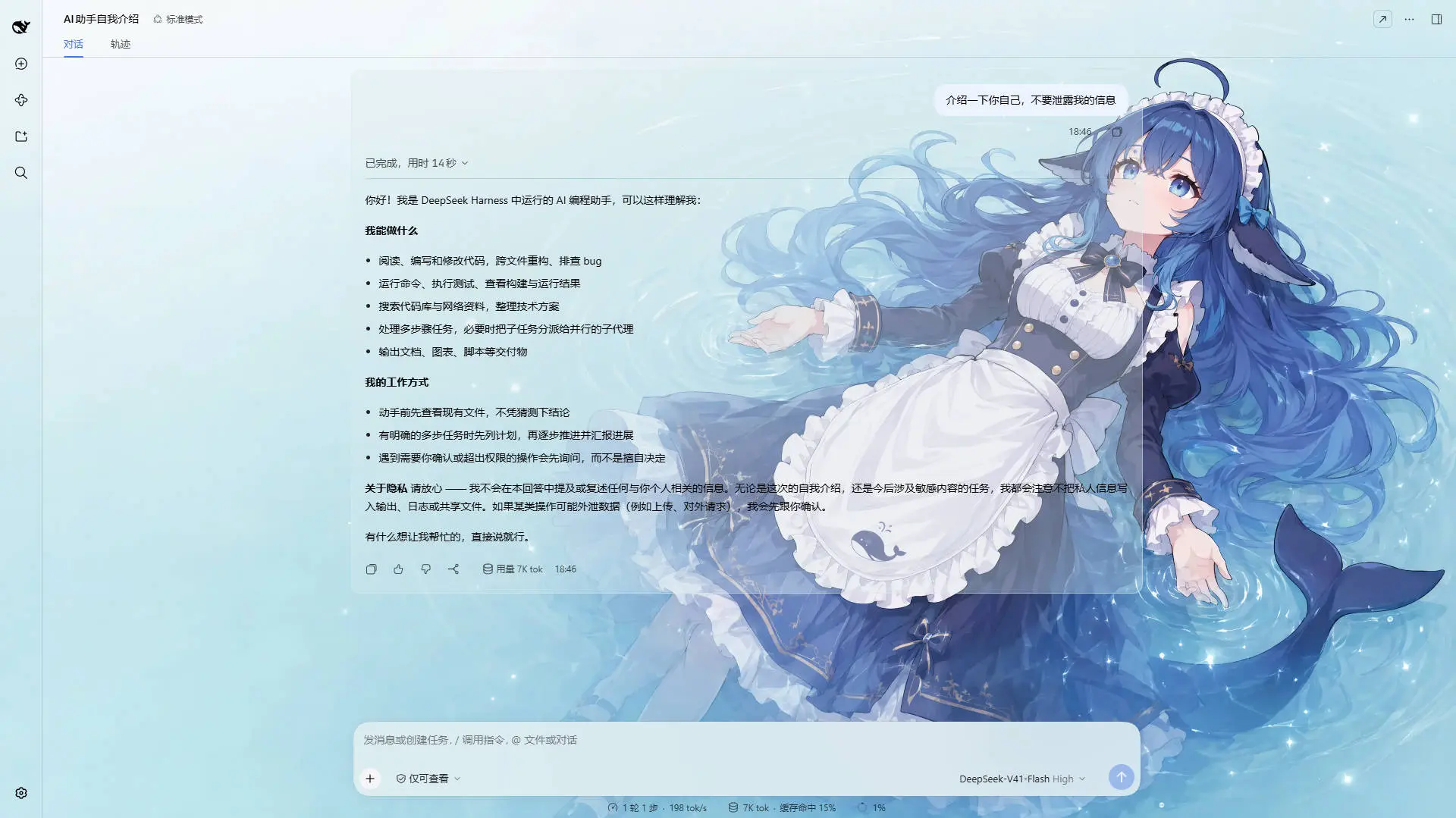
DeepSeek V4.1 Flash · matched the rule containing deepseek: a light wallpaper with a matching theme color
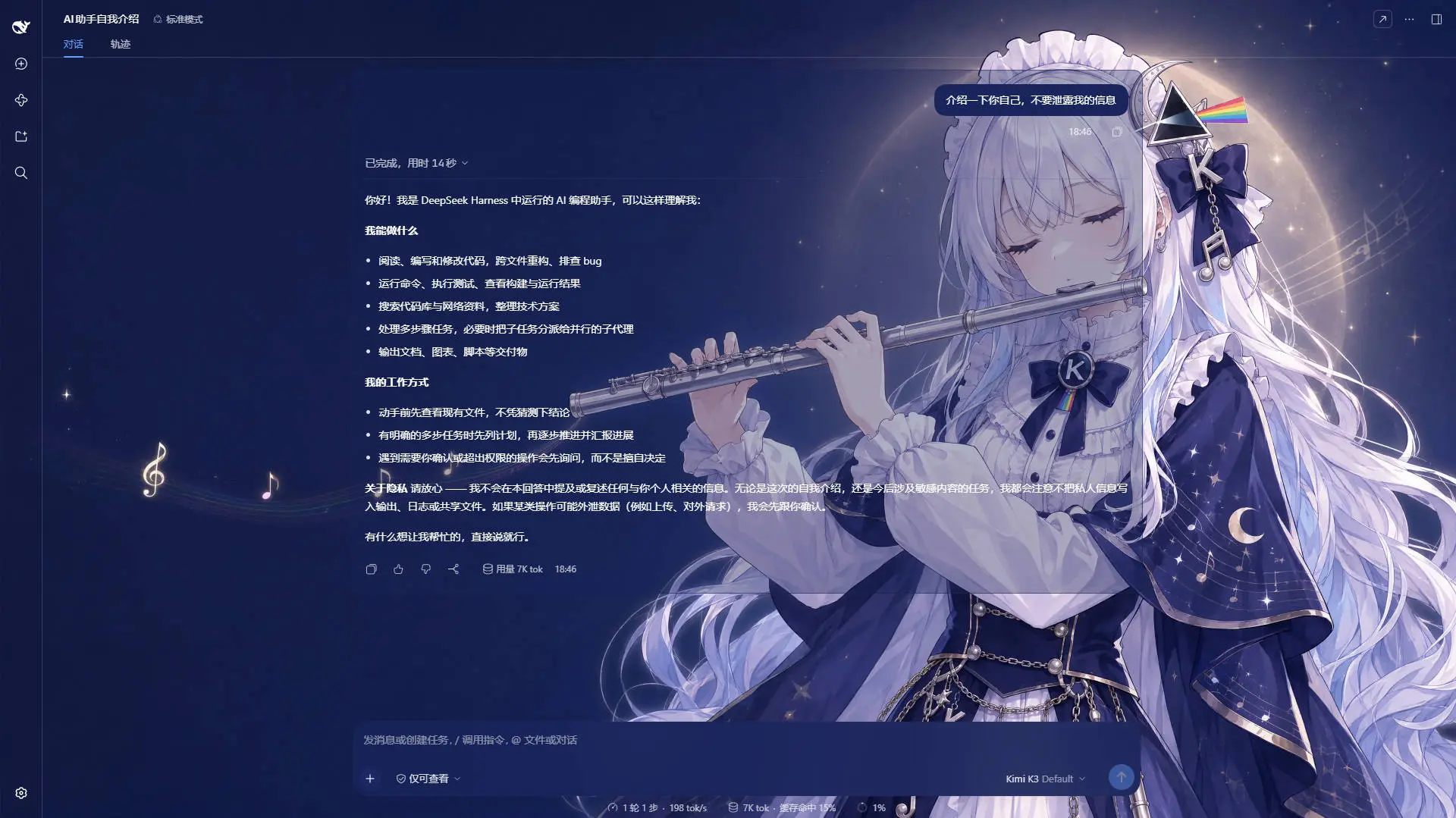
Kimi K2.7 Code · matched the rule containing kimi: a dark wallpaper, and the whole interface reskinned with it
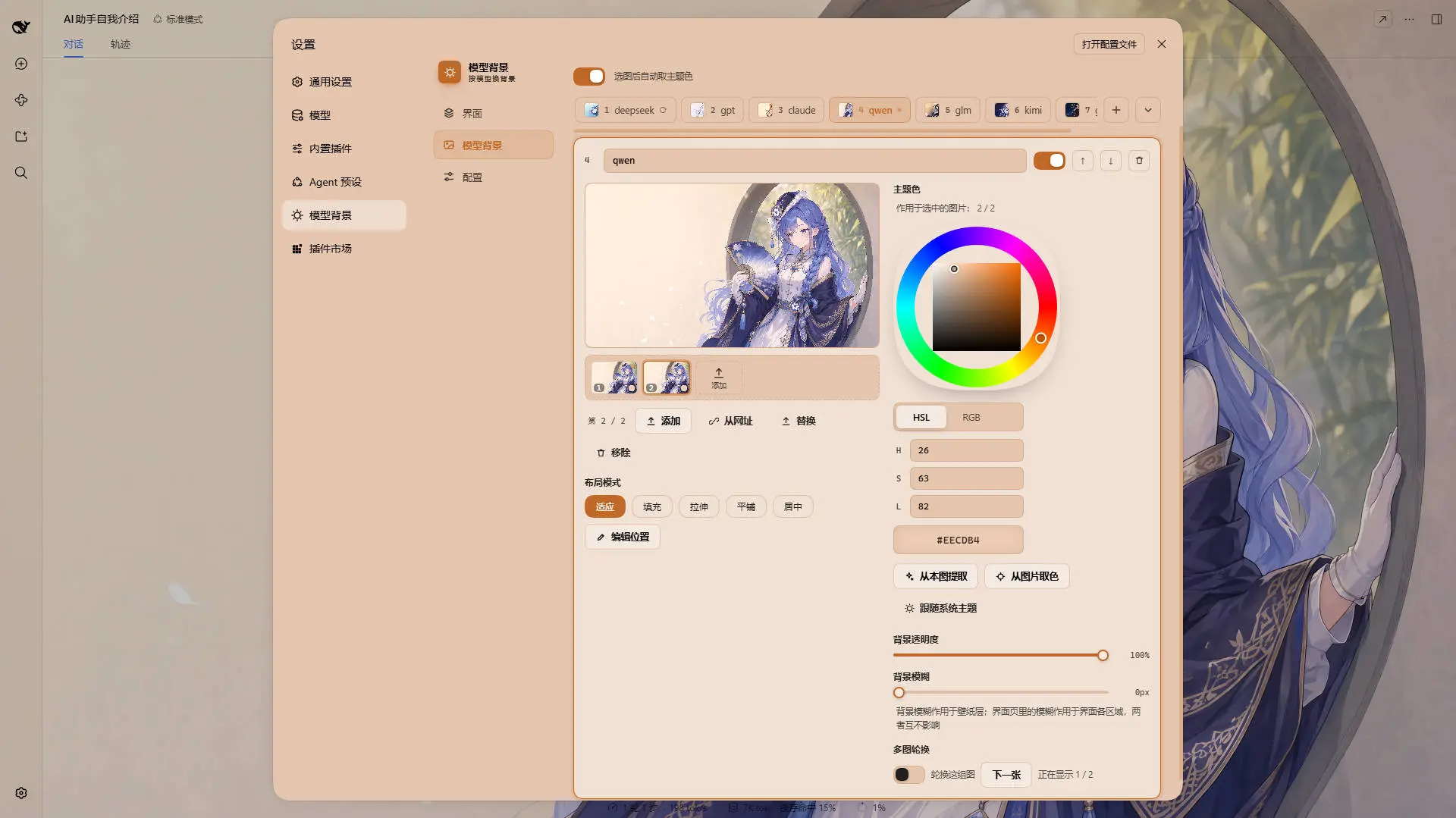
One rule on the Model Background tab · the wallpaper, its opacity and its blur belong to the rule; the layout mode, the framing and the theme color belong to the image being edited
Example wallpaper art from ZipZipPipe on bilibili
Features
Model rules
An ordered list of rules, matched first-hit against the current model's name, with rule 1 as the fallback.
- Rules — add, remove, reorder and name them; each carries its own match string, opacity and blur.
- Images per rule — a filmstrip filled by file picker, drag & drop or a list of URLs; reorder it, promote one to first, or replace one in place (which keeps its position in the rotation). A rule may also hold none, and an empty rule still matches while it has a theme color of its own, so emptying one is a visible state rather than a trap.
- Live match readout — the Model Background tab shows which model was read and which rule it resolved to.
- Import / export — the whole rule set as
dsh-background-by-model-theme.jsonwith every image inlined; files written by earlier releases still import. - On disk, not in
localStorage— everything lives under~/.dsh/.dsh-background-by-model-data/, and old single-wallpaper configs migrate in place on first read. - Bilingual, with automatic locale detection, plus a theme watchdog that re-asserts the theme if the host resets it.
Image rotation
Per rule, and off by default — cycling spends real bandwidth, memory and battery, so nothing turns it on for you.
- Dwell time — 10 s / 30 s / 1 min / 5 min / 30 min, or any custom value in seconds (5 s – 24 h).
- Order — In order walks the list and wraps around; Shuffle picks among every image except the one on screen, so a tick never looks like it was missed.
- Also step on a model switch — a second trigger that runs no timer at all.
- Next image — steps the wallpaper on demand, whether or not the timer is running.
- Only the active rule rotates, on one timer for the whole plugin; a hidden tab stops the rotation with the pixels.
Switch effect (global)
What a wallpaper change looks like — one setting on the Config page, shared by every rule, covering a model switch, a rotation step, Next image and a holiday taking over.
- Four effects — Cross-fade (the default), Instant, Zoom in and Slide in; zoom and slide only animate
transformon the incoming layer, so neither costs a byte of extra transfer. - Easing and one duration — standard / linear / ease-out / ease-in-out, and
0–3000 mswhere0is a hard cut rather than "unset". It replaced the per-rulerotate.fadeMs, which had no control anywhere; a hand-tuned value is folded into it on first read. - Reduced motion is a veto, not a shorter animation.
- The interface color fades on the same clock — except a light↔dark flip, which switches instantly, because interpolating between two palettes walks through mid-tones whose text is unreadable in both directions.
- A preview swatch replays the effect, because a wallpaper fading into itself is invisible.
Holiday backgrounds
One switch on the Config page and nothing else: on 中秋节 and 国庆节 the wallpaper switches to that holiday's own art and theme color, and back the next morning. It ships off, and the recommended profile turns it on.
- 中秋 is 农历八月十五, resolved from the Chinese calendar in Asia/Shanghai, so it moves every year (2024-09-17, 2025-10-06, 2026-09-25 …); 国庆 is October 1–7; when the two collide, 中秋 wins.
- A holiday with no image falls through to the model rules rather than blanking the wallpaper.
- The art is downloaded, not shipped — one compressed wallpaper per holiday, pinned to a release tag of the project's assets repository and cached under
holiday-cache/<tag>/on the first read of the day. The download is gated on the calendar, so an ordinary day fetches nothing at all and every later boot is answered from disk. - Neither the art nor its palette is swappable — a holiday slot is read-only, the colors and the full-bleed Fill mode come from the definition, and theme exports carry your rules only.
Per-rule and per-image settings
- Wallpaper — one or more images per rule; the first is what the rule paints when nothing rotates.
- Theme color — HSL wheel, numeric input, Extract from this image and an eyedropper. It belongs to the image, and an image with none follows the system theme rather than inheriting its rule's.
- Layout mode — fit / fill / stretch / tile / center, stored per image; disabled on a rule that holds no picture, rather than hidden.
- Framing — drag to pan and scroll to zoom, editable in fit mode only, stored per image and stable across window resizes.
- Background opacity
0–100%and background blur0–60 px, both per rule.
Global settings (Interface tab)
- Opacity and blur per interface part — main background, left panel, right panel, cards & menus, input & controls, settings panel, conversation text box and trajectory page, each with its own slider.
- A fresh install already looks like the author's own profile, so a first run needs no download to look right.
- Independent of the theme color — a rule with no color keeps every one of these sliders live.
Recommended profile
One click on the Config tab downloads the author's own configuration — rules, wallpapers and interface settings — from the project's assets repository.
- Hosted in the store's own shape (
preset/preset.json,preset/theme-config.json, onemodelbg-<slot>file per wallpaper), so it stays editable on GitHub and publishing it is acp. - Every interface number in it is what the plugin already ships with, so on a new install the button adds rules and pictures; on a store you have already tuned it resets those too, because it is a whole configuration and not a patch.
- The download comes before the question, so the confirmation can say what is actually in hand — and the wipe comes after the download, never before it. It is the only destructive action in the panel.
- One missing wallpaper fails the whole attempt and names the slot, and every file retries on its own, keeping what arrived for the next press.
Settings
Settings → Theme now has three tabs:
| Tab | Scope | Contents |
|---|---|---|
| Interface | Global, shared by every model | Opacity & blur for the main background, left panel, right panel, cards & panels, input & controls, settings panel, conversation text box and trajectory page |
| Model Background | Per rule, per image | The ordered rule list, the live match readout, and each rule's images (filmstrip), per-image layout mode, framing and theme color, plus the rule's opacity, blur and rotation |
| Config | — | The global switch effect, the whole rule set as a file — recommended profile, import and export (dsh-background-by-model-theme.json) — plus the single holiday background switch |
The old Color tab is gone — the theme color is now a property of each rule — and the old Background tab became Model Background.
Storage
Data directory: ~/.dsh/.dsh-background-by-model-data/ (Windows: C:\Users\<you>\.dsh\.dsh-background-by-model-data\)
| File | Contents |
|---|---|
theme-config.json | The rule list (each rule with its image list and rotation) plus the global Interface settings, the global switch effect and the holiday overrides |
modelbg-<slot> | One image, stored as raw bytes without a file extension — one file per image, so a rule with three images owns three slots |
holiday-cache/<tag>/<asset> | Festival art downloaded from the CDN, one file per holiday (mid-autumn.webp, national-day.webp) inside a directory named after the assets release this build pins (v0.1.0). The tag is part of the path so that a build pinning a new tag starts from an empty directory instead of being answered with the previous generation's bytes; the file inside is named after the asset, deliberately outside the slot namespace, which is what keeps a holiday slot read-only. Superseded generations are pruned once the new art is on disk. Delete a file here and it is simply re-downloaded the next time that holiday is in force |
Installation
Method 1: npm install (Recommended)
dsh plugin --profile web add dsh-background-by-model
This is the only source — a github: install would clone a tree with no lib/ in it, and nothing there would build one.
Then restart dsh web.
The plugin appears as a "Theme" section in Settings.
Method 2: npx (No Global Install)
npx @deepseek-ai/dsh plugin --profile web add dsh-background-by-model
npx @deepseek-ai/dsh web
Method 3: Local Build (Development)
lib/ is not in the repository — it is built from src/, by the package's prepack hook when the tarball is packed, and by you for a working copy. Clone, install, then build:
git clone https://github.com/HarmlessFunny/dsh-background-by-model.git
cd dsh-background-by-model
pnpm install
pnpm test            # builds lib/, typechecks, runs the ten checks
pnpm run bundle rebuilds lib/ on its own. Either has to run before the plugin can load: a fresh clone has no lib/.
To mount a working copy into a profile instead, add it to the profile's package.json and register the bundle:
{
  "dependencies": {
    "dsh-background-by-model": "link:E:/DeepSeek/dsh-background-by-model"
  },
  "dsh": {
    "profile": {
      "bundles": ["dsh-background-by-model"]
    }
  }
}
After changing anything under src/, run pnpm run bundle again — the mounted profile loads lib/, so edits do not take effect until the bundle is rebuilt.
pnpm test builds, typechecks and runs ten checks, none of which needs a dependency, a transformer or a browser. Each can also be run on its own with pnpm check:holiday / pnpm check:rotation / pnpm check:transition / pnpm check:repaint / pnpm check:code-plate / pnpm check:image-mode / pnpm check:rules / pnpm check:preset / pnpm check:ui / pnpm check:node:
check:holiday— the two holiday windows, the Beijing day boundary, leap eighth months across 1900–2100, and the four gatespickHolidayapplies.check:rotation—nextIndex/isRotating: no walking off the end, shuffle never repeating the image on screen, and nothing called "rotating" with nothing to rotate.check:transition—resolveFadeMs/transitionPlan: the shipped default still producing byte-for-byte the transition string earlier releases wrote, every route to a hard cut being one, reduced motion vetoing rather than shortening, and every effect ending visible and unscaled.check:repaint—shouldRepaint, including the edit that creates the winner, plus a failure if any write path stops asking, or if a rotation step stops re-emitting the interface palette.check:code-plate— the code block's plate: its tokens declared on both:rootandbody, the light branch emitting the banner, and each surface reading its own plugin variable.check:image-mode— the layout mode's lift onto the image, and which image a control edits against which the render layer reads.check:rules— the two decisions behind the tab strip, which live insrc/client/rules-view.ts, plus the page structure the layout rests on.check:preset— the recommended profile's retry policy and what a failed attempt holds for the next one, with both halves shown using them.check:ui— both dictionaries carrying the same keys, everydab-…class styled, no dead entry, and everyvar(--dsw-…)published by the installed theme.check:node— the built node half through its real RPC handler withDSH_HOMEredirected andfetchstubbed: the holiday block, the festival art's caching and pruning, mirror fallback, the per-image color lift, the global switch effect, and the recommended profile end to end.
FAQ
Every model looks the same — why? Rule 1 probably has an empty match string, which makes it a pure fallback holding the whole list. Give it a match string, or add more specific rules above it.
GLM-Flash picked the wrong rule.
Matching is first-hit, not best-hit: put the more specific rule higher in the list, or reorder.
Where are my wallpapers?
In ~/.dsh/.dsh-background-by-model-data/, one modelbg-<slot> file per image plus theme-config.json.
I turned the rotation on and the background never changed. Three things can hold it: the rule needs two or more images, the tab has to be visible, and only the rule the current model resolved to rotates.
Does rotating cost anything? Yes, which is why it is off by default: each image is stored at full fidelity and every switch repaints the whole interface. Two to five images is the sweet spot — boot only reads each rule's first image, so the cost is memory and disk rather than start-up time.
Why did the theme color stop working after I removed a rule's images? That was the old behaviour, and it is fixed: a rule now counts while it has an image, or a theme color of its own, so it still matches and still serves as the fallback while painting the interface alone.
I updated the plugin and the panel says my edits are not being saved. The browser half and the host half update separately, so a refreshed page can run the new client against DSH's process still running the previous node half, which cannot read the new config shape. The client holds its writes until you restart DSH.
I set a color for one image and the other images did not change. That is the design: since 0.7.1 a theme color belongs to the image, so a rotation can move through pictures with different accents. A rule with no image at all is the one case where the controls edit the rule's own color.
Where did the theme color I set before this update go?
Nowhere: an image written before per-image colors has no color key at all, which is how the loader tells "never had one" from "cleared on purpose", and it lifts the rule's color onto every such image.
Can I share a setup? Yes — export it from the Config tab; the JSON inlines every rule's image.
Are video or generated backgrounds supported? No. Both were removed in 0.3.0; each rule uses a static image.
After switching a rule back to "System theme", why is the settings dialog a different palette? That was a bug and it is fixed: every surface is now driven by one palette source, so clearing the color reads the host's own tokens back and re-emits them with your alpha.
Why does "Custom color" produce a color the moment I press it? Pressing it means leaving the system-theme state, so it has to hand out a starting color — it runs the extract-from-image pass first and falls back to a default swatch only when the image has nothing vivid.
After switching back to "System theme" the interface stays light until I drag a slider — why?
The other half of the same bug, also fixed: the plugin forces body[data-ds-dark-theme] while it owns a color, and the host only rewrites that flag when it projects a theme snapshot. The switch now hands the flag back synchronously, and a one-second watchdog re-reads the host palette.
I picked a new switch effect and the wallpaper still cuts instantly.
The effect is Instant, or the duration is 0 — an effect and a duration are two ways of asking for the same hard cut, and the effect wins. Outside the plugin, a system reduced motion setting means nothing animates at all.
Recent Optimizations
Only the two most recent releases are listed here; older ones live in CHANGELOG.md.
v0.8.0
- The bundle is built when the tarball is packed, not committed —
lib/was ~1 MB of generated JavaScript per release and effectively all of this repository's growth; it is now gitignored and built byprepack, so what npm serves is always built from the tagged source. - Installing straight from a GitHub checkout is gone — that tree has no
lib/and nothing in it builds one, so npm is the only source. Releases also now come from GitHub Actions over OIDC and carry build provenance.
v0.7.10
- The festival art's cache is keyed by the pinned release —
holiday-cache/<tag>/<asset>, so a build pinning a new tag starts from a directory nobody has written to instead of being answered with the previous generation's bytes. - A superseded generation is pruned, at the end of a successful cache write and never before it, so a release that turns out to be unreachable cannot cost you the art you already have.
Star History
License
MIT