
 @ArtificialNotImbecile
dsh-context-taxonomy
Logical-call context taxonomy plugin for DeepSeek Harness
- Stars
- 0
- Language
- TypeScript
- Created
- Aug 13, 2026
- Updated
- Aug 14, 2026
Introduction
DSH Context Taxonomy
English | 简体中文
See how DeepSeek Harness builds the context for every ordinary agent call. Inspect the complete system prompt, conversation history, current prompt, tool definitions, model options, token composition, cache usage, and reasoning evidence in one explorable view.
Context Taxonomy is a learning and debugging companion for DeepSeek Harness. It turns the provider-neutral logical request at Harness's public llm/stream dispatch layer into an inspectable taxonomy, then keeps the result beside the conversation in a dedicated Context Taxonomy tab.
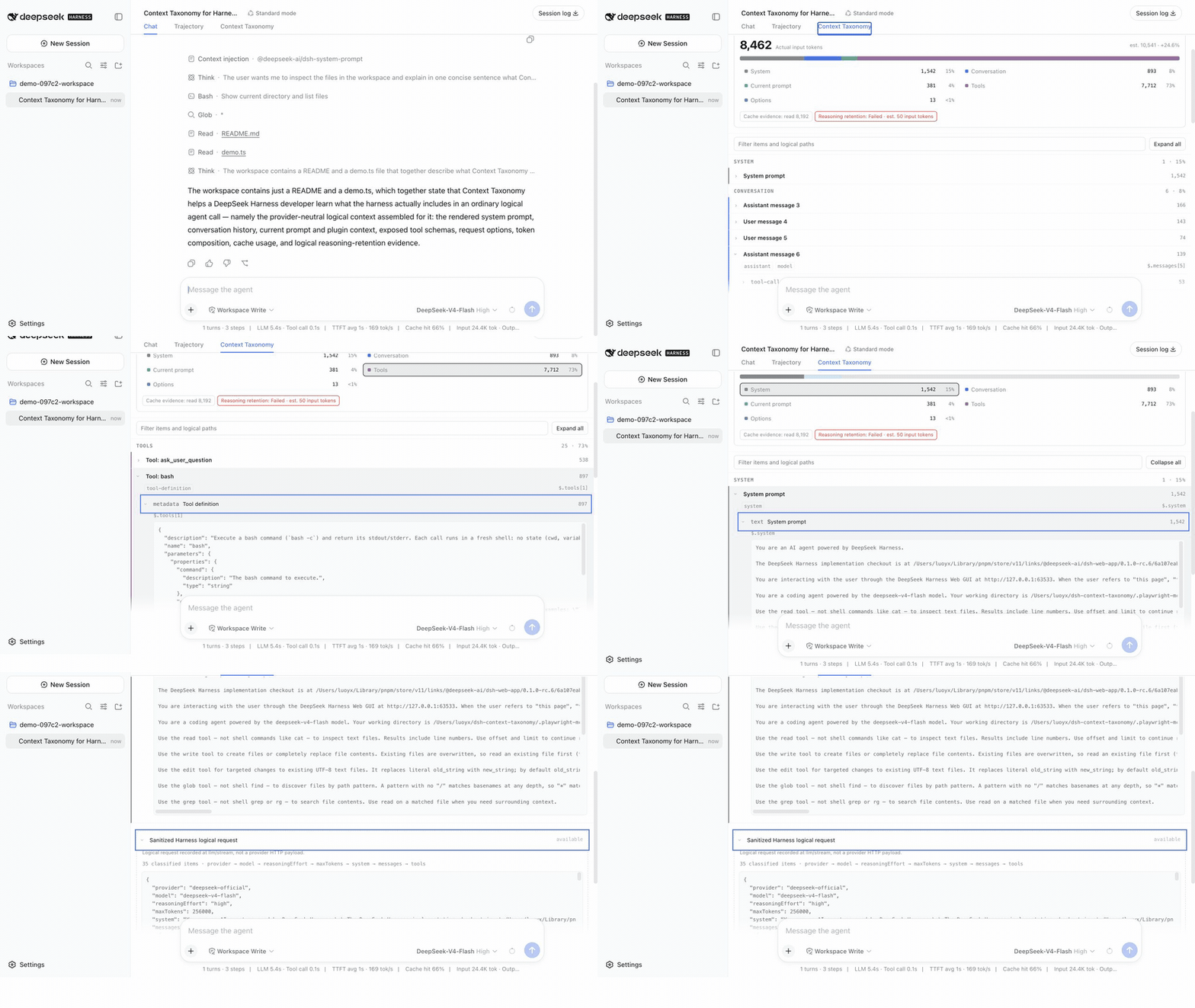
Recorded from a real DeepSeek-V4-Flash run on the official Harness 0.1.0-rc.6 Web profile—not a mock or fixture.
How this differs from Harness Trajectory
Context Taxonomy complements the official Trajectory view; it does not replace it. The two views deliberately overlap on system prompts, tool definitions, request options, and reported token usage, but organize that evidence around different questions.
| Harness Trajectory | Context Taxonomy | |
|---|---|---|
| Primary question | What happened during the agent run, and in what order? | What context made up this particular logical model call? |
| Organization | A Turn/Step event ledger covering User, Assistant, Tool, Subtool, retries, compaction, and timing. | A per-call snapshot divided into System, Conversation, Current prompt, Tools, Options, and Unclassified sections. |
| Best at | Following execution flow, inspecting tool inputs/results, diagnosing latency, and locating failures or retries. | Explaining prompt composition, context growth, exposed tool schemas, message provenance, and unexpected logical-request fields. |
| Context analysis | Shows the recorded prompt, tools, options, usage, and prompt changes alongside the execution ledger. | Adds estimated composition by category, MessageSource.kind / ContextForm provenance, unclassified-field surfacing, a logical reasoning-retention check, and sanitized canonical JSON. |
| Coverage and history | Reconstructs the Session timeline, including compaction, from official Session data. | Observes ordinary agent-loop calls that reach this plugin's llm/stream listener; it excludes auxiliary calls and cannot reconstruct calls made before installation. |
| Storage | Uses the official Session data already retained by Harness. | Keeps a separately retained, sanitized sidecar so each observed logical call remains independently inspectable. |
Use Trajectory when you need the execution story: model responses, tool calls, nested work, timing, retries, and compaction. Use Context Taxonomy when you need the request anatomy: why a call had this prompt, which context and tools were exposed, where its estimated input composition came from, or which fields do not fit the expected taxonomy. Using both gives the most complete debugging and learning view.
Quick start for existing Harness users
If dsh --version already works and reports 0.1.0-rc.6, install the plugin into your Web profile and start Harness with the short commands:
dsh plugin --profile web add @artificialnotimbecile/dsh-context-taxonomy@0.1.0
dsh web
If dsh web is already running, stop and restart it after installation so the new bundle is loaded. Then create or open a Session, send an ordinary agent request, and select the Context Taxonomy tab. The plugin records calls made after it is installed; it cannot reconstruct older calls.
If the dsh binary is not on your PATH, use npx as a reproducible fallback:
npx --yes @deepseek-ai/dsh@0.1.0-rc.6 plugin --profile web add @artificialnotimbecile/dsh-context-taxonomy@0.1.0
npx --yes @deepseek-ai/dsh@0.1.0-rc.6 web
The longer form does not install Harness globally: npx runs the pinned Harness CLI from its cache. In both forms, plugin --profile web add modifies only the local Web profile, normally stored under $DSH_HOME/profiles/web or ~/.dsh/profiles/web when DSH_HOME is unset.
Use it when you want to answer questions such as:
- What system prompt did Harness assemble for this call?
- Which messages were conversation history, current context, or plugin injections?
- Which tools and JSON schemas were exposed to the model?
- Which provider, model, reasoning effort, sampling options, and token limit were selected?
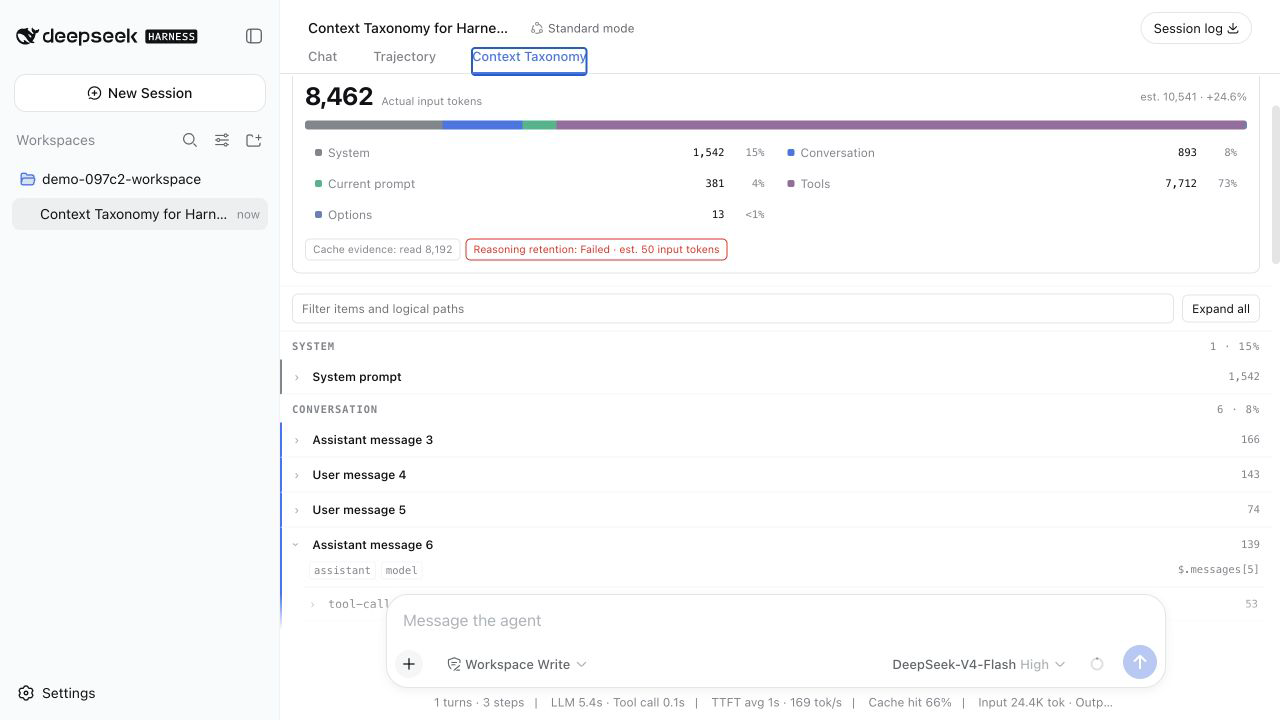
- How much of the input came from the system prompt, messages, tools, and options?
- Did the adapter report cache reads/writes or reasoning tokens?
- What changed between retries or later calls in the same Session?
That makes the plugin useful for learning Harness architecture, teaching plugin development, debugging prompt growth, comparing agent presets, auditing tool exposure, and investigating model behavior without reading a raw Session log by hand.
The plugin is intentionally precise about what it observes: it does not capture provider HTTP payloads, headers, endpoints, serializer output, transport attempts, or delivery status. Calls that fail before LLM dispatch, or that are intercepted before this listener, are not visible. In the UI, provider-reported usage is labeled actual and locally derived composition is labeled estimated.
What you can inspect
- System, conversation, current-prompt, tool, option, and unclassified sections.
- DSH
MessageSource.kindandContextFormprovenance when messages carry it. - Reported prompt/cache/output/reasoning usage without treating missing fields as zero.
- Estimated per-section composition, clearly separated from provider-reported usage.
- A logical-only DeepSeek reasoning-retention check; it is never presented as wire evidence.
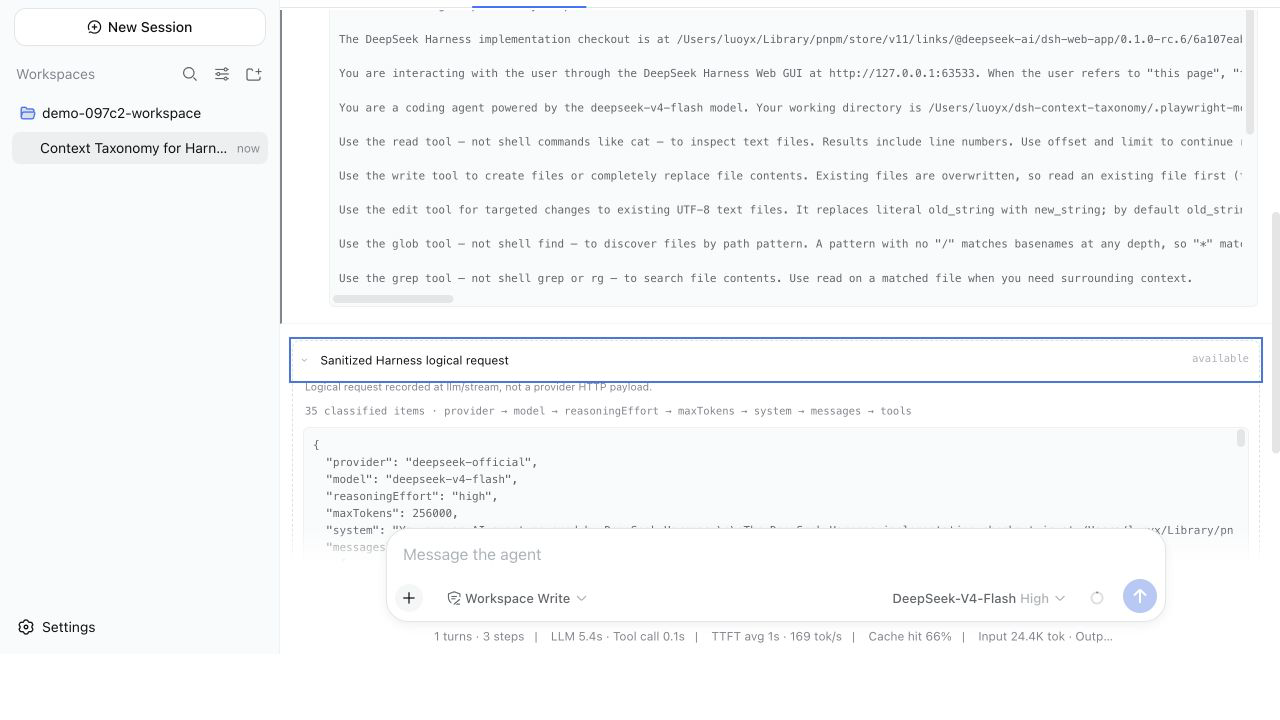
- Sanitized canonical logical JSON with lazy, bounded paging.
- Durable per-Session captures across Harness restarts.
Read the call at a glance
Inspect the sanitized logical request
Install from GitHub source
The first release targets DeepSeek Harness 0.1.0-rc.6 exactly and supports its web profile only. Installation is the explicit opt-in to local capture.
For an auditable source install, pin the release and select this repository's publishable subdirectory:
npx @deepseek-ai/dsh@0.1.0-rc.6 plugin --profile web add \
  'github:ArtificialNotImbecile/dsh-context-taxonomy#v0.1.0&path:packages/dsh-context-taxonomy'
Git installs execute the package's prepare build. On the first attempt, pnpm 11 stops safely and prints the exact codeload URL + commit + workspace-path key required under allowBuilds in $DSH_HOME/profiles/web/pnpm-workspace.yaml. Review the pinned source, add that exact key, and repeat the command. A package-name-only entry is intentionally insufficient for Git dependencies. The precompiled npm release is the recommended install path.
Data handling
The compact index uses Harness storageDomain; sanitized logical JSON is stored as private gzip blobs under $DSH_HOME/context-taxonomy. Built-in redaction covers secret-like keys, bearer credentials, credential query parameters, data URLs, and large base64 values, and cannot be disabled. Hashes are computed only after sanitization.
Defaults retain 30 days, 200 captures per Session lifecycle, 512 MiB globally, and 16 MiB per capture. Directories use mode 0700 and blobs 0600. The plugin does not provide at-rest encryption or a mutation/deletion Remote in v1.
Development
pnpm install --ignore-scripts
pnpm run build
pnpm run test
pnpm run pack:plugin
The repository root is a private workspace. The publishable package lives at packages/dsh-context-taxonomy, while Kimi K3's UI specification and framework-free prototype live under design.
License
MIT