
 @534119219
chicheng-push
DSH(DeepSeek Harness) Web 消息推送插件:多渠道推送(Server酱/PushPlus/Bark/钉钉/企微/Telegram/飞书/Webhook等),设置界面提供「推送插件」入口,可被其他插件调用(pushNotifier 服务 / /push/api 接口)
- Stars
- 7
- Language
- JavaScript
- Created
- Aug 15, 2026
- Updated
- Aug 16, 2026
Introduction
chicheng-push


dsh 消息推送插件:在 Web 设置界面左侧栏新增 「推送插件」 入口,可配置管理多个推送渠道;同时把推送能力以 pushNotifier 服务(host 侧)和 /push/api/send HTTP 接口暴露给其他插件,例如定时执行插件在任务完成后调用推送。
界面语言:中文 / English UI 均支持(locale 字典随浏览器语言切换)。
截图
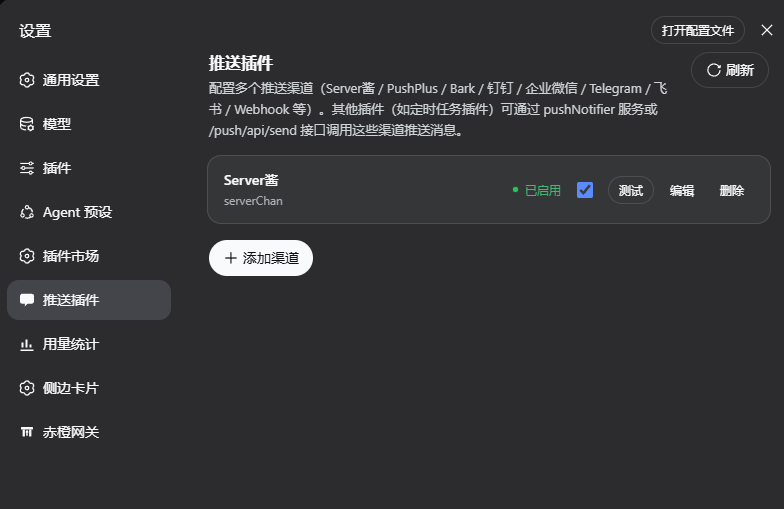 | 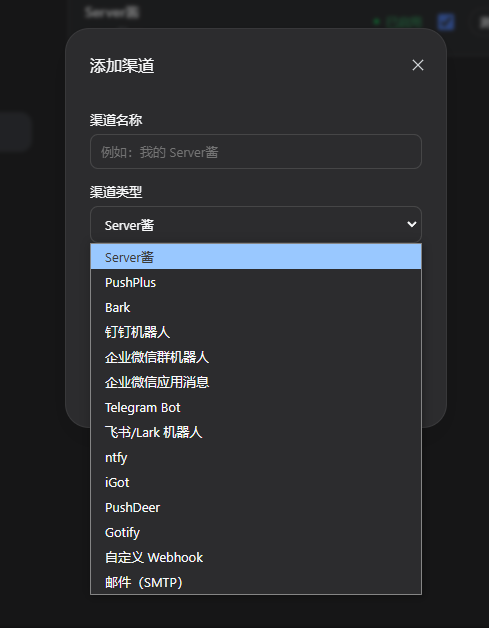 | 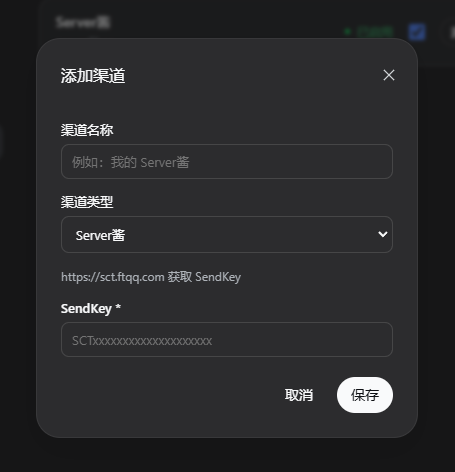 |
| 设置入口 — 设置界面左侧栏的「推送插件」入口 | 渠道列表 — 启用/停用、测试、编辑、删除 | 添加 / 编辑渠道 — 按类型动态表单,必填项标 * |
目录
渠道实现参考 whyour/qinglong 的 notify 目录,默认支持:
| 渠道 | 类型 id | 说明 |
|---|---|---|
| Server酱 | serverChan | sctapi / sctp 多通道 |
| PushPlus | pushPlus | 支持群组与渠道 |
| Bark | bark | iOS 推送 |
| 钉钉机器人 | dingtalkBot | 支持加签 |
| 企业微信群机器人 | weWorkBot | 群 Webhook |
| 企业微信应用消息 | weWorkApp | corpid,corpsecret,touser,agentid |
| Telegram Bot | telegramBot | 支持自建 API 域名 |
| 飞书 / Lark 机器人 | lark | 支持加签 |
| ntfy | ntfy | 支持自建实例与鉴权 |
| iGot | iGot | 聚合推送 |
| PushDeer | pushDeer | 支持自建 |
| Gotify | gotify | 自部署 |
| 自定义 Webhook | webhook | $title / $content 变量 |
| 邮件(SMTP) | email | 需要环境可动态加载 nodemailer |
结构
chicheng-push/
├── package.json          # dsh.bundle / dsh.client 声明
├── cordis.patch.yml      # 插入 profile 层
├── lib/
│   ├── index.js          # host 半:渠道存储 + 推送实现 + /push/api/* + pushNotifier 服务
│   └── client.js         # client 半:设置界面「推送插件」页
├── assets/               # 界面截图
├── docs/                 # 补充文档(面板图标补丁等)
├── examples/             # 集成示例(定时任务插件)
├── smoke.mjs             # 集成测试
└── README.md
安装
方式 A:npm 发布包(推荐,预构建免 allowBuilds)
插件发布到 npm 后:
dsh plugin --profile web add chicheng-push
npm 安装的预构建产物会跳过 pnpm 的 allowBuilds 构建授权,一条命令装好。
方式 B:本地打包 / 本地路径
在插件目录内打包安装:
cd D:\Harness\chicheng-push
npm pack
dsh plugin --profile web add chicheng-push-0.1.0.tgz
或者直接以本地路径安装:
dsh plugin --profile web add D:\Harness\chicheng-push
确认 profile 清单
无论哪种方式,确认 profile 清单已包含本插件:编辑
C:\Users\TJ\.dsh\profiles\web\package.json,在 dsh.profile.bundles 数组中
加入 "chicheng-push"(dsh plugin add 会同步 dependencies;若未自动加入
bundles,手动补一行):
"dsh": {
  "profile": {
    "bundles": [
      "@deepseek-ai/dsh-base",
      "@deepseek-ai/dsh-web-app",
      "dsh-better-sidebar",
      "chicheng-gate",
      "dshmarket",
      "dsh-cron-scheduler",
      "chicheng-push"
    ]
  }
}
- 手动重启 dsh web 服务,插件生效。
使用
重启后打开 设置 → 推送插件:
- 添加渠道:选择类型 → 填写字段(必填项标
*)→ 保存;可添加任意多个渠道。 - 测试:对单个渠道发送一条测试消息(真实推送,可验证配置)。
- 启用/停用:停用的渠道不会出现在「发送到全部渠道」中。
- 编辑 / 删除:管理已有渠道。
渠道数据持久化在 $DSH_HOME/push/channels.json(默认 C:\Users\TJ\.dsh\push\channels.json)。
其他插件如何调用
方式一:host 侧 pushNotifier 服务(进程内,推荐)
chicheng-push 在 host 侧注册了名为 pushNotifier 的 cordis 服务。其他 host 插件(如
定时执行插件)在 apply(ctx) 中直接读取即可:
// 定时任务插件 lib/index.js —— 任务执行完成后推送结果
const push = ctx.get("pushNotifier");
if (push) {
  const result = await push.send({
    title: `任务「${task.name}」执行完成`,
    content: `状态:${record.status}(exit ${record.exitCode})\n耗时:${record.durationMs}ms  `,
    channels: "all",           // 省略或 "all" = 全部启用渠道;也可传渠道 id/name 数组
  });
  console.log(`[cron] 推送结果 ok=${result.ok} sent=${result.sent}/${result.total}`);
}
服务 API:
push.list()                                   // -> channels
push.types()                                  // -> 渠道类型定义(字段 schema)
push.send({ title, content, channels })       // -> { ok, total, sent, results[] }
push.sendText(title, content, channels)       // 便捷重载
push.test(id)                                 // 发送测试消息到指定渠道
send 返回 { ok, total, sent, results },results 是每个渠道的
{ id, name, type, ok, message | error }。
方式二:HTTP 接口 /push/api/send(进程外 / 脚本 / agent)
任意位置(同源或受信 host)POST JSON:
curl -X POST http://127.0.0.1:3080/push/api/send \
  -H "content-type: application/json" \
  -d '{"title":"定时任务完成","content":"exit 0","channels":"all"}'
响应:{ "ok": true, "total": 2, "sent": 2, "results": [...] }
接口列表(全部 POST,fenced:仅同源 / loopback / 受信 host):
| 方法 | 请求体 | 说明 |
|---|---|---|
list | {} | 渠道列表 |
types | {} | 渠道类型定义(表单 schema) |
save | { channel } | 新增或更新(带 id 为更新) |
remove | { id } | 删除 |
toggle | { id, enabled } | 启用/停用 |
test | { id } | 测试消息 |
send | { title, content, channels? } | 发送(channels 省略 = 全部启用) |
在定时执行插件中的集成示例
以 dsh-cron-scheduler 为例:任务 run 落定后通过
pushNotifier 服务推送结果。完整示例与参数说明见
examples/cron-integration.md,核心片段:
// executeRun 的 finalize 之后
const push = ctx.get("pushNotifier");
if (push) {
  await push.send({
    title: `定时任务「${task.name}」完成`,
    content: [
      `状态:${record.status}(exit ${record.exitCode ?? "-"})`,
      `耗时:${record.durationMs ?? "-"} ms`,
      `开始:${record.startedAt}`,
    ].join("\n"),
  }).catch((error) => console.warn("[cron] push failed:", error));
}
设置面板图标补丁(官方 shell)
设置面板左侧栏的「推送插件」图标默认回退为设置齿轮——要让它与主侧栏
「消息平台」的聊天气泡图标一致,需要给官方 shell 的 navIcon() 打一个补丁
(settings.section slot 契约不支持自定义图标)。补丁内容、目标文件、升级后
恢复步骤见 docs/panel-icon-patch.md。
开发说明
- host 半为零第三方运行时依赖(HTTP 渠道使用 Node 内置
fetch);email 渠道仅在配置且 可动态加载nodemailer时使用。 - 修改
lib/index.js后需重启生效;修改lib/client.js后刷新页面即可(bundle 由/plugins/chicheng-push/client.js?rev=<hash>提供)。 - 集成测试:
node smoke.mjs(19 项断言,含真实 HTTP 发送链路)。
安全
- 渠道配置(含 SendKey / Token / 授权码)明文存储在
$DSH_HOME/push/channels.json, 请确保该目录仅当前用户可读写;详见 SECURITY.md。 /push/api/*接口有 fence 保护(仅同源 / loopback / 受信 host)。